C200: C200 in 2019?

There's only one CFast card slot, but you can capture lower-quality options on the SD cards while you record CRL.

Thanks, not sure why I thought two cards.

As Puredrifting said, I'm pretty comfortable switching cards if required and I don't often split across the two cards on my Ursa so this isn't a big deal but good to know.
 
I see no problems with the C200 CRL image for high end work. I guess it would be easy to start with 2 C200s. Recoup some/full investment and then sell off one C200 and buy a C500 II. If I would have been booked like you then I would have bought the C500II in a heartbeat.

Personally I am planning to get a C500 II. However, mostly likely I will time the purchase for a major project which I am planning.

I agree regarding the use of the C200 for highend work, I think the CRL image is great.
 
Dan, the potential situation you’re describing is basically mine for the last 1.5 yrs (minus all the traveling). Having a C200 A-cam and C200B gimbal/B-cam makes shooting a breeze and you can rest easy knowing your footage will match without having to do anything in post. The quality of footage is fantastic for the price, especially when downscaled to 1080 - gives you plenty of wiggle room to punch in on interviews, add digital zooms, stabilize footage, etc. without losing any quality.. I use EgoDisk 512s all the time no problem. If you have Canon lenses you’ll love the autofocus.

My current post work flow is to transcode to Prores 422 while baking in the WideDR LUT on corporate jobs. Saves a little space and is way easier to work with in Adobe Premiere. I’m on an iMac and Premiere hates both CRL files and AVCHD/MP4 files in my experience. Transcodes take a long time unfortunately. Also, if you have to transfer footage day of shooting to client and they have anything slower than an SSD you’re gonna be stuck on set well past wrap time. Usually in those cases I have them leave me a drive to ship back to them.

In theory I’d like to buy the new C500MKII, but typing this all out is reminding me of how good I have it now...
 
Mind you, looking at your website I'll hit you up if I ever do get any local work and need some drone.
No worries, thanks! Let me know if you ever have any questions! Our i2/x7 is currently somewhere at the bottom of the pacific ocean but its replacement is already coming so we should be up and running again very soon.

What NLE are you using for the C200? How does it go in Resolve? I'd read conflicting things re: raw camera adjustments.

I keep holding off upgrading my computer and haven't purchased yet but I'm about to be all resolve 16. I'll report back but it looks good enough for anything I'd use it for.
 
Also, if you have to transfer footage day of shooting to client and they have anything slower than an SSD you’re gonna be stuck on set well past wrap time. Usually in those cases I have them leave me a drive to ship back to them

What SSDs do you use?
 
Just a general about SSDs...there are many fast ones today, but it's about the connections too.

TB3...super fast offloads.

I have collected a mountain of SanDisks over the years...by now they are pennies:

~$100 - 1TB - https://www.bhphotovideo.com/c/product/1346596-REG/sandisk_sdssdh3_1t00g_g25_ultra_3d_1tb_ssd.html

Or this one: https://www.bhphotovideo.com/c/product/1415978-REG/sandisk_sdssda_1t00_g26_1tb_ssd_plus.html

$200 - 2TB - https://www.bhphotovideo.com/c/product/1346597-REG/sandisk_sdssdh3_2t00g_g25_ultra_3d_2tb_ssd.html

Still old school with USB adapters:

https://www.bhphotovideo.com/c/product/848762-REG/Apricorn_ASW_USB3_25_SATA_Wire_3_0_Notebook.html

https://www.bhphotovideo.com/c/product/1171126-REG/startech_usb3s2sat3cb_usb_3_0_to_2_5.html

Been offloading like this since 2014...same SSDs, same adapters, same computer.
 
What SSDs do you use?

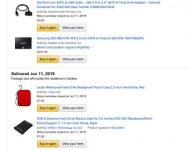
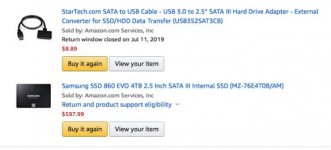
I did a kajillion hours of research as well as some buying and returning and landed on this as the most reliable and best bang for the buck:
Screen Shot 2019-09-13 at 8.39.42 AM.jpg

I've found that Samsung bare SSDs are as reliable as can be and any enclosed SDD over 2TB to be 100% completely unreliable on a mac.

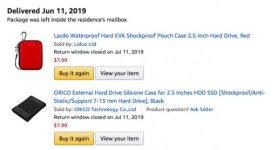
A lot of times on sets where I'm handing over cards I'll back up cards to this drive throughout the day so I already have one copy in the bag, and then do one big transfer from this drive to whatever they have. Saves a ton of time and I know worst case scenario if we need to audible and have me ship a drive cause it's going to take too long to transfer I have a full copy of the footage on all the cards and a full backup copy on my hard drive.

(not sure if you can read the above picture since it gets resized so small, trying again below...)
Screen Shot 2019-09-13 at 8.44.40 AM.jpg
Screen Shot 2019-09-13 at 8.44.31 AM.jpg
 
Last edited:
I did a kajillion hours of research as well as some buying and returning and landed on this as the most reliable and best bang for the buck:
View attachment 136861

I've found that Samsung bare SSDs are as reliable as can be and any enclosed SDD over 2TB to be 100% completely unreliable on a mac.

A lot of times on sets where I'm handing over cards I'll back up cards to this drive throughout the day so I already have one copy in the bag, and then do one big transfer from this drive to whatever they have. Saves a ton of time and I know worst case scenario if we need to audible and have me ship a drive cause it's going to take too long to transfer I have a full copy of the footage on all the cards and a full backup copy on my hard drive.

(not sure if you can read the above picture since it gets resized so small, trying again below...)
View attachment 136865
View attachment 136866

Is this Samsung SSD/Startech USB 3.0 cable reliable enough as an editing drive or no? The enclosed USB-C SSD's are great for editing but pricy.
 
Yes, there is no difference. An enclosure and a cable coming out of it is the same thing (and just another way for companies to make a bit more money, but in this case it's logical as most consumers need the drive in a casing).

This is how everyone should have been editing many years ago but it took some time for people to realize the option and its benefits.

[I have a variety of Samsung SSDs too including that 860 chris f mentioned, which is great.]
 
Is this Samsung SSD/Startech USB 3.0 cable reliable enough as an editing drive or no? The enclosed USB-C SSD's are great for editing but pricy.

I'm not sure, I use it strictly for transferring and bought two of the cables just incase one ever failed out in the field. At $9 it's a no brainer to me.
 
Dan, the potential situation you’re describing is basically mine for the last 1.5 yrs (minus all the traveling). Having a C200 A-cam and C200B gimbal/B-cam makes shooting a breeze and you can rest easy knowing your footage will match without having to do anything in post. The quality of footage is fantastic for the price, especially when downscaled to 1080 - gives you plenty of wiggle room to punch in on interviews, add digital zooms, stabilize footage, etc. without losing any quality.. I use EgoDisk 512s all the time no problem. If you have Canon lenses you’ll love the autofocus.

My current post work flow is to transcode to Prores 422 while baking in the WideDR LUT on corporate jobs. Saves a little space and is way easier to work with in Adobe Premiere. I’m on an iMac and Premiere hates both CRL files and AVCHD/MP4 files in my experience. Transcodes take a long time unfortunately. Also, if you have to transfer footage day of shooting to client and they have anything slower than an SSD you’re gonna be stuck on set well past wrap time. Usually in those cases I have them leave me a drive to ship back to them.

In theory I’d like to buy the new C500MKII, but typing this all out is reminding me of how good I have it now...


Thanks Chris, good to know re: EgoDisk 512s.

On the Canon lenses, I read that some of the older L lenses don't manage the autofocus as well as the newer Canon designs, is this the case in your experience?
 
Yep, just had the UMP G2 for a few weeks, interesting camera in comparison to the C200.
I've given up on Canon doing any fixes or additions to the firmware in the C200, it's done. Stick a fork in it.

How did you find the Ursa when compared to the C200? Since I'd be coming from an Ursa Pro, which did you prefer purely from an image perspective?

Thanks.
 
How did you find the Ursa when compared to the C200? Since I'd be coming from an Ursa Pro, which did you prefer purely from an image perspective?

Thanks.

I like both cameras. Personally I find the UMP G2 was pretty heavy when rigged out with a V Mount, beefy lens, rods, etc. I’ll give the edge to the C200 for color and overall images. The UMPs lack of an onboard waveform monitor to me is a big negative, I hate histograms. The UMP has better menus and the EVF is so good in comparison to the just adeqaute EVF on the C200. The XLR location on the UMP is just plain bizarre and I really disliked where they are.

Overall, I prefer the C200 better but the UMP G2 is a solid and easy to use camera. I am learning Resolve but I wish the UMP shot Prores RAW besides BM RAW. BM RAW can’t be edited in FCP X and I like FCP X a bit better than Resolve for speed. But I like Resolve a lot too.
 
I like both cameras. Personally I find the UMP G2 was pretty heavy when rigged out with a V Mount, beefy lens, rods, etc. I’ll give the edge to the C200 for color and overall images. The UMPs lack of an onboard waveform monitor to me is a big negative, I hate histograms. The UMP has better menus and the EVF is so good in comparison to the just adeqaute EVF on the C200. The XLR location on the UMP is just plain bizarre and I really disliked where they are.

Overall, I prefer the C200 better but the UMP G2 is a solid and easy to use camera. I am learning Resolve but I wish the UMP shot Prores RAW besides BM RAW. BM RAW can’t be edited in FCP X and I like FCP X a bit better than Resolve for speed. But I like Resolve a lot too.

Thanks for the thoughts. I agree regarding XLR placement on the UMP, and I'm a bit apprehensive to record interview audio directly into the UMP, where as the Canon I've recorded hours upon hours of seamless audio into a C100 mk ii so I'd be pretty happy returning to single system for sound and vision.

Does FCPX work well with the native CRL files? Is the round-trip to Davinci easy enough? I currently edit BRAW 12:1 in Resolve on my 2019 MBP without any issue. I think from a practical production point of view the C200 is the no brainer, but I am concerned I'll end up losing time in post. Typical travel day for me will mean shooting for 8 hours then editing for 6 back at a hotel.
 
Thanks for the thoughts. I agree regarding XLR placement on the UMP, and I'm a bit apprehensive to record interview audio directly into the UMP, where as the Canon I've recorded hours upon hours of seamless audio into a C100 mk ii so I'd be pretty happy returning to single system for sound and vision.

Does FCPX work well with the native CRL files? Is the round-trip to Davinci easy enough? I currently edit BRAW 12:1 in Resolve on my 2019 MBP without any issue. I think from a practical production point of view the C200 is the no brainer, but I am concerned I'll end up losing time in post. Typical travel day for me will mean shooting for 8 hours then editing for 6 back at a hotel.

If it's something short with limited footage, I'll bring in the CRL and edit it, outputting a Prores Master. If it's a lot of footage, proxy all of the way, then re-link to the CRL for the finished cut. CRL works pretty well in FCP X for me, its just another format as far as FCP X is concerned, nothing weird or unusual once you download the Canon plug-in.
 
Last edited:
If it's something short with limited footage, I'll bring in the CRL and edit it, outputting a Prores Master. If it's a lot of footage, proxy all of the way, then re-link to the CRL for the finished cut. CRL works pretty well in FCP X for me, its just another format as far as FCP X is concerned, nothing weird or unusual once you download the Canon plug-in.

Thanks. As tempting as the camera is I'm not sure the post side of it will gel. While I'll save effort in the logistics of the camera, I think I'll become frustrated compared to the relatively easy workflow of BRAW editing natively in Resolve (software I already use, compared to FCPX which I've never touched).
 
Thanks. As tempting as the camera is I'm not sure the post side of it will gel. While I'll save effort in the logistics of the camera, I think I'll become frustrated compared to the relatively easy workflow of BRAW editing natively in Resolve (software I already use, compared to FCPX which I've never touched).

Nothing wrong with shooting the BMD cameras either, horses for courses.
 
Back
Top