FS7: Burn in a LUT?

Well Id say have a look back 5-10 years.. actually the old stuff is not that great.. and often shot with monitors and EVFs that actually outprice the whole FS7 - not to mention the top end 2/3 cameras ($50+k) are pretty awesome even now if you can live with HD.

Ive played with some SR codec and its awesome.

It is of course true that baked looks can be graded.. and make good use of the data the camera actually cameras.
 
I have not been following this thread and have not read through the whole thing. But I just want to point out that baking in a LUT on most cameras is a really bad idea. The internal LUT on the FS7 an most other cameras is only a 17x-depth .cube. That's because it is really meant for use as a monitoring LUT, not a final color correct. For proper grading I would want to use a 33x or 63x depth adjustment. 17x is fairly coarse and can lead to banding and other artifacts. Most LUT boxes and on-set LUT tools are only 17x. They are meant for preview only.
 
I have not been following this thread and have not read through the whole thing. But I just want to point out that baking in a LUT on most cameras is a really bad idea. The internal LUT on the FS7 an most other cameras is only a 17x-depth .cube. That's because it is really meant for use as a monitoring LUT, not a final color correct. For proper grading I would want to use a 33x or 63x depth adjustment. 17x is fairly coarse and can lead to banding and other artifacts. Most LUT boxes and on-set LUT tools are only 17x. They are meant for preview only.

+1
I have been saying the same thing for years. If you feel the urge to bake in a MLUT to take a short cut with grading, go to the custom mode and use a nicely crafted scene file instead. Anything that an MLUT can do can be done better with a scene file.
 
Thanks , that's the first time I've heard that. Very interesting. Info like that is why i continue to lurk around these forums.

Lenny
 
I have not been following this thread and have not read through the whole thing. But I just want to point out that baking in a LUT on most cameras is a really bad idea. The internal LUT on the FS7 an most other cameras is only a 17x-depth .cube. That's because it is really meant for use as a monitoring LUT, not a final color correct. For proper grading I would want to use a 33x or 63x depth adjustment. 17x is fairly coarse and can lead to banding and other artifacts. Most LUT boxes and on-set LUT tools are only 17x. They are meant for preview only.

I want to be sure I understand this Mitch. Are you saying ANY LUT used internally in camera is only 17x depth? Even if it was created specifically at 33x in Resolve or other program? Or that specifically the Sony built-in LUT (or other camera's built-in LUTs are this way? Because my understanding (or perhaps I've assumed this ) was that MLUTs (custom built one's brought in) on the FS7 could be 33x or higher.
 
I just figured they didn't care on the A7 series and didn't bother to make white balancing & gamma so technically exact. Do you know if that's true about 8 bit?

From talks I've has with the local Sony tech guys, some of who are pretty up with what's happening technically, is yes you are pretty correct. As the A7 series is not technically a 'broadcast product' it doesn't need to meet certain SMPTE behaviour and criteria hence it can do things certain higher end products cannot. Given the fact that the A7s are 8-bit makes that lot easier to achieve.

While I understand the objection to offering white balance adjustments in principle I can't help wonder why RED, Arri and Panny are able to do it . Couldn't they have allowed limited adjustments to green and magenta and Kelvin within parameters around the basic 3 settings? I just don't think they thought this out.

That's what I liked when I've used the Varicam LT the ability to dial in white balances in V-LOG. Sony could have done what ARRI do on the ALEXA quite easily. That's white balance by adjustment of the Blue and Red gain levels. When doing this with the Alexa you are normally adjusting this looking at a grade quality monitor and RGB parades to ensure that you don't overdrive one of the RGB channels.

"There are no filter wheels, white balancing is done by adjustment of red and blue gains."

https://tech.ebu.ch/docs/tech/tech3335_s11.pdf

I think Sony probably thought, just surmising here could be totally wrong "If we give solo operators who work without camera setup techs the ability to adjust Gains imagine the dramas some of them will get into!"

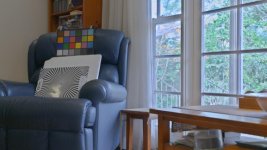
A couple of times I wished I could white balance on the FS7 in Cine EI with mixed light just like I can with the Varicam LT. A couple of times I have worked my way around this issue with an unconventional 'work around' in the following way. I select "Custom" mode. I then select Gamma "S-LOG3" and now most importantly I make sure the Matrix, which is available in Custom mode of course is TURNED OFF!. What I find is I then have virtually the whole of the S-LOG3 gamma and exposure parameters and dynamic range to work with BUT with the addition of the ability to white balance. The resultant images I then grade in a fairly normal S-LOG manner. Below are two shots from some time back when I was playing around and experimenting with this approach. Shot #2 is a Custom S-LOG3 shot with matrix OFF straight out of the FS7 and #1 is the same shot graded with just curves and saturation and nothing else. The lighting in the shot is one overhead 50 watt tungsten point source down light pointing straight down towards the chart. You can see the lamp's glare on the Siemens Star chart. The outside image is illuminated with daylight and it was a sunny day so a fairly wide dynamic range was involved. I white balanced on the white polly sheet behind the star chart as it was illuminated by both the 3200k tungsten and the 5600k daylight. After that experiment I did further tests shoots and was happy to use this Custom/LOG/NO matrix approach on a number of shoots and all been good so far. Unconventional I know but it works. A couple of editors have liked the fact that the WB was pretty close to start with.

EDIT: These pics were graded to 1 volt P-P broadcast levels so really needs to be viewed on a true Rec 709 monitor to see them correctly.

Chris Young

Custom SLOG3 Matrix Off basic curves sat 720.jpgCustom SLOG3 Matrix Of 720f.jpg
 
Last edited:
Personally I dont see why doing wb in the grade is that much of a hassle.. but I come from stills in capture one where that is the first move one makes.

EIther
Slack version - click on something grey white in the scene (the window edge)

Not totally slack version
Shoot a grey card - click on that

Personally I think the gretag card grey patches are often a bit small , a full 10.8 grey card is better.

With the FS7 Id suggest getting in the park by chooseing one of the three wb settings
 
Morgan , Of course you are right but As I recall you are doing your own grading before handing off to a client . That is completely different situation from many of us who are handing camera original off to a client who may or may not have it together around grading and may or may not want to deal with it at all.

Cy, I've always thought Sony assumed that it was was super cool and cinema camera-ish to be like film used to be.

I've played a bit with the custom slog idea but not enough to feel comfortable . One problem is I like to see the corrected ( LUT In ) image in the camera when I'm working , esp if I'm lighting. I think Morgan has done a lot of that if I remember correctly. Also how do flesh tones work out since you are now no longer in the gamut Slog3 was designed for? The F5 and F55 allow you to use SGamut3.cine in Custom which makes your system a better choice, but i don't know how much of a practical difference it makes when you are in a tough situation to begin with.
 
I want to be sure I understand this Mitch. Are you saying ANY LUT used internally in camera is only 17x depth? Even if it was created specifically at 33x in Resolve or other program? Or that specifically the Sony built-in LUT (or other camera's built-in LUTs are this way? Because my understanding (or perhaps I've assumed this ) was that MLUTs (custom built one's brought in) on the FS7 could be 33x or higher.

While the camera can accept a 33x .cube, it is truncated to a 17x internally. This is true on some other devices as well, not just Sony.
 
This begs the question how big a noticeable difference is that 17x LUT likely to make on a shot. Is it as bad as using 8 bit on an Slog shot ? Has anyone encountered it as a problem?. Would be worth testing both on skin and a graduated sky.
 
Well I think it might be worth testing... but the point may be moot Lenny. If you remember, Doug proved quite a long time ago - here and on Sony's community site that in a blind test - we all preferred his scene file to any MLUT he was given. See his link in post #2 of this thread.

I remember it because up to that point I was burning in LUTs and his test convinced me to start using custom more.
 
I also posted images once comparing Custom interviews to the same ones shot in Slog3 with FS7 and no one guessed correctly . However there are times when one might want to use Slog especially in a scene with high DR. I have a client for whom I've shot the same talking head in front of an open window for years. I used to do it in Custom HGH7 and it looked fine but recently we've switched to Slog3 and she likes it better . So I'm not willing to give up on Slog that quickly . I will shoot some tests when I get around to it probably of a gradient sky. Truth is I've shot plenty of interviews on the A7iii and A7sii and still haven't encountered banding or complaints on flesh tones so I'm open minded about how bad the 17X LUT will be in practise.

Lenny
 
I assume part of the problem - or at least the thing that makes it harder to judge - is seeing everything via internet streaming where it's been compressed. In my own tests when viewing on a timeline with 17" Panny monitor, long ago now, I was 99% certain that I liked colors much better from my FS7 using MLUT (Art's or even my own) than I did any scene file in custom mode. (so long as scene didn't mix some odd lighting challenges). And I've not encountered banding problems baking in - though have not shot much that way in some time. Assume that just as with grading Slog footage in post, this is much more likely to occur when one starts pushing / pulling the image.
 
Banding is only one possible issue. Another is color accuracy. Imagine shooting a Coke can and nor being able to correctly reproduce the precise hue of red, because your LUT is only 17x and it’s too blunt a tool.
 
Banding is only one possible issue. Another is color accuracy. Imagine shooting a Coke can and nor being able to correctly reproduce the precise hue of red, because your LUT is only 17x and it’s too blunt a tool.

Ive been thinking all of this over. I cannot find a clear solution. I would suggest, however, that shooting a coke advert one would most definitely shoot raw or log and do colour in post.

I think all the non post colour business is basically appropriate to fast turnaround work.

Can you get withing 90% of where you want to be without post.. and is that good enough?

Those who expect to get to 100% in camera are either kidding them selves or would spend so much time lighting, need such an expensive monitor and probably a load of pre testing that it would just be cheaper and simpler in post (post hours are much cheaper than set hours)

It would seem to do get to 90% in camera one needs to be able to white balance in camera would be critical to getting inside 90% - which leans one towards custom.

As soon as the footage touches Resolve one might as well have shot log as applying to the entire timeline is one click.
 
Are the camera's white balance choices saved in the metadata so post knows what settings/values were being used at any given time? And can Resolve read it? And if can read it, can it automatically compensate? If not, it might actually make the post processing more complicated rather than simplifying things. Or maybe it doesn't matter if someone is trying to shoot WYSIWYG and coming closer to a correct WB in camera is the goal. Yeah, I guess that's it. I may have answered my own question. More custom WB options for people who want to use LOG but skip grading.

an accurate WB isn't grading. You don't skip grading. Au contraire you get straight to it without adjusting the white balance first.

Why would you need to know the wb set in camera if you don't know the color temperature you were shooting? With a proper wb you start with a neutral image in postproduction. It's neutral not only on the yellow blue axis but also in green magenta. I personally find it way easier and more accurate also than 3200 / 4100 / 5600 presets.

As far as I remember you are selling warm and cold "white" balance cards? What's the sense of them then if the 3 presets are good for you? :)
 
Haha - Morgan we've been around this one many times in the past. That's where us "old school" moribund camera types have less trouble because we did it for years.
I love shooting log but in some ways prefer handing off Custom or a burn in because then at least I know the editor (whose probably "correcting" this and is not really an expert in color) won't screw it up.

Also you don't need to ever get something exactly perfect in the field in Custom. As long as you are close there is plenty of room for small adjustments that are virtually always needed in post. You don't need log to do color correction.

It reminds of the producer who when I asked him if he wanted WYSIWYG or Log said wide eyed -" Oh can you shoot it without Log? That would be great. I pick up people all the time around the country who seem to think shooting Log absolves them of lighting carefully on set." "They can fix it in Post."

Personally I dont see why doing wb in the grade is that much of a hassle.. but I come from stills in capture one where that is the first move one makes.

EIther
Slack version - click on something grey white in the scene (the window edge)

Not totally slack version
Shoot a grey card - click on that

Personally I think the gretag card grey patches are often a bit small , a full 10.8 grey card is better.

With the FS7 Id suggest getting in the park by chooseing one of the three wb settings

Yep, as an old schooler, you did it one of two ways, you did it right in-camera in the field or you didn't and you didn't get called again. Some networks used to have camera requirements, even for the "mundane" day-to-day news. You shot on X camera and it was set-up Y way(some shows used to require you had to have your camera sent-off and set up by a certain person that we've talked about before). But seriously, I've said it countless times on here, until fairly recently, with regards to the level most of us are working at, "fix it in post" was said as a tongue-in-cheek joke. Now it's trivial to do so, at least from a technical perspective. There are still the huge factors of talent and time of those handling the footage after we hand it off. I don't do anything but shoot. 100% of everything I do is handed off to the client. Sometimes they want log footage. Sometimes it needs to be ready to air as-is right out of the camera in a matter of hours or even minutes, but it still has to look good. Post is something that some, like Morgan with his stills background, take for granted. It's not a luxury that some of us have, regardless of how quick and simple you may deem it to be. Even just the basics of a WB or exposure tweak. I've also said this before, one of the greatest assets of DVX, its diverse user base, is also one of it's greatest drawbacks. So many think that the way they operate is the ONLY way it can and should be done and every other way is wrong.

Look, I'm not advocating the "good enough" attitude or philosophy, because I can't stand that idea, but shooting with a non-post/non-graded workflow doesn't have to be a sacrifice or compromise. We've been turning high-quality images(relative to the standards at the time) for decades without it.
 
Back
Top