Brightness Handling. How do you setup your DSLR / Brightness?

etrust

Well-known member
Hi Guys,

I would like to know how you setup your dslr in a scene in meaning of Brightness / Level.

For example: You are outside, sunny day, bright sky. Do you point the grid to the brightnesst place, setup the brighness level to the middel (using ND, F-Stops etc..) ?

I would like to know how you are working and seting up your brighness.

I would like to invite you to discuss this point.

Thank you.
 
I use ML on the 550D so I always rely on the histogram to help me set exposure. That's exactly how I used to work with camcorders (I never got the hang of zebras! so being able to use it on the 550D has really smoothed out my transition to DSLR's.
 
I use ML on the 550D so I always rely on the histogram to help me set exposure. That's exactly how I used to work with camcorders (I never got the hang of zebras! so being able to use it on the 550D has really smoothed out my transition to DSLR's.

Hi I'm using a 7d. Clicking on the info button i can check it on the histogram. but I would like to now which process you exactly use.. Because sometimes is the sky ok but other objects or people dark..
 
The biggest problem I have is judging which objects can be under exposed and which ones can be overexposed. Outside conditions are where people truly have to rely entirely on what the camera can see and only certain lighting techniques at the most. Thing like weather, angle from the sun, and things like that always help, but to me, DSLR's just seem too sensitive to direct sunlight for some types of work - I just don't have a clue how people are getting good outdoor footage.
 
expose for something (like skintones). practice prolly best answer. and get technicolor onto your canon & underexpose a bit, now you've saved your footage *while* practicing on it... :)

"DSLR's just seem too sensitive to direct sunlight for some types of work - I just don't have a clue how people are getting good outdoor footage."

Uhm... heard of ND filters?
 
No, I mean that the sensetivity to sunlight vs. shade is just ridiculous with these and many digital cameras.

I mean, with all my thought, I just don't know how shade is so dark with these cameras, if you're filming outside, you can't light every tree, porch, ect ect.
 
Hi Guys,

interesting. I'm using ND Filters and Pol Filters, but I still have problem outside when you have a bright sky and white objects like Walls, Shirts and so one..

Pushing the Brightness down seems not to be a solution because other objects seems to dark.

I have downloaded Cinestyle, but I want to know if there is a Basic rule working with very bright situations..
 
With outdoor scenarios, I would think the trick is to dial down the color curve so that the camera does not recognize full whites and full blacks. Professional digital cameras do this already if I'm not mistaken. It does not bring back detail, but it calms the picture and doesn't sacrifice saturation or contrast. I would rate this technique as a secret of the pros. When you're filming a white wall, you don't need info returned, you simply need it to look calm.
 
@Snapper123

What is troubling you about shooting outside?

No digital camera handles outdoor shots with strong highlights and shadows well without filters and a mindful composition. Taking a camera - just body and lens - and pointing it towards the setting sun will likely clip on both sides of the histogram. Cameras like the 7D only have about 8 stops of dynamic range, potentially 9 or 10 when cheated with flattening picture styles like Technicolor's. A scene like previously described would probably require 20 stops of range to avoid clipping or crushing - something even film cannot do without the use of filters.

Outdoor shooting is just as much about the limits of the camera and your grip truck as it is where you point the camera, like all other shooting environments.


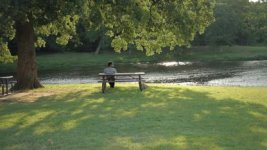
Here's a grab from a recent shoot. I used both an ND.9 and a Polarizer to get a decent exposure. Only the bright cluster of reflections in the water clipped; shadows were clean.
 

Attachments

  • 500_Still.jpg
    500_Still.jpg
    19.9 KB · Views: 0
I'm not really sure how to describe it, it's just that with practically every movie I see (especially from decades and decades past when CG wasn't an option) there's always just tons of sky, and no sign of any sort of skyline filter. I mean car chase scenes, neighborhood scenes, lots of establishing shot type stuff. I mean, I try and practice when I can on cloudy days, but I can count how many times it rains or turns cloudy where I live on my hand. When I try and simply do a lot a practice shooting during the day, it's bad enough that it's pretty much heat-wave blaring weather here, but even beyond how blaring everything is to the eye, the camera takes that and amps up about 10x and it seems literally impossible to shoot in terms of how the sun just blares off everything in sight causing all sorts of issues. And it seems that stopping eveything down just kills any shadows completely once you get everything down to a certain level.
 
Hi I'm using a 7d. Clicking on the info button i can check it on the histogram. but I would like to now which process you exactly use.. Because sometimes is the sky ok but other objects or people dark..

It's really a matter of experience - I've shot enough stuff that I know if I'm in a dim wedding reception, the graph should peak somewhere just to the left of centre. Shooting surfing, I know that the peak should be around about the 2/3 to 3/4 mark and the bright whitewater should just be hitting the far right side of the graph etc. It's a matter of comparing your subject matter to your graph and thinking "how bright should this be to look accurate?" and also asking yourself what each little rise and fall of the graph could represent eg: a spike towards the right side (brighter) could be the brides dress, the big spike down near the left (darker end) could be the shadows from those bushes behind her.

I think this is why I never got the hang of zebras; say you set them at 70% and try to get skin tones to expose at that level, then you are not taking into account whether the scene is actually darker than that in real life. Obviously smarter people than me have figured this out but personally, I prefer the histogram because you can see where everything is on your graph and take a more subjective approach to exposing.
 
I'm not really sure how to describe it, it's just that with practically every movie I see (especially from decades and decades past when CG wasn't an option) there's always just tons of sky, and no sign of any sort of skyline filter. I mean car chase scenes, neighborhood scenes, lots of establishing shot type stuff.

Grad ND is often used to knock the sky down so that the landscape/cityscape can be brought up (and it doesn't show if it's used properly). A lot of it, too, is avoiding mid-day when the sun is straight down. Early day and late day are preferable as the sun is at an angle. Keeping it behind the camera is also key.
 
To reiterate,

No camera in a major production is shot naked - not even film cameras. Filters are always used outside.

Your 7D will struggle with outdoor shooting. You will have to use filters and will have to shoot at a time of day and at an angle that favors the limitations of your camera instead of highlighting them.

Also, motivated clipping is OK. There is a reason there is a great interest in how the new digital cinematography cameras handle roll-off to blown highlights, something most digital cameras resolve as blocky and unattractive.
 
Grad ND is often used to knock the sky down so that the landscape/cityscape can be brought up (and it doesn't show if it's used properly). A lot of it, too, is avoiding mid-day when the sun is straight down. Early day and late day are preferable as the sun is at an angle. Keeping it behind the camera is also key.

Quick question Alex, I understand completely on keeping the camera to your back as you could get nice natural sun light lighting on exactly what it is you are shooting, but how do you avoid flagging you subject ( you know the long shadows )?


Thanks


To reiterate,

No camera in a major production is shot naked - not even film cameras. Filters are always used outside.

Your 7D will struggle with outdoor shooting. You will have to use filters and will have to shoot at a time of day and at an angle that favors the limitations of your camera instead of highlighting them.

Also, motivated clipping is OK. There is a reason there is a great interest in how the new digital cinematography cameras handle roll-off to blown highlights, something most digital cameras resolve as blocky and unattractive.


I would have to disagree with every camera is shot using filters, because certain short films I have seen from people here even said they did not use any filters what so ever in front of their camera lenses ie.

 
Last edited:
I would have to disagree with every camera is shot using filters, because certain short films I have seen from people here even said they did not use any filters what so ever in front of their camera lenses ie.

You have a point. Sometimes they are not used. It appears there are quite of few DSLR shooters who do not know that filters are a major part of the production, however.
 
Don't get hung up on the tools (read: camera) here. The question you asked is really a light/light control issue* that goes hand in hand with framing, angle, filtration, and time of day. Something shot with the sun directly overhead of your subject isn't going to look good whether you hold the highlights and save the shadows or not. It's just bad lighting.

*For the nit-pickers: Of course different formats will give you different amounts of wiggle room.
 
Quick question Alex, I understand completely on keeping the camera to your back as you could get nice natural sun light lighting on exactly what it is you are shooting, but how do you avoid flagging you subject ( you know the long shadows )?

There are still many tools that come off the grip truck at golden hour. Bounces and reflectors are the biggies there. Scrims, flags, and silks to control hot spots. The light from the sun can be bounced to create side, fill, and backlight. And if exposure for the sky isn't important (or in the frame) the sun can be used as an excellent and dramatic backlight, with the bounce creating a key. And a 10k HMI is no stranger to daylight shooting.

This is why major productions pay lots of money for a well-stocked truck and a team of gaffer and grips. There are, of course, smaller solutions that can be handled by smaller crews and on smaller budgets... but they are merely scaled-down versions of the same.

I would have to disagree with every camera is shot using filters, because certain short films I have seen from people here even said they did not use any filters what so ever in front of their camera lenses ie.

There are plenty of shots in the film you linked that illustrate why filters and reflectors are necessary.
 
Last edited:
Hi Guys,

wow! So nice discussion here. Wel I'm using a 7D and I think it's a good beginning to test diferent time of the day and maybe also try the cinestyle Picture Style. I also will use Filters that maybe help with the Brigtness.

Is there something like a 180 degrees rule for the sun :=) ?
 
Canon Highlight Tone Priority for Outdoors Shooting

Canon Highlight Tone Priority for Outdoors Shooting

Hey everyone!

There is a feature on Canon DSLR's that is very useful for lighting situations. It's called Highlight Tone Priority. I'd suggest you take a look at it and try out various combinations of Highlight Tone Priority mixed with exposure compensation and Auto Lighting Optimizer. I have found in my personal experience that this allows the camera to really calibrate the sensor to your specific needs, especially in a very bright environment. The Canon APS-C sensors are very customizable, and this is yet one more setting that allows it to be honed in to your personal preference. You will see a little "D+" in your camera info when this is activated and notice that blown-out bright areas are toned down and brought closer to the rest of the picture when you are in Live View.

There's a great video explaining how to use this option here:

http://www.youtube.com/watch?v=p5BmKVxMXx0

Take a look! Let me know what you think.
 
Back
Top