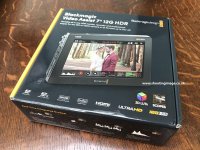
Blackmagic Video Assist 12G HDR

They're saying it offers 100% of P3. Which is a pretty serious spec. I wonder if it'll correlate to an accurate (as far as 2500 Nit screens can be) colour reproduction.

Has anyone heard whether there's confirmation of SDI/HDMI cross-conversion on these? The inability of the Ninja to convert it's HDMI signal to the SDI ports on the SDI module, makes it only half useful to me. If this can do both, then I'll be picking a couple of them up.

Also, can it display 17:9 images in full? The Ninja V's cropped display of DCI images is a nightmare.

Not sure I ever heard of a 135 degree viewing angle display with 100% p3 color. I would love to be wrong but some of these specs do not line up. For how long is that p3 color going to stay 100% with no way of tweaking or calibrating?
 
I looked at this at NAB NY a couple days ago and the screen is really bright and the monitor is surprisingly compact and interface seems improved over the old bmva. Only thing I noticed was there seemed to be line smearing or something... Maybe burn in?
 
Not sure I ever heard of a 135 degree viewing angle display with 100% p3 color. I would love to be wrong but some of these specs do not line up. For how long is that p3 color going to stay 100% with no way of tweaking or calibrating?

Generally color doesn't shift as much as brightness over time.
 
Hi all, I'm getting interested in the 7-inch Black Magic Video Assist 12G and was wondering if anyone has actually got one yet? (they seem to be appearing as 'In stock' at dealers/official resellers but I've not seen any user reviews yet).

If you've got one, how are you finding it? Is the fan noisy? Build quality OK? ...and any other comments would be most welcome.

Thank you in advance.
 
Hi all, I'm getting interested in the 7-inch Black Magic Video Assist 12G and was wondering if anyone has actually got one yet? (they seem to be appearing as 'In stock' at dealers/official resellers but I've not seen any user reviews yet).

If you've got one, how are you finding it? Is the fan noisy? Build quality OK? ...and any other comments would be most welcome.

Thank you in advance.

No they are still in pre-order status, not shipping yet.
 
Just an update on this. In the end my Atomos Ninja Blade started acting up recently so I put in a pre-order with 3DBroadcast here in the UK (about a week or so ago) and I've just been told they now have the 7-inch VideoAssist 12G.

It'll be shipped to me shortly. :-)
 
It's arrived. Superb build quality and gorgeous screen. Love the BMD user interface.

Fan is practically silent - but I've not had it recording for a long period in a hot environment - it's pretty cold here in the UK right now.

Very pleased with it so far.

Knocks the socks off my old Atomos Ninja Blade!
 

Attachments

  • BMDVideoAssist1.jpg
    BMDVideoAssist1.jpg
    130.4 KB · Views: 0
Nice! Let us know what you think after using it for a while.

I'm planning on getting an external recorder and am debating between Atomos Ninja V and the Blackmagic Video Assist 5". The Blackmagic has 2 battery slots but records to SD cards (which are perhaps more prone to failure?) vs the Ninja V which uses SSD but only has 1 battery slot. For long-form events (2+ hours) which would be the best option?
 
For 10+ hours of keynotes, I liked to power the Shogun off a Powerbase. I had enough batteries to keep swapping them, but wanted one less thing to think about.

https://www.bhphotovideo.com/c/product/1403151-REG/core_swx_pb_edge_powerbase_edge_small_form.html

https://www.bhphotovideo.com/c/product/1493127-REG/atomos_atomdtpcb2_d_tap_to_dc_barrel.html

Any brick with a port would work, but this one kept the setup simple with the camera sitting on top of the battery and the monitor on top of the camera.
 
I'm planning on getting an external recorder and am debating between Atomos Ninja V and the Blackmagic Video Assist 5". The Blackmagic has 2 battery slots but records to SD cards (which are perhaps more prone to failure?) vs the Ninja V which uses SSD but only has 1 battery slot. For long-form events (2+ hours) which would be the best option?
Depending on what resolution and frame rate you are recording at, you might also want to consider media costs. SSDs are considerably less expensive per gigabyte than SD cards, especially the UHS-II V90 cards that are recommended for recording higher resolutions on the Video Assist. For example, the AngelBird V90 cards, which are one of the ones Blackmagic recommends (https://www.blackmagicdesign.com/support/faq/59028) for recording 2160p ProRes, cost $400 for a 256 GB card (about $1.50/GB). In contrast, the WD Blue 3D NAND SSD (one of Atomos' recommended drives) only costs $100 for a 500 GB drive ($0.20/GB), making the SD card 7 times more expensive per GB than the SSD.

You can also get SSDs in higher capacities, up to 2 TB (or even 4 TB for some models), whereas most of the UHS-II V90 cards max out at 256 GB in capacity. Especially when recording 4K/Ultra HD, ProRes video takes up a fair bit of space. For example, ProRes 422 at 2160p30 resolution uses 265 GB/hour of space, so you could barely record for an hour on a single 256 GB SD card at that setting. Even if you were to drop to ProRes LT (185 GB/hr at 2160p30), you still couldn't fit 2 hours of 4K video on a single 256 GB card.

The 7" Video Assist HDR alleviates this problem somewhat since it has 2 SD card slots allowing for card swapping and continuous recording (although the SD card storage cost disadvantages still remain).

All of this is assuming that you stick to internal (SD card) storage on the Video Assist. Both Video Assist HDR models (5" and 7") also allow for external recording to a USB-C SSD. Then the storage costs and available capacities are much more competitive with the 2.5-in internal SSDs that the Atomos recorders use. The tricky part with using an external USB-C drive is figuring out how to rig things such that the external drive isn't dangling and USB-C cable cannot be easily disconnected. I'm sure eventually some 3rd party manufacturers will introduce some cages for the Video Assist line with USB-C SSD mounting mechanisms (similar to what was done for the Blackmagic Pocket 4K and 6K cameras), although this may make for a bulkier and heavier setup.
 
I have an AIMTOM Portable Power Station to power my Ninja V and it runs fine for over a two hour time using the mains supply that came with the Ninja V. I also have orders in for the ATOM X sync module for my Ninja v's but they have not been released yet ( hope soon ) they have a 7 min battery in them plenty of time to change the battery as I also have lots of 970 batteries from my older Sony camcorders.
 
Also really keen to hear some reports. I basically want recording on all of my on-set monitors these days. In-camera playback SUCKS on all cameras, so if the 1st AC can playback take to check focus at their leisure, and the director (if they're carrying a compact wireless unit around) can check anything they need (with complete independence) - that just makes everyone's life on set easier.

And having 2500 NIT brightness available, so that the process of using the monitors outdoors in the daytime isn't a pain in the neck, is also a big deal.

Hoping these work out.
 
Just a quick update.

With all the menu choices set correctly, and with my Sony FS5 (Mk 1, no Raw Output key installed, at least not yet), I can feed the BMD VideoAssist 12G 7-inch with a 1080p25 signal from the FS5 with a SDI cable. This is with the internal SDXC cards on the Sony FS5 set to (relay) record 2160p25 at 100Mbps XAVC-L. I can then loop to my Atomos Ninja Blade from the VideoAssist's HDMI output to it's HDMI input. All 3 devices show a video image and all 3 start/stop recording when I hit record on the FS5 - yippee! (Note that, as is normal with this cam, the cam's LCD goes black but will continue to display the camera data and REC icons)

There was a question about cross-conversion (SDI/HDMI) in the unit. This shows that the BMD VideoAssist 12G will convert a SDI feed coming into the unit to a HDMI output - but because of the (current) equipment limitations I have at my disposal I cannot test this with a 2160p signal. At least this will be good for having the 2 units, set just as monitors (I can easily disable the record trigger on the cam's menu). The BMD VideoAssist 12G will be my primary monitor, just so I can keep an eye on focus, exposure etc. (so much better than the crap FS5 screen for that!) and perhaps the 5-inch Ninja Blade on the end of a long HDMI cable for the client.

If I use a HDMI cable from the FS5 to the BMD VideoAssist 12G then I can at least get a 2160p25 signal (8 bit of course with this cam over HDMI) to the BMD VideoAssist 12G - and the start/stop trigger works as expected. However, the Ninja Blade cannot accept this resolution input (from the HDMI loop through) so is black ("No Input").

By the way, one thing I've definitely noticed is there is no image delay (at least not one I can detect) with the BMD VideoAssist 12G. I'm really pleased about this as my Ninja Blade had a very noticeable delay, no doubt due to earlier technology/lower processing power and this sometimes did my head in!

Now the BMD VideoAssist 12G has been on for a couple of hours or so, I can (just, very, very faintly) hear the fan...my studio is a super quiet environment - but here's the interesting thing. The fan on my FS5 is in fact, although very quiet, slightly louder! I actually thought the fan noise that I was hearing as I typed this was from the BMD VideoAssist 12G - but switching off the FS5 proved me wrong!

With just the VideoAssist left on, I really cannot hear it at all (unless I put my ear right next to it). I've never had an issue with fan noise on my FS5 so my take from this means the fan noise from the BMD VideoAssist 12G is unlikely to bother me either.

Not sure how useful any of the above information might be - so just posting in case it is!

BTW, the screen is gorgeous and super bright. No idea how colour accurate it is but the specs imply it should be more than OK for my specific uses.

One other thing. I've also bought (two) 'BMD MiniXLR to XLR Audio Conversion Cables' as I'm interested to see how the BMD VideoAssist 12G will perform (just) as an audio recorder. I have a Foster FR2-LE, which is great and which I use now and again, but just wondering if the BMD VideoAssist 12G will be as good (or hopefully better) than the Fostex, which I acquired about 12 years ago. Not had time to test that yet - but will hope to in the next week or so.
 
Last edited:
Awesome info!

Also, I accidentally hit "thumbs down" when I wanted to do the opposite. My apologies! It seems it can't be undone...
 
Think I may have discovered a software bug. No matter what settings I try, I cannot seem to get the unit to record "just audio" using the two new BMD MiniXLR to XLR adaptor cables that arrived yesterday. Yes, I've made sure phantom power is set to on, on both channels, tried both cables/channels and I've tried 2 mics, both of which I know are fine/working.

Nothing showing on audio meters and I'm not able to record even the silence!

Anyone else tried this yet and got it working?

My unit came with Software Version 3.0. I've just seen on the BMD support pages that they issued a Version 3.0.2 update on Thursday (22nd Jan 2020) which has some bug fixes (but it does not say what they are). Trouble is it says it needs Mac OS Mojav 10.14 as a minimum system requirement (both my Mac Pro "Trashcan" and my MBP are locked down with Sierra 10.12.6). I upgrade every 3 or so years but then always lock everything down once everything is working as it should, which is why I'm still on Adobe CC 2017 and an earlier version of FCPX.

I think I will have to borrow my wife's Windows 10 work laptop (which it says is supported) to ensure the download/install goes without a hitch.
 
Last edited:
Think I may have discovered a software bug. No matter what settings I try, I cannot seem to get the unit to record "just audio" using the two new BMD MiniXLR to XLR adaptor cables that arrived yesterday. Yes, I've made sure phantom power is set to on, on both channels, tried both cables/channels and I've tried 2 mics, both of which I know are fine/working.

Nothing showing on audio meters and I'm not able to record even the silence!

Anyone else tried this yet and got it working?
It's pretty common for these video monitor/recorders to require a valid video input signal in order to start recording. They are designed to be video recorders and they are usually only capable of writing video files, with any audio that is recorded as audio tracks in the video files. These devices are not really designed as a replacement for a standalone audio recorder, which would typically record audio-only WAV files.

So while I haven't had a chance to try the new Video Assist 12G HDR units yet, the original Video Assist 4K had this limitation, as have most of the other monitor recorders I've used from other manufacturers.
 
Thanks for that Dave - makes perfect sense. Looks like I just got too excited about the potential flexibility of the unit.

It would have just been the icing on the cake if it could have done it - but no worries if it won’t.
 
Back
Top