Hi All,
I was finally hit by the wobbles, jitters, and jello effect of rolling shutter whith the GH2 recently (shooting events handheld without OIS), and have been doing some research on how to minimize it in the future. I've compiled what I found so far (as well as some possible ideas) for my own future reference, but wanted to post it here in the hope that it might help others, and also in the hope that others will add their knowledge and experience as well. Please jump in with any input and I will edit the post with updates as I get them.
I have divided this info into 3 categories: physical operation/movement, camera lenses/settings, and post production.
* Notice that this is mostly about dealing with the jittery/wobbly effect of rolling shutter on a relatively static or slow moving shot, not so much the big leaning vertical lines noticeable on fast pans or fast moving objects. Some of these recommendations may help with that as well, but the leaning effect may be harder to prevent depending on the speed of the movement of the camera or object.
A. Physical Operation / Movement
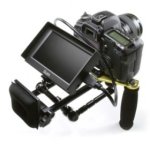
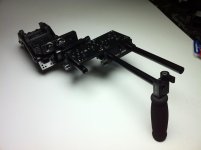
This is perhaps the most important factor in preventing jello effects and applicable to all cameras that suffer from it, not just the GH2. Go for the most stable platform that you have available or that is practical for the shot. In order of most stable to least stable (not including more specialized things like car mounts, aerial platforms, etc, but if you do have experience with them, please add), they are:
Q: Should any of these be placed in a different order?
I should also note that all of the above can be improved with proper technique and practice. For example, here are some still photography camera handling techniques that may be applicable to hand-holding for video as well. Also try to always use the viewfinder or a loupe system instead of holding the camera in front of you and using the LCD - putting the viewfinder or loupe against your eye socket will serve as a third point of contact that will help stabilize the camera more than just your two hands. Slower and steadier movements in general will lead to less or no jello effects. Bare hand-holding seems to be only a last resort, particularly if using a non-OIS lens, and especially anything above a 50mm.
B. Camera Lenses and Settings
Second most important factor in preventing jello effects. Several of these are specific to the GH2 (not in any particular order):
Q: Do shutter speed and aperture settings have any positive effect? I've seen some posts saying no for shutter speed, but was hoping for a concensus or real observed results. I doubt that aperture has any effect, but doesn't hurt to ask.
Q: Do any of the hacks or any stock bitrate settings have a positive effect? Again, I believe I've seen some posts mentioning this, but I'm not sure.
Q: Do any other camera or lens settings / factors have an effect?
C. Post Production
It's always best to prevent jello effects while you are shooting, because the post-production fixes listed below can be expensive, time-consuming, and probably won't produce perfect results. If you end up with jello effects in your shots anyway, there are post-processing tools (usually in the form of plug-ins) that can help you remove some of the effect from your footage:
I've heard of some other tools as well, but don't recall their names right now. Please add any that you know will reduce jello effects.
Q: Is there anything else that I left out or that I should change? Please jump in with your thoughts. I will edit this first post with updates or changes as you mention them.
I was finally hit by the wobbles, jitters, and jello effect of rolling shutter whith the GH2 recently (shooting events handheld without OIS), and have been doing some research on how to minimize it in the future. I've compiled what I found so far (as well as some possible ideas) for my own future reference, but wanted to post it here in the hope that it might help others, and also in the hope that others will add their knowledge and experience as well. Please jump in with any input and I will edit the post with updates as I get them.
I have divided this info into 3 categories: physical operation/movement, camera lenses/settings, and post production.
* Notice that this is mostly about dealing with the jittery/wobbly effect of rolling shutter on a relatively static or slow moving shot, not so much the big leaning vertical lines noticeable on fast pans or fast moving objects. Some of these recommendations may help with that as well, but the leaning effect may be harder to prevent depending on the speed of the movement of the camera or object.
A. Physical Operation / Movement
This is perhaps the most important factor in preventing jello effects and applicable to all cameras that suffer from it, not just the GH2. Go for the most stable platform that you have available or that is practical for the shot. In order of most stable to least stable (not including more specialized things like car mounts, aerial platforms, etc, but if you do have experience with them, please add), they are:
- Video Tripod
- Video Monopod
- Dolly or Slider
- Jib
- Steadicam or other similar floating gimbal device
- Shoulder rig, gun-stock rig or other similar fixed, body-mounted/braced device
- Tension device, like a string monopod, a strap monopod (steadistrap, strap pod), or applying tension to the camera strap
- Double-handed floating camera rig, like a fig rig, halo rig, etc - something with one handle on either side of the camera
- Pistol grip (is it better than bare handholding, particularly if bracing your elbow on your torso and looking through the EVF for additional point of contact?)
- Bare Hand-holding
Q: Should any of these be placed in a different order?
I should also note that all of the above can be improved with proper technique and practice. For example, here are some still photography camera handling techniques that may be applicable to hand-holding for video as well. Also try to always use the viewfinder or a loupe system instead of holding the camera in front of you and using the LCD - putting the viewfinder or loupe against your eye socket will serve as a third point of contact that will help stabilize the camera more than just your two hands. Slower and steadier movements in general will lead to less or no jello effects. Bare hand-holding seems to be only a last resort, particularly if using a non-OIS lens, and especially anything above a 50mm.
B. Camera Lenses and Settings
Second most important factor in preventing jello effects. Several of these are specific to the GH2 (not in any particular order):
- Use lenses with image stabilization. If possible, experiment with the camera IS settings to find the optimal one for the specific lens you are using and types of shots you are trying to achieve.
- Use wider lenses. The longer the focal length of the lens, the more noticeable the shake is, leading to more pronounced jello effects. Otherwise, the longer the lens, the more solid stabilization is required.
- Use higher frame rate modes, like 60i instead of 24p. (source: post by Barry Green)
- Use 720 resolution modes instead of 1080. (source: post by Barry Green)
- Use ETC mode.
Q: Do shutter speed and aperture settings have any positive effect? I've seen some posts saying no for shutter speed, but was hoping for a concensus or real observed results. I doubt that aperture has any effect, but doesn't hurt to ask.
Q: Do any of the hacks or any stock bitrate settings have a positive effect? Again, I believe I've seen some posts mentioning this, but I'm not sure.
Q: Do any other camera or lens settings / factors have an effect?
C. Post Production
It's always best to prevent jello effects while you are shooting, because the post-production fixes listed below can be expensive, time-consuming, and probably won't produce perfect results. If you end up with jello effects in your shots anyway, there are post-processing tools (usually in the form of plug-ins) that can help you remove some of the effect from your footage:
- Vegas Pro 10 and above
- Deshaker (filter for Videodub)
- Final Cut Pro X
- After Effects CS 5.5 or later
- iMovie (version?)
- Vegas Movie Studio (version?)
- Mercalli (plug-in for various programs)
I've heard of some other tools as well, but don't recall their names right now. Please add any that you know will reduce jello effects.
Q: Is there anything else that I left out or that I should change? Please jump in with your thoughts. I will edit this first post with updates or changes as you mention them.
Last edited:
 However, marginal or undesirable footage is sometimes in the eyes of the beholder, and sometimes it's all you can get in a given situation if you want to have any video at all of a certain moment. The jello effect can make a shot that could have been salvageable by a shake reduction plug-in into an unsalvageable or barely usable shot. In short, this is the main purpose of the thread: to share and learn all that can be done to prevent/reduce/repair jello, including camera handling technique, which I acknowledge is the most important factor. Thanks!