
Navigation
Install the app
How to install the app on iOS
Follow along with the video below to see how to install our site as a web app on your home screen.
Note: This feature may not be available in some browsers.
More options
You are using an out of date browser. It may not display this or other websites correctly.
You should upgrade or use an alternative browser.
You should upgrade or use an alternative browser.
C300: Best file format for vimeo?
- Thread starter anatusa
- Start date


Eric Coughlin
Veteran
Export settings I use in Premiere: Target bit-rate at 20,000 Mbps, maximum bit-rate at 30,000 Mbps, VBR 2 pass, Profile: High, Level 4.2, Render at Maximum Depth (for both), Key Frame Distance 24, Format: H.264, 1920 x 1080.
Sometimes I'll use a lower data rate.
Unless you enjoy soft fuzzy 720p which will make your C300 look as dull as a Canon DSLR, make sure to upgrade your videos to 1080p. Vimeo automatically uploads 1080p videos to 720p, so to get 1080p on each video you need to go to Settings --> Video File --> Check the box for 1080p and select "Upgrade this Video".
Too much content on Vimeo is kept at 720p which causes great pain to me.
Sometimes I'll use a lower data rate.
Unless you enjoy soft fuzzy 720p which will make your C300 look as dull as a Canon DSLR, make sure to upgrade your videos to 1080p. Vimeo automatically uploads 1080p videos to 720p, so to get 1080p on each video you need to go to Settings --> Video File --> Check the box for 1080p and select "Upgrade this Video".
Too much content on Vimeo is kept at 720p which causes great pain to me.

marvinhello
Well-known member
i've done some experiments, the result is that, files uploaded as AVC-Intra 100 retains the most quality from the original master (even grains are preserved). the file size is huge of course, its ideal for TVC, MV or short films which image quality matters a lot.

Mark Williams
Veteran
Keep in mind that Vimeo will re-encode you uploaded videos. If you have a "plus" account they will do 2 instead of 1 pass encoding which results in better quality. Also with "plus" you can embed in HD and display 1080p quality.
https://vimeo.com/help/faq/vimeo-me...oes-vimeo-plus-differ-from-a-basic-membership
https://vimeo.com/help/faq/vimeo-me...oes-vimeo-plus-differ-from-a-basic-membership
Last edited:
i've done some experiments, the result is that, files uploaded as AVC-Intra 100 retains the most quality from the original master (even grains are preserved). the file size is huge of course, its ideal for TVC, MV or short films which image quality matters a lot.
I thought you could only upload h264 to vimeo. That's interesting I'm going to give it a try. Any way to achieve a similar effect with reduced file size though?
I have some scenes in my film (filmed in prores) that have some bad banding as soon as I encode from prores to h264.
Eric Coughlin
Veteran
How do you export AVC-Intra 100 from Adobe Premiere?

Erik Naso
Veteran
How do you export AVC-Intra 100 from Adobe Premiere?
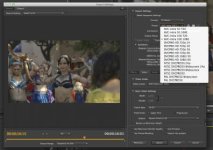
Easy! Just like this.
Export media or "Command M" on a mac. When Adobe Media Encoder opens select FORMAT as P2 Movie and Preset is AVC-INTRA 100. Done!
Last edited:
marvinhello
Well-known member
I thought you could only upload h264 to vimeo. That's interesting I'm going to give it a try. Any way to achieve a similar effect with reduced file size though?
I have some scenes in my film (filmed in prores) that have some bad banding as soon as I encode from prores to h264.
AVC-Intra 100 offers best quality/file size balance in my opinion, it's a 10bit 422 codec and MOST IMPORTANTLY it does not cause gamma/black point issue compared to ProRes. the the output speed is very fast.
Eric Coughlin
Veteran
Ah, under P2 Movie. Couldn't find where it was in the export options. I'll have to try this out. Thanks!View attachment 80322
Easy! Just like this.
Export media or "Command M" on a mac. When Adobe Media Encoder opens select FORMAT as P2 Movie and Preset is AVC-INTRA 100. Done!
I did a test with prores clip that had BAD banding when exporting to h264 (let alone uploading to vimeo). I exported as an MXF AVC-Intra 100 (just a short part of my clip which came out to a whooping 40MB for like 3-4 seconds).
Extremely massive file size aside, it uploaded just fine to vimeo and more importantly IT LOOKED GREAT after vimeo did it's thing.
Now my only problem is that I'm going to have a 7 minute film so geez it'll be around 5-10GB which is going to be difficult to upload (we have crappy upload speeds here).
Extremely massive file size aside, it uploaded just fine to vimeo and more importantly IT LOOKED GREAT after vimeo did it's thing.
Now my only problem is that I'm going to have a 7 minute film so geez it'll be around 5-10GB which is going to be difficult to upload (we have crappy upload speeds here).
Eric Coughlin
Veteran
I guess AVC-Intra 100 is 100 Mbps while AVC-Intra 50 is 50 Mbps. I'd think for uploads (as in, where you don't need to do any more color grading) 50 Mbps would not be much different than 100 Mbps. Is there any truth to what I'm thinking here?
marvinhello
Well-known member
I guess AVC-Intra 100 is 100 Mbps while AVC-Intra 50 is 50 Mbps. I'd think for uploads (as in, where you don't need to do any more color grading) 50 Mbps would not be much different than 100 Mbps. Is there any truth to what I'm thinking here?
Unfortunately AVC Intra 50 is anamorphic and Vimeo doesn't undersstand the pixel ratio, the result will be a squeezed video.
marvinhello
Well-known member
I did a test with prores clip that had BAD banding when exporting to h264 (let alone uploading to vimeo). I exported as an MXF AVC-Intra 100 (just a short part of my clip which came out to a whooping 40MB for like 3-4 seconds).
Extremely massive file size aside, it uploaded just fine to vimeo and more importantly IT LOOKED GREAT after vimeo did it's thing.
Now my only problem is that I'm going to have a 7 minute film so geez it'll be around 5-10GB which is going to be difficult to upload (we have crappy upload speeds here).
Great to know! AVC Intra rocks!
not sure what kind of Vimeo account you have, but the Plus account have a 5GB cap for a single upload.
marvinhello
Well-known member
how do you upload a P2/AVC-Intra movie to Vimeo? Does Vimeo understand the P2/CONTENTS folder structure or do you just upload the video MXF file?
Just the MXF
Great to know! AVC Intra rocks!
not sure what kind of Vimeo account you have, but the Plus account have a 5GB cap for a single upload.
After further digging around I'm finding XDCAMEX 35 to be a really nice balance of quality (that Vimeo doesn't destroy - as you said it even keeps the same grain structure) and file size.
Thanks for chiming in on this thread. I honestly never thought to assume that Vimeo would accept anything but h264. It's great this thread popped up when it did, I spent the last 2-3 days experimenting with various h264 settings and playing around with my grade to try to get an artefact free image. Your advice has led to a massive breakthrough and my film finally looks great online!
Just the MXF
but the video and audio components of the P2 structure are separate, how do you upload that to vimeo? I have a 7 min AVC-Intra video and the contents folder contains 2 video MXF's and 4 audio MXF's how do you combine or upload that?
but the video and audio components of the P2 structure are separate, how do you upload that to vimeo? I have a 7 min AVC-Intra video and the contents folder contains 2 video MXF's and 4 audio MXF's how do you combine or upload that?
I'm personally using the MXF OP1a container not the P2 Movie. The mxf contains the video and audio in that case and you just upload that file to Vimeo.