AVCHD high bitrate tests- MUD FREE footage

I always thought the Neoscene output I got made some of the "mud" and macroblocking kind of smooth out. i never thought it looked darker or softer at all though.

Yes, I still use it, without using the pulldown removal. I think it does a chroma smoothing process, and may make for a better conversion to prores than FCP log and transfer.
 
I can confirm mtbcad finding with this settings:
Video bitrate adjustment 38000000
Overall bitrate adjustment 40000000
Limiting bitrate adjustment 42000000

Problem is when zooming with kit lens... Camera stops recording in 720 mode

Another "Issue" I'm seeing, that with these high bit rates, the AutoFocus becomes disabled when utilizing 1080p.

Tested several setting and confirm this. Fixing to do a plain patch

Only Ver.; Language; and Native 24p. (I'm becoming suspicious of the 24p Native setting. Hence, I'm using only these setting on my next patch.)

Pardon me if this already has been brought up.
 
Another "Issue" I'm seeing, that with these high bit rates, the AutoFocus becomes disabled when utilizing 1080p.

Tested several setting and confirm this. Fixing to do a plain patch

Only Ver.; Language; and Native 24p. (I'm becoming suspicious of the 24p Native setting. Hence, I'm using only these setting on my next patch.)

Pardon me if this already has been brought up.

Well... I think my camera is hosed... I tried just basic setting, and auto-focus is not working on 1080! I've been using the Olympus 17mm pancake for all my test.

Any ideas?
 
Have you reset your camera to it's default settings?

You might want to try another lens as well to be sure it's not lens specific.
 
e-steve, Do you know How would I go about reseting the camera?
I just mounted the 14-140 Lens to try it out. But obviously I'm beginning to freak out. :-(
 
and I'm sorry to suggest the most obvious thing, but did you make sure the switch on top hasn't been turned to MF? It's always little things like that with me, I'm sure you've already checked it though.
 
There is a "RESET" option in the setup menu (with the wrench).

No need to freak out just yet. Systematically just need to rule things out. If the PTool caused the issue, you can probably just revert to the original firmware and it should resolve itself.

If the 14-140 lens works fine, the next thing to do is to test your 20mm on another GH1 body if you have any friends.

Then you can determine if your lens went bad for some reason.
 
Did the camera reset - Used my 14-140 lens... Here's the result.

Autofocus on 1080 using 14-140 does work... Seems slow - But that's probably a perception issue.
With the Olympus 17mm lens - 1080 does not auto-focus.

However, now I'm not sure if this lens supports autofocus @ 1080??? Does anyone know?

I've always used 720/60 so I never noticed the difference. Now with the hack, obviously I want to try using 1080 - so maybe It's something expected what I'm experiencing - but not knowing is creating doubts of me messing up the camera...

:-(
 
Testing settings from this thread:
http://www.dvxuser.com/V6/showpost.php?p=2019788&postcount=1
Setup:
Lens 7-14 @ 9 mm /F4
S: 1/50
ISO: 3200
Card: Sandisk Extreme 30 Mb/s Class 10

Settings:
15)
GOP: N/A
VBA: 32
OBA: 34
LBA: 40
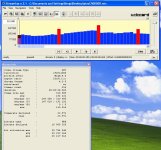
These are "B" Settings in Ptool 3.36 (rev. 20100616)

20)
GOP: N/A
VBA: 50
OBA: 52
LBA: 60
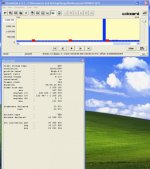
These are "C" Settings in Ptool 3.36 (rev. 20100616)

"B" Settings look much better at low-level (see attachments).
 

Attachments

  • ptool_3.36 b settings streameye.JPG
    ptool_3.36 b settings streameye.JPG
    88.8 KB · Views: 0
  • ptool_3.36 c settings streameye.jpg
    ptool_3.36 c settings streameye.jpg
    70.1 KB · Views: 0
(...)

However, now I'm not sure if this lens supports autofocus @ 1080??? Does anyone know?
The only one featuring (slow) AF during video recording is the Panasonic 14-140mm f/4.0-5.8 OIS aka stock lens AFAIK, so your find shouldn't be a surprise :-)

Autofocus on 1080 using 14-140 does work... Seems slow - But that's probably a perception issue.
With the Olympus 17mm lens - 1080 does not auto-focus.

(...)
 
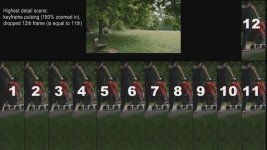
Keyframe pulsing

Keyframe pulsing

Sorry to come up with that again, I think we need to modify I-Frames.

Barry has mentioned this before, I analyzed some highest detail scenes (with the 38/40/42 AVCHD settings, class 6 card) and I noticed this strong keyframe pulsing, see screenshot below.

Plus, maybe it is my card, on very high detail scenes it drops every 12th frame (although I did not change GOP settings). It doesn't do that on less detailed scenes.

Is this happening to others as well, or is it related to Edius / Canopus AVCto HQ utility?
 

Attachments

  • Keyframe pulsing.jpg
    Keyframe pulsing.jpg
    65.9 KB · Views: 0
I tried everything I could think of to solve this 23.971 problem. I've finally thrown in the towel for now and went back to 60i and using JES Deinterlacer on the footage. It still looks great at the "C" settings. I log and transfer into FCP as ProRes 422 (HQ) then deinterlace with JES and the footage is good to go.

Can't you use the same method as to slow down GH1 60/50 fps footage to slow-motion: open the 1080 24P L&T transcoded files in Cinema Tools and there set the frame rate to 23.976? And set the field dominance to none as well.
 
For those of you with FPS issues, you can change the FPS at the container level with TSMuxer. I don't use a MAC, but there is a MAC version available

It works on PC; for example where AE before would detect it as 23.97 fps, it is now 23.976 fps

Add your clip => highlight the video track => General Track options Change FPS (24000/1001) => output m2ts muxing => push start muxing

This just re-wraps the clip - it doesn't change the bitstream FPS, only the container level, and nothing is re-encoded and should be enough to "fool" NLE's
 
I did my first AVCHD tests today with this setup

Video bitrate adjustment 38000000
Overall bitrate adjustment 40000000
Limiting bitrate adjustment 42000000

with native 25p, shutter priority at 1/50

I tried panning to follow cars passing at consistent speed close to the camera. I could see no great difference with the above patch compared with no patch. However, holding the camera steady at the same spot so the cars passed rapidly through the frame, the difference in the sharpness of the foliage on the other side of the road was quite clear. But what was also interesting was that when a car passed almost filling the frame, of course the view of the foliage was completely blocked, then immediately revealed as the car passed out of frame. With unpatched firmware, you could almost see the image of the foliage reconstructing behind the car. With patched firmware, it was immediately 'there' again as the better codec setup dealt better with the sudden change of content from one frame to the next.

It seems to me that any kind of comparisons made by panning may be rendered invalid by inconsistencies in panning speed, and by motion blur unless using the kind of shutter speed which you wouldn't use for real.

Perhaps a better way is to study a static detailed shot being obscured and revealed with a consistent sudden-ness. It might not be too hard to construct a kind of pendulum device on which would be mounted a (white?) card, swung in front of the camera starting at a repeatable height so the speed of it passing the camera would be consistent from test to test. Operate this device while pointing the camera at a detailed scene and see what codec breakup is induced with different settings.

Or anything to make these tests more repeatable and scientifically valid.
 
Have moved my settings to

Have moved my settings to

60, 62, 70, pal camera, 50p/50i(25p). Am not sure if anyone else has tested this setting but looks very very detailed, with 30MB card no issues, 720p are mid 20's high detailed and 17 low, 1080p are mid to high 30's high and 20 low.
Detail looks impressive to say the least. Personally am thinking rolling shutter in native p is worse than wrapper and for pal users no big deal.

Mjpeg, 1080p with Pappas settings, am still have issues, no more than seconds.

For ptool vesion compare, have gone back to incrementing the first version change box and ticking the version compare box as well, loads OK.
 
60, 62, 70, pal camera, 50p/50i(25p). Am not sure if anyone else has tested this setting but looks very very detailed, with 30MB card no issues, 720p are mid 20's high detailed and 17 low, 1080p are mid to high 30's high and 20 low.
Detail looks impressive to say the least. Personally am thinking rolling shutter in native p is worse than wrapper and for pal users no big deal.

Mjpeg, 1080p with Pappas settings, am still have issues, no more than seconds.

For ptool vesion compare, have gone back to incrementing the first version change box and ticking the version compare box as well, loads OK.


I'll try this setting out in a few. I'm going to pick up the 30mb/s card I had ordered a few days ago from the mail. I'll post my results.
 
Back
Top