AVCHD high bitrate tests- MUD FREE footage

To TEster13:

Is it possible to have two different settings for FHD and SH?

Because as I understand we have SH: 17Mbps, H: 13Mbps, L: 9Mbps all 720 60p

It seems that settings for AVCHD in Ptool do not affecting H and L.
THx

Agreed - I've never wanted to use H and L, but they could be handy now - say set to 25 and 17 or 17 and 13.
 
To TEster13:

Is it possible to have two different settings for FHD and SH?

Because as I understand we have SH: 17Mbps, H: 13Mbps, L: 9Mbps all 720 60p

It seems that settings for AVCHD in Ptool do not affecting H and L.
THx

jobless, have you shot in H or L mode to confirm they are not affected by AVCHD settings? It is just hard for me to believe AVCHD settings would only affect FHD and SH mode but not H nor L mode. If that is true, there must be other variables that control H and L mode.
 
I did quick a test with H and I got 12Mbps with hidetail scene. I used C settings...
My Idea was that we can use C settings for FHD and SH( in low detailed scenes) and for H we could use other settings to get 30Mbps stable ( for hidetail)....
 
woodcarver, I'm not having any of those issues with FCP but I'm using Cineform Neoscene to transcode to ProRes LT. Shooting AVCHD with the 24p patch, "C" settings. Shows up as 23.98 in the bin, no field dominance. Runs fine on the timeline.

If you are shooting 24P, why would you be using Cineform Neoscene, which is partially a De-interlace program? You can Log and Transfer the 24P material right into FCP. The only issue is the 23.971 frame rate and the field dominance thing.

From the tests I did on 60i AVCHD footage, between using Cineform Neoscene as opposed to Log & Transfer into FCP as ProRes 422 (HQ), de-interlace with JES de-interlacer, the footage that went the L&T to JES route looked better to my eyes than the stuff I was getting out of Cineform Neoscene.

I didn't try to de-interlace with JES the 24P footage coming out of the camera, because I figured "what's the point?" If I have to run the footage through the de-interlace program anyway, might as well shoot 60i.

Best,
-Tim
 
If you are shooting 24P, why would you be using Cineform Neoscene, which is partially a De-interlace program? You can Log and Transfer the 24P material right into FCP. The only issue is the 23.971 frame rate and the field dominance thing.

From the tests I did on 60i AVCHD footage, between using Cineform Neoscene as opposed to Log & Transfer into FCP as ProRes 422 (HQ), de-interlace with JES de-interlacer, the footage that went the L&T to JES route looked better to my eyes than the stuff I was getting out of Cineform Neoscene.

I didn't try to de-interlace with JES the 24P footage coming out of the camera, because I figured "what's the point?" If I have to run the footage through the de-interlace program anyway, might as well shoot 60i.

Best,
-Tim

You can turn off the deinterlacing/pulldown part of NeoScene. All I'm using it for now is transcoding... I bought it back when you did have to do that with 24p material. But it's nice now as it sorts out whatever issue is happening with the 23.971 framerate & Final Cut.

What were the differences in Cineform vs L&T/JES? Color-related or resolution or something about the cadence?
 
I did quick a test with H and I got 12Mbps with hidetail scene. I used C settings...
My Idea was that we can use C settings for FHD and SH( in low detailed scenes) and for H we could use other settings to get 30Mbps stable ( for hidetail)....

It would be good to have old stable SH mode(17mbps) in H mode. ;)
 
You can turn off the deinterlacing/pulldown part of What were the differences in Cineform vs L&T/JES? Color-related or resolution or something about the cadence?

It was color related and sharpness related. Though both of those issues could now be different with the patches we're testing. No cadence issues that I noticed.

This is from memory because I tested it a while ago, but if memory serves, the Cineform footage looked a bit softer, a bit muddier (not the MUD we've been talking about here, but just a bit darker/softer) and the colors were not as clean. Again, kind of darker, softer, duller. I've been doing this for years and most folks would probably look at it and go "Looks the same to me." I'm just real picky.

Best,
-Tim
 
It would be good to have old stable SH mode(17mbps) in H mode. ;)

Curent settings in Ptool affecting 17Mbps bitrate ( FHD and SH) so I suppose that we could only change H and L Modes. I would vote for H-30Mbps ( No mud) and L -- 17Mbps ...
 
Has anyone else had the problem described below? I haven't been able to find much about this and it seems like a fairly serious issue. Thanks.

One thing I'm noticing with the High Bitrate AVCHD 1080p (24 fps) footage that I've been shooting; when I Log and Transfer it into FCP and try to drop it onto a 23.98 timeline, I get the following error message:

Attention - This clip does not match this sequences settings or any of your sequence presets.

For best performance your sequence and External video should be set to the format of the clips you are editing.

Change sequence settings to match the clip settings?


When I take the original firmware footage, Log and Transfer it into FCP, de-interlace it with JES De-interlacer, and then drop it onto a 23.98 timeline, I don't get the error message.

What seems to be different about the High Bitrate AVCHD 1080p (24 fps) footage is the Field Dominance. With the footage shot with the 60i wrapper and de-interlaced with JES, there is None under Field Dominance, with the High Bitrate AVCHD 1080p (24 fps) footage, there is Upper (Odd) under Field Dominance.

Anyone have any ideas on this and whether it might cause some issues down the line in editing or distribution?

Best,
-Tim
[/quote]

I am having the same problem with Edius, I can drop native 24p in a 23.98fps timeline, no errors, but the motion sequence stops every 4th frame (similar to the original 24p in a 60i wrapper). Funnily though, if I use the Edius AVCtoHQ conversion utility, it correctly produces a Canopus HQ 23.98p file... But this means working with intermediates rather than original files... which is still much better than having to do the pulldown. Hence I am fine so far.
 
I am having the same problem with Edius, I can drop native 24p in a 23.98fps timeline, no errors, but the motion sequence stops every 4th frame (similar to the original 24p in a 60i wrapper). Funnily though, if I use the Edius AVCtoHQ conversion utility, it correctly produces a Canopus HQ 23.98p file... But this means working with intermediates rather than original files... which is still much better than having to do the pulldown. Hence I am fine so far.

No 4th frame stopping in the 23.98 timeline on my native 24p (23.971 fps) video in Edius Neo Booster 2.5.

Randy
 
Last edited:
It was color related and sharpness related. Though both of those issues could now be different with the patches we're testing. No cadence issues that I noticed.

This is from memory because I tested it a while ago, but if memory serves, the Cineform footage looked a bit softer, a bit muddier (not the MUD we've been talking about here, but just a bit darker/softer) and the colors were not as clean. Again, kind of darker, softer, duller. I've been doing this for years and most folks would probably look at it and go "Looks the same to me." I'm just real picky.

Best,
-Tim


I always thought the Neoscene output I got made some of the "mud" and macroblocking kind of smooth out. i never thought it looked darker or softer at all though.
 
Can we start putting the actual settings used for everything in the posts? I can't keep up with all of the "i used the perfect B settings", etc. The settings are confusing when you start saying things like "Jobless's B settings" vs. "B settings in Ptool", etc.
 
Can we start putting the actual settings used for everything in the posts? I can't keep up with all of the "i used the perfect B settings", etc. The settings are confusing when you start saying things like "Jobless's B settings" vs. "B settings in Ptool", etc.
+1
Especially given that those don't match anymore. Oh, yeah, there is only three to report now.
 
here here. can there be a post made were *only* these settings go? I keep seeing special named settings but no one ever gives out the numbers ;) Thanks!
 
+1
Especially given that those don't match anymore. Oh, yeah, there is only three to report now.

Well there are a couple different versions of "B" and "D" settings that I've seen mentioned around here.

It might be helpful to also reference line number that corresponds to settings in the Ptool spreadsheet. More people need to input their settings so we can keep an easy to read record of settings that have been tried.

Also, to the member that "keeps" the spreadsheet, can we add another couple of columns to the spreadsheet that keep a tally of "pass" or "fail" so when other people give other member's settings a try, they can report if they worked or not without having to enter in another row of identical information?
 
here here. can there be a post made were *only* these settings go? I keep seeing special named settings but no one ever gives out the numbers ;) Thanks!


Please use the form already provided and fill out what you've tried (this goes for everybody):

http://www.dvxuser.com/V6/showpost.php?p=2012636&postcount=2

Remember folks, these settings are SUGGESTIONS, not perfect settings! We are meant to TEST these settings for Tester13 and report issues back. This has completely devolved into something very unscientific where folks are only interested in getting improvements without actually doing any work I think. We need to stop asking for the same settings and start trying new setting combinations to try to figure out how these various settings work together.
 
@ Rabot - just saw this post and it has me intrigued. Are you uploading xdcam codec direct to vimeo? Are you getting better results?

After alot of arious testing, I feel like XDcam deliver better result that my last best setting aka H.264 bframe multipass 100% quality.

Less blocking but a bit less good in black area I think, but no scientific testiting.
 
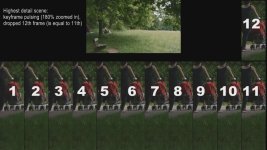
Keyframe pulsing

Keyframe pulsing

Barry has mentioned this before, I analyzed some highest detail scenes (with the 38/40/42 AVCHD settings, class 6 card) and I noticed this strong keyframe pulsing, see screenshot below.

Plus, maybe it is my card, on very high detail scenes it drops every 12th frame (although I did not change GOP settings). It doesn't do that on less detailed scenes.

Is this happening to others as well, or is it related to Edius / Canopus AVCto HQ utility?
 

Attachments

  • Keyframe pulsing.jpg
    Keyframe pulsing.jpg
    65.9 KB · Views: 0
Back
Top