Navigation
Install the app
How to install the app on iOS
Follow along with the video below to see how to install our site as a web app on your home screen.
Note: This feature may not be available in some browsers.
More options
You are using an out of date browser. It may not display this or other websites correctly.
You should upgrade or use an alternative browser.
You should upgrade or use an alternative browser.
AVCHD encoder research
- Thread starter Vitaliy Kiselev
- Start date
Started looking into the MTS a bit deeper with http://www.bitstreamtools.com and have come to the conclusion, the rogues do not exist. I'm unsure if the fact that PAT/PMT tables show up in the middle of slice data as DaLiv suggests is the reason StreamEyes can't handle it... but unfortunately this is a bug imho. Frame counts are incorrect in StreamEye when there are "rogue" frames, meanwhile nearly any application that can playback MTS will give you a correct count. Rogues are StreamEyes combining frames for a GOP into a single P/I frame. It could be as simple a DaLiV suggests. If you look at my MTS file, you'll see the GOP # change with each rogue I Frame. If you multiply the number of rogues by 12 (size of the GOP for 24P), you will account for the number missing frames. Beyond that, the actual data in the MTS files are valid, and the link for TSPacket Editor above demonstrates that I frames and P frames are properly layed out according to GOP.
(I hope I made sense.. lol, need sleep)
(I hope I made sense.. lol, need sleep)

Vitaliy Kiselev
Carbonite Member
This is main reason why I wanted to use something beside StreamEye, as it is generally very buggy thing.
Vitaliy Kiselev : take a look to product near streameye ...
http://www.elecard.com/products/products-pc/professional/stream-analyzer/
seems that tool more adequate then streameye (screen show packet analyzing inclusive of internal structures of each frame of transport stream) .
have tested on previous files = H.264 supported, structure shown correctly (each packet structure, address in stream and size may be easyly got, not more need manual searches )
)
http://www.elecard.com/products/products-pc/professional/stream-analyzer/
seems that tool more adequate then streameye (screen show packet analyzing inclusive of internal structures of each frame of transport stream) .
have tested on previous files = H.264 supported, structure shown correctly (each packet structure, address in stream and size may be easyly got, not more need manual searches
)
Last edited:
That's too bad ... I was just beginning to like StreamEye; it's nice to see a graphical representation of the stream. Stream Info panel is generally spot on as well (well max bitrate is incorrect as we know now).
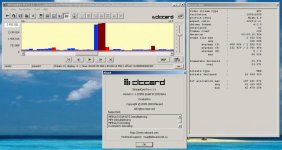
FWIW, their StreamEye Pro product is afflicted with the same bug (see attached screenshot). Perhaps someone with sufficient knowledge of the problem can report it to them. Who knows, maybe they'll be willing to beta test their development stuff with this project
FWIW, their StreamEye Pro product is afflicted with the same bug (see attached screenshot). Perhaps someone with sufficient knowledge of the problem can report it to them. Who knows, maybe they'll be willing to beta test their development stuff with this project
Attachments
Vitaliy Kiselev
Carbonite Member
Can we move back to writing our own small analyser?
I've been working on a utility that parses streams. All I've done so far is look at the TS headers, which can be used to identify frames. The streams are broken up into 192 byte packets with a 8 byte header where the first 4 bytes are a sequence counter, the next 3.5 bytes identify packet type, and the remaining nibble is simply a counter. For example, you might see an 8 byte value at the beginning that is 07 F5 54 20 47 10 11 1A. The first 4 bytes (07F55420) are simply a counter that increments by 2F0 with each frame (in this example). The second 4 bytes (4710111x ) appear to indicate packet type, except that the "x" simply cycles with each packet. Frame starts have a value of 47 50 11 1x This is where StreamEye starts each frame (offset). The length they report is simply the distance to the next starting packet, which is the next packet that has 47 50 11 1x in bytes 4-7 of the header.
This means a couple of things: The frames are not just video, they can also contain audio. If there is some kind of other data in these packets Streameye is not differentiating it, it just considers everything a video frame. The rogue frames could be anything.
There are several kinds of packets I've seen with different values in bytes 4-7 of the headers, but I haven't figured them all out yet.
The empty frames I've found seem to appear in the "black" tests, but not otherwise. When they do appear they have a code of 47 10 11 1x, which is also the most common type of packet for legitimate video data.
In order to differentiate frame type a deeper drill-down is necessary. I'm working on this. Pretty soon we should have a little utility that does what the StreamEye chart does, except that it will differentiate audio, video, empty frames, etc... I don't plan to do any of the fancy video stuff, though - that would take too long. Hopefully, I'll have a rough version available in a couple of days.
Chris
This means a couple of things: The frames are not just video, they can also contain audio. If there is some kind of other data in these packets Streameye is not differentiating it, it just considers everything a video frame. The rogue frames could be anything.
There are several kinds of packets I've seen with different values in bytes 4-7 of the headers, but I haven't figured them all out yet.
The empty frames I've found seem to appear in the "black" tests, but not otherwise. When they do appear they have a code of 47 10 11 1x, which is also the most common type of packet for legitimate video data.
In order to differentiate frame type a deeper drill-down is necessary. I'm working on this. Pretty soon we should have a little utility that does what the StreamEye chart does, except that it will differentiate audio, video, empty frames, etc... I don't plan to do any of the fancy video stuff, though - that would take too long. Hopefully, I'll have a rough version available in a couple of days.
Chris
Last edited:
Vitaliy Kiselev
Carbonite Member
We don't want any video stuff, in fact.
All we want is understand that this is in low level.
You can look at any available TS demuxer sources.
P.S. I suggest you to look for Hex viewer components for C#, They must be easy to integrate.
Something like simple grid and HexView upon click on the row.
All we want is understand that this is in low level.
You can look at any available TS demuxer sources.
P.S. I suggest you to look for Hex viewer components for C#, They must be easy to integrate.
Something like simple grid and HexView upon click on the row.
Yeah, I'm looking for widgets now. The hex stuff is easy, I've already done that. Now I'm looking for a simple, free, barchart widget. I want one that can do stacked bars so I can show headers, video, audio, other, and empty packets in a bar that represents one frame.
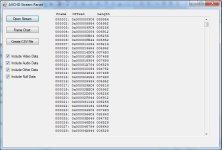
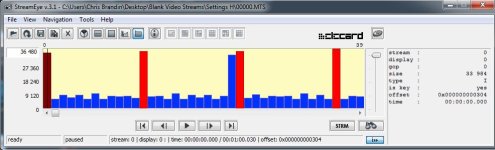
Using the simple parsing method I described above I've already gotten the results shown in the first attachment below. Obviously, I haven't put the other data in yet. The offsets and frame sizes are exactly the same as what StreamEye reports (see second attachment). Note the big frame at frame 24 - it is a rogue as it contains null data packets (this was a 24pN black test).
Chris
Using the simple parsing method I described above I've already gotten the results shown in the first attachment below. Obviously, I haven't put the other data in yet. The offsets and frame sizes are exactly the same as what StreamEye reports (see second attachment). Note the big frame at frame 24 - it is a rogue as it contains null data packets (this was a 24pN black test).
Chris
Attachments
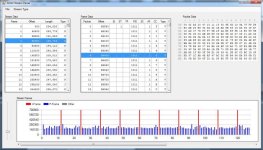
I thought I'd give you all a heads up on my stream analyzer utility.
I've got most of it working, but I still need to add the code that differentiates I and P frames - hopefully I get that done tomorrow.
Features:
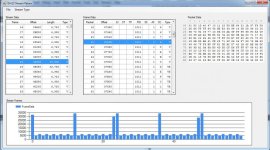
The left hand panel lists individual frames. It correctly assembles the frames according to selected frame type giving the actual length of the frame and the correct offset (unlike StreamEye).
The middle panel lists the packets that constitute the selected frame. It lists the frame type (including null and empty frames - for rogue analysis).
The right hand panel provides a hex dump of the selected packet.
The chart on the bottom works pretty much like StreamEye's chart. I haven't added coloring to it yet. When I do there will be colors for I & P frames as well as indicators for empty and null packets within frames.
Chris
I've got most of it working, but I still need to add the code that differentiates I and P frames - hopefully I get that done tomorrow.
Features:
The left hand panel lists individual frames. It correctly assembles the frames according to selected frame type giving the actual length of the frame and the correct offset (unlike StreamEye).
The middle panel lists the packets that constitute the selected frame. It lists the frame type (including null and empty frames - for rogue analysis).
The right hand panel provides a hex dump of the selected packet.
The chart on the bottom works pretty much like StreamEye's chart. I haven't added coloring to it yet. When I do there will be colors for I & P frames as well as indicators for empty and null packets within frames.
Chris
Attachments
Very impressive, Chris. Loving the chart! and looking forward to the first test driveThe chart on the bottom works pretty much like StreamEye's chart. I haven't added coloring to it yet. When I do there will be colors for I & P frames as well as indicators for empty and null packets within frames.
Vitaliy Kiselev
Carbonite Member
Impressive.
Righ now we are going the righ way, as good tools are always necessary.
The more tools we have the more stable progress we'll see in our project.
Righ now we are going the righ way, as good tools are always necessary.
The more tools we have the more stable progress we'll see in our project.
Here's the first cut at the utility. Just Unzip the file somewhere and run Setup.exe. It will install everything you need.
Notes:
I haven't had much time for testing (obviously), so let me know if you have any issues. I've only run it on my Windows 7 x64 machine, so I can't be sure about compatibility with other systems. No reason it shouldn't work though.
It's pretty obvious how to use it. One thing, though, the column headers can be used to sort packets according to what is in those columns. So remember to click on the Frame, or Packet column headers to put the sorting back.
You drill down by clicking on a row in the Frames box to get a list of Packets. Then click on a row in the Packets box to get a hex dump of that packet.
The Packet Type column usually indicates "V" for video, if the Packet is empty it will indicate "VE".
The program requires .NET v4, which it will try to go get if you don't have it installed.
You will notice that the offsets and frame sizes are somewhat different than what StreamEye shows - that's because they got it wrong, not because I did.
The program can't handle more than 1,000,000 frames at this point - so don't look at real long files. Better to stay with clips not longer than several minutes anyway.
The program is a lot faster that StreamEye on my system. Let me know how it performs for you.
The "Stream Type" menu item doesn't do anything yet.
Have fun! Let me know how this works for you.
Chris
Notes:
I haven't had much time for testing (obviously), so let me know if you have any issues. I've only run it on my Windows 7 x64 machine, so I can't be sure about compatibility with other systems. No reason it shouldn't work though.
It's pretty obvious how to use it. One thing, though, the column headers can be used to sort packets according to what is in those columns. So remember to click on the Frame, or Packet column headers to put the sorting back.
You drill down by clicking on a row in the Frames box to get a list of Packets. Then click on a row in the Packets box to get a hex dump of that packet.
The Packet Type column usually indicates "V" for video, if the Packet is empty it will indicate "VE".
The program requires .NET v4, which it will try to go get if you don't have it installed.
You will notice that the offsets and frame sizes are somewhat different than what StreamEye shows - that's because they got it wrong, not because I did.
The program can't handle more than 1,000,000 frames at this point - so don't look at real long files. Better to stay with clips not longer than several minutes anyway.
The program is a lot faster that StreamEye on my system. Let me know how it performs for you.
The "Stream Type" menu item doesn't do anything yet.
Have fun! Let me know how this works for you.
Chris