AVCHD analysing tools

Here's the newest StreamParser. Also somewhat of a breakthrough concerning the meaning of Bitrate settings.

Things added:

More Information Panel Data.

A much more robust file checking function.

The ability to select bytes or bits in the charts.

The program now tells you what the buffering requirements are (that's what "Overall Bitrate" really means). See the attached capture image.

By using this new version I think I figured out what Video, Overall, and Limiting Bitrates really mean. The camera appears to write to memory every 0.95 seconds. The 0x1F PID is the flash memory write program and it is called every 0.95 seconds. The Overall Bitrate is actually the buffer allocation size for that function and it has to be big enough to hold as much data as can be produced in 0.95 seconds. The first 4 bytes of each packet is a counter derived from the 27MHz clock (the TS clock). The increment value between Packets is calculated by the camera using the highest Video Bitrate setting and represents how much time is available to store each Packet (192 Bytes) of data. StreamParser calculates all this for you and shows it in the Information Panel when you load a file. You should set the "Overall Bitrate" to at least the shown value.

What happens if this value is too low is that you get a buffer overrun - which results in a corrupted file (which is why you got that message, svecher), but won't necessarily result in a write error. I looked at all my strange test files and they all had corruption problems that were detected by StreamParser. The File Check function will nearly always detect this kind of thing.

The Video Bitrate is actually the maximum bitrate the camera is set up to be able to write to flash memory as averaged over 0.95 seconds.

The limiting Bitrate is the maximum bitrate allowed for any single Video Frame. This will affect the ratio between I frame and P frame sizes. It's probably a good idea to set this to 1.25x the Video Bitrate or thereabouts. So, if Video Bitrate is set to 50M, Limiting Bitrate should be about 62M-63M. The Overall bitrate should be set what StreamParser tells you (around 53M).

Chris
 

Attachments

  • OverallBitrate.jpg
    OverallBitrate.jpg
    16.7 KB · Views: 0
  • GH13StreamParser10E.zip
    211.8 KB · Views: 0
Last edited:
Problem is that we no longer have Limiting bitrate patch :).
From my POV it is only error checking. So, if bitrate reaches this level it triggers error and we have the freezing (as error is not processed propertly).

As for Overall bitrate and Overall Bitrate 2 we need controlled experiments using your tool.
It is best to use all other settings at their original values.
In reality they can be directly connected to timing things as both are multiplier of 90000 (90KHz main frequence used in encoder and muxer). They are localed in muxer parts, so changes must not be related to video.
 
Last edited:
Unreal work Chris, now the next question is how do preset 1 and 2 and Remove encoder limits, Overall bitrate2 affect all this?

I know getting ahead of you a bit here but never know when we might lose you, everyone else seems to have buggered off to shoot nice videos...hehe

R

UPDATE - Oops... looks like Vitaliy cross posted while i was typing.

OK new question. Vitaliy, what result are you looking for when we test Overall bitrate and Overall Bitrate 2? A reduction in difference between I and P frames?

It helps to know what we are aiming for.

R
 
Last edited:
I looked at files I produced when I set limiting bit rate and frame sizes were indeed limited to the set bit rate, so I think the setting does more than just check things - I believe it actually limits the maximum frame size.

I'm also fairly certain that I'm right about the overall bit rate setting because I can reliably produce corrupted files (containing invalid junk packets) by setting this value even a little too low. Also virtually every test file I have produced (even old ones) with overall bit rate set too low contain junk packets - even if they can be played. I think StreamEye shows "rogue" frames because it can't detect and ignore these junk packets.

Chris
 
It can't fully limit frame size, as if you try to set it low it just hangs.
Plus in reality it is just check, so it checks if specific value is below this "Limiting bitrate", and if not it go to error state (many other checks follow). I am quite sure about this as same error code is used during initial parameters checks in many video related routines (like if pointer is nil, etc).

Try to make tests with latest PTool (where more broad patch is integrated inside Video bitrate).
 
The Video Bitrate is actually the maximum bitrate the camera is set up to be able to write to flash memory as averaged over 0.95 seconds.
I'm not sure what you mean here. Does Video Bitrate set a limit on the total number of bits that can be written in each 0.95 second period? Or is it perhaps the maximum limit of the running average bitrate, windowed over a 0.95 second sampling period?

The Overall Bitrate is actually the buffer allocation size for that function and it has to be big enough to hold as much data as can be produced in 0.95 seconds.
If Overall Bitrate is merely the size of an internal memory buffer, is there any reason not to set it as high as practical? Such as 100 000 000?
 
Last edited:
It sets a hard limit on how often 192 byte packets can be written, among other things. the camera writes to flash every 0.95 seconds, so the buffer has to be big enough to hold as many packets as can be produced in each 0.95 second period. the buffer takes up memory. Seeing as the camera cannot produce more data than this limit, allocating a bigger buffer is a complete waste and could cause an "out of memory" condition.

the Limiting Bitrate appears to only affect the production of video frame data and does not have any bearing on writing to flash memory. The processing of stream data is handled by a different process than the transfer of data to flash memory. stream data processing is triggered by PID 0x100, and flash memory operations are triggered by PID 0x1F. PID 0x100 events occur every 0.095 seconds, and PID 0x1F events occur every 0.95 seconds.

Chris
 
The processing of stream data is handled by a different process than the transfer of data to flash memory. stream data processing is triggered by PID 0x100, and flash memory operations are triggered by PID 0x1F. PID 0x100 events occur every 0.095 seconds, and PID 0x1F events occur every 0.95 seconds.
Interesting how these packet processing rates (10.53hz and 1.053hz) are not synchronized with any of the video frame rates. The codec must be compressing each frame in a separate process that is throttled down to the bitrate limits enforced by the packet streaming process.
 
Here's the newest StreamParser.

Congratulations again! Excellent tool and even better explanation. This is an excellent base for further research.
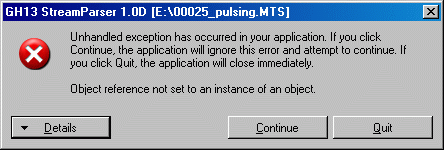
However, I have problem with one of my "pulsing" clips:

http://dsc.ijs.si/3d/files/gh1/00025_pulsing.MTS

When I click on empty frame (e.g. frame 13) within "Stream Data", it crashes (see attached picture).

This clip is very interesting. Each "empty" frame (13,26,...) results in a visible degradation of picture resolution when you check the footage frame-by-frame.
 

Attachments

  • Pulsing_error.gif
    Pulsing_error.gif
    10 KB · Views: 0
There is a lot of text beneath. It's better that he checks it with original file. However, here are the first few lines...
 

Attachments

  • Pulsing_error2.gif
    Pulsing_error2.gif
    19.1 KB · Views: 0
Hi Chris

here are some suggestions to you for incoporating into next revision
1. exact data/screen capture for easy sharing.
2. the footage length in time.
3. screen shot of footage
4. PAL/NTSC, 50/p25 indication
5. "About" at "help"
 
StreamParser bug fixed

StreamParser bug fixed

Thanks for the bug report and file crunchy. It's much appreciated!

Attached is the newest version of StreamParser with the bug fixed.

You found a packet type that was different than anything I've seen before, so my parser didn't know how to handle it - now it does.

I added a feature where if an unrecognized frame type is encountered it puts a "U" in the frame type column instead of crashing. Let me know if you ever see a "U" frame as I will want to examine it.

I also fixed a bug where the chart came out too small sometimes.

Chris
 

Attachments

  • GH13StreamParser10F.zip
    212.1 KB · Views: 0
Last edited:
Hi Chris

here are some suggestions to you for incoporating into next revision
1. exact data/screen capture for easy sharing.
2. the footage length in time.
3. screen shot of footage
4. PAL/NTSC, 50/p25 indication
5. "About" at "help"

1. You can use a free program called "Gadwin Printscreen" that does a teriffic job for this. I'll look into doing this in the program, if it's not too muck work; but don't hold your breath because Gadwin Printscreen is so good already.
2. Ok, I'll do this. I plan to add other info items as time goes on too.
3. This is a pretty big deal and beyond what I had intended for StreamParser.
4. This is among the info items I plan to add.
5. Good idea. I need to add some help stuff too.

Thanks for the feedback!

Chris
 
Attached is the newest version of StreamParser with the bug fixed.
Let me know if you ever see a "U" frame as I will want to examine it.

I cannot install the new version of StreamParser, while the old one can be installed. Do you know what can be wrong? Below is received message during installation.

Let me know if you ever see a "U" frame as I will want to examine it.

Count on me. :)
 

Attachments

  • Install_Parser.gif
    Install_Parser.gif
    9.7 KB · Views: 0
  • Install_Parser2.gif
    Install_Parser2.gif
    35.1 KB · Views: 0
I have XP. It's interesting that the previous (D) version works OK. There was something added (component?) in the new version which does not work in XP system.
 
I'll look into this.

Can you try running the "GH13StreamParser.exe" directly and see if that works? It's in the "Application Files>GH13StreamParser_1_0_0_16" folder in the zip file.

Chris
 
It does not work (see the attached picture). :(

On the other hand, D version works if run directly (after uninstalling it, of course).
 

Attachments

  • Install_Parser3.gif
    Install_Parser3.gif
    10.5 KB · Views: 0
OK, I think I fixed it. For some reason the application manifest changed the CPU type - I have no idea why.

I tested this install file on my XP machine and it worked.

Remember to uninstall old versions before installing this.

Chris
 

Attachments

  • GH13StreamParser10F.zip
    212.1 KB · Views: 0
Back
Top