Navigation
Install the app
How to install the app on iOS
Follow along with the video below to see how to install our site as a web app on your home screen.
Note: This feature may not be available in some browsers.
More options
You are using an out of date browser. It may not display this or other websites correctly.
You should upgrade or use an alternative browser.
You should upgrade or use an alternative browser.
AVCHD analysing tools
- Thread starter Vitaliy Kiselev
- Start date
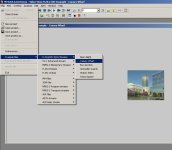
Well, they did their demo a little differently. Example files seem to be built into an .EXE file itself or one of DLLs and are accessible via special "example files" menu. You can't open an arbitrary file at all.Have you tried renaming your clip to whatever the demo file is called? Chris
Attachments
Before I forget, Doom9 has a very helpful AVC/H.264 forum with a great reference sticky thread http://forum.doom9.org/showthread.php?t=96059.
Toward the bottom they've posted a link to full AVC specifications, which are apparently free
http://www.itu.int/rec/T-REC-H.264/e
Toward the bottom they've posted a link to full AVC specifications, which are apparently free
http://www.itu.int/rec/T-REC-H.264/e
h264vista parse files by that specification ... (for GH1 firstly it extract stream from mpeg transport stream, if not done - crash caused /0001 is header as for 264 block as for mpeg block but they very different ... so when it crossed in not right sequence - will exception /)
I tried opening several different MTS files with H264visa; it crashed on GH1(3) ones and couldn't even open the Sony NEX5 ones. It seems very buggy.h264vista parse files by that specification ... (for GH1 firstly it extract stream from mpeg transport stream, if not done - crash caused /0001 is header as for 264 block as for mpeg block but they very different ... so when it crossed in not right sequence - will exception /)
Starting a wishlist for the outstanding GH13StreamParser by one cbrandin.
1. Parse and display audio and "settings" frames in "Stream Data" window. Checkbox selector controls which streams are displayed.
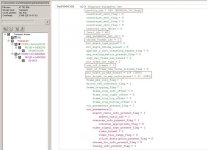
2. When stream's "settings" frame is selected in "Stream Data" window actual settings are displayed in frame data window (for reference see in Elecard Stream Analyzer decoding the H264 picture parameter set frame in attachment). Clicking the setting highlights appropriate hex value in packet data window.
3. "User friendly" stream info panel.
1. Parse and display audio and "settings" frames in "Stream Data" window. Checkbox selector controls which streams are displayed.
2. When stream's "settings" frame is selected in "Stream Data" window actual settings are displayed in frame data window (for reference see in Elecard Stream Analyzer decoding the H264 picture parameter set frame in attachment). Clicking the setting highlights appropriate hex value in packet data window.
3. "User friendly" stream info panel.
See this post for frame-rate calculations as well as link to Doom9's excellent AVCHD resource sticky http://www.dvxuser.com/V6/showpost.php?p=2033047&postcount=29
Thanks, Chris!
Attachments
Starting a wishlist for the outstanding GH13StreamParser by one cbrandin.
1. Drag and drop MTS files from the desktop into the Stream Parser window.
2. GOP number labels along the bottom of the bar chart.
3. Peak, average, and frame-by-frame display of video bitrate.
Major props to Chris for donating his time to this project!
We just shouldn't forget the reason why G13StreamParser is developed. It's main purpose is to allow us to find the inner mechanism of AVCHD coding in GH1. So it's better not to overload Chris, at least not in this stage. Namely, I have a feeling that some items in wishlists would require quite some effort. Sure, I would be glad if Chris could make all of them. 
I wrote the utility originally to analyze the rogue frame issue, which it solved within hours proving that rogue frames don't exist.
The design goal is to analyze how the GH1 CODEC actually works, not how it should work according to the standard - thus I'm doing my own packet decoding. The program never will be a EyeStream replacement; that would require months of work. However, most of the suggestions offered so far will not be too hard to do. Sometimes a feature that sounds complicated turns out to be easy, and visa versa. So I don't mind suggestions - keep them coming. Just don't be disappointed if some of them aren't done. It only took me a few days to write the program because I'm not trying to write a generic H.264 analyzer; rather it's a simple dedicated GH1 AVCHD analyzer.
Chris
The design goal is to analyze how the GH1 CODEC actually works, not how it should work according to the standard - thus I'm doing my own packet decoding. The program never will be a EyeStream replacement; that would require months of work. However, most of the suggestions offered so far will not be too hard to do. Sometimes a feature that sounds complicated turns out to be easy, and visa versa. So I don't mind suggestions - keep them coming. Just don't be disappointed if some of them aren't done. It only took me a few days to write the program because I'm not trying to write a generic H.264 analyzer; rather it's a simple dedicated GH1 AVCHD analyzer.
Chris

Vitaliy Kiselev
Carbonite Member
I wrote the utility originally to analyze the rogue frame issue, which it solved within hours proving that rogue frames don't exist.
The design goal is to analyze how the GH1 CODEC actually works, not how it should work according to the standard - thus I'm doing my own packet decoding. The program never will be a EyeStream replacement; that would require months of work. However, most of the suggestions offered so far will not be too hard to do. Sometimes a feature that sounds complicated turns out to be easy, and visa versa. So I don't mind suggestions - keep them coming. Just don't be disappointed if some of them aren't done. It only took me a few days to write the program because I'm not trying to write a generic H.264 analyzer; rather it's a simple dedicated GH1 AVCHD analyzer.
This is right approach.
But I want to suggest two things:
a) Think about going native code instead of managed code.
b) Give yourself some thought about future shareware version. This is main reason for a) point.
New GH13StreamParser
New GH13StreamParser
Here is the latest version of GH13StreamParser.
I've added a bunch of things:
The Stream Type menu item now lets you select frame types to look at. It can look at any, or all of, Video, Audio, and Other frames.
The little "SEL" buttons allow you to sync windows. If you press the one near the Frames panel it will scroll it to where you have the stream chart. If you press the one near the stream chart it will scroll the chart to whichever frame you have selected in the Frames panel.
If the Packet Type shows "E-V" instead of "V", for example, it means the Packet is empty (i.e. contains no data except for the TS header).
I added a lot of logic today so don't be too surprised if a few bugs show up.
Next, I'll add a stream information window that contains basic information about the stream file (type of video, audio, etc...) and GOP numbers in the Frames panel and the chart.
Vitaliy, Good suggestion about using native mode instead of managed mode - I'll change over in the next version. Thanks.
Chris
New GH13StreamParser
Here is the latest version of GH13StreamParser.
I've added a bunch of things:
The Stream Type menu item now lets you select frame types to look at. It can look at any, or all of, Video, Audio, and Other frames.
The little "SEL" buttons allow you to sync windows. If you press the one near the Frames panel it will scroll it to where you have the stream chart. If you press the one near the stream chart it will scroll the chart to whichever frame you have selected in the Frames panel.
If the Packet Type shows "E-V" instead of "V", for example, it means the Packet is empty (i.e. contains no data except for the TS header).
I added a lot of logic today so don't be too surprised if a few bugs show up.
Next, I'll add a stream information window that contains basic information about the stream file (type of video, audio, etc...) and GOP numbers in the Frames panel and the chart.
Vitaliy, Good suggestion about using native mode instead of managed mode - I'll change over in the next version. Thanks.
Chris
Attachments
Last edited:
Good stuff, Chris. I really couldn't find anyI added a lot of logic today so don't be too surprised if a few bugs show up.
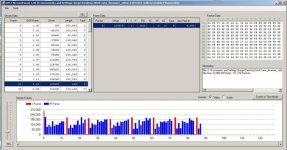
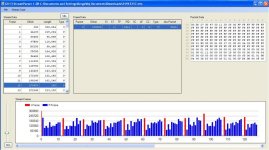
Ok, putting this thing to use here is a screenshot for the following clip sent in by richtrav. Note the funky last P frame in a GOP with only one tiny packet. Weird ...
Attachments
Last edited:
New GH13 Stream Parser Version
New GH13 Stream Parser Version
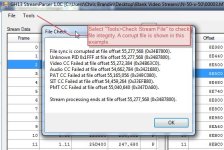
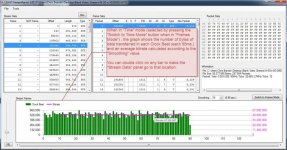
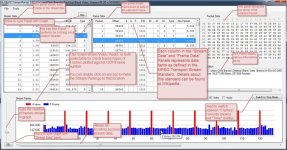
Here is the next version of GH13 Stream Parser. Lots of new stuff added, including a new "Time Mode" graph that accurately calculates bit rates. Attached below are a few screenshots with annotations (this is the closest I've gotten to actual documentation.
There are only a few more things I intend to add - mostly information panel details about streams, packets, etc... Aside from that this is basically functionally complete. As soon as I figure out the info panel stuff I plan to post this on the regular GH1 Firmware Hack Forum. So please report any bugs to me; that way I can fix them before I release this and not look stupid.
I considerably improved the robustness of the parsing algorithm; you may want to re-run your tests with this version as it is more accurate (svecher, you may want to re-test that file from richtrav - let me know if anything changes).
You have to uninstall previous versions of GH13StreamParser before you install this one. To install, unzip into a folder and run "Setup". If you already have .NET v4 installed, you can run "GH13StreamParser.exe" (it's inside the zip file somewhere) without going through the install process. Setup will look for .NET v4 and if it isn't installed it will attempt to download it from Micresoft and install it first.
Enjoy!
Chris
New GH13 Stream Parser Version
Here is the next version of GH13 Stream Parser. Lots of new stuff added, including a new "Time Mode" graph that accurately calculates bit rates. Attached below are a few screenshots with annotations (this is the closest I've gotten to actual documentation.
There are only a few more things I intend to add - mostly information panel details about streams, packets, etc... Aside from that this is basically functionally complete. As soon as I figure out the info panel stuff I plan to post this on the regular GH1 Firmware Hack Forum. So please report any bugs to me; that way I can fix them before I release this and not look stupid.
I considerably improved the robustness of the parsing algorithm; you may want to re-run your tests with this version as it is more accurate (svecher, you may want to re-test that file from richtrav - let me know if anything changes).
You have to uninstall previous versions of GH13StreamParser before you install this one. To install, unzip into a folder and run "Setup". If you already have .NET v4 installed, you can run "GH13StreamParser.exe" (it's inside the zip file somewhere) without going through the install process. Setup will look for .NET v4 and if it isn't installed it will attempt to download it from Micresoft and install it first.
Enjoy!
Chris
Attachments
Vitaliy Kiselev
Carbonite Member
You could make same popup things as in PTool.
Just make new window (without outer frame) and place some controll that allow text formatting (HTML will be best) on it.
I also suggest to make MOV file analizer (for GH1 and Canon cameras).
As for MTS. It could be necessary to dig deeper at AVCHD and AC3 to understand codec behaviour.
You could try to place all data in one control.
For example, using tree you could make histogram hotizontal and upon click on bar show all frames corresponding to it below, and upon clicking on individual frame show it contents on the right and few core info items on level below.
P.S. Outstanding work. I really hope that this tool will be streadily improved and result in some software useful for professionals (and cheap ).
Just make new window (without outer frame) and place some controll that allow text formatting (HTML will be best) on it.
I also suggest to make MOV file analizer (for GH1 and Canon cameras).
As for MTS. It could be necessary to dig deeper at AVCHD and AC3 to understand codec behaviour.
You could try to place all data in one control.
For example, using tree you could make histogram hotizontal and upon click on bar show all frames corresponding to it below, and upon clicking on individual frame show it contents on the right and few core info items on level below.
P.S. Outstanding work. I really hope that this tool will be streadily improved and result in some software useful for professionals (and cheap
).Here is the next version of GH13 Stream Parser.
Excellent work! It became extremely useful tool. Can you just explain that "Clock Beat" and 95ms stuff in Time mode?
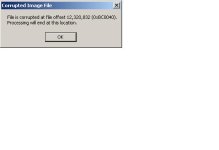
Chris, I think it looks about the same graph and data-wise, but I did get an error screen during opening the file this time, which I believe I haven't seen before. It's kind of weird that by looking for giant rogue frames we have found tiny little ones to be the real problem ...I considerably improved the robustness of the parsing algorithm; you may want to re-run your tests with this version as it is more accurate (svecher, you may want to re-test that file from richtrav - let me know if anything changes).