ATOMOS Samurai Reviews?

One workaround to get PRORES files out of your camera is to play a VFR clip and the Samurai will record it to PRORES. You wont get the quality benefit but when you deliver files to the editor he/she has it all in PRORES.
 
It'll work but might be to short to go between camera and recorder. I have a RG179 cable on order and plan to put one regular BNC in one end and an angle mini BNC in the other and just the right length to fit. I believe RG179 looses more of the signal than RG59 so keep them short.
 
Last edited:
It'll work but might be to short to go between camera and recorder. I have a RG179 cable on order and plan to but one regular BNC in one end and an angle mini BNC in the other and just the right length to fit. I believe RG179 looses more of the signal than RG59 so keep them short.

I have the same plan to use an angled mini BNC to the Samurai and a regular BNC to the camera. I'm looking for a cable manufacturer that have that specific cable setup or at least Mini BNC to BNC in different cable lengths with reliable quality. The one I linked in the previous reply has Mini BNC-BNC but that cable doesn't look very reliable. For run an gun situations I will hook up my Samuari on the rods in the back of the camera to make it more compact and then I would only need 1-1.5ft HD-SDI cable.
(1-20 feet mini BNC-BNC http://allcoaxcables.com/html/mbnc1.html)

editman, do you plan on customizing the cable/connectors yourself or have you found a manufacturer?
 
editman, do you plan on customizing the cable/connectors yourself or have you found a manufacturer?

I have angle mini BNC connectors at home and will get a premade RG179 cable with a normal BNC already crimped in one end. I guess I will get it in a ten days or so.
 
I have angle mini BNC connectors at home and will get a premade RG179 cable with a normal BNC already crimped in one end. I guess I will get it in a ten days or so.

Sounds good. Please post pics when you get them.

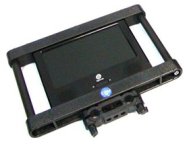
I thought of this configuration for the Samurai for run and gun situations. (I will use my TV Logic monitor for focus/exposure purposes and the Samurai as an external recorder only)

monitor cage.jpg
 
Yep- love my Ninja. My only quibble is that they give you better audio control and monitoring. As it is you have decent level and metering but it's not vvery precise- all bars no numbers. Now that Sound Devices is in this market with really amazing audio monitoring and controls on their PIX units- I'd hope ATOMOS steps it up a bit in their next firmware update...

-Noah

I would think their reasoning is your audio is 90% likely to be coming digital from a device with proper level markings.

But yes, if you're doing analog audio in (but I never would on 1/8th jacks), you'd sure want better meters.
 
Shooter, what is your workaround for VFR on the Samurai?

The work around was in the fact that you could play back a clip from the camera (recorded in VFR mode) and the Samurai would record that just as it was recorded. (VFR) Obviously not in "true" 4.2.2 ...but VFR 4.2.2 nonetheless.

Now that may hae changed a bit with the new firmware update but that may only mean that one would have to use the "manual record" option on the Samurai instead of the T/C trigger.
 
I did a quick job today with the Samurai on my AF101. It was a press event and one of the poorly lit rooms I've ever shot in. I couldn't rig any lights and had to use a long zoom so I bumped ISO to 2000. If you have something decent exposed in the frame even ISO2000 looks fine but this time it was just grossly underexposed. In such situation I would say the screen on the Samurai is pretty useless. It's just to dark to make anything out f it. The LCD on the AF101 looked fine for what it was and really bright in comparison.

Beside the screen on the Samurai it worked like it should. It started and stopped as soon as I touched the rec button on the AF101.

I had to to continue to shoot in ISO800 but now I could set up my LED kit and lit the subject properly. Back in the edit room I evaluated the footage and the ISO2000 underexposed clips are noisy. I do think the recorded PRORES files are a bit more detailed so noise is more apparent. I noticed that textures seemed to be more detailed up until it almost went into aliasing. When I have compared AVCCAM to PRORES I've found a bit more detail and this would explain the increased resolution from the camera. Real or just visual higher resolution I don't know but it looks more detailed. I also think that the noise is more uniform but I have to shoot more before saying anything conclusive.

Some of the shots had a gritty feeling to them and that's something I've seldom seen before from the AF camera. Gritty in a good way that is and not smooth like H264 files can be when throwing away so much of the original information.
 
True.

Its just that I noticed the same thing with the nanoflash (usually if the image is slightly underexposed) but it was very fine grain and not too noticeable unless you were looking for it.

On another forum I read a user was having to use Neat Video to clean up video from a Samurai (while the image recorded to camera was essentially noise free). This was with an older camera with smaller 1/3 chips, so maybe the situation was different in that scenario.
 
Can someone post files recorded on the samurai and the same AVCCAM file to test in post and see how well it holds up, or to even figure out how much difference there is between the two, that's what I think will help me the most to make a purchasing decision.
 

That is correct .. I notice no additional noise other than what's coming from
the sensor. A good way to tell is to loop-through a monitor record some stuff,
and then play it back.

It looks dead the same to me (noise-wise).

jeff
ps: You can now order additional caddies from B&H (pre-order). They come in packs of
5 for $30 or so.
 
Last edited:
Hello

I was just wondering if anyone has managed to use samurai pro res in an avid workflow?

I understand that dn x hd is on its way but i was wondering if it would be possible in the mean time?

thanks
 
Back
Top