C100: Anyone using 5DtoRGB? any comparisons done?

There are obviously two crowds, the internal, and the ninjas, while i'm tempted by the ninja, the onboard is just so darned nice, it's hard to justtify. I don't do enough green screen to justify it, nor do i usually shoot rippling water much.

But i do have projects in which that extra little something is merited, and i'm wondering how much of a difference people are seeing between the internal, ninja, and 5dtoRGB files.

They've really pushed AVC to the limit, pulling some quick grades on this noir feature with the internal codec really aint bad!

 

Attachments

  • 150.jpg
    150.jpg
    30.6 KB · Views: 0
Hey Darren, many C100 owner/shooters are with you on this. The internal and external records are 90-95% identical, and for the rest, the difference is very technical. Web audiences do not see the differences.

AVCHD has its exasperating, howl-at-moon frustrations, but heck - it's a quarter (or fifth, or that or thereabouts) of the size of Ninja/Pix220 records, and if you're dealing with high shooting ratios, and you're the one that's doing the backups and the archives, it makes a huge difference. Really.

I've done quite a few chromakey shoots now - not complex stuff, just talking heads - and quite frankly, I'm happy with the internal records. Just like the EX1. Don't try this with an FS100.

Quite frankly, the only real business case for a Ninja for me now is for long-form recording with quick turnaround edits: conferences, presentations, etc.

http://www.mdma.tv/c100/

That little test shows 4:2:0 vs 4:2:2, but also shows some strange artefacts that are specific to the C100 in PAL/1080p25 mode that show up in the AVCHD footage. The combination of hand held motion and grain make for some strange interlace artefacts - you can see 2-4 pixel wide lines in the grabs, which don't happen on the ProRes records. We are talking very specific conditions, but if I were doing my own film, I'd have a Ninja or my Pix recording it. You won't see this on the web, but it will affect compression for the web.

Also, if I were doing my own project, I'd convert my AVCHD to ProRes with 5DtoRGB. I'd have backups of the original cards, but I'd be working with 5DtoRGB first. Clients don't see and won't pay for the difference, but when it's your own work, different logic applies. It may be only 5% better than AVCHD in FCPX, but that's enough for me. Ninja/Pix? What does it do to your mobility and shooting ratio? So I'd use that sparingly.
 
I've done quite a few chromakey shoots now - not complex stuff, just talking heads - and quite frankly, I'm happy with the internal records. Just like the EX1. Don't try this with an FS100.

Quite frankly, the only real business case for a Ninja for me now is for long-form recording with quick turnaround edits: conferences, presentations, etc.

I've been thinking the Ninja2 might help me with my green screen work. A few fuzzy haired folks can make a clean key almost impossible for me. I've been blaming it on the AVCHD but now you've got me wondering.

I've also shot several long-form conferences in the last few months and the internal recording has been stellar. Small...easy to transfer...easy to edit...I'm totally satisfied with the internal recording for that type of work.
 
What NLE are you using? If you're using Premiere, then I don't think you're going to see any difference at all besides the size difference. Premiere up-converts footage to 32-bit and 4:4:4 sampling.
 
Hey, not knocking the internal recording for conferences - but it takes time to get the stuff into the NLE, and what the Ninja allows is that you pop the drive out, attach it to your system AND START EDITING. That is stellar in some circumstances. I can shoot a morning's worth of conference, and spend the lunch break editing it down to a 3-5 min summary - which is not so easy with the SDHC card thing. I spent a lot of time looking at little FCPX pie charts. And trying to hurry that procedure leads to hurt in a big way.

I'm currently using the built-in hybrid keyer in FCPX, though tried AE/Premiere Pro and Keylight variants, plus DVmatte Pro on FCP7. The FCPX keyer rewards well-lit bgds with much better results once you've mastered its fickle ways, but it's nothing like a full-on AE keyer. But that takes time and resources my clients can't afford. I can do most hair and almost all glasses (reflections suck). But I'm corporate and I know my quality threshold! :Drogar-BigGrin(DBG)

I'd say that, thanks to the dual record function, I'm now shooting 95% internal. The Pix is being used more as an external monitor :undecided
 
Let me rephrase it this way:

Has anyone done tests, to see how the 5dtorgb compares in either a greenscreen, heavy grade, or high motion, to external recordings. the high motion i can't imagine much difference, but i'm more interested in the 4:2:2 and how well 5dtorgb estimates those extra bits as compared to proper external 4:2:2

good stuff

cheers
 
I'm not trying to do any editing over lunch and would appreciate you not giving my boss any ideas! LOL!

I'm mostly doing full recordings of conference presentations from a platform in the back of a ballroom with my 70-200mm f4L. I've had to record for just under 3 hours at a time and the C100 has performed flawlessly. It takes a while to transfer but the AVCHD comes off the SDHD card quicker than it did with my 7D CFs...and good luck recording 3 hours str8 with a 7D. :-)
 
Let me rephrase it this way: Has anyone done tests...

Okay, let me rephrase my answer this way: 5DtoRGB does a 'smoothing' operation on 4:2:0 for a more 'natural' look which works well for rescuing stuff shot on 4:2:0 when it should have been shot on a Ninja.

5DtoRGB is NOT a Ninja substitute. This is my conclusion from my tests to see if I needed to buy a Ninja, the image results of which I'm not sharing for the moment. 5DtoRGB is more of a 'tune the carburettor and points' solution rather than 'replace it with a fuel injection' solution. The Ninja/Pix simply records what the C100 does anyway with slightly more accuracy when compression challenges arise - hence my riposte to your 'I don't film water, I don't film greenscreen' statement.

You won't gain any extra latitude in grading by recording at 10 bit as the output is 8 bit.

Once again: 5DtoRGB is not a $49 Ninja. It is merely balm to sore 4:2:0, and even then it doesn't do miracles, just smooths things with a sort of 'shrink the big rough colour pixels down, scale them up with a better algorithm in not-real-time, and whilst it does that, cure any 109% or Gamma related issues'.
 
The Ninja gives you a lot more shadow detail and texture, particularly at high ISOs. Foliage and fast motion hold up a lot better. Not sure if it matters as much as one would think for greenscreening, but haven't tried it. The lower contrast modes fall apart faster in AVCHD so I tend to avoid using Canon log with it. Shadows can get really gnarly and Canon recommends underexposing this mode quite a bit. 5DtoRGB rolls the superwhites into the 0-100 range and recovers the brightest parts better than any other NLE I've used, with less saturated clippy highlights so I like it... I use it when shooting AVCHD now and of course use AVCHD for most purposes... it's very good.

The Ninja is a piece of garbage in a lot of respects. Unreliable 24p detection for one. Chintzy construction. The whole HDMI recorder thing is very suspect, too, wish it were BNC. (This is why pros won't rent C100s, and why it's more of an owner/op camera.) Did a month-long shoot and lost like four HDMI cables and constant blips and stuff. The screen sucks, too, but is useful.

I think for tv it doesn't matter unless you're doing a lot of effects work or grading to match another camera. For theatrical or when in need of heavy grading maybe? Those macroblocks look bad blown up huge. For web or most tv you're kidding yourself shooting anything but AVCHD.
 
Last edited:
Makes sense. I just did some tests with 5DtoRGB, FCPX and C100 AVCHD files. Using the "full range" setting in 5DtoRGB, I'm able to bring down the highlights over 100 to legal range with better quality. One big issue I've been having is applying certain filters in FCPX, such as the Sharpen filter. Final Cut applies the filter before the color correction, so the original footage gets sharpened, and any color correction after that works with the sharpened video. Stray highlights like on someone's forehead or other bright spots are uncorrectable and look like crap because the sharpen filter chainsaws off the waveform at 100. 5DtoRGB solves this problem for me, and also helps a little bit with chroma jaggies.

If you're planning on transcoding to ProRes, one might as well use 5DtoRGB. No timecode for my AVCHD footage though. Anyone know a solution for that?
 
How do you get 5DtoRGB to recognize your C100 files? On my mac it will only read the "PRIVATE" folder coming off the card as a non-readible file.

Very intrigued at this possibility because since we've switched from FCP 7 to Premiere, I've yet to find a good transcoding/archiving process for the C100's AVCHD files.
 
How do you get 5DtoRGB to recognize your C100 files? On my mac it will only read the "PRIVATE" folder coming off the card as a non-readible file.

Very intrigued at this possibility because since we've switched from FCP 7 to Premiere, I've yet to find a good transcoding/archiving process for the C100's AVCHD files.
You have to go into the private folder, right click and keep pressing show package contents until you get to the "stream" files and drag the mts files into the 5dtorgb window
 
You have to go into the private folder, right click and keep pressing show package contents until you get to the "stream" files and drag the mts files into the 5dtorgb window

Does it do a decent job of stitching the files or does that still happen when you import with Media Browser?
 
How do you get 5DtoRGB to recognize your C100 files? On my mac it will only read the "PRIVATE" folder coming off the card as a non-readible file.

Very intrigued at this possibility because since we've switched from FCP 7 to Premiere, I've yet to find a good transcoding/archiving process for the C100's AVCHD files.
Just drag your private folder onto the 5d2rgb icon in the dock.
 
Thanks MattRobertson and dustylense. It looks like buying the $50 version of the software and doing batch converts to ProRes LT is the best option moving forward. At least until Red Giant's Bulletproof can handle native C100 AVCHD files.
 
There was sth about 5DtoRGB remapping the whites or bringing them to "legal" level. Does FCPX do the same? Can someone elaborate on this?
 
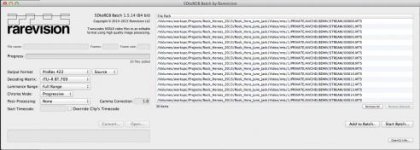
Ran into some big issues on my most recent edit (that we had to air as-is last weekend, yikes) that used transcoded files from C100 through 5DtoRGB. Below is a screengrab of the settings used as well as a link to one of the glitchy ProRes files. Any ideas on what's going wrong here?

Video link: http://we.tl/g4r80c5qsd

C100_to_5DtoRGB_glitch.jpg
 
Aha.

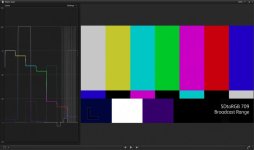
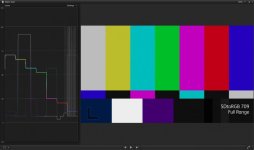
The issue was that you used 'Full Range' instead of 'Broadcast'.

The use of 'Full Range' pulls 109 whites into 100 and lifts the blacks a bit. Thus knocking things a little out of kilter:

5DtoRGBbroadcast.jpg
5DtoRGBfull.jpg

FCPX is pretty good on its WFM, showing over-100% whites, which you can pull back down with anything from MBL to Nattress Curves.

If you're doing fast turnaround stuff for broadcast, there are a couple of settings in the Other Functions menu to help: one is Press, which shoehorns everything to 100% or under, and Clip, which does exactly that - clips at 100%.

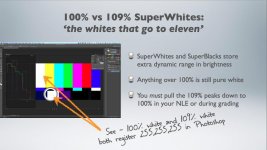
I prefer to work in FCPX and manage my own way through the 109% issue - note that in FCPX-land, just like in PProWorld, everything over the 100% is clipped:

superwhitesand100IRE.jpg
(c) Matt Davis 2013
 
ah, I had no idea that that would cause glitches in the footage, I thought that was just an option to force things into broadcast safe. I will retry the transcode with that setting clicked and see if that does the trick. Thanks!
 
Back
Top