Aliasing/Moire Workaround

shoqman

Member
Ok, so there's a lot of freaking out going on about deep focus, ultra sharp shots and the resulting aliasing etc.

First of all, the whole point of this camera is that your shots don't end up with super deep focus. That's why we all bought it and that's fine- it does phenomenally for creating a very organic cinema feel.

If you must have super deep focus shots with loads of horizontal detail, then frankly, you're better off buying a super cheap HV20 or whatever. They will beat it hands down for those kinds of shots, and that's fine too. Use the right tool for the kinds of shots you're getting.

If, however, you must use the 7D for a shot such as that, do the following:

Focus the shot so it's razor sharp.
Look at the LCD and if there is moire showing up, or aliasing (and yes you can see it on the LCD) then pull the focus SLIGHTLY off until it goes away.
Sharpen in post.

Looks great, almost indistinguishable. Except for the lack of moire/aliasing.

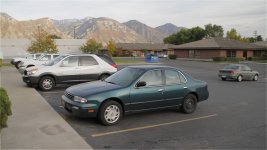
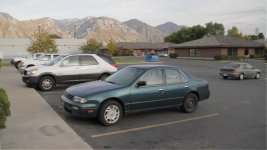
See pictures below.

Also, view at full size- you can't see it as well otherwise.
 

Attachments
  • Real_Sharpness.jpg
    Real_Sharpness.jpg
    111.9 KB · Views: 0
  • Post_Sharpness.jpg
    Post_Sharpness.jpg
    110.2 KB · Views: 0
Last edited:
Definitely helps with the aliasing/moire problem, but it looks like its reducing DR a little. Note the roll-off on the chrome wheel on the white SUV.
 
A slight focus shift is the easiest and most effective moire-combatter. Just recognize that you're getting an effectively lower-resolution shot when employing it, so don't think it's an automatic cure-all for everything.
 
A slight focus shift is the easiest and most effective moire-combatter. Just recognize that you're getting an effectively lower-resolution shot when employing it, so don't think it's an automatic cure-all for everything.

Yeah, thus the "buy an HV20" part of the comment.

Also though, the "real sharpness" version does not appear that much sharper to me.
 
Also though, the "real sharpness" version does not appear that much sharper to me.

I definitely prefer the look of the post shot. As well as fixing the moire (most noticeably on the roof) it seems to result in more pleasing color gradients - I much prefer the look of the car in the foreground.

Good point about the dynamic range, although you can see the light is slightly different between the two pictures so it might be that too. If it is the process, I suspect that for color correction this may not be a bad thing - smoother rolloff instead of a sharp edge where a highlight clips.
 
very good trick idea! Wonder exactly how much is required to throw off the moire/aliasing. Testing time..
 
If you shoot 1080p and are downresing to 720 in post you probably wouldn't notice the softer look...hmmm...
 
How much different is this trick from using a soft focus filter on the lens? I like soft focus, so it would be great if it were very comparable so that I wouldn't have to worry about excessive defocusing all the time.
 
Definitely effective, the 5D guys have been using this method since the camera first came out. Works great.
 
How much different is this trick from using a soft focus filter on the lens? I like soft focus, so it would be great if it were very comparable so that I wouldn't have to worry about excessive defocusing all the time.

I have Soft Focus filters .5 , 1.0. & 2.0 I use one or stack them on every video shoot since I got them 10 years ago. They do take the edge of video without making things look soft, and seem to target the fine lines and clipped hot spots while leave everything else alone. The only problem is I have all the filters but no DSLR yet to test them with. I want the 5D but need 24p for NTSC & PAL export.
 
I have changed antialiasing/IR filter combinations in some dSLRs for getting more powerful antialiasing and lower noise/better color. If there is enough interest in a video only conversion that handles the aliasing issue, it can probably be done with a loss of warranty.
 
I combat aliasing by reducing the sharpness in-camera, and using a diffusion filter in front of the lens. I see no aliasing in my footage whatsoever.


Marco
 
...do the following:

Focus the shot so it's razor sharp.
Look at the LCD and if there is moire showing up, or aliasing (and yes you can see it on the LCD) then pull the focus SLIGHTLY off until it goes away.
Sharpen in post.

Looks great, almost indistinguishable. Except for the lack of moire/aliasing.

...

Great tip - thanks!
 
I have changed antialiasing/IR filter combinations in some dSLRs for getting more powerful antialiasing and lower noise/better color. If there is enough interest in a video only conversion that handles the aliasing issue, it can probably be done with a loss of warranty.

My problem would be that I need the stills capability as much as the video. Is there a way to do something like a filter that would at least get you closer?
 
I combat aliasing by reducing the sharpness in-camera, and using a diffusion filter in front of the lens. I see no aliasing in my footage whatsoever.


Marco

I have found that the in camera sharpness setting does nothing to change the aliasing and moire. It probably makes the whole thing fuzzier so you don't notice it as readily, but the binning and consequent problems are still there and unaffected regardless.

The diffusion filter, however, sounds intriguing- I need to try one and the soft focus filters mentioned and see if they do the same thing as soft focus pulling.
 
Thanks for the slight defocus tip! Very handy. I'll keep that in mind when this problem rears its ugly head. I hear you can slightly blur the chroma channel after the fact and that supposedly helps quite a bit as well.
 
Hey Marco, which diffusion filters are you using? Do you have any footage we can see with the filter in use?
 
The only thing one can do is the reduce the high frequencies on the source by defocusing the areas the has them, using a filter on the lens, or using a antialias filter with the right spec on the sensor. All these methods provide optical filtering which reduces high frequency content and alias which is created by high frequencies. The advantage of the optical filters is that they provide a uniform filtering on the entire frame and the one close to the sensor can be specified with high precision.

The sharpness controls will not do much to the alias because they are only applied after the signal is converted to digital. The high frequencies have already aliased back to low frequencies. When you are removing alias, you are also removing usable detail because these two are embedded after the analog to digital conversion. It could be acceptable depending on the scene though, especially for chroma. You can eliminate all chroma on a resolution test chart without a problem.

When optical filtering is performed, the MTF can be raised back by a digital sharpness filter in post. The high frequenciess are low but clean.

One cannot have effective filtering for both video and still mode because the resolution is very different. The company will have to produce a dedicated model. The main use is still mode so this is used to design the filtering. Different antialiasing filtes are required for a 10% difference in effective pixel size, and in these cameras the difference is more than 300%.
 
It sounds like they'd have to make a camera with two optical filters for each mode that would each switch out depending on what mode you were in. Are you listening Canon? :)
 
Back
Top