
Navigation
Install the app
How to install the app on iOS
Follow along with the video below to see how to install our site as a web app on your home screen.
Note: This feature may not be available in some browsers.
More options
You are using an out of date browser. It may not display this or other websites correctly.
You should upgrade or use an alternative browser.
You should upgrade or use an alternative browser.
AJA KiPro is clipping the signal????
- Thread starter macgregor
- Start date

KyleProhaska
Veteran
The .mp4
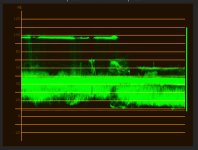
The Kipro
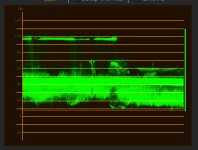
The Kipro
KyleProhaska
Veteran
I'm confused...those are waveforms from the shots you uploaded. Both look identical to Premiere, neither of them shows clipped highlights. Perhaps I'm misunderstanding here??

tom.wong
Well-known member
can you upload a pre quicktime wrapped of the same clip in xdcam? ran some tests on my end
both clips are identical and not clipped in premiere
but both clips are clipped in Da Vinci. but I had to convert the mp4 to quicktime first, but i'd prefer a more pure xdcam wrapped clip before I come to any conclusions.
and I also feel like the highlights are just in the superwhite territory, where there is detail but QT just isn't playing nice with it. either fault of pro res, or quicktime in itself. but when I got log tests, recorded in cineform, this seemed like a none issue compared to the original xdcam. curious.
both clips are identical and not clipped in premiere
but both clips are clipped in Da Vinci. but I had to convert the mp4 to quicktime first, but i'd prefer a more pure xdcam wrapped clip before I come to any conclusions.
and I also feel like the highlights are just in the superwhite territory, where there is detail but QT just isn't playing nice with it. either fault of pro res, or quicktime in itself. but when I got log tests, recorded in cineform, this seemed like a none issue compared to the original xdcam. curious.

macgregor
Veteran
Also a feel? There is no feel. Lol. IT is exactly what´s going on.
So you say in Premiere is fine (premiere for mac or for PC?). I don´t have Premiere here. I have AE and it´s clipped in AE as well.
The XDcam file is the original file from the camera.
BTW, I just opened the prores in the new DaVinci as well and it´s clipped with no chance of recovering the highlights.
So you say in Premiere is fine (premiere for mac or for PC?). I don´t have Premiere here. I have AE and it´s clipped in AE as well.
The XDcam file is the original file from the camera.
BTW, I just opened the prores in the new DaVinci as well and it´s clipped with no chance of recovering the highlights.
macgregor
Veteran
The related story some months ago: http://strypesinpost.com/tag/quicktime/
tom.wong
Well-known member
Also a feel? There is no feel. Lol. IT is exactly what´s going on.
So you say in Premiere is fine (premiere for mac or for PC?). I don´t have Premiere here. I have AE and it´s clipped in AE as well.
The XDcam file is the original file from the camera.
BTW, I just opened the prores in the new DaVinci as well and it´s clipped with no chance of recovering the highlights.
i'm asking for a copy of the xdcam file quicktime wrapped, not in it's original mp4 wrapper. and it still doesn't explain why it's not clipped in premiere, and how you can recover the highlights in some software, and not in others. fish don't you think? so the question is, is it quicktime, or is it pro res?
macgregor
Veteran
1. How do I wrap the XDCAM file in a QT? In Vegas, all I have to do is throw the mp4 in the timeline. No conversion. In FCP I just imported it using the sony browser plugin.
2. the MP4 imported in FCP with Sony XDcam Browser does look the same as the prores. Highlights are clipped BUT they can be recovered.
3. I think the problem might be that Prores is decoded as limited range, and only certain programs (FCP, Color?) that have native built in Prores decoding can have access to the full range. Any programs that use QTplayer to decode prores, are screwed (Vegas, AE, Davinci...).
4. Still waiting on seeing if Premiere is showing full range from Prores or not.
2. the MP4 imported in FCP with Sony XDcam Browser does look the same as the prores. Highlights are clipped BUT they can be recovered.
3. I think the problem might be that Prores is decoded as limited range, and only certain programs (FCP, Color?) that have native built in Prores decoding can have access to the full range. Any programs that use QTplayer to decode prores, are screwed (Vegas, AE, Davinci...).
4. Still waiting on seeing if Premiere is showing full range from Prores or not.
macgregor
Veteran
Ok guys, here we go. I found the answer. Since the Alexa records internally in Prores and has a dynamic range similar to the F3 Slog... read this:
Why is ProRes always set to legal range?
Apple specifies that ProRes should be legal range. Our tests have shown that an extended range ProRes file can result in clipping in some Apple programs. However, the difference between legal and extended coding are essentially academic, and will not have any effect on any real world images. An image encoded in 10 bit legal range has a code value range from 64 to 940 (876 code values), and a 10 bit extended range signal has a code value range from 4 to 1019 (1015 code values). Contrary to popular belief, extended range encoding does not provide a higher dynamic range. It is only the quantization (the number of lightness steps between the darkest and brightest image parts) that is increased by a marginal amount (about 0.2 bits).
Which means, unless I can set up the Aja Kipro to compress the full range into limited range, we're screwed.
Why is ProRes always set to legal range?
Apple specifies that ProRes should be legal range. Our tests have shown that an extended range ProRes file can result in clipping in some Apple programs. However, the difference between legal and extended coding are essentially academic, and will not have any effect on any real world images. An image encoded in 10 bit legal range has a code value range from 64 to 940 (876 code values), and a 10 bit extended range signal has a code value range from 4 to 1019 (1015 code values). Contrary to popular belief, extended range encoding does not provide a higher dynamic range. It is only the quantization (the number of lightness steps between the darkest and brightest image parts) that is increased by a marginal amount (about 0.2 bits).
Which means, unless I can set up the Aja Kipro to compress the full range into limited range, we're screwed.
tom.wong
Well-known member
so is the alexa pro res recording suffering from the same issues? or they managed to bypass it through the compression? if it's the latter maybe we can all write to companies creating these recorders to look into doing the same thing... hopefully a firmware upgrade can solve these issues.
macgregor
Veteran
More info here:
Art Adams wrote:
>> I was skeptical about the claim that you couldn't record ProRes values above 100%, though, so I >>checked... and I have some Alexa footage that was shot at ISO 800 in extended mode and the >>highlights don't exceed 100%. And actually they don't exceed about 95% because they were shot in >>LogC.
Disclaimer, this is speculation on my part..
I don't know this for sure, but I believe that you are limited to the ProRes codec's range. Your image payload will probably limited to what ever your ProRes variant's range is. Based upon what I know of ProRes and QuickTime, the image range is probably scaled to YCbCr legal range. (Again, I could be wrong, but I don't believe so. Everything I have seen, when decoding the images, says legal range to me.)
Art Adams wrote:
>> I was skeptical about the claim that you couldn't record ProRes values above 100%, though, so I >>checked... and I have some Alexa footage that was shot at ISO 800 in extended mode and the >>highlights don't exceed 100%. And actually they don't exceed about 95% because they were shot in >>LogC.
Disclaimer, this is speculation on my part..
I don't know this for sure, but I believe that you are limited to the ProRes codec's range. Your image payload will probably limited to what ever your ProRes variant's range is. Based upon what I know of ProRes and QuickTime, the image range is probably scaled to YCbCr legal range. (Again, I could be wrong, but I don't believe so. Everything I have seen, when decoding the images, says legal range to me.)
Last edited:

Duke M.
Veteran
If I remember right (I didn't go back and rewatch it) this is the tutorial you need.
Correcting color curves in After Effects and Photoshop.
http://vimeo.com/14396098
Correcting color curves in After Effects and Photoshop.
http://vimeo.com/14396098
macgregor
Veteran
so is the alexa pro res recording suffering from the same issues? or they managed to bypass it through the compression? if it's the latter maybe we can all write to companies creating these recorders to look into doing the same thing... hopefully a firmware upgrade can solve these issues.
Basically it means that the Arri guys were aware of this issue: Prores decoding and expecting limited range images. So they decided to map their 14 stops in a limited range 10bit 422 prores so there is not clipping of the highlights.
Now since the F3 slog just outputs a full range SDI signal, they just don´t care what will happen next. I have the feeling that if you record with a AJA or Blackmagic uncompressed 10bit RGB (which are usually full range codecs) we wouldn´t have this problem. BUt any Field prores recorder is going to have this problem.
So:
- either the Prores field recorders upgrade their firmware so they can compress full range --> limited range
- sony upgrades the cameras so they include a switch from limited range - full range. Actually this setting DOES exists in the F35. I can´t remember if it gets disabled when shooting SLog and I´m not sure neither if it exists in the F3.
tom.wong
Well-known member
Basically it means that the Arri guys were aware of this issue: Prores decoding and expecting limited range images. So they decided to map their 14 stops in a limited range 10bit 422 prores so there is not clipping of the highlights.
Now since the F3 slog just outputs a full range SDI signal, they just don´t care what will happen next. I have the feeling that if you record with a AJA or Blackmagic uncompressed 10bit RGB (which are usually full range codecs) we wouldn´t have this problem. BUt any Field prores recorder is going to have this problem.
So:
- either the Prores field recorders upgrade their firmware so they can compress full range --> limited range
- sony upgrades the cameras so they include a switch from limited range - full range. Actually this setting DOES exists in the F35. I can´t remember if it gets disabled when shooting SLog and I´m not sure neither if it exists in the F3.
well I emailed sound device to see if they are aware of the issue and see if there is anything they can do about it, and I encourage everybody that cares about this to email aja and sound device all the same to see that there is a big concern for it. but for now, I don't think anybody is "screwed" just gotta be more aware and figure out where your "pro res" clip point is going to be, and adjust for that. it really sucks because the only other way is to go a uncompressed solution, or very expensive bulky recorders. but I'm sure a good workflow can be found. Right now I'm not too fond of transcoding uncompressed to another codec on set without a tower. preliminary results with the fastest mbp, isn't too promising unless you have a slower paced shooting schedule.
macgregor
Veteran
The practical solution is to change your exposure setting so the highlights you want to protect don't exceed the 104 IRE reference white clip point on the HDSDI output using a waveform monitor.
This is unacceptable and in most cases impossible (bulb in the shot for example).
The solution right now is to apply a filter to the edit in FCP that will compress the highlights down. Then export. I can't think on anything else.

Postmaster
Dark Side of the Camera
Don´t want to sound snappy, but betting on a device that only supports one proprietary codec is always a bit of a risc.
Good to know that the SD Pix recorders - at least support DnxHD. But as far as I know, the Cinedeck is the only recorder out there,
where you can install about every codec you want... (well except ProRes). I hope thee will be more "open" recorders in the future.
Good to know that the SD Pix recorders - at least support DnxHD. But as far as I know, the Cinedeck is the only recorder out there,
where you can install about every codec you want... (well except ProRes). I hope thee will be more "open" recorders in the future.