AJA KiPro is clipping the signal????

macgregor

Veteran
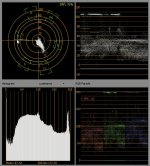
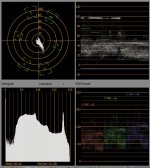
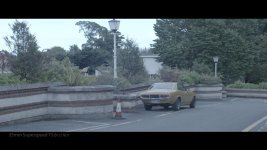
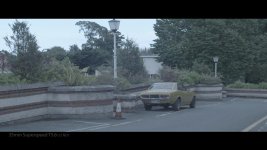
So, I just recorded a test: F3 Slog into the aja (proresHQ) and internally (MP4).

The MP4 shows more dynamic range in the highlights. I can see in the waveform how highlights gets clipped. To my surprise. the same shot recorded in the SXS cards, appears just fine. No clipping.

Is there a setting in the AJA to control this? Is this QT pro res decoding fault? I´m on PC btw.
 
Last edited:
Ok, yep, I just confirmed what I was fearing...

So I opened the same file in Mac OS:
In QT, the highlights are still clipped.
In FCP, the footage still is clipped beyond 100IRE BUT if I bring down the highlights (ie: using 3 wheel colour correction) I can recover the lost information. So the data is there, it´s just QT playing games with us and clipping values when decoding the file.

Great. I´ll keep investigation on how to solve this.

The MP4 just does not hide the over the limit values ,that´s why it seemed to hold more info at first.
 
The AJA Ki Pro and Ki Pro Mini products produce QuickTime files with values approved by Apple for the Apple ProRes codec.
 
"Apple dictates what they believe is acceptable for your footage, Mac. They do not approve of your pushing the codec to your limit. Please next time shoot in a more controlled environment. Thank you." - The Team at Apple.
 
That's easy...shoot MPG4.

LOL! Just kidding....I shoot both and have not noticed this, but it is surely concerning. You are indeed going into the KiPro with SDI, correct?
What are you using to read/convert the ProRes files? Is it able to utilize 10-bit? Send a file on over to me and I'll load it up in Davinici and see what it looks like.
Can do on Sunday.
 
doesn't pro res quicktime hold into super white values, ie 110 , considering log is in a beyond 709 gamut? it would explain why the quicktime is allowing for the sky to reach over 100 but you still retain all your highlight detail if you pull it down, while the mp4 forces it under 100 because the container isn't capable of super white.
 
A bit of pedantry, but ... you can't. The F3 doesn't shoot MPEG-4. It shoots MPEG-2, but for no discernable reason other than confusion, it labels the files ".mp4". But they're not mpeg-4, they're mpeg-2.

yeh it can be misleading, mp4 is the wrapper, like avi, or mov, but the actual codec is mpg2
 
Ok, yep, I just confirmed what I was fearing...

So I opened the same file in Mac OS:
In QT, the highlights are still clipped.
In FCP, the footage still is clipped beyond 100IRE BUT if I bring down the highlights (ie: using 3 wheel colour correction) I can recover the lost information. So the data is there, it´s just QT playing games with us and clipping values when decoding the file.

Great. I´ll keep investigation on how to solve this.

The MP4 just does not hide the over the limit values ,that´s why it seemed to hold more info at first.
That makes me curious... Do you expect the same result from other 422 10-bit quicktime recorders or do you think this is specific to the Ki-pro?
 
The short answer is (because he can recover the data) its not the Ki Pro Mini causing the problem. Its the playback software. Simply reducing the IRE to broadcast limits allows it to play it back. So yes, that will be with all recorders.
 
That makes me curious... Do you expect the same result from other 422 10-bit quicktime recorders or do you think this is specific to the Ki-pro?

Does the Prores Quicktime codec limit you to REC709 broadcast legal values regardless of how its recorded?
 
The short answer is (because he can recover the data) its not the Ki Pro Mini causing the problem. Its the playback software. Simply reducing the IRE to broadcast limits allows it to play it back. So yes, that will be with all recorders.


Well, maybe my 2nd post wasn´t clear enough, but yes, it´s a QT issue and not the AJA. QT is not showing values over 100IRE. Since the F3 Slog records a lot of info beyond 100IRE, it does not show up unless you bring down the highlights. BUT at least in PC (AE and Vegas), I can´t bring down any detail. I can do it in FCP however. In short, it´s a mess.

I don´t want to have to manually compress the highlights. This also affects the workflow, since the chances of loosing those 1-2 stops in the highlights are pretty high depending on what the editor does. It also means no chance for PC users to get the best out of the footage in PC.

I remember something similar happening with canon 5D footage back on the days, where CAnon cameras would use full range levels, but QT will decode and show video as limited range, therefore losing information in the highlights. It was later solved by a QT upgrade.
 
That's easy...shoot MPG4.

LOL! Just kidding....I shoot both and have not noticed this, but it is surely concerning. You are indeed going into the KiPro with SDI, correct?
What are you using to read/convert the ProRes files? Is it able to utilize 10-bit? Send a file on over to me and I'll load it up in Davinici and see what it looks like.
Can do on Sunday.

Here you go. Now everyone can enjoy:
- MP4: http://dl.dropbox.com/u/13362047/443_0014_01.MP4
- Prores: http://dl.dropbox.com/u/13362047/Clip1TK42.mov
 
There's more than one way to do it in After Effects and Premier Pro for PCs. I'd be surprised if there wasn't a way to do it in Vegas Pro.
 
Both of them are identical in the waveform in Premiere Pro CS5. What you have is a problem with FCP7 handling the gamma...always a fun issue.

EDIT: In looking more closely I see a difference of maybe 1% in the entire range between the two...but NOT what you're seeing.
 
Both of them are identical in the waveform in Premiere Pro CS5. What you have is a problem with FCP7 handling the gamma...always a fun issue.

EDIT: In looking more closely I see a difference of maybe 1% in the entire range between the two...but NOT what you're seeing.

Then Premiere is probably clipping both files. Is the sky clipped or not?
Vegas will show you the full range of the MP4 (one of the reasons why I love Vegas). VLC player for example will read the MP4 as limited range however, clipping the highlights.

In any case, the prores file does not show up like in my waveform on set.
 
The sky wasn't clipped, it's sitting at that 95-97% range. Looks fine to me.

Btw, I wasn't aware you could record S-Log to the SxS cards. Basically it's just taking that signal and smushing it into the SxS .mp4 format? I know you can't take full advantage of it without the external recorder, but you still get a crazy benefit having S-Log it looks like even without it if you had to go without.
 
Back
Top