AG-DVX200 4K Large-Sensor Handheld Camcorder

Okay, here it is -- a package of scene files designed to deliver approximately the same look as a GH4 would do. They're different sensors, different controls, so it's not easy to make them match exactly, but some of these are pretty darn close, and some are... not as close, but closer than the stock scene files would have been.

These scene files were created using a GH4 on all zero settings. If you like to boost the noise reduction or cut the saturation or whatever, you can do those same things on the DVX200 using the appropriate controls. I set the GH4 on auto-exposure, with all parameters at 0, levels of 0-255, and swapped among the various color profiles.

In this package are an emulation of the GH4's Natural, Scenery, Portrait, Cine-D, Cine-V, and Standard profiles.

This is saved as SCENE2.TXT. Within SCENE2.TXT are six scene files:
SCN1/SCENE1 is Natural
SCN2/SCENE2 is Scenery
SCN3/SCENE3 is Portrait
SCN4/SCENE4 is Cine-D
SCN5/SCENE5 is Cine-V
SCN6/SCENE6 is Standard

Note, I didn't try to match noise levels or sharpening or anything like that; I was strictly working on gamma and color, and overall exposure. These were tested against three standardized charts: the ChromaMatch, the CamBelles, and a Chroma DuMonde, using both cameras in tungsten preset and auto-exposure.

Download the GH4 scene files here, experiment, and adjust them to see if they can get you the results you're looking for.

Hey guys, I think Barry may be onto something here. I just pulled all of his scene files into my camera and with many of them I'm seeing an image much closer to what I was expecting to see out of the box. Many of the scene are rendering colors way better than before just with some quick testing running in AWB.

I don't have a GH4 or know that much about it but his duplication of the GH4 scenes may have just got me to the point of being able to use the camera in a semi run and gun environment via the scenes.

I'm not in a situation tonight where I can put the camera through it's paces with the new scenes but I hope to have some time tomorrow to shoot some stuff.

I'm hoping that with these along with what Panasonic is working on, things may start looking up.

Thanks for taking the time to do this Barry!
 
Last edited:
The skin tones looked really good on the birds. :)Old firmware, so not really very relevant.- Greg
Haha, yes the birds has really nice skintones ;-)I think it was relevant, because it is an example of useable skintones with the old firmware. Quite a few has complained about skintones in footage done with the old firmware. This showed it was actually possible :-)
 
Also shadows become speckled in spots over the eye and ear. Old firmware though so hopefully this is fixed

Well I cannot see any speckles either. Must be my eyes or my monitor or my internet connection or... I am viewing on a 24" Dell monitor full screen HD 1080P selected from Youtube , my PC i7 3770K Win7, GTX470. 30Mbps internet connection. Source says 50P so there may be some interpolation for my 60hz monitor.
 
I just can't seem to be able to get rid of the noise in blacks and dark blues. I took detail down and upped the coring. No noticeable difference. Will try to get some footage uploaded tomorrow. Is anyone else having this problem?
 
Hi guys, I got home a little late today and besides it being a drab day, I started to run out of daylight but managed to shoot about 4 minutes of 1080p footage around the house and yard with Barry's GH4 scene pack.

I think if I would have taken the camera out of the box with these 6 scene files in the camera I may not have come to my original snap judgement that I may have to return the camera. If what I saw on day one looked like what I'm seeing now I would have at least felt that I had a nice starting point and it was just going to be a matter of tweaking some things and not being thrown to the wolves and starting from the ground up as Panasonic has seemed to have done to us. They did the DVX200 a great injustice by not giving it a pretty decent look right out of the box like you get with even many lower priced cameras.

Now I'm sure that many of you have a much more critical eye than I do but I think when you compare what Barry just put together with the original factory scene files, to me, it looks like a different camera. Definitely more along the lines of what I was expecting to see and giving me hope that the camera does have the potential that we were hoping it had.

For the first few minutes I strictly ran in a run and gun type environment. This camera seems too slow when AWB'ing compared to many other cameras that I have used and at times it can be a drastic visible change in your image while shooting. It's not very often that I use AWB in a run and gun situation, so that's not too big of deal for me.With Barry's scene files, once the camera hones in on a WB, the colors look pretty darn good.

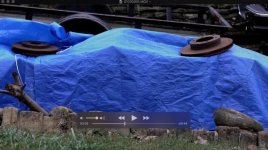
One thing that I did notice is that at times some of the highlights look a little unrealistic and blown out. This may not have anythig to do with Barry's work and may be a by-product of using auto exposure. Below is a screen capture of when I was scanning around my yard and I went past a wood pile that has one of those cheap blue tarps on it. Although this may not be the typical subject that everyone has to deal with, it sort of jumped out at me during playback. If you look on top of the tarp the highlights just don't appear right. This was scene 6. Using one of the other scenes this did not appear to happen nearly quite as much so that might be something that I would like to adjust in scene 6 as long as it doesn't take too much away from anything else in that scene. I think for now scene 6 will be one of my favorites. I'm not sure what setting I could adjust to try and bring adjust to keep that a little more under control?. It really didn't look like that in person. I've seen my Sony FX-1 do this same thing from time to time and it was typically from what I think is due to the auto gain ramping up a little too high.

Screen Capture.jpg

I went back in the house and shot some stuff on the table like I had done with the factory scenes. I did a manual white balance and compared the new scenes to what I remember seeing in the factory scenes. Flippinh back and forth through the scenes, I think most people will find something that they like or at least a more manageable starting point to get things to where you want them to be. I think Barry's scenes are meant to replicate the GH4 and not be exactly what every single person is looking for and be an end all be all scene. With the factory scenes, I found that color representation was so far out of whack with what I was seeing with my eyes that I was really never able to find something that I thought was usable. Barry's scenes are quite opposite of the factory scenes.

I'm sure there will be more good things to come with this camera and it's just a matter of it being tamed through custom scenes and hopefully more firmware updates. I hope to shoot some stuff this week that I will be able to post for everyone to see. Just holding my hand out as far as I could in front of the lens showed me that skin tones in a few of the scenes seem to be much more natural than the factory scenes. I didn't have anyone around to test that with today so I'll have to grab someone in the office this week and see how the skin tones look with the various scenes under my lights in a sit down interview environment.
 
Last edited:
Barry, thank you for this work. I am embarrassed to say I do not know how to get to the package of scene files you've created - or enter them onto my DVX200. (Have worked in pro video for 25+ years, but cannot find how do do this. Sometimes I miss the old days) Can you direct me to were I can learn the process of transferring? Manually entering? scene files. Many thanks.
 
Barry, thank you for this work. I am embarrassed to say I do not know how to get to the package of scene files you've created - or enter them onto my DVX200. (Have worked in pro video for 25+ years, but cannot find how do do this. Sometimes I miss the old days) Can you direct me to were I can learn the process of transferring? Manually entering? scene files. Many thanks.

Hi Dan, it's fairly easy but let me give you a brief description and then I'll give you some step by step instructions.

A scene file contains all 6 scenes that you are able to manually select on the EVF or menu wheel. When you goto the camera's menu and you save the scene file for the first time you will be saving all 6 of the scenes that are currently in the camera. Doing so will create a folder on your SD card that has a file in it called SCENE1.TXT. In SCENE1.TXT will be a long string of data with each of the individual settings (gamma, color, etc.) for each of the 6 scenes. I think you can have 8 scene files that contain 6 scenes each stored on your SD card. ie. SCENE1.TXT, SCENE2.TXT etc.

What Barry has created is SCENE2.TXT which is a scene file that contains the 6 new scenes to closely match the GH4. I think this will get you in the ballpark and allow you to get his GH4 scenes loaded.

1. On your DVX200 select MENU, SCENE FILE, SCENE FILE, SAVE, SCNFILE1. This will save all of your existing 6 scene files to your SD card in one file called SCENE1.TXT. The file will be located on the SD card in the folder PRIVATE, MEIGROUP, PAVCN, SBG, P2SD. As long as you don't format the card you can easily get those 6 scenes back into your camera at any time. If they are the original factory scenes you can always go into MENU, OTHER FUNCTION, INITIAL SET and select SCENE and it will re-load all 6 of the factory scenes back into the camera.

2. Download Barry's scene file GH4 scene files here (the file should be named SCENE2.TXT, if not, rename it to that and keep it on your desktop or other location so that you'll remember where you put it. You'll need it shortly) For some reason on my Mac it saved the files as click.txt. I had to rename it SCENE2.TXT

3. Turn off the camera and pull out the SD card and put it into your computer or external SD card reader.

4. Copy SCENE2.TXT from where you saved it and paste it into the PRIVATE, MEIGROUP, PAVCN, SBG, P2SD folder on the SD card. You should now have SCENE1.TXT and SCENE2.TXT in that folder.

5. Put the SD card back in the camera and turn on the power. Goto MENU, SCENE FILE, SCENE FILE and select LOAD. You'll notice that the only choices that you can click on are SCNFILE1 and SCENEFILE2 because the camera knows that those are the only two files on your SD card.

6. Click on SCNFILE2 and select ALL. This will load all 6 scenes from Barry's SCENE2.TXT file onto the DVX200. It should give you some kind of message that the scenes have been loaded.

Here are the descriptions again just so you have these all in one place:

SCN1/SCENE1 is Natural
SCN2/SCENE2 is Scenery
SCN3/SCENE3 is Portrait
SCN4/SCENE4 is Cine-D
SCN5/SCENE5 is Cine-V
SCN6/SCENE6 is Standard

Advanced Information
You may have been able to tell as you went through the above process that if you wanted to, you could save or load one individual scene to or from a scene file. So let's say you are running the 6 factory scenes in your camera and you've saved them to your SD card as SCENE1.TXT and you also have Barry's SCENE2.TXT on your SD card. Maybe you think that the factory SCN4 is terrible and you really like Barry's SCN6. You could select LOAD and select SCNFILE2 and select SCN6 and load it into SCN4. That would replace the factory SCN4 with Barry's SCN6.

Panasonic has made this a little confusing being that the data is saved as SCENE1.TXT and you scroll through SCN1-SCN6 on the display and you also have what's called SCNFILE1 to load from or save to. SCNFILE1=SCENE1.TXT
 
Last edited:
Thanks mapper65 for taking so much time to type out detailed instructions! Very helpful!

Only thing I would clarify is that you can't use the camera itself to copy the scene file to the memory card, because when the camera is operating as a USB card reader, it is in read-only mode; you can't write to the SD cards that are in the camera. So yes, you'll need to have an SD slot on your computer, or a separate USB reader, in order to be able to write the SCENE2.TXT file onto the SD card.

Glad you're finding them useful!
 
I like the color rendition of Barry's scene files and thanks again for all the hard work, but I seem to be getting much less light into the camera.
 
Thanks mapper65 for taking so much time to type out detailed instructions! Very helpful!

Only thing I would clarify is that you can't use the camera itself to copy the scene file to the memory card, because when the camera is operating as a USB card reader, it is in read-only mode; you can't write to the SD cards that are in the camera. So yes, you'll need to have an SD slot on your computer, or a separate USB reader, in order to be able to write the SCENE2.TXT file onto the SD card.

Glad you're finding them useful!

Thanks Barry, I modified my instructions above so that someone won't spin their wheels and eventually get to your post only to find out that they can't modify files on their SD card with the camera connected to their computer via the USB cable.

I did some testing here at the office today and I'm happy with the skin tones in the only scenes that I tried, 3, 5 & 6. I have mixed lighting in the room that I was doing the testing in, along with a skylight directly overhead so I suspect under a more controlled environment things will look even better. I think it's definitely critical that people stay away from AWB unless your scene is never going to change and even then I still think there's no replacement for a manual WB.
 
I like the color rendition of Barry's scene files and thanks again for all the hard work, but I seem to be getting much less light into the camera.

I haven't really noticed that but you may want to make sure that your shutter didn't jump up to a higher setting like it did for me after going from Auto to Manual. I was scratching my head for a few seconds after using my Sekonic light meter and the image being way too dark. Here my shutter was up around 1/100 and I was metering for 1/60. When I dropped it back down to 1/60th then everything looked as I was expecting.

Also if you are running in Auto and have your max auto gain set too low, you may end up with a dark image. I think I'm saying that correctly.
 
Hi, guys!
all just guesswork, no matter what the monitor when we see the two camera image side by side
and the DVX 200 isn't good. (the camera is only, plus wires, monitor)
soever we examine how this camera is not suitable for serious work.

Today I took it to the Dealerships.... and the caffe was tasty :)
I look forward to the answer
Cash Back
 
I like the color rendition of Barry's scene files and thanks again for all the hard work, but I seem to be getting much less light into the camera.
Three things:

1) for proper matching against a GH4, the auto-iris should be at least consulted to set exposure; I had to make sometimes significant adjustments to the auto-iris.
2) to match the GH4's black level, I had to frequently drop the master pedestal, which lowers overall exposure. You can reverse that out by raising the master pedestal back to zero, at which point you won't need so much exposure, but the gamma will then be a less-close match. Which may or may not matter to you.
3) the auto-shutter is a curse. It's way too easy to end up in auto-shutter without knowing it. Basically, if you don't see the shutter speed displayed on the right side of the LCD, you're in auto-shutter mode -- and it may very well choose a faster shutter speed than you'd want. If you don't see the shutter speed displayed, press the SHUTTER button, and then adjust it to 1/60 or 1/50 (as appropriate).
 
Three things:

1) for proper matching against a GH4, the auto-iris should be at least consulted to set exposure; I had to make sometimes significant adjustments to the auto-iris.
2) to match the GH4's black level, I had to frequently drop the master pedestal, which lowers overall exposure. You can reverse that out by raising the master pedestal back to zero, at which point you won't need so much exposure, but the gamma will then be a less-close match. Which may or may not matter to you.
3) the auto-shutter is a curse. It's way too easy to end up in auto-shutter without knowing it. Basically, if you don't see the shutter speed displayed on the right side of the LCD, you're in auto-shutter mode -- and it may very well choose a faster shutter speed than you'd want. If you don't see the shutter speed displayed, press the SHUTTER button, and then adjust it to 1/60 or 1/50 (as appropriate).

Thanks Barry. I made some adjustments and all is good. Still needs some tweaking but things are looking up.
 
BARRY--- thank you SO much for your work on the scene files and for your efforts to help us in this forum. I am really looking forward to seeing how your scene files work. Sounds like you have made some progress.

That said... it strikes me as funny (and a more than a little sad) that we are all thrilled by the fact that our $4,200 camera is getting close to looking as good as a $1,300 digital SLR.
:-?
 
BARRY--- thank you SO much for your work on the scene files and for your efforts to help us in this forum. I am really looking forward to seeing how your scene files work. Sounds like you have made some progress.

That said... it strikes me as funny (and a more than a little sad) that we are all thrilled by the fact that our $4,200 camera is getting close to looking as good as a $1,300 digital SLR.
:-?

This is exactly why I have decided not to buy the DVX200 after all. I had so high hopes for the DVX200 as an upgrade for my old HMC151E and GH3. I have tried it for the second time yesterday, and my conclusion is, that this is not the camera for me. Maybe it is because it is too complicated for my skill-level, but there are things that really irritates me:

1. Delay between reality and picture on screen.
2. Menu very non-logical.
3. Heavy - too heavy for run-and-gun without some kind of shoulder-support or rig.
4. Monitor not very usable in sunlight - and EVF placed wrong for shoulderrig (again a need for some extra accessories like external monitor/viewfinder = more money)
5. I experienced bad colors - this camera was updated to fw 1.25 - I tried all scenes and also VLOG - I tried auto and manual - most of it looked like crap. Unfortunately I did not have acces to Barrys new scene-files.
6. Noise in the dark is still an issue, but might be solved with new scene-files. VLOG did not do any good regarding this issue.
7. I experienced banding in the white???? A white wall showed banding. Strange - might be caused by scenefile or something...but it did also show up with VLOG....??
8. And then this strange noise - I have not seen this since I tried to use a a Letus Extreme for my HMC151 - some strange noise that looks like there is some one holding a dirty glas with spots in front of the lense. It appeared when the picture was underexposed, but it was visible with just a small amount of underexposure. The lense was clean.
9. The build-in mic is recording a electrical sound from within the camera and zoom, handling etc.

The camera looks good, and is very well designed, but it is my experience, that it takes a good deal of practice to get really good footage out of it. I have not got the time and I fear a situation in the field on a job, where everything goes bananas and I can´t find out what is wrong because of its complexity.

I therefore have decided to go for the GH4 instead. The GH5 is apparently being announced in september 2016, and I would not be suprised if the GH5 will surpass the DVX200 in many areas. I had the same experience when I bought my HMC151 and after a year the GH2 came out and did a lot better regarding picturequality - especially after the GH2 hack. My HMC151 costed me a lot of money, but was a workhorse and I loved it. But it was a bit frustrating trying to explain my customers that my GH3 was far better than the HMC151....I think many DVX200 owners will be in the same situation when the GH5 comes out - maybe with build in OIS and 6 or 8K and lower noise and XLRs :-)
 
Last edited:
Back
Top