AF100 is 95% Ready. For the last 5%, Panasonic should....

Paul Vicente

Well-known member
Improve the gamma curves for highlighted areas, especially on skin tones.


I use AVCHD a lot, and my biggest issue is not resolution, not image quality, not noise. It is how easily my HDC-SD3 and AG-HMC150 cameras can allow a highlighted area get overexposed.

For example on someone's nose or cheek, or due to very light blond hair.

You might say: "bring down your exposure". I could do that, but it comes at the cost of underexposing the rest of the image.

I do not recall having this issue with the DVX100 or HVX200. These could handle bright areas very nicely, with a natural and smooth transition to white.

If you want an example of what I am talking about, see Filipo Chiesa's video at 0:56. This is just one example of this issue in what is otherwise an excellent sample of the AF100's capabilities.

Please: I am trying to be productive here. Keep the flames out.

Feel free to add your 5% request. It is your last chance before Panasonic opens the factory floor.
 
Paul, how do you handle that issue with your cameras today? Do you shoot very slightly underexposed, and bring it up in post? Or do you simply live with the somewhat harsh highlights?
 
Assuming there is just 5% of the magic "Done Juice" sitting on a counter that can be poured into any number of features to improve it, I'd have to say dynamic range. Not that what has been shown so far has been bad, it's just that a little more never hurt anyone!
 
Paul, how do you handle that issue with your cameras today? Do you shoot very slightly underexposed, and bring it up in post? Or do you simply live with the somewhat harsh highlights?

I can hide it with color correction.... I bring down the luminance values just in the highlights... It works out pretty well, but I never had to do that before. I guess another way would be to underexpose slightly. To be honest, I have not experimented with other potential methods to deal with this (such as changing the knee settings).
 
Like barry said, use a different profile. They were all using cine d.

Bottomline, try it when it comes out before you buy it
 
Assuming there is just 5% of the magic "Done Juice" sitting on a counter that can be poured into any number of features to improve it, I'd have to say dynamic range. Not that what has been shown so far has been bad, it's just that a little more never hurt anyone!

Yes, I think this may be part of the problem of what I am talking about above. The AVC cameras I have handle detail very well, with lots of tones from black to say 85%-90%. After that, it just gets clipped or so it seems.
 
Like barry said, use a different profile. They were all using cine d.
Clarification - I don't know for a fact what anyone else was using. I know that Philip asked me what I'd recommend, and I asked him what he preferred and he said "flat as possible", so I said "cine-D". But I don't know if he stuck with that recommendation or maybe experimented with other options.

I used cine-D a lot, but I also used b.press with low knee several times too.

It is a long-known issue with cine-d that it delivers the most dynamic range, at the expense of having ugly clipping in the highlights. And I think that's what folks are seeing and reacting to. Which is, of course, pretty much a non-issue -- one of the key rules of using cine-D is "don't let anything clip". And if something is flat-out going to clip, cine-D is not the gamma curve you want to use for that shot.
 
Barry,

Do you feel the camera needs a push somewhere in its final 5% development process? If so, what would you prioritize?
 
Barry,

Do you feel the camera needs a push somewhere in its final 5% development process? If so, what would you prioritize?
It's basically done, but there's a little bit of time. We gave them specific suggestions of features, and there were things that I think are important. But it wouldn't be appropriate to discuss those publicly, that feedback was for the company itself. If they make the changes, great. If they don't make the changes, I'm sure we'll all make mention of that in our various reviews of the final product. But we won't know until they finish the product.
 
It is a long-known issue with cine-d that it delivers the most dynamic range, at the expense of having ugly clipping in the highlights. And I think that's what folks are seeing and reacting to. Which is, of course, pretty much a non-issue -- one of the key rules of using cine-D is "don't let anything clip". And if something is flat-out going to clip, cine-D is not the gamma curve you want to use for that shot.
'
That would explain the colour clipping!
 
Improve the gamma curves for highlighted areas, especially on skin tones.


I use AVCHD a lot, and my biggest issue is not resolution, not image quality, not noise. It is how easily my HDC-SD3 and AG-HMC150 cameras can allow a highlighted area get overexposed.

For example on someone's nose or cheek, or due to very light blond hair.

You might say: "bring down your exposure". I could do that, but it comes at the cost of underexposing the rest of the image.

I do not recall having this issue with the DVX100 or HVX200. These could handle bright areas very nicely, with a natural and smooth transition to white.

If you want an example of what I am talking about, see Filipo Chiesa's video at 0:56. This is just one example of this issue in what is otherwise an excellent sample of the AF100's capabilities.

Please: I am trying to be productive here. Keep the flames out.

Feel free to add your 5% request. It is your last chance before Panasonic opens the factory floor.


100% agree the roll off on the highlights is really disappointing so far. it's not gradual it's instant blow out
 
Clarification - I don't know for a fact what anyone else was using. I know that Philip asked me what I'd recommend, and I asked him what he preferred and he said "flat as possible", so I said "cine-D". But I don't know if he stuck with that recommendation or maybe experimented with other options.

I used cine-D a lot, but I also used b.press with low knee several times too.

It is a long-known issue with cine-d that it delivers the most dynamic range, at the expense of having ugly clipping in the highlights. And I think that's what folks are seeing and reacting to. Which is, of course, pretty much a non-issue -- one of the key rules of using cine-D is "don't let anything clip". And if something is flat-out going to clip, cine-D is not the gamma curve you want to use for that shot.


Ive been using cine-V alot for the past year on the hmc/hpx . Especially here where it gets really hot.
I use cine-D when its partially cloudy, works for us.

Thanks for answering the questions Barry :thumbsup:


For the other 5% I think they need to drop the price :)
 
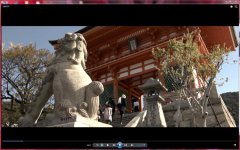
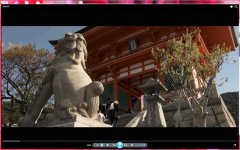
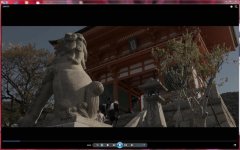
I think everyone should chill out because there are a lot of variable that we don' t know about the camera and the shooting. More so that the shooters them-self did not know much about the camera. I have 2 screen capture of the start of the Filippo shoot. The first one you have the transition coming from a black background a little dark but with the highlight in check!!! and details in most of the high lights. The second is when the transition has finished and see how much of the highlights have clipped (the back of the lion) and a third copy where I just applied a little curve in photoshop on the first shot where I put it more or less at a normal illumination. These were done on vimeo compressed sample (lots of artifacts in the sky for example) and I think that we could get much better result with the orriginal mts. So perhaps the Af-100 would be the type of camera that you can underexpose a bit a use a curve for proper exposed image. japan-2.jpgjapan-1.jpgjapan-3.jpg
 
I guess another way would be to underexpose slightly. To be honest, I have not experimented with other potential methods to deal with this (such as changing the knee settings).

If your Panasonic camera does indeed have adjustable knee settings, then that is an appropriate way to deal with the very problem you are having. Adjusting the knee changes how the camera deals with the highlights. Setting it to a lower number compresses them, allowing you to get more detail in bright areas, keeping them from clipping. The trade-off is that if you set it too low, things can look plastic-y, or unrealistic.
Long story short: that's what knee is for. It's a professional setting professionals use to deal with highlights.


Barry said the scenefile settings on AG Af 100 are the same as the hpx 170 so the Knee options would be High, medium and low and auto ,so no numbers:( . And using Cine D or Cine V would have the Knee option disabled in the hmc150/hpx 170.
 
Last edited:
I used cine-D a lot, but I also used b.press with low knee several times too.

It is a long-known issue with cine-d that it delivers the most dynamic range, at the expense of having ugly clipping in the highlights. And I think that's what folks are seeing and reacting to. Which is, of course, pretty much a non-issue -- one of the key rules of using cine-D is "don't let anything clip". And if something is flat-out going to clip, cine-D is not the gamma curve you want to use for that shot.


You see, it should not matter which setting the cam is in-- it should handle highlights naturally whatever the setting. No? I think that this is the only achillies heel for this camera.... Otherwise it is near perfect.... But if they don't fix the bad highlight problem, many folks might steer clear. As I see it, this is a software issue... They should fix it now while they can.
 
Back
Top