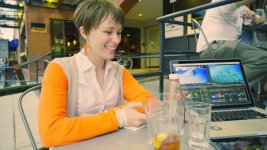
A7s sample footage

I had a go at grading this slog2 clip. Once again I made a point of not spending too much time with the clip: I allowed myself 5 minutes and followed my usual workflow for 5N footage: curves+levels, then WB+MB_Mojo. Then I added 200% saturation, because Kholi wants to see poppy pictures :)
(I would have shot with much more saturation in-camera, adding it in post is just asking for image issues to pop up)

a7s_dugdale.jpg
 
No, no, I didn't shoot this, I'm still 6000 Km away from my a7s. It was shot by Dave Dugdale using standard PP7 settings, that's why I had to boost the saturation so much in order to get a poppy image.
 
I took a crack at Dave's footage a few days ago. The levels are too low and the saturation could come up but I had fun with it.
euzUtwW.jpg
 
Cyork I realy like your grade on the dave dugdale clip. It has a nice matted and natural look to it. And it looks like you did a great job on the skin tone. Can you tell what was your grading process on this.
 
Cyork I realy like your grade on the dave dugdale clip. It has a nice matted and natural look to it. And it looks like you did a great job on the skin tone. Can you tell what was your grading process on this.

Filmconvert (pattern forming here lol) F55 sgamut lut. Then in FCPX I attacked the orange shirt and brought it down. Did another key on her face and did some fine saturation adjustments to try and get the Low, mid, high saturation balance right. Then an overall adjustment to flatten it, film it up a bit. I think it wouldn't work for some clients though. More lift, appearance of overall pop.
 
I mean the monitor you're grading with.
I calibrate all my monitors with an old spyder2express. I know that orange is super strong, but the color channels are not blown. My guess is that it was super orange in the real world to begin with. You could try to isolate it and bring it down but that is post work, I don't want my camera to do that for me.

BTW I also like cyork's grade better than mine. I just wanted to have a quick go at going for a poppy image, starting from standard PP7.
 
The matte gauze is an inherent feature of S-log on the A7s. It can make skin look very flat and lifeless if the light's not hitting it just right. I'm kinda fighting the highlights to liven up the skin. Underexposure makes the situation worse. Something to be wary of. There might be a setting in S-log that dials back on the gauze a bit (Kholi?), I like it but I think it's probably been tuned more for hard light.
 
Quick dirty test. Even though I had the IS on, that 70-200 was a heavy mofo. Didn't have sliders, tripod or anything with me. I wanted to do a quick test to see DR inside a dark shop. The last shot was a crazy 51,800 iso.

https://vimeo.com/101189782
pw: slog2test
 
The matte gauze is an inherent feature of S-log on the A7s. It can make skin look very flat and lifeless if the light's not hitting it just right. I'm kinda fighting the highlights to liven up the skin. Underexposure makes the situation worse. Something to be wary of. There might be a setting in S-log that dials back on the gauze a bit (Kholi?), I like it but I think it's probably been tuned more for hard light.


Hey, you're going out of the HDMI port right? You should try recording simulatenous to a card to see if you experience the same curve going out to HDMI.

I have a feeling that certain settings doesn't hit HDMI, and that's why you're getting blue noise as well (of course).

The problem is one that Paulcurtis mentioned, because it's no longer an true SLog2 profile, you don't have anything to delog it, and you have to define the curve yourself.

Going straight to the card, if you're using my setup, try flopping over the log panel in R11 and defining your range with the settings I mentioned in that PicPro thread ( I thin Low Range sits at .250 and high range at .750). After you've defined your own curve, use LGG to refine contrast, and of course the actual contrast dials (contrast/pivot)

One other thing... Noise Reduction is something you just kinda have to do when you have a great image. Even I forget this, but going back to the A7S / 4K RAW comparison, just doing a quick Neat Video pass on the 4K video cleaned up the 4K RAW DNG stuff to the level of the A7S, and I got to keep the insane amount of color depth, sharpness/detail, etc.

Going out of the HDMI port's going to give you far more noise... just a heads up.
 
Last edited:
I had a go at grading this slog2 clip. Once again I made a point of not spending too much time with the clip: I allowed myself 5 minutes and followed my usual workflow for 5N footage: curves+levels, then WB+MB_Mojo. Then I added 200% saturation, because Kholi wants to see poppy pictures :)
(I would have shot with much more saturation in-camera, adding it in post is just asking for image issues to pop up)

View attachment 89119

xD I do like poppy. I don't thin kthe original S-Gamut can handle it at all, though. You really have to use Impulz or Film Convert to mute bounced hues. It wouldn't be such a big deal if it didn't affect skin so much, but it's jumping around in specular all over the place. =[

Both Impulz and Film convert will work better with defined, separated images. I'd rather start with this any day than fighting my way out of the yellow casts. THat's just me!
 
Hey, you're going out of the HDMI port right? You should try recording simulatenous to a card to see if you experience the same curve going out to HDMI.

I have a feeling that certain compression doesn't hit HDMI, this is also likely why you've got an excess of blue channel noise.

One other thing... Noise Reduction is something you just kinda have to do when you have a great image. Even I forget this, but going back to the A7S / 4K RAW comparison, just doing a quick Neat Video pass on the 4K video cleaned up the 4K RAW DNG stuff to the level of the A7S, and I got to keep the insane amount of color depth, sharpness/detail, etc.

Going out of the HDMI port's going to give you far more noise... just a heads up.

I don't have a card but I'll get one in a couple of days. In the meantime I'm gonna try vanilla S-log, same shot, your PP with a bit less saturation, and the 5D raw too for comparison. Yeah the blue noise looks about the same shooting raw stills and I get rid of it with ACR so it makes sense to lose the chroma noise on the prores. It's barely noticeable at +1 ETTR but pretty intense at 0-0.5.

The problem is one that Paulcurtis mentioned, because it's no longer an true SLog2 profile, you don't have anything to delog it, and you have to define the curve yourself.

Yeah I got sick of trying to LUT stack, it was degrading the image, so I just built a 3 point curve and finished off with filmconvert, easy.

Did you come across a way to reduce the matte gauze while you were fiddling with your PP?
 
Back
Top