A7s sample footage

Last edited:
Just a quick clarification. Did you mean "It's *not* very noisy at all..."? Just asking... I'm trying to follow along with the thread, and I'm confusing myself, trying to absorb as much knowledge as I can.

It can be both, but mostly noisy when you're trying to save highlights, forcing everything else under.

When there's actually a really nice contrast ratio the camera's clean, and even in a lot of high contrast scenarios IMO It's still clean enough.

I'd like to get more comments on shadow banding, though. Seems like I'm trying to escape that while trying to save highlights.
 
At ISO3200 - using the sunny 16 rule.

ok. A while ago, stacking 3 ND's to reach 8-stops and the wrong IR cut on top of that, image was suffering. Having all the even numbered stop of the ProND's, hoping to reduce the need to stack ND + IR Cut in the future. Might need to consider the UV/IR Cut, instead of using the ProND2 losing a stop. 4x5.65's have some big gaps to fill above the IRND 1.2 (hot mirror) to get to 10-stop range, grrrr...
 
I was actually wondering about that. In any other gamma, it seems to be clipping in FCPX and Premiere but when I look at SLOG2 footage, it doesn't seem like there is anything being clipped. Good to know.
 
slog2 goes beyond 235, that's for sure
but starting at 23 is a drag --> down to 12.6M colors instead of 16.7M, that's a 25%-smaller color space (still 20% bigger than if it was 16-235, though, since that would mean 10.6M colors)

the proof is in the pudding, in any case: no matter what theory says, if I don't see banding in the footage, I'll be happy (and so far I see bad noise way before banding)
 
Last edited:
ok. A while ago, stacking 3 ND's to reach 8-stops and the wrong IR cut on top of that, image was suffering. Having all the even numbered stop of the ProND's, hoping to reduce the need to stack ND + IR Cut in the future. Might need to consider the UV/IR Cut, instead of using the ProND2 losing a stop. 4x5.65's have some big gaps to fill above the IRND 1.2 (hot mirror) to get to 10-stop range, grrrr...

I prefer stronger ND then stacking too many. Might have to buy a 2.1 (7 stops) for this cam. That said, I don't think shallow DoF, outside on a sunny day, in SLog2 will be the best use of this camera. It has many other strengths though...

Has anyone seen any IR tests??
 
I think i replied in a different thread but not sure everyone is reading everything.

The XAVC handling is really ropey at the moment in terms of what app is doing what. Internally AFAIK it's all YUV. Some process has to convert that to RGB.

In AE if you run 8 bit then you will see clipping. In float you will see >1.0. Nuke won't even look at XAVC which is a shame because that route means i can just grab raw data and do the conversions myself (because Quicktime simply cannot be relied on to do the right thing)

If you transcode XAVC to something else you don't know that the process isn't clipping (I tried one convertor but it clipped)

My head scratching issue is that the blacks in Slog2 with the A7s appear *higher* than they should. If the levels are 16-235 then it could be that i'm seeing the blacks not being normalised. So whilst the brights are superbright the blacks are not being scaled down. So 16 isn't becoming 0 and therefore the normal raised black of Slog (normally around 16) is now around 25-30.

This needs to be sorted in the decoder in the sense there is no point in pulling the blacks down *afterwards* because the data is the same. But in the interface between the app and the YUV data if the conversion was done correctly then it would yield as much data as possible. I notice in some YUV configurations negative luma in some cases.

So the wider question is how are people reading these XAVCs at the moment? Is Resolve 11 giving everything? (that's my next test)

cheers
Paul
 
I don't think Sony scale anything: neither blacks, nor whites. They probably use the full range (not legal range only; "legal" doesn't apply in this case anyway as noone would broadcast s-log in the first place), but let black fall where it falls by s-log definition. You can probably get the exact black level from the files (in theory, it should be 23, or 22, depending on rounding, but not 16). S-log curves simply aren't meant to be used with 8 bits.
Resolve seems to handle XAVC video alright, not sure about the audio.
 
I think i replied in a different thread but not sure everyone is reading everything.

The XAVC handling is really ropey at the moment in terms of what app is doing what. Internally AFAIK it's all YUV. Some process has to convert that to RGB.

In AE if you run 8 bit then you will see clipping. In float you will see >1.0. Nuke won't even look at XAVC which is a shame because that route means i can just grab raw data and do the conversions myself (because Quicktime simply cannot be relied on to do the right thing)

If you transcode XAVC to something else you don't know that the process isn't clipping (I tried one convertor but it clipped)

My head scratching issue is that the blacks in Slog2 with the A7s appear *higher* than they should. If the levels are 16-235 then it could be that i'm seeing the blacks not being normalised. So whilst the brights are superbright the blacks are not being scaled down. So 16 isn't becoming 0 and therefore the normal raised black of Slog (normally around 16) is now around 25-30.

This needs to be sorted in the decoder in the sense there is no point in pulling the blacks down *afterwards* because the data is the same. But in the interface between the app and the YUV data if the conversion was done correctly then it would yield as much data as possible. I notice in some YUV configurations negative luma in some cases.

So the wider question is how are people reading these XAVCs at the moment? Is Resolve 11 giving everything? (that's my next test)

cheers
Paul

Can anyone upload a decent XAVCs file please!!!!!!!!!! In Slog, Sgamut, and decent exposure in a high contrast scenario. That way we can check.
 
I prefer stronger ND then stacking too many. Might have to buy a 2.1 (7 stops) for this cam. That said, I don't think shallow DoF, outside on a sunny day, in SLog2 will be the best use of this camera. It has many other strengths though...

My use of the ProND1000 10 stop is there if needed in strong daylight, and more so, I have been stacking ND to 10+ stops for use of the Time Lapse and Star Trails intervalometer Sony apps installed in the A6000 for long exposures creating image trails, mostly at night with moving cars for the light effects. Hopefully no need to use the 10 stop or stack beyond that for normal 24p shooting with a camera like the a7S in S-Log2 (or variant thereof) having minimum ISO 3200.
 
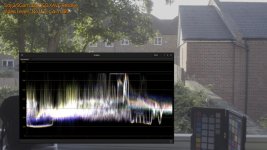
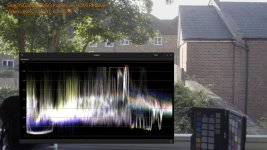
Here's an example

Exactly the same frame from XAVC and the HDMI output recorded via the O7Q. Exposure was 32% on the mid grey chip-ish. Done via the waveform on the O7Q.

You can see several things from this:

1. Is that the XAVC is quite soft, the ProRes holds more detail

2. In Resolve both of these come through as video levels. If you set them to data then the ranges are scaled even lower. So i think we can say for sure they are video based levels, at least from resolves viewpoint

3. The ProRes is showing very different clip points. I don't know if this is the O7Q or the output from the HDMI

4. The highlight handling appears quite different, there is a spike of red in the ProRes that could be used for highlight recovery and the general knee appears different.

This doesn't clear up anything at all though, just complicates matters i think.

The black blob in the bottom left is my black trap, a lens bag. This is supposed to be 0 black.

xavc.jpgprores.jpg

I have others with cine and various other options, i'm trying to squeeze in sorting them out in between actual real life work :)

cheers
Paul
 
detail.jpg

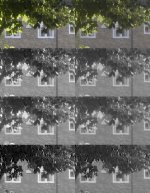
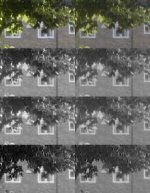
It appears that the source files are scaled here, so here's a close up for the detail viewpoint.

ProRes left, XAVC right. Then R, G and B below

You can see clipping issues in the B (being daylight clips first). The green is pretty similar but 4:2:0 vs 4:2:2 is pretty obvious in the channels.


cheers
Paul
 

Attachments

  • detail.jpg
    detail.jpg
    15.3 KB · Views: 0
I think you should set these clips to data levels in Resolve anyway, so that we can see the true values in the files. Having them imported as video levels simply forces Resolve to expand the 16-235 range to 0-255.

Edit: Also, maybe don't pull the gain for true white levels?
 
Last edited:
I think you should record in DPX for this test to avoid any issue related to video levels on prores. DPX is full range. Period.
 
Does not placing the hot mirror filter at the very end created unwanted reflections?

ok. A while ago, stacking 3 ND's to reach 8-stops and the wrong IR cut on top of that, image was suffering. Having all the even numbered stop of the ProND's, hoping to reduce the need to stack ND + IR Cut in the future. Might need to consider the UV/IR Cut, instead of using the ProND2 losing a stop. 4x5.65's have some big gaps to fill above the IRND 1.2 (hot mirror) to get to 10-stop range, grrrr...
 
It's worth putting pression on Sony to see if we could expect this to happen...
If not , my feeling is depend of the lighting situation i will have to switch thought different custom profile, "true" slog2 or not and struggling after to get a consistent look for all the shots later in grading.. Does it make to you or do you think you could use a custom profil for every situation? (off course, when you can not change the set lighting...)

vince*


ok. A while ago, stacking 3 ND's to reach 8-stops and the wrong IR cut on top of that, image was suffering. Having all the even numbered stop of the ProND's, hoping to reduce the need to stack ND + IR Cut in the future. Might need to consider the UV/IR Cut, instead of using the ProND2 losing a stop. 4x5.65's have some big gaps to fill above the IRND 1.2 (hot mirror) to get to 10-stop range, grrrr...

^ There may or may not be a technical limitation. I think the Bionz processor in the last-gen cameras (e.g. NEX-7 and FS100) could only do 8-bit, that's why they had to go for a different processor on the FS700. The new Bionz X in the a7s may share that hardware limitation. Or maybe it doesn't and it's just a marketing decision. I'm just saying that there may be an actual reason for the no-10-bit thing.
 
I think you should set these clips to data levels in Resolve anyway, so that we can see the true values in the files. Having them imported as video levels simply forces Resolve to expand the 16-235 range to 0-255.

Edit: Also, maybe don't pull the gain for true white levels?

I'm not a fan of Resolve at all, so perhaps this is a workflow thing. Resolve is awful when it comes to automagically messing with what you want (don't even get me started on the scopes).

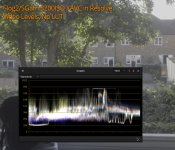
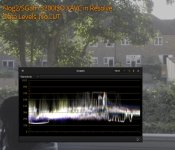
In the example below i have changed the clip attributes from Data to Video and that's what the result is. It seems the opposite of what i would expect. So i assume that

Resolve is taking data and scaling it to legal limits? Because this is actually video limits it is compounding that operation and you're seeing data levels scaled twice?

Recording DPX makes enormous sense actually, i will run off some DPX comparisons later on.

videolevels.jpgdatalevels.jpg

I gained the white down to see whether resolve was retaining superbrights. Depending on the format it normally does, it maps 235 to 100 and so you have to gain down. This way i can see if there's hidden data.

cheers
Paul
 
Does not placing the hot mirror filter at the very end created unwanted reflections?
Hi Vincent. Reading my post, I must apologies as I have referenced two separate ND sets. The stacked ND actually tested was 82mm Tiffen 0.9 ND + Tiffen 0.9 ND + B+W 0.6 (all non-IRND) to reach 2.4 ND, 8 stops. I also added a Tiffen T1 once, rated up to use with 0.9 ND. I abandoned it, the three filters was already taxing on the detail. Thus committed to purchasing all the even stop numbered ProND for now. A6000 now with project partner as he prepares for India trip to collect various content for our project. He is an audio guy, so my testing was to write down intervalometer and camera settings to achieve various Time Lapse outcomes, simplify the process for him. I ordered more ProND for his trip, and will test again when those arrive.

As for stacking the 4x.5.65, not done that yet. I have Skier 0.9 and 1.2. 1.2 is max for Skier filter. If I want to use only 1 mattebox filter of preferred choice, the True ND filter, expensive, they have single 2.1 max. Then 1.8, 1.5, etc down. Camera and lens sets recently back from lens tech, testing the mattebox filters and stacking will follow soon. Can't comment on unwanted reflections. The Hot Mirror's are indeed reflective. Cautious to handle them thus far. Sorry if my post mixed up reference to the two different filter sets.

Edit: Not referring to an a7S. BMCC current camera setup.
 
Last edited:
I'm not a fan of Resolve at all, so perhaps this is a workflow thing. Resolve is awful when it comes to automagically messing with what you want (don't even get me started on the scopes).

In the example below i have changed the clip attributes from Data to Video and that's what the result is. It seems the opposite of what i would expect. So i assume that

Resolve is taking data and scaling it to legal limits? Because this is actually video limits it is compounding that operation and you're seeing data levels scaled twice?

Recording DPX makes enormous sense actually, i will run off some DPX comparisons later on.

View attachment 88926View attachment 88927

I gained the white down to see whether resolve was retaining superbrights. Depending on the format it normally does, it maps 235 to 100 and so you have to gain down. This way i can see if there's hidden data.

cheers
Paul

Resolve doesn't scale anything if the source is interpreted and imported as data levels; what you see is what you have in the file, no need to pull down whites there is nothing else up there. If it is interpreted and imported as video levels the source range is expanded from 16-235 to 0-255 (0-1023 in scopes); that's also what your two last screenshots show - the video levels import increases contrast due to the expansion of the legal range. And in the case of video levels interpretation of a source you can indeed have invisible whites and blacks (below 0 and above 1023 on the scopes). I'd say Resolve handles the video/data levels thing in a robust and predictable way unlike other applications.

Curious to see the DPX files though.
 
Back
Top