A7s sample footage

I'm to excited. I was a little nervous at first looking at all these super animated color graded videos, but straight out the box with the slog 2 and that cinematic motion cadance I knew this would not be going back to b&h no time soon.

Great to hear about the cadence, it's an area that Sony has failed in previously, the FS100 was particularly bad. It was a concern with the high rolling shutter.
 
I think a lot of times when i'm seeing footage on the web with real video like motion it has morento do with people adjusting shutter to compensate shooting in brightness. However I could never put a finger on why my canon 7d had a nicer motion blur than my 5d mark 2.
 
Great to hear about the cadence, it's an area that Sony has failed in previously, the FS100 was particularly bad. It was a concern with the high rolling shutter.
May i ask, what were the bad the results produced by the FS100 in particular?
 
The FS100 has no "real" cinegammas with curves for a smooth highlight rolloff.
It just has the picture profiles with knee adjustments - which can be seen in
particular situations.
You have to adjust your profile according to the shooting situation you're in.
If you do that properly, the FS100 still can deliver one nice HD footage, that
you'll never see from the likes of 5DIII.
It's more detailed, has less RS/jello and comes with full XLR audio section and
batteries for a whole shooting day.

Cinegammas would help a lot - but won't come. The F3 has the same sensor but
totally different A/D electronic, cinegammas, s-log and better codec and delivers
a really nice HD footage.

I don't know a camera yet, which delivers a log-a-like footage in 8bit that is still
nice after delogging. LOG means a very complicated curve, that compresses some parts
of the input gamma/dynamic much stronger than others.
It has to be exposed differently (middle gray much darker than usual) and brought back
into a normal gamma in post. 8bit just isn't enough for this type of work naturally.

Even with the FS700 or the F3 i always use tweaked cinegammas when working in 8bit.

It might be just me, but slog2 (which is extremely flat) won't be used that much by me
as long it's just 8bit. Dynamic range isn't all - it's just one part of the whole technical
picture quality...
 
Found some data analytics on performance of raw files.

http://legault.perso.sfr.fr/sony_a7s_measures.html

The DR bump at 3200 iso is pretty clear.

Interesting.

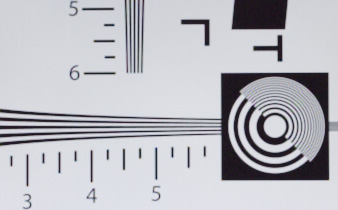
And another technical test: slashcam put the a7s against some test charts and found that the 60p and 120p modes have even more aliasing/moire than the 24p APS-C mode.

The FF 24p mode is pristine and super sharp; we already knew that, but look at this chart test:

a7s 24p FF
1265-ISO340_Sony_A7s_Fullframe_24fps-30fps-ISO340_Sony_A7s_Fullframe_24fps-30fps.jpg


5D3 RAW FF:
1155-ISO340-ISO340.jpg


5D3 H264:
camcorder-testergebnisse_testbilder_testbild_iso_klein_263.jpg
 
So 60p in APS-C is better than 60p FF. Cool I can dig that. That's a relief because 60p FF looks really bad.

APS-C actually looks better than the MK3 raw :Drogar-BigGrin(DBG)
 
So raw is actually 12-bit in a 14-bit file? Weird.
DXOMark test doesn't show a bump at 3200 though (could be due to different measurement methods).
* different methods indeed, and they are not that accurate to begin with because measuring noise is not a simple task: I believe this difference is just measurement error and copy variation
* the camera has 14-bit ADCs, then a near-log curve is applied and a 12-bit file is saved; if the curve is well designed you're not losing anything here, 12-bit log is close to perfection if you ask me

So I worked out how to fix the rolling shutter http://silkgimbal.com :)
I'm building a light-and-small one-axis gimbal to put on top of my flycam :)
 
Last edited:
* different methods indeed, and they are not that accurate to begin with because measuring noise is not a simple task: I believe this difference is just measurement error and copy variation
* the camera has 14-bit ADCs, then a near-log curve is applied and a 12-bit file is saved; if the curve is well designed you're not losing anything here, 12-bit log is close to perfection if you ask me

Sony use 12-bit non-linear raw in a lot of their cameras. What's strange is 12-bit data in a 14-bit file.
 
Well, that's weird indeed, but I guess it's a metadata thing, it must be a 12-bit file, I don't think Sony would be making the file bigger than it needs to be.
 
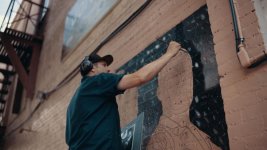
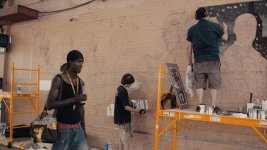
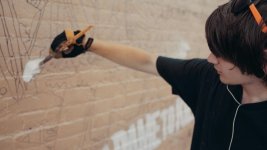
Some frame grabs from some shots I grabbed downtown today. SLOG2, Filmconvert, Orisiris with grain. Pretty dang satisfied and we haven't even scraped the surface with any good custom profiles yet! (I forgot to compensate for the highlight/shadow clipping so there's definitely a little more there to mine in post)
mural painter 2 copy2.jpgmural painter 3 copy2.jpgmural painter 5 copy2.jpgmural painter copy2.jpg
 
Some frame grabs from some shots I grabbed downtown today. SLOG2, Filmconvert, Orisiris with grain. Pretty dang satisfied and we haven't even scraped the surface with any good custom profiles yet! (I forgot to compensate for the highlight/shadow clipping so there's definitely a little more there to mine in post)

How are you combining film convert and Osiris? Do you use a specific camera setting in FC and then plug an Osiris LUT after? I'm still trying to find the best way to treat the Slog shots. Those grabs look pretty amazing.
 
How are you combining film convert and Osiris? Do you use a specific camera setting in FC and then plug an Osiris LUT after? I'm still trying to find the best way to treat the Slog shots. Those grabs look pretty amazing.

Thanks!

Yeah, the hierarchy in FCPX does change the look a bit (experiment with that) but that's exactly what I do. Filmconvert then Osiris. Dial/tweak to taste. I think lowering the highlights in colorboard brings back the clipping but I can't tell if Film Convert is seeing the clip before or after that adjustment. Need to experiment a bit more.
 
Cyork, thanks for posting those great looking images.
They have that "dry" quality that I like from the BlackMagic cameras, but richer. The A7s is growing on me...
Now, the Wi-fi transmission of live images sounds almost too good to be true, does it mean that I could use an iPad as a monitor while someone else operates the camera? Does this work when the camera is actually recording internally?
 
Cyork, thanks for posting those great looking images.
They have that "dry" quality that I like from the BlackMagic cameras, but richer. The A7s is growing on me...
Now, the Wi-fi transmission of live images sounds almost too good to be true, does it mean that I could use an iPad as a monitor while someone else operates the camera? Does this work when the camera is actually recording internally?

The transfer function isn't a live transfer. It's after you record (from what I've discovered). However, there is another interesting feature that could be mined to use an iPad or any smart phone as a wireless monitor. It's in the apps tab. It's called Smart Remote. It allows you to control the camera from a distance (through a wifi network) and let's you see the image while recording. It doesn't keep up with 24 fps but I think it could still be useful for clients or directors. The only problem is that the person with the phone now has control over the camera. If that part of the app could be turned and it could be used only for monitoring, I think I would make use of it.
 
The transfer function isn't a live transfer. It's after you record (from what I've discovered). However, there is another interesting feature that could be mined to use an iPad or any smart phone as a wireless monitor. It's in the apps tab. It's called Smart Remote. It allows you to control the camera from a distance (through a wifi network) and let's you see the image while recording. It doesn't keep up with 24 fps but I think it could still be useful for clients or directors. The only problem is that the person with the phone now has control over the camera. If that part of the app could be turned and it could be used only for monitoring, I think I would make use of it.

^ This! I installed this app from Sony into the A6000 last week. Unfortunately the A6000 is one of the models not supporting the movie mode, expected yet an amazing AU$825 camera with lens. I was thinking, a7S would likely have the ability to live view wi-fi monitor to iPad, or the like, in movie mode. Only two weeks ago the app was updated to work in movie mode for some models. The A6000 works in stills mode, still a great and useful feature for take discrete shots or to not touch the camera to trigger a shot. Sends a proxy photo back to the iPhone for reference, to share on the web. The wi-fi on the a7S in movie mode, if it works, so useful for all the obvious reasons. Not sure if latency would be too high for a wireless follow focus operator to reference. Great for director monitor, etc. Oh, and the Time Lapse and Star Field apps are both handy, considering the price. YMMV.
 
Last edited:
Back
Top