7D vs zoom H4 and H4n sync test

J Davis

Veteran
I've been on non audio shoots so its only now I'm finally getting around to this test.

This was on an 11 minute 1080p24 clip using a clapper board. Card was sandisk extreme IV udma 8gig.

length on the time line between peaks from clapper board was 15689 frames
zoom audio file was too long by 8 frames

so time stretch is 99.9% same as for GH1 and 5DM2

EDIT: my test is with zoom H4
for zoom H4n test results see post 15
 
Last edited:
Weird...it was thought that stretch was due to 5D shooting straight up 30.0000p, instead of 23.976p, right? Wonder what's causing this.
 
It's my belief the fault is with the clocks on the zoom
remember I got the same results with the GH1? (link)

As a control for this 7D test, I had my laptop recording at 48khz at the same time. Later tonight I will drop that file on the timeline to compare.
 
I've never had any sync slip using my D90 and Edirol HR09. If I ever get my 7D from Amazon, I'll test with the Roland. This could be a problem with the Zoom, huh?
 
This is a problem with the sync clock on the zoom h4. It drifts I believe about 2 frames everyone 2 minutes, but don't quote me on that. You can google it and find a lot of topics on it.

The Zoom H4N has fixed this problem according to many of the users and the company.

I use my regular h4 and usually can get it synced up pretty well, though I haven't done very long shots.

Best,
Andy
 
The Zoom H4N has fixed this problem according to many of the users and the company.

I'm not sure they have. The zacuto vid showing the test between the 5Dm2 and the zoom H4n reported the same error rate and suggested the same stretch 99.9% as the solution


source link ---> zacuto vid
 
I'm not sure they have. The zacuto vid showing the test between the 5Dm2 and the zoom H4n reported the same error rate and suggested the same stretch 99.9% as the solution

But seeing as the 5Dm2 is shooting 30fps, not 29.97 it seems like some adjustment would be necessary no matter what, doesn't it?
 
But seeing as the 5Dm2 is shooting 30fps, not 29.97 it seems like some adjustment would be necessary no matter what, doesn't it?

I don't think audio is affected unless you time stretch.
I remember during my GH1 days comparing a clip before pull down and after pulldown and audio was the same.

I would think a 29.97 and a 30 would have the same audio as the duration of each clip would be the same if measured in seconds.

EDIT
sorry 4 brief expl.
also I'm at work now so cannot verify or test
 
I'm running a 7D 1080/24 and H4n test right now.
Should have something in the next hour or so, by the time I get around the checking/posting.
 
I'm running a 7D 1080/24 and H4n test right now.
Should have something in the next hour or so, by the time I get around the checking/posting.

Thanks. Very glad to have someone double check my results.

BTW - I was testing with a zoom H4 not H4n but I think their clocks are the same.
When I dropped the .mov on the timeline I selected the FCP option to convert timeline settings to match clip.
 
Looks solid as a rock to me - not even one frame of slippage seen in the FCP timeline.
The waveforms from the 7D and the H4n lined up perfectly.

7D recording 1080/24
H4n using the built-in mics recording in Stereo Mode at 48k/16bit.

The audio on this video is from the Zoom - I muted the 7D audio on the timeline.


So it seems to be that there are two things at play in past tests:
  1. It's possible the sync clock in the H4 has a tendency to drift, which seems to not be a problem in the H4n
  2. The 5Dm2 shooting at exactly 30fps as opposed to 29.97fps will cause sync issues with properly recorded audio,
    and will require a retiming of the audio file to sync up.
 
So, just for the sake of my understanding.

If I have a 7D and an H4n, I'm good to go.

If I have a 7D and an H4, I need to time stretch because the H4 is slow.

If I have a 5D and an H4n, I need to time stretch because the 5D does XX.000 frame rates.

Right?
 
I'm not sure they have. The zacuto vid showing the test between the 5Dm2 and the zoom H4n reported the same error rate and suggested the same stretch 99.9% as the solution


source link ---> zacuto vid

That is because the 5D shoots at 30fps, not 29.997


I don't think audio is affected unless you time stretch.
I remember during my GH1 days comparing a clip before pull down and after pulldown and audio was the same.

I would think a 29.97 and a 30 would have the same audio as the duration of each clip would be the same if measured in seconds.

It isn't because of the audio, its because of the video. The FCP/Premiere/Avid timeline is 29.997 while the video is 30.00. This is what causes the slippage with a 5D/H4n set up.
 
Looks solid as a rock to me - not even one frame of slippage seen in the FCP timeline.
The waveforms from the 7D and the H4n lined up perfectly.

7D recording 1080/24
H4n using the built-in mics recording in Stereo Mode at 48k/16bit.

The audio on this video is from the Zoom - I muted the 7D audio on the timeline.


(video will be embeded as soon as vimeo does it's thing.... about 30 minutes from now)


So it seems to be that there are two things at play in past tests:
  1. It's possible the sync clock in the H4 has a tendency to drift, which seems to not be a problem in the H4n
  2. The 5Dm2 shooting at exactly 30fps as opposed to 29.97fps will cause sync issues with properly recorded audio,
    and will require a retiming of the audio file to sync up.

You're sure? How long was the clip you tested?
Is it a voice test you are doing? Or do you have a really high (clapper board) peak at start and end of the clip?

wow ... now I want to repeat my test tonight to verify I didn't make a mistake
 
Last edited:
You're sure? How long was the clip you tested?

A bit over 10 minutes.
The video is now embeded above.

Is it a voice test you are doing? Or do you have a really high (clapper board) peak at start and end of the clip?
Just me clapping.
Nothing too complicated - but like I said, the waveforms matched up perfectly - and the peaks on those claps were literally 1 frame in FCP, so any slippage would have been very obvious to notice.
 
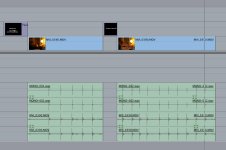
Here is a snapshot of the timeline, in case you were curious.
The audio was synced up at the start of the clip... and the middle section was deleted (for obvious reasons).
The end section was left exactly as it was.
 

Attachments

  • AudioSync.jpg
    AudioSync.jpg
    104.3 KB · Views: 0
Back
Top