Hi
I've shot a musicvid on the hvx200. using 720pn PAL on 25fps and 50 fps. Now i've edited it and want to upload a small sized quicktime for my hompage. Like 30 mbytes.
I use final cut pro 5.14.
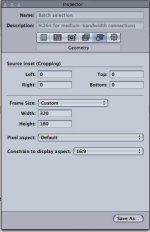
My problem is i can get a nicw qt conversion if i use one of the export quicktime conversion presets with 16:9 ratio. But they are all huge. If i try to make it smaller it gets squeezed 4:3 and really nasty looking.
Does anyone have experience in this area? How do i make a small 16:9 qt out of my material.?
I've shot a musicvid on the hvx200. using 720pn PAL on 25fps and 50 fps. Now i've edited it and want to upload a small sized quicktime for my hompage. Like 30 mbytes.
I use final cut pro 5.14.
My problem is i can get a nicw qt conversion if i use one of the export quicktime conversion presets with 16:9 ratio. But they are all huge. If i try to make it smaller it gets squeezed 4:3 and really nasty looking.
Does anyone have experience in this area? How do i make a small 16:9 qt out of my material.?