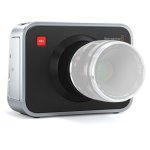
4k bmpcc

Sound Devices has long had mini xlr/TA3 connectors on their mixers and recorders to allow more outputs and interconnects in a packed form factor.

Yeah, my Sound Devices 552 has full size XLR inputs but mini XLR for the direct outs (but full size XLR for L/R output mix).

'Pocket' is just a continuation of the branding.

Hundreds of thousands have begged for a Pocket II/BMPCC II for years, and even Grant - during the press conference - said he was asked so much about it every single time he spoke with people, so it was an obvious choice to include it in the name for its familiarity.

Even the first one was never meant to be taken literally. Like, really...what kind of camera is going to fit in a normal pants pocket besides a phone or compact point-and-shoot with a retracting lens.

Even though you could squeeze the BMPCC with a pancake lens if you needed to, its like come on now.


Nailed it.
 

Attachments

  • Untitled_1.3.2.jpg.e594e133cf24fee7597b6cd53a79be8a.jpg
    Untitled_1.3.2.jpg.e594e133cf24fee7597b6cd53a79be8a.jpg
    61.5 KB · Views: 0
Last edited:
The only mystery about this camera to me is the other record button on the front. I feel like maybe I'm missing something, but they seem to imply from one video I saw that it's for ease of use when vlogging. But there is no flip out screen, so who is going to be hand holding this thing for vlogging? On top of that, it's not like the first record button is in the back, it's on the grip, probably closer to the hypothetical vlogger than the second record button that is between the grip and lens mount. So I'm struggling with the logic here.
 
Did seem very strange to me to see that Grant talked up its selfie/vlogging abilities, yet this is a camera which doesn't have a screen that can face you!! :-/
 
Can you connect with your iphone or android device remotely to this camera? If so, then it would be good for vlogging as well as for remotely viewing and operating.
 
The only mystery about this camera to me is the other record button on the front. I feel like maybe I'm missing something, but they seem to imply from one video I saw that it's for ease of use when vlogging. But there is no flip out screen, so who is going to be hand holding this thing for vlogging? On top of that, it's not like the first record button is in the back, it's on the grip, probably closer to the hypothetical vlogger than the second record button that is between the grip and lens mount. So I'm struggling with the logic here.

There had to be some interesting internal discussions when the feature list included that button but did not include a flip screen. That button leaps out as being so... what's the word........ stupid, as compared to all the other well thought out features of this camera. Obviously, price point trumped the flip screen. Still, this camera is so cool. I tip my hat to BMD for being the company that really understands the term thinking outside the box.
 
I don't doubt it could be an oversight as BM has been a bit wacky over the years, but keep in mind they also heavily update their cameras with firmware and it could end up being a programmable button if nothing else (besides recording).

The original BMCC (and BMPC) has it in a similar spot so might just be a familiar engineering layout.

BMCC.jpg
 
Indeed, no one is handing them any awards for industrial design. I don't like to criticize equipment for looks, but wow, that thing is something special.
 
Andrew Julian (the creator of that video) IIRC (I spoke to him 5 years ago about it on Vimeo) edited that footage in Lightroom, which is what many of us did back then as Resolve was barely usable, ha.

So you essentially processed one DNG frame like a photo with insane RAW control and just copied and pasted the settings to the others and exported everything as 12-bit stills. Then you'd take that into your NLE and make 'compound clips' (or whatever anyone else calls them).

This was an extremely tedious and long process that often crashed, but the results were worth it.

There was truly nothing like it.

And some BM people may now be ticked off at me for releasing these "secrets", haha.

(Even though I think that's what many Magic Lantern people do now too.)
 
Photoshop batch jobs on a sequence of still images has been a proper workflow for a long time, way before HD came into being. It is only natural that early cdng users would do the same thing to process the raw image information. Spit out a numbered sequence of TIFF or PNG and recombine it with the audio in your editor of choice. It was an all I frame workflow :laugh:
 
For sure...and what's going to happen when affordable stills cameras are eventually able to shoot 24/60 frames per second in high resolutions continuously in RAW?

Your video quality will be caught up to your stills quality and then all heck breaks loose, ha.

(I believe the RX10 IV does 24fps in 10 second bursts, but I believe in JPG only.)
 
"Photoshop batch jobs on a sequence of still images has been a proper workflow for a long time, way before HD"
Yep..I remember doing that deal with a blown pixel from a D30 (SD)
 
Andrew Julian (the creator of that video) IIRC (I spoke to him 5 years ago about it on Vimeo) edited that footage in Lightroom, which is what many of us did back then as Resolve was barely usable, ha.

So you essentially processed one DNG frame like a photo with insane RAW control and just copied and pasted the settings to the others and exported everything as 12-bit stills. Then you'd take that into your NLE and make 'compound clips' (or whatever anyone else calls them).

This was an extremely tedious and long process that often crashed, but the results were worth it.

There was truly nothing like it.

And some BM people may now be ticked off at me for releasing these "secrets", haha.

(Even though I think that's what many Magic Lantern people do now too.)

Wow that sounds relatively painful compared to the flexibility today of DaVinci Resolve.
 
Back
Top