
Navigation
Install the app
How to install the app on iOS
Follow along with the video below to see how to install our site as a web app on your home screen.
Note: This feature may not be available in some browsers.
More options
You are using an out of date browser. It may not display this or other websites correctly.
You should upgrade or use an alternative browser.
You should upgrade or use an alternative browser.
4 Track
- Thread starter Jim Simon
- Start date
I'm not calling the poster stupid, the idea is stupid. It's stupid because it's useless.
It's not only a safe assumption that I do have a use for the device I'm asking about (or I wouldn't be asking for it), but I detailed out that use in post 10.
Additionally, such devices do exist, further belying the "useless" claim. I'm simply asking if a lower priced device exists, something under $300 new.
The point Jim we're making is you've got a serious SERIOUS misconception going on here when it comes to your mental model of how time code actual functions in reality.
Many of us have repeatedly pointed this out to you over and over again in this thread.
But you stubbornness to put an ounce of effort into understanding what we're telling you means that you're doomed to run into problems in the future due to your misunderstanding of how time code is meant to work.
Many of us have repeatedly pointed this out to you over and over again in this thread.
But you stubbornness to put an ounce of effort into understanding what we're telling you means that you're doomed to run into problems in the future due to your misunderstanding of how time code is meant to work.
The point Jim we're making is you've got a serious SERIOUS misconception going on here when it comes to your mental model of how time code actual functions in reality.
That's not relevant, though. Use whatever term you wish, I'm asking for a sub-$300 device that can record a single 4 channel file with what Resolve interprets as timecode. Whether or not's it's actually timecode, I don't care. What I get as timecode from the BMPCC and Zoom H4n is sufficient for my meager needs, even if it's insufficient for greater needs.
Can you understand that?
That's not relevant, though. Use whatever term you wish, I'm asking for a sub-$300 device that can record a single 4 channel file with what Resolve interprets as timecode. Whether or not's it's actually timecode, I don't care. What I get as timecode from the BMPCC and Zoom H4n is sufficient for my meager needs, even if it's insufficient for greater needs.
Can you understand that?
I think the trouble some are having is understanding why you need what Resolve sees as "timecode" if you aren't syncing to anything. In my experience, if that timecode isn't referencing something else in order to sync sound with picture, it's pretty meaningless.
A lot of times understanding someone's issue and the helping them requires that we (as a group) have a thorough understanding of what one's needs are and how one is using equipment and why they want to do what they are doing. Right now, it doesn't seem like anyone understands the need for a time of day timecode that isn't referencing anything and saying "it just helps me, so that's why I need it" doesn't help us understand. If you were to say "well, I like to have it because it allows me to do 'x', 'y', and 'z'", and those things made sense, then we'd be able to further offer advice in a meaningful way. The reason is, if what you are doing isn't the most optimal way to get your desired result, the find folks on here can offer a better solution that you might not have thought of.
Right now what we are basically seeing is "I'm firm in my budget of $300 or less, and I need a 4 track poly file with timecode. The timecode doesn't need to reference anything other than internal time of day. I can't deal with two separate two track poly files or 4 separate mono files". The short answer to that is the product you are looking for doesn't really exist. You'll most likely need to increase your budget. If that isn't possible, then you'll have to make due with what is available right now. Based on the little time I've spent with Resolve 14, and knowing what I know about the existing recorders on the market (it's my job as a product specialist), I can safely say there are workable solutions in your budget, but you have to make some compromises. You can easily bring in a pair of two track poly files into Resolve and deal with it somehow. If you don't want to have to deal with an extra step, then lots of dealers of lots of options in terms of recorders for you to choose from that will do what you want, but at a higher price than $300.
TL;DR - You'll either need to make compromises in your work flow or increase your budget for a recorder.
I think the trouble some are having is understanding why you need what Resolve sees as "timecode" if you aren't syncing to anything.
Because it helps to know which clips pair up. That's all I want it for. Nothing more.
the product you are looking for doesn't really exist.
Well at least that's an answer. Thank you.
Because it helps to know which clips pair up. That's all I want it for. Nothing more.
But they are NOT paired up accurately if time code does not match. It is as simple as that.

Because it helps to know which clips pair up. That's all I want it for. Nothing more.
Jim, the cheapest recorder that offers everything you want is the TASCAM DR-701D at $500 new. It stamps TC and it records a poly WAV file. The TC clock, however, resets every time the unit is powered off, so if you want time of day you'll have to manually reset it every time you power up the recorder. Kind of a PITA, really.
On the plus side, it can sync to external TC through HDMI from some cameras, solving the clock reset issue.
If all you want TOD time code for is to have a way to visually confirm that your files match up, you're adding a whole lot of complication (and expense) for little return. I have done a lot of non-sync work, and there is a tried and true tool that makes quick work of file matching in post:
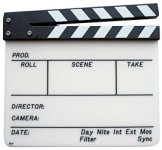
There are even useful versions in app form for your mobile phone or iPad.

Noiz2
Sound Ninja
It's not only a safe assumption that I do have a use for the device I'm asking about (or I wouldn't be asking for it), but I detailed out that use in post 10.
Additionally, such devices do exist, further belying the "useless" claim. I'm simply asking if a lower priced device exists, something under $300 new.
It is safe to assume that you think you have a need. But as many have pointed out what you say you want will not do what you think it will do.
The time stamp that pretty much every recorded puts on files is doing what you say you need. For reasons already explained it is pretty silly for a recorder to fill that TC field. You have said you have files that do it correctly from a number of recorders but I have files from some of those recorders and none of them show up as you have described.
Resolve doesn't need the TC and in fact having bogus TC would probably screw up the auto sync that it does by waveform.
But I will stop bothering you with reality.
You do probably have to find another forum to ask this on though because none of the professional sound people on this list seem to have an answer you want to hear.
Jim, the cheapest recorder that offers everything you want is the TASCAM DR-701D at $500 new. It stamps TC and it records a poly WAV file. The TC clock, however, resets every time the unit is powered off, so if you want time of day you'll have to manually reset it every time you power up the recorder. Kind of a PITA, really.
On the plus side, it can sync to external TC through HDMI from some cameras, solving the clock reset issue.
If all you want TOD time code for is to have a way to visually confirm that your files match up, you're adding a whole lot of complication (and expense) for little return. I have done a lot of non-sync work, and there is a tried and true tool that makes quick work of file matching in post:
View attachment 126030
There are even useful versions in app form for your mobile phone or iPad.
FWIW I have run Tascam DR-60 II for about 6 hours on a $10 usb battery designed for phone use, and the USB battery still had power left. Don't know if this is an option with the Dr-701D but maybe a relatively cheap option to leave it powered up all day?
Jim, the cheapest recorder that offers everything you want is the TASCAM DR-701D at $500 new. It stamps TC and it records a poly WAV file. The TC clock, however, resets every time the unit is powered off, so if you want time of day you'll have to manually reset it every time you power up the recorder. Kind of a PITA, really.
On the plus side, it can sync to external TC through HDMI from some cameras, solving the clock reset issue.
If all you want TOD time code for is to have a way to visually confirm that your files match up, you're adding a whole lot of complication (and expense) for little return. I have done a lot of non-sync work, and there is a tried and true tool that makes quick work of file matching in post:
View attachment 126030
There are even useful versions in app form for your mobile phone or iPad.
Not a great fan (unless you really *really* need triggering over HDMI) of the DR701D now in 2017 (was a great choice however when it first came out) as the Zoom F4 is only a hundred bucks more yet offers so much much more!
FWIW I have run Tascam DR-60 II for about 6 hours on a $10 usb battery designed for phone use, and the USB battery still had power left. Don't know if this is an option with the Dr-701D but maybe a relatively cheap option to leave it powered up all day?
Yes, you can do that with the DR701D
But they are NOT paired up accurately if time code does not match. It is as simple as that.
I understand. I also don't care. Knowing which clips go together is all I need. Syncing is done with audio.
there is a tried and true tool that makes quick work of file matching in post:
View attachment 126030
Not very practical for event work, though.
For reasons already explained it is pretty silly for a recorder to fill that TC field.
I'll accept that it's silly if you accept that it suits my needs.
none of the professional sound people on this list seem to have an answer you want to hear.
Dave Fisk and Alex H answered it well enough.
"You'll...need to...increase your budget for a recorder. "
"the cheapest recorder that offers everything you want is the TASCAM DR-701D at $500 new."
Thank you everyone.
Noiz2
Sound Ninja
Dave Fisk and Alex H answered it well enough.
"You'll...need to...increase your budget for a recorder. "
Thank you everyone.
Yes and I said that 61 posts ago, as did many more folks.
Noiz2
Sound Ninja
I will accept that you have a workflow and wether I think it makes sense or not it's what you want to do.
So this isn't for you.
For others that may come across this thread a few points should be cleared up.
Since it may be confusing to some, TC is a specific thing and what the OP is referring to are values some devices apparently stuff into that field. In that case it would be "Time Code", but free-run TC and unusable for all the things that TC is normally used for.
He seems to want to use that value as a way of knowing which files go together and that kind of works but a better way is to use the creation date since it contains the time and date and the TC field only has the Time of Day translated to a TC value.
He is using the Resolve "PluralEyes" like syncing to align tracks and not the TC.
The biggest problem with doing it this way is that it is completely nonstandard and generally speaking people and software will assume that if there is valid TC in a file that it is going to match the TC on the other files that go with it and in this workflow that is not the case.
So in Resolve you have to tell it to ignore the TC or it would be a mess. Like wise if you send it to an editor you need to tell them to ignore the TC because it's close enough that it will look like some setting is off and they will waste time trying to solve the issue that doesn't exist.
Personally I'm dubious that there are recorders that do this. I haven't found any but supposedly they do exist. In professional uses non referenced TC is worse than useless because of the problem mentioned above. If you are a total OMB it doesn't really make a lot of difference since you are the only one to deal with the files. But if you ever plan on working on bigger projects it's a bad workflow to get into.
The poly WAV issue is interesting and really another OMB issue. It makes perfect sense that that Resolve would want mono files and I'm guessing that it splits polly files if it is doing a waveform sync (not sure but the only way it would make sense). But in the workflow described it doesn't sound like the same sound would be on all the tracks, which would make waveform syncing problematic, at least for some tracks. The work around I guess would be to sync the tracks you can and then snap the corresponding tracks to the ones that did sync.
The reason it's a OMB issue is if you are going to sound post or even have a sound editor you know they will have lots of software to convert and transform just about anything to just about anything. It's one of the "costs of doing business" in sound post. You are always getting files that need to converted into something else.
The thing is that real TC would solve the above problem because the TC would sync between all tracks and it would not matter if the tracks were mono, stereo, or poly.
I will assume that the OP has actually got this to work for his needs.
To me it sounds like a workflow that has only been tested on paper because I can see a lot of places where it could fall apart, as in the board feed is different enough from what the camera picks up that you end up having to sync everything by ear. There were a lot of that kind of failure when PluralEyes first started being used. To get the software to work your tracks needed to be very similar to each other. It was a workflow that was not a replacement for TC but a way to replace the compressed often noisy audio that DSLR's had with the same track recorded on a better recorder. The "proper" workflow then was to feed the same audio to both the DSLR and the recorder. If you did that then it worked like magic. Second best was to match a better track to on camera recordings and that worked pretty well most of the time. But then folks started thinking they could record anything at the same time and the software would somehow figure it out and the whole workflow fell apart.
So if you have gone through this thread and decided that the OP's needs are yours I would test the set up a BUNCH before I tried it on a paying gig. The biggest change I would recommend is to use the creation time/date and leave the TC field blank unless you have real jammed TC, just to avoid confusion down the line.
So this isn't for you.
For others that may come across this thread a few points should be cleared up.
Since it may be confusing to some, TC is a specific thing and what the OP is referring to are values some devices apparently stuff into that field. In that case it would be "Time Code", but free-run TC and unusable for all the things that TC is normally used for.
He seems to want to use that value as a way of knowing which files go together and that kind of works but a better way is to use the creation date since it contains the time and date and the TC field only has the Time of Day translated to a TC value.
He is using the Resolve "PluralEyes" like syncing to align tracks and not the TC.
The biggest problem with doing it this way is that it is completely nonstandard and generally speaking people and software will assume that if there is valid TC in a file that it is going to match the TC on the other files that go with it and in this workflow that is not the case.
So in Resolve you have to tell it to ignore the TC or it would be a mess. Like wise if you send it to an editor you need to tell them to ignore the TC because it's close enough that it will look like some setting is off and they will waste time trying to solve the issue that doesn't exist.
Personally I'm dubious that there are recorders that do this. I haven't found any but supposedly they do exist. In professional uses non referenced TC is worse than useless because of the problem mentioned above. If you are a total OMB it doesn't really make a lot of difference since you are the only one to deal with the files. But if you ever plan on working on bigger projects it's a bad workflow to get into.
The poly WAV issue is interesting and really another OMB issue. It makes perfect sense that that Resolve would want mono files and I'm guessing that it splits polly files if it is doing a waveform sync (not sure but the only way it would make sense). But in the workflow described it doesn't sound like the same sound would be on all the tracks, which would make waveform syncing problematic, at least for some tracks. The work around I guess would be to sync the tracks you can and then snap the corresponding tracks to the ones that did sync.
The reason it's a OMB issue is if you are going to sound post or even have a sound editor you know they will have lots of software to convert and transform just about anything to just about anything. It's one of the "costs of doing business" in sound post. You are always getting files that need to converted into something else.
The thing is that real TC would solve the above problem because the TC would sync between all tracks and it would not matter if the tracks were mono, stereo, or poly.
I will assume that the OP has actually got this to work for his needs.
To me it sounds like a workflow that has only been tested on paper because I can see a lot of places where it could fall apart, as in the board feed is different enough from what the camera picks up that you end up having to sync everything by ear. There were a lot of that kind of failure when PluralEyes first started being used. To get the software to work your tracks needed to be very similar to each other. It was a workflow that was not a replacement for TC but a way to replace the compressed often noisy audio that DSLR's had with the same track recorded on a better recorder. The "proper" workflow then was to feed the same audio to both the DSLR and the recorder. If you did that then it worked like magic. Second best was to match a better track to on camera recordings and that worked pretty well most of the time. But then folks started thinking they could record anything at the same time and the software would somehow figure it out and the whole workflow fell apart.
So if you have gone through this thread and decided that the OP's needs are yours I would test the set up a BUNCH before I tried it on a paying gig. The biggest change I would recommend is to use the creation time/date and leave the TC field blank unless you have real jammed TC, just to avoid confusion down the line.
Last edited:
Can you say clapper?
We've covered that.
I have done a lot of non-sync work, and there is a tried and true tool that makes quick work of file matching in post:
View attachment 126030
There are even useful versions in app form for your mobile phone or iPad.
Not very practical for event work, though.