FS7: 4.3 update to record ISO in Cine EI --- BUT WHERE IN MENU!?!?!?!?!

Marshallarts

Well-known member
Over the past week I've WASTED countless hours trying to find this. This update came out over a year ago.... In EVERY webpage (except one, wait for it...) that even mentions this update, NONE actually say where to activate this capability. Even Alister Chapman's blog mention of this update doesn't actually say where to f*cking activate it!

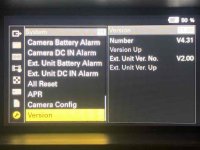
What am I missing. I have two FS7's, one v4.31, one v4.32

Now I did finally find ONE website that mentions something. Here: https://www.visuals.co.uk/visualsblog/fs7-fs7ii-firmware/

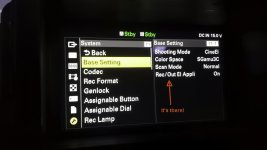
It says: "This new function is turned on and off in the menu under System – Base Settings – Rec/Out EI Applied when the camera is set to CineEI mode."

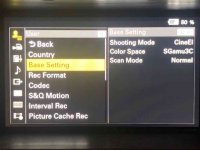
But guess what.... There is no "Rec/Out EI" under Base Settings in the menu...

WHAT IS GOING ON!!?!!??!

Times like this remind me why I hate Sony so much.

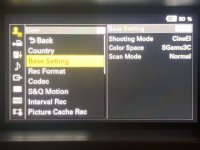
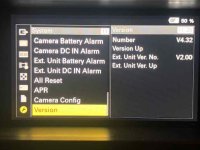
EDIT: So it appears I am the owner of not one but TWO cameras that are both past 4.3 and yet this option does NOT appear in my menu.... Very interesting.... (see pics below)
 
Last edited:
It's there LL! If it isn't I would be checking your firmware :)

Chris Young

Rec-Out-EI-denoise.jpg
 
Last edited:
That is an odd one?

I'm on 4.31. This REC/OUT option was introduced on v4.30 originally. 4.32 addressed the issue with the new 120 and 240 GB XQD cards not being recognized correctly in the in the FS7 Mk I. It was firmware 1.2 for the Mk II from memory. It not showing doesn't make sense to me. I really think this would need to be shown to a Sony service dept. Just a thought. Have you tried accessing this menu with a VF LUT applied, like the 709/800 one?

Chris Young

System EI menu upgrade.jpg
 
Okay, So it appears my two cameras are both an anomaly. Yes, I just tried an ALL RESET and it did not solve my issue. And yes, I went ahead and tried with my Monitor LUT ON and OFF. Still not there. I think I will be reaching out to Sony to tell them.

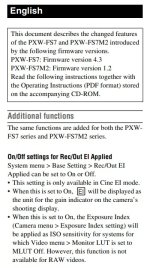
cyvideo, I don't know where you found that "additional functions" instruction for that update. I've wasted hours trying to find anything, and specifically anything provided by Sony. Even their most recent manual available for download doesn't include this. Talk about frustrating!!!

Also cyvideo, in my efforts to find anything I've stumbled across many frustrated people regarding what they call a useless update. Because I find Sony so frustrating I was hoping you could confirm and/or critique some thoughts of mine:

Isn't this Rec/Out EI setting doing the exact same thing as burning in an SLog3 LUT using "SDI1 & Internal Rec"? (I just shot a test and yes, the recorded clip did show the ISO changes. I had the monitor LUT off so I didn't see the changes until after playback.) I'm confused why Sony needed to add this functionality as a different menu option?

As for its usefulness, wouldn't this be a good example (Unless I'm mistaken I think it's fairly obvious and simple):

I recently shot some two camera interviews. For one shot we used a different aperture (could be for any reason, intentional or not). At two different apertures in the same lighting situation, without this capability you would have two different exposures since the ISO is locked at 2000. This is undesirable from my standpoint because I don't trust post. I want them to be able to use the same LUT and would prefer to change ISO to compensate for aperture differences so long as my waveform is good and I'm getting the dynamic range I want.
 
Marshallarts, You should have another menu item for base setting in the system menu . For some reason the EI thing is in there but not when it shows up in in the user menu .
The point of it i believe is similar to when you burn in the L:UT but you are not burning in, in this case its just changing the sensitivity on Log recording to make it easier for some people in post.
 
Last edited:
Okay, So it appears my two cameras are both an anomaly. Yes, I just tried an ALL RESET and it did not solve my issue. And yes, I went ahead and tried with my Monitor LUT ON and OFF. Still not there. I think I will be reaching out to Sony to tell them.

cyvideo, I don't know where you found that "additional functions" instruction for that update. I've wasted hours trying to find anything, and specifically anything provided by Sony. Even their most recent manual available for download doesn't include this. Talk about frustrating!!!

Also cyvideo, in my efforts to find anything I've stumbled across many frustrated people regarding what they call a useless update. Because I find Sony so frustrating I was hoping you could confirm and/or critique some thoughts of mine:

Isn't this Rec/Out EI setting doing the exact same thing as burning in an SLog3 LUT using "SDI1 & Internal Rec"? (I just shot a test and yes, the recorded clip did show the ISO changes. I had the monitor LUT off so I didn't see the changes until after playback.) I'm confused why Sony needed to add this functionality as a different menu option?

Now I am getting confused. Your pictures threw me off. After checking with Sony downloads the latest version for the FS7 Mk I is v4.31. THERE IS NO v4.32 listed in the Sony's downloads. So what is this v4.32 you have showing on one of your cameras. Where did it come from? v4.31 fixed the later 120 and 240GB XQD issues. I think a trip to Sony land is in order sad to say.

The 'additional function's image I posted was a grab from the v4.31 manual that came part and parcel with the v4.31 firmware download? Did that not come with your download?

Re this REC/OUT function. Trying to simplify it in my mind.

Without engaging it if you want to over expose by let's say one stop how do your judge it? In the normal Cine EI mode a one stop over exposure would place your Waveform peaks NOT at the recommended 61 IRE. The peaks for a one stop push would need to be at about 73 IRE, and a two stop over push is up to about 85 IRE. That is the respective peak white levels on the Waveform for one and two stops over with S-LOG3 Cine. With REC/OUT engaged regardless of your whether you have selected Base 2000 ISO or an under rated 1000 ISO, one stop, or a 500 ISO, two stops, you DO NOT use higher waveform levels. You adjust your peaks for the proscribed 61 IRE.

Regardless of ISO rating all white peaks should be based on 61 IRE when using REC/OUT. The end result effect is the same in either workflow. You over expose your recording by one or two stops. It's just that with REC/OUT engaged you only have one set of peak white values to aim for. That is 61 IRE. Without REC/OUT engaged you need to use those two additional Waveform levels to judge your one or two stop over recording. They are as I said about 73 IRE for one stop over and 85 IRE for two stop over. I find working to 61 IRE all the time for peaks regardless of the camera's ISO rating is just an easier more consistent way of judging your peaks. That is of course if you want to work to the recommended 61 IRE peaks of S-LOG3 Cine.

Chris Young
 
Hi Chris,


I believe all you're saying is correct, except I'm confused when you wrote "In the normal Cine EI mode a one stop over exposure would place your Waveform peaks NOT at the recommended 61 IRE" because with Rec/Out EI "OFF" then in this normal Cine EI mode you do not see any ISO changes reflected in the waveform. So this would be incorrect. That is unless you active the LUT using the P%: SLog3 setting and make sure the Video Signal Monitor is assigned to the the SDI source that has the LUT activated. This is all too confusing, and in my opinion shows just how over-engineered Sony's are.

And in the end wouldn't this Rec/Out EI be the same as using "SDI1 & Internal Rec" under monitor LUT and choosing the P5 SLog3 LUT that's preloaded? Unless the whole point of Rec/Out EI is to allow an additional Monitor LUT to be used for monitoring that would otherwise be used for this ISO burn in. Again, unless I'm wrong, this is Sony being ridiculous and overcomplicating what should be simple.

Regarding my Version being 4.32, I also noticed they are only at 4.31 on their website!!!!? I have NO idea how or why mine says 4.32. I believe it was updated on a rental I had it out for. So weird
 
Last edited:
This is my third attempt to respond to LennyLevy, both prior attempts were somehow deleted when I hit "post reply". Just another example of frustrating user error.

Yes, you are correct, I have been, and have always in the many years I've owned my FS7s, accessing the Base Settings through my User Menu. I didn't even set it up this way, I believe it was preloaded with it in this location, and I've never accessed it through the system menu.

Why Sony would allow a feature only in one location which is accessible in two directories screams "classic Sony". I wish they would wake up and realize how terribly over-engineered their menus are.

Regarding the Rec/Out EI vs burning an ISO change using "SDI1 & Internal Rec", I still don't understand if there is a difference. Do you believe one is less destructive?
 
Last edited:
Note that in cyvideo's screen grab he is in the System menu. [ System>Base Setting>Rec/Out EI Appli ]

But in your frame grab, Marshallarts, you are in the User menu. [ User> Base Setting ]


Is that the difference and why you are not seeing "Rec/Out EI Appli"?


_________________
 
I believe all you're saying is correct, except I'm confused when you wrote...

Maybe because my explanation was not too clear. I have that problem sometimes. Try this and see if it makes any sense to you. In normal Cine EI mode with or without a LUT engaged in the VF or SDI outputs do the following. For the sake of this experiment let's set your iris to a reasonable mid-range exposure in a lighting situation that lets you set your peaks to the recommended 61 IRE of S-LOG3. Have 1000 and 500 ISO as your other ratings set under the 'gain' switch. These two settings represent. 1 stop and 2 stops of under exposure. Without changing your iris flick between the default 2000 ISO setting and the 1000 and 500 settings. While doing that what is your waveform doing in the viewfinder? Nothing, your picture is just getting darker by one and two stops as you switch between the 2000, 1000 or 500 ISO positions. Obviously if we expose footage at these three settings without opening the iris to compensate the 1000 ISO would record the file one stop under-exposed and the 500 setting would be recorded two stops under-exposed. So how do you over expose one or two stops? You would open the iris to lift your peaks to 73 IRE to compensate for the fact that you are rating the camera one stop under. Likewise 85 IRE for two stops under. Would you agree with this explanation so far?

Now part two of the experiment. Go into your menu and now set the REC/OUT setting to ON. Now without adjusting your iris go through the first steps of the above procedure and as you select the lower ISO setting of 1000 and 500 what is the waveform monitor doing now. It's now working in concert with the darkening viewfinder as you select the lower ISO ratings. When you select 1000 ISO the viewfinder gets darker and the waveform level NOW DROPS by one stop to reflect this under exposure. As it will do again when you select 500 ISO but it will be a two stop drop. To compensate for these under ratings of one and two stop drops just bring your waveform peaks back up to 61 IRE. In REC/OUT all that is happening is the camera is now working in a fashion that is familiar to anyone who is familiar with any video, for example an ENG video camera. If the image is dark open up the iris. Regardless of what 'gain' you are using you are still looking to expose your image correctly.

Now roll off three shots at the three different ISO levels with all shots adjusted for peaks of 61 IRE. Put all these three shots on a timeline and what do you see. You will see that they are all the same brightness even though they were exposed at three different ISO ratings. What you have done is burn into the lower rated ISO clips the one and two stop exposure lift compensations you made by making sure the 1000 and 500 ISO shots all peaked at 61 IRE. The lower rated clips will have one and two stops less noise. From an editors point of view he will see the cameraman's work all exposed correctly. Whereas in the original EI mode the editor would see clips that are brighter with higher IRE levels of one and two stops which he/she would now have to adjust down to the correct levels. The process of pulling down these over exposed shots will reduce the noise levels in those shots which is one of the reasons this whole 'Over expose S-LOG3' practice came about. Using Cine EI REC/OUT gives you the same result but its done in camera not on the timeline by the editor.

I can't seem to explain this in less words but once you understand what is happening it is in my opinion the better way to work IF you are going to under rate the camera. Why? Because 1) I find it easier and operationally more accurate to work to one set of peak IRE levels regardless of camera ISO rating and 2) I've not been asked by an editor why some of my exposures are so hot by one to two stops. All in all a win win situation as far as I am concerned. Also from an editors point of view if working with LUTs he/she can usually work with a native 2000 ISO LUT on ALL clips rather than having to use an assortment of exposure compensated LUTs for variously rated/exposed shots.

Now I'm not saying you use the Sony recommended 61 IRE for S-LOG3 as an absolute peak reference but I use that recommended level as it is a way of explaining how it all works for me. I judge my extreme peaks on a shot by shot basis depending on shot composition and what to me are the real important parts of the shot to get correct. BTW you will know when you are in Cine EI REC/OUT mode because in the VF you will see a solid white background surrounding the 'EI" just to the right of the ISO setting in the top left side of the VF.

I hope the explanation may help you. Others have said it has helped them so here's hoping.

Chris Young
 
Last edited:
Why Sony would allow a feature only in one location which is accessible in two directories screams "classic Sony". I wish they would wake up and realize how terribly over-engineered their menus are.

Please don't blame Sony just because you don't understand how your camera works. As JPNola points out, you clearly do not understand the tremendous power and flexibility of the customizable User Menu. You should read up on it and see what you're missing. It is a great feature to have onboard the camera and can make the camera so much simpler to operate if you take the time to set it up for your own unique needs. It's one thing to be uneducated about the operation and functions of your own camera, that is your business; but when you start posting ignorant statements like this that malign a great menu system you need to be called out. Sorry.
 
Last edited:
Please don't blame Sony just because you don't understand how your camera works. As JPNola points out, you clearly do not understand the tremendous power and flexibility of the customizable User Menu. You should read up on it and see what you're missing. It is a great feature to have onboard the camera and can make the camera so much simpler to operate if you take the time to set it up for your own unique needs. It's one thing to be uneducated about the operation and functions of your own camera, that is your business; but when you start posting ignorant statements like this that malign a great menu system you need to be called out. Sorry.

Great menu system might be pushing it :) .. the new menu system of the fx9 is alot better / simpler .. largely copied from the Venice.. there is definitely more "logic" to the menu groupings .. but agree ,first think I did with my f5 was set up the User menu .. of all camera,s it makes life alot easier ..
 
I don't find anything really wrong with the Sony menu systems per se. Probably been around them too long, ever since Sony cameras had menus. Yes I guess they could be reorganized a bit better but in my experience the more there is in a camera menu then generally the more capability and functionality the camera can offer an operator. To be honest I find a lot of operators couldn't be bothered to learn their way through them as they look to be too intimidating, especially if coming from DSLR/Mirrorless menus or they are just plain lazy. Either way they do themselves a disservice by short changing themselves of the knowledge that often can make a camera ops life easier and simpler. An old teacher of mine often drummed us with a much repeated statement, "Read, learn and inwardly digest my boy!" Maybe an old saying but over the years I discovered it does indeed work. If anyone thinks camera menus are complex try learning to fly and check out some of the menus you will run through during that experience.

Chris Young
 
Great menu system might be pushing it :) .. the new menu system of the fx9 is alot better / simpler .. largely copied from the Venice.. there is definitely more "logic" to the menu groupings .. but agree ,first think I did with my f5 was set up the User menu .. of all camera,s it makes life alot easier ..

I actually prefer the menu organization of the FS7 vs. the FX9. But it makes no difference because the beautiful thing about the User Menu is that it allows each of us to make our own menu system no matter how we feel about the original layout. 10 minutes that is well-spent.
 
I actually prefer the menu organization of the FS7 vs. the FX9. But it makes no difference because the beautiful thing about the User Menu is that it allows each of us to make our own menu system no matter how we feel about the original layout. 10 minutes that is well-spent.

Agreed.. maybe the fs7 was different from the f5.. f5 it was a bit all over the place.. must have been hard on the rental users ..alot of burnt in LUT,s .. ! I ike the "project" menu of the fx9 .. it will be easier for the rental market users .. but for an owner for sure its 10 mins very well spent ..
 
Back
Top