25mm 1,4 Leica help.

CustomerGH4

Well-known member
So I traded the 20mm 1,7 II for a Leica Summilux 25mm 1,4 and Im dissapointed, the Leica lens is not sharp at all like the 1,7 was. I have tried to stop down on 1,6-2.0 and even on 5.6, but the images are always too soft.

:( Is there nothing I can do to get sharpness out of it?
 
So I traded the 20mm 1,7 II for a Leica Summilux 25mm 1,4 and Im dissapointed, the Leica lens is not sharp at all like the 1,7 was. I have tried to stop down on 1,6-2.0 and even on 5.6, but the images are always too soft.

:( Is there nothing I can do to get sharpness out of it?

Is it used?
 
Before he rushes back to return it he should post a few samples for us to look at. I can usually spot stuff like focusing errors or motion blur. My Pan/Leica 25mm is also tack sharp even wide open, but at wide apertures it is very easy to focus then many people "rock back" a bit before shooting and that's enough to look not properly focused.

Just watch people taking pictures and see what I mean.

Focus...Rock back (often as much as 6" or so).
 
Before he rushes back to return it he should post a few samples for us to look at. I can usually spot stuff like focusing errors or motion blur. My Pan/Leica 25mm is also tack sharp even wide open, but at wide apertures it is very easy to focus then many people "rock back" a bit before shooting and that's enough to look not properly focused.

I think You are correct. It could have been that I swayed because its a bit bulkier then 20mm and takes time to get used to. I should have thought things trough and keep the original pictures. Anyhow here is a sample I made. The upper one is 20mm (aperture 1.7) and lower one is 25mm (aperture set to F1.6 to compare to 20mm) and I honestly can´t make a difference in the sharpness. So I guess its okay and I just have to practice more?

http://www.upload.ee/image/4119047/koer.jpg
 
Found the problem I think! I discovered that I had put on silent mode and on manual it says that the silent mode turns on the electronic shutter. "The shutter sound can be turned off for recording in a quiet environment. The mechanical shutter is disabled, making it easier to take pictures with minimized blur. We recommended making a trial recording in advance because distorted subjects"

Could this be it? I turned the electronic shutter mode off and indeed the pictures now look clearer.
 
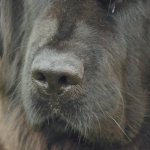
It looks as sharp to me, just that it focused on the dogs nose and not his eye (i have a hard time getting the GH cameras to do this easy task compared to any other camera), and the depth of field is shallower so not as much of the image is sharp.
 
Looks OK to me with a little contrast/color/sharpness correction... ( you focused on the dog's nose )

I am guessing that this was a handheld shot, yes ? ( a monopod or tripod would greatly increase apparent sharpness in the image )

DogNose.jpg
 
It looks as sharp to me, just that it focused on the dogs nose and not his eye (i have a hard time getting the GH cameras to do this easy task compared to any other camera), and the depth of field is shallower so not as much of the image is sharp.

Yes indeed, when I put focus on eyes it always focuses the nose instead. Here on the bunny image, the focus is on one eye but still the focus goes on the nose, I guess because its more close. http://www.upload.ee/image/4119654/P1010264.JPG (BTW this one is now made with the mechanical shutter instead of using the electronical shutter and its not blurry imo as it was before.)

And TheDingo, yes it was handheld.
Thanks for your replies guys, Im relieved that everything seems ok.
 
Last edited:
Back
Top