New Panasonic AG HC-X2 (HC-X1/UX180 successor)

It comes from film cameras, overcranking and undercranking..

If I am ever asked to work with film, I'll keep that in mind. Personally, I work in television/video and the way I described it is the "norm", and always has been since high frame rates became available.
 
I should not rush to judgement on the X2 sensor's rolling shutter as I have not tested it yet but I was not happy with the UX90's at 24p. Most clients really don't care what format you deliver as long as it meets their needs which is usually for streaming. Occasionally you will get a client who is set on what they want.

It's also okay to simply not like the 24p framerate.

Hardcore gamers, for instance, are extremely sensitive to low framerates and some will not entertain titles with anything less than non-dropping 60fps.
 
If I am ever asked to work with film, I'll keep that in mind. Personally, I work in television/video and the way I described it is the "norm", and always has been since high frame rates became available.

It's only the norm in your world, which is perfectly fine.
 
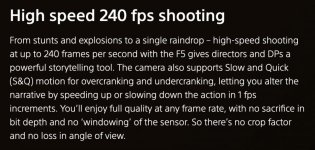
Actually was surprised to see Sony using the over/under terminology, which I don't think I've seen for any of the new cameras (replaced with simpler S&Q references), but they once did for the F5 and F55:

Sony has been using that terminology for well over 10 years, as have I in all my training videos and field guides. But that has nothing to do with the subject at hand.

In television/video production:

Correct: 23.98p captured at 60 fps
Incorrect : 60p @ 23.98p (this would actually indicate fast-mo, not slow-mo)
 
When I starter using the CX350 I was surprised that 1080p30 PN was taken out of the P2 list of frame rates. So there must be a reason why Panasonic is .using MOV for 30p with their cameras.

I once shot a theatre production in 24p (this was delivered on DVD, so the motion was worse than computer playback) and the first thing that was noticed was "why is the image stroby"... To each their own. I just think you can't go wrong delivering live things in faster frame rates.

Ouch, there is so much panning with theatrical plays that I would not shoot it at less than 30p and preferably 60p.
 
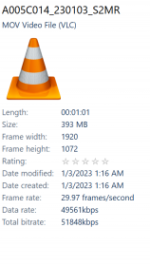
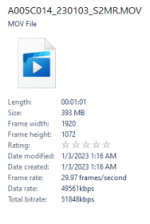
On another note I just opened my new HC-X2 to run some tests to find out that all 1080 formats are 1920x1072? Any idea why?
 
Sony has been using that terminology for well over 10 years, as have I in all my training videos and field guides. But that has nothing to do with the subject at hand.

In television/video production:

Correct: 23.98p captured at 60 fps
Incorrect : 60p @ 23.98p (this would actually indicate fast-mo, not slow-mo)

We'll just have to agree to disagree because this sounds so wrong to me. lol

You are producing a 23.98p file and you say 23.98p "@" 60fps? That makes no sense. What if it's mixed footage? 48p and 60p?

Which year did the @ symbol make it into these descriptions?

___

Why not use the words that people 40-50-60 years before us created (and that you say you use in your material).

When you add mixed footage into a NLE, you don't add 60fps @ a 24p timeline. You put 60p over a 24p timeline, 48p over a 24p timeline (to slow it down, if that's the intent).
 
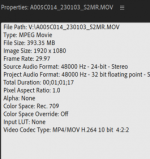
What does Premiere say about the footage/clip? (not the sequence)

Each clip should have its own specs. Does it say 1920x1080?

The specs above are from VLC, what's QT say about the exported file?

[With the amount of software and hardware that's been created in the world, including different standards, sometimes things don't communicate properly, or interpret one another accurately.]
 
What does Premiere say about the footage/clip? (not the sequence)

Each clip should have its own specs. Does it say 1920x1080?

The specs above are from VLC, what's QT say about the exported file?

[With the amount of software and hardware that's been created in the world, including different standards, sometimes things don't communicate properly, or interpret one another accurately.]

It's 1080, see clip properties in premiere below.
 

Attachments

  • photo131002.png
    photo131002.png
    60.9 KB · Views: 0
So nothing's wrong then, and VLC is just displaying its own number 8 pixels short, yeah? :2vrolijk_08:
 
We'll just have to agree to disagree because this sounds so wrong to me. lol

You are producing a 23.98p file and you say 23.98p "@" 60fps? That makes no sense. What if it's mixed footage? 48p and 60p?

Which year did the @ symbol make it into these descriptions?

___

Why not use the words that people 40-50-60 years before us created (and that you say you use in your material).

When you add mixed footage into a NLE, you don't add 60fps @ a 24p timeline. You put 60p over a 24p timeline, 48p over a 24p timeline (to slow it down, if that's the intent).

When you shoot with the camera set for a 24p recording format, but you capture the shot @ 60 fps (or 120 fps or whatever frame rate you want), the clip is still a 24p clip. When you bring that clip into your NLE it is just a 24p clip, and the NLE has no idea, nor does it need to know, what frame rate was used to capture it. The clip is just a 24p clip. No processing needs to be done to the clip because it is already slowed down when it was shot:

"24p captured @ 60 fps" = 2.5x slow motion
"24p captured @ 120 fps" = 5x slow motion

So, the phrase "23.98p captured @ 60 fps" just means you have a 24p clip that was recorded with a frame rate of 60 fps. Thus, it is 2.5x slow-motion, but it is still just a 24p clip when you put it on the timeline.
 
I mean, we both know that, this is just about how one would go about with the lingo.

But I'm always up for changing myself, learning; it's all good either way.
 
So nothing's wrong then, and VLC is just displaying its own number 8 pixels short, yeah? :2vrolijk_08:

I just put the clip on new windows 11 laptop that does not have VLC and it shows as 1072 in explorer. Tried it on a second desktop without VLC and it shows as 1072.
 

Attachments

  • photo131003.png
    photo131003.png
    42.6 KB · Views: 0
I mean, we both know that, this is just about how one would go about with the lingo.

That is my point. The lingo matters.

You said . . .
It would actually be capturing 60p @ 23.98p (60 over a lower-framerate, overcranked, but that's semantics).
.

No. There is no such thing as "60p @ 23.98p" Both numbers can't have a "p" in them. The "p" indicates that the preceding number refers to a progressive record/playback format, so you can't have a 60p format that was captured @ 23.98p. But you can have a 24p clip that was captured @ 60 fps. Note: "fps" not "p".

It seems like I'm splitting hairs, but I had it correct in my first post and your "correction" of my post is wrong. Its not a matter of agreeing to disagree. One is right and one is not.
 
So nothing's wrong then, and VLC is just displaying its own number 8 pixels short, yeah? :2vrolijk_08:

Not sure why windows is showing 1072 but just connected the camera to the Blackmagic HD switcher and it was fine. One thing I really like about this release is that now I can get a simultaneous feed from both HDMI and SDI in 1080p.
 
Back
Top