News show - lighting the host nicely

seanadl

Active member
Hi all,

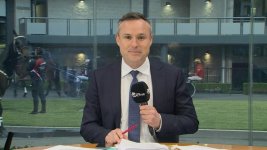
I just shot a pilot for an online news show I'm producing/directing/appearing in. Current set up is I'm sat at a desk, in front of a backlit set which also has a screen embedded into it.
I don't have a truss to hang lights from as you would normally see on a news set. I'm having to make do with putting lights on C-stands between the main camera and the front of the set.

At the moment I have x2 Nova P300c lights from Aputure (with soft boxes/grid) on C-stands to the left and right of the host, in front of the desk. They are angled roughly 45 degrees on either side of the host. They are also raised up around 7 feet or so and angled downwards.

As you can see from the pictures - the eyes aren't particularly bright using this set up. If i lower the lights a bit, this improves. However, I then run into the problem of getting glare on the TV screen behind.

Any suggestions about where I could place these lights to get a more flattering light on the face, without it hitting the background too much (particularly the screen)?
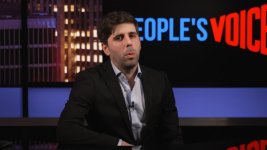
 

Attachments

  • screenshot-lighting_1.1.1 copy.jpg
    screenshot-lighting_1.1.1 copy.jpg
    42.1 KB · Views: 0
Move the presenter away from the set, and move the cameras too, or tilt the screens behind so the lights can come down lower? You could have the truss - just use proper lighting stands and put truss between them, then you can hang fixtures anywhere along it? You've also got some pretty deep shadows under his chine, again suggesting the keys need to come down. Careful adjustment of the angles should give you camera positions where reflections are more controlled.
 
My friend Bill lights news sets all over the world (often remotely). Obviously, those are gigs with big budgets for sets, instruments, and space but poke through his gallery and see if you can pick up any tips. http://poweroflighting.com/gallery/

Also, maybe consider a desk light (or at least a reflector) to lessen the chin shadow. You don't need much light, but it can help even things out. Kino used to have a nice small one. https://www.kinoflo.com/Archives/Desk-Lite/Desk-Lite.html
Perhaps just some LED tape. Here's a marketing page from Rosco showing their stuff in use on a news set. https://www.rosco.com/spectrum/inde...hting-solution-every-anchor-will-sign-off-on/

You could probably whip up something with one or two small LED panels like the little M lights from Aputure or the Falcon Eyes PocketLite (I have a couple of those), or whatever you have lying around.
 
Move the presenter away from the set, and move the cameras too, or tilt the screens behind so the lights can come down lower? You could have the truss - just use proper lighting stands and put truss between them, then you can hang fixtures anywhere along it? You've also got some pretty deep shadows under his chine, again suggesting the keys need to come down. Careful adjustment of the angles should give you camera positions where reflections are more controlled.

Thanks for the response! I've got a little more wiggle room to move the presenter further away from the set - but not much. I've pretty much used up all the space. Currently the set is about 3 metres deep (from the back wall/tv to the edge of the front) and the presenter is probably about half a metre from the edge of the front. Camera is backed up almost to the wall. The screen is built flush into the frame of the set so it can't be tilted.

The lights being lower definitely looked more flattering and created less shadows under the chin/eyes. I'm going to doing that tomorrow when I'm in the studio and flag off to avoid reflections. I'll let you know how that goes!
 
My friend Bill lights news sets all over the world (often remotely). Obviously, those are gigs with big budgets for sets, instruments, and space but poke through his gallery and see if you can pick up any tips. http://poweroflighting.com/gallery/

Also, maybe consider a desk light (or at least a reflector) to lessen the chin shadow. You don't need much light, but it can help even things out. Kino used to have a nice small one. https://www.kinoflo.com/Archives/Desk-Lite/Desk-Lite.html
Perhaps just some LED tape. Here's a marketing page from Rosco showing their stuff in use on a news set. https://www.rosco.com/spectrum/inde...hting-solution-every-anchor-will-sign-off-on/

You could probably whip up something with one or two small LED panels like the little M lights from Aputure or the Falcon Eyes PocketLite (I have a couple of those), or whatever you have lying around.

Thanks for the tips! That's really helpful to see how other news studio's are lighting and arranging their sets. Interestingly looks like some of them actually have their desks nearer to the walls than I do, with the camera's much further away. Perhaps on my photo it looks like the desk is nearer to the wall than it actually is because of the camera being too close? Might need to experiment with that. Of course If I do that i'll definitely run into lighting/tv screen glare issues even more.

I had no idea about the under desk lights! The logo on the desk we're using is backlit with a nanolight tube inside the desk. The tube actually spilled out quite a bit and lit the presenter from underneath. I ended up flagging this off by putting black cloth behind the desk as I thought lighting from underneath wasn't a good idea. Is there a technique to lighting from below that yields flattering results?
 
At the moment I have x2 Nova P300c lights from Aputure (with soft boxes/grid) on C-stands to the left and right of the host, in front of the desk. They are angled roughly 45 degrees on either side of the host. They are also raised up around 7 feet or so and angled downwards.

Typically in portraiture (and a talking head at a desk is very much a portrait) you'll want the lights angled down at about a 45 degree angle. The example shown looks like your down angle is more than this. Said another way, move your lights further from the desk so that your down angle isn't too steep. This will help with the eye shadows and the chin shadow.

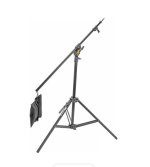
Also, for this duty you need at least one additional light -- a hair light / shoulder light to separate the presenter from the background. You'll have to boom it along the ceiling for blocking purposes. Use something like an Avenger A4041B. Definitely sand bag it, and use the counterweight. Use barndoors to put the light only where you want it. Getting it just right is a PITA, but it pays off with a more effortless looking image if done right.

Ideally you'd want the lights higher up, say 10 or 12 feet, on a grid that's higher still. This would serve to get the lights out of talent's eyes, or at least his eye line. Else you can induce squinting, and if using a teleprompter you can make it more difficult for talent to read it. But since you don't have that height available get your lights as high as you can and out from the talent so your down angle is around 45 degrees.
 
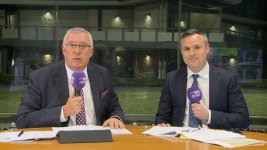
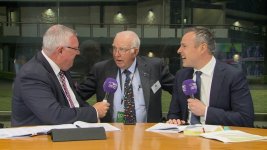
I have a similar situation quite often at various horse racing venues but not with monitors behind the talent just massive plate glass windows. Where obviously I don't want lights reflecting in the glass. I have a million reflections in the glass of the back of the presenters and the studio monitors which are to either side of the camera. These we are all happy to live with. You can even see me in the one and two shots. I just remain still when the studio shot is live to air. No one has ever commented on my reflection being in there.

This is a very fluid situation where it can vary from a single to a two and a three-shot. One lighting setup has to cover all of them. Like you the problem was to get more even light onto the presenters be it one, two or three and all with the minimum fuss and time. Not the most glamourous setup but the network is happy with it so I'm happy to go with it as it is a simple and repeatable setup I can use at any of the race venues where glass and reflections are a problem. This is most of them because they like to have the horse parade ring in the background as they talk about the horses.

It just involves four 1K LED panels with white diffusers on them. All four are mounted on Avenger A4041B Aluminum Boom Stands and are set in a rectangle. These particular stands make it all possible because of their boom capability plus they can go to thirteen feet, nice and high. One panel is to the left and one is to the right of the camera. About two meters to either side of the camera. So about five meters between the two front lights. Up really high to clear glass reflections. The other two are set slightly behind the presenters out of camera shot above their heads and point almost vertically downwards from above their heads but tilted slightly forward towards the camera. Out of shot in front of the desk and a bit lower than the desk level, there are two white core-flute boards clamped to low height C stands. These are tilted about twenty degrees back towards the presenters. These pick up the spill from the two presenter overhead LED panels and these core-flute boards then bounce back softly towards the presenters and just lift the eyes with small spectral highlights. Helping to give a more even light and get rid of chin shadows etc. Nothing really artistic but it works and avoids lighting reflections in the glass. Maybe a similar type of setup may help minimise reflections in the monitor in your case. It's what we call "Sale of the Century" quiz show type lighting. Boringly flat and F/5/6 across the board. As I say, not glam but it does the job simply and efficiently and talent can be anywhere within that rectangle of lights and the lighting is pretty even.

Chris Young

https://www.bhphotovideo.com/c/product/200109-REG/Avenger_A4041B_A475B_Baby_Combi_Boom.html/overview

Lighting 01.jpg - Click image for larger version  Name:	Lighting 01.jpg Views:	0 Size:	61.1 KB ID:	5689426
Lighting 02.jpg - Click image for larger version  Name:	Lighting 02.jpg Views:	0 Size:	65.1 KB ID:	5689427

Lighting 03.jpg - Click image for larger version  Name:	Lighting 03.jpg Views:	0 Size:	67.6 KB ID:	5689428

Lighting 04.jpg - Click image for larger version  Name:	Lighting 04.jpg Views:	0 Size:	21.6 KB ID:	5689429
 
Last edited:
Back
Top