Zebra and Exposure advice. Pic attached

Gene Sung

Veteran
I have a question for you guys on Zebras and exposure. I'm on an FS700 and this was shot with Cinegamma 1 with Knee set to 105 and slope to 0

I have my Zebras set to 100. These 2 pics had tricky exposure (a bit backlit) and I think I might have over exposed it a bit.

The sky was lots of Zebras but the main objects of the scene (the city buildings and the Dark wall with the picture of the man) looked really under exposed / very dark on the LCD screen. The Histogram (which is in the lower right corner of each pic), was skewed towards the Left (under exposed).

But then on my Mac monitor, the main objects did NOT look nearly as dark as they did on the LCD

My questions is, did I expose this right? Should I have lowered the exposure until all the Zebras in the sky were GONE? I'm kind of thinking the FS700 LCD monitor underexposes a bit. How do you guys deal with the Zebras on the high contrast scenes with bright sky and darker foreground / scene objects?

Thanks for any tips
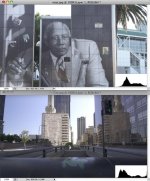
SceneHisto.jpg
 
There is nothing wrong with you actual exposure, in fact, you could've under exposed a bit more. In high contrast scenes you always have to compromise anyway, either expose for the bright, or the dark, depends on which is most important.
Anyway, in bright scenes where the LCD is hard to see rather use the loupe or sunshade for the LCD, or if you hate the loupe, increase the brightness on the LCD itself, as you have just experienced it to be misleading, but note that the seemingly dark LCD is probably due to being in a harsh bright environment (like a bright sunny exterior) and the LCD just seems darker.

Also, IMHO, I like to shoot most scenes with zebras set to 100%, and I make sure nothing gets zebra'ed, then thats a sure bet that nothing is over exposed. But in a case of extreme contrast like your example, I choose to blow the sky a bit, rather than letting the most important bits get under exposed.
 
You really should not rely on the LCD for exposure. The histogram is probably the best native tool. The second image has a noticeable spike on the right side which means you've lost a quite a bit of data in the highlights (in the sky). I would have underexposed it a bit and lift the shadows in the post if needed. The first image looks pretty good.
 
I've been following two rules since shooting with my FS700 (mostly outdoors):

1. Make sure nothing clips over 100 IRE (cinegamma 2). I'll adjust the darks/mids in post- it holds up great with this cam.
2. Don't shoot in the mid-day sun. :D
 
Why not to expose 100+ and make shure that nothing clips in the right corner. You can bring superwhites down to normal 100IRE. When you see some zebras you'll know that this part is lost
 
I fail to understand why this micro-computer we all carry around (FS100 or FS700) can't interpret the scene and give us the exposure that retains the most data possible. This is particularly annoying in the FS cameras, which allow for manually adjusting the black floor, but have no way for the camera to do this simple task for us. In these scenes you can clearly see, by looking at the histogram, that you have a bit of unused latitude in the shadows. And yes, they are overexposed a bit. Perhaps someday, someone will come up with a "smart" auto-exposure algorithm, but for now the bottom line is that we have to use the big computers in our heads to get the best exposure, and the histogram is the best tool on this camera to assist in that process.
 
Thanks for the tips guys. I usually just go by the Histogram, but since the FS700 has Zebras I've been using those. I think I just have to wrap my head around the Zebras a little more, as right now they are making me paranoid. LOL. I noticed that in bright daylight on the FS700 at least with Cinegamma 1, seems like you have to underexpose quite a bit more. The curve on the Histo needs to be well to the left of center.

And yes, I know to never trust the LCD.
 
I usually just go by the Histogram, but since the FS700 has Zebras I've been using those. I think I just have to wrap my head around the Zebras a little more, as right now they are making me paranoid. LOL. I noticed that in bright daylight on the FS700 at least with Cinegamma 1, seems like you have to underexpose quite a bit more. The curve on the Histo needs to be well to the left of center.

As soon as you figure out zebras, you'll be addicted and wonder how anyone can get by without them.

I should point out that you aren't "under exposing", you are instead exposing properly. Thinking that way will help with learning how to use the zebras. At least, it helped me.

Interesting to me, is the differences in the mediums. When I was making photographs with a big honking LF film camera, the rule was "expose for the shadows and develop for the highlights". With digital cameras, it's "expose to the right" being careful to not clip the highlights (and let the shadows fall where they may). With digital cinema, I get my best success with exposing for the faces (putting skin tones where I want them, from around 40-70 IRE) and let both the shadows and the highlights fall where they may. But this is all just me. Clearly, YMMV.
 
Back
Top