

Taylor Rudd
Veteran
Rather than try to describe my setup, I'll just post a picture.
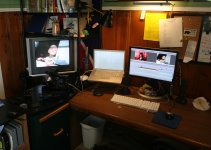
Okay. I hooked plugged my XH A1 into a TV to use as a monitor (I know, not good for broadcast monitoring - but I'm a student). The TV is not HD, but does have component inputs.
I got a signal to go from FCP to the monitor, however, I was receiving some crazy flicker. Thinking this was a problem with the TV, I played straight from tape to the TV. No flicker (the footage on tape was the same footage I was trying to play through FCP).
I played footage from all different framerates from FCP and here is what I found:
60i - perfect image, no flicker
30f - constant flicker around any areas that could be considered highlights and midtones
24f - would not even play in the camera. It would only display the frame the playhead was on (or be stuck on the first frame once you hit play. After you hit stop the frame would update).
Obviously, the camera is having trouble playing anything that isn't natively 60i, and it won't even play a 1080p24 sequence.
Is there any way to trick the camera into displaying the 24p sequence on playback? I'm still not sure what causes the highlight flicker on 30f playback (since it is a 1080i60 sequence).
I have a feeling I'm SOL. Suppose I should've bought that Mac Pro...
Any help/insight is greatly appreciated
Okay. I hooked plugged my XH A1 into a TV to use as a monitor (I know, not good for broadcast monitoring - but I'm a student). The TV is not HD, but does have component inputs.
I got a signal to go from FCP to the monitor, however, I was receiving some crazy flicker. Thinking this was a problem with the TV, I played straight from tape to the TV. No flicker (the footage on tape was the same footage I was trying to play through FCP).
I played footage from all different framerates from FCP and here is what I found:
60i - perfect image, no flicker
30f - constant flicker around any areas that could be considered highlights and midtones
24f - would not even play in the camera. It would only display the frame the playhead was on (or be stuck on the first frame once you hit play. After you hit stop the frame would update).
Obviously, the camera is having trouble playing anything that isn't natively 60i, and it won't even play a 1080p24 sequence.
Is there any way to trick the camera into displaying the 24p sequence on playback? I'm still not sure what causes the highlight flicker on 30f playback (since it is a 1080i60 sequence).
I have a feeling I'm SOL. Suppose I should've bought that Mac Pro...
Any help/insight is greatly appreciated
