asingfield
Active member
Just seeing if this would work and/or if there is a better way of doing it.
cheers

Follow along with the video below to see how to install our site as a web app on your home screen.
Note: This feature may not be available in some browsers.

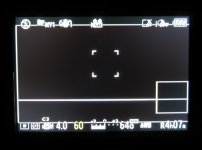

This isn't working for me... when I try to open the .jpg on the gh2 it says "This picture cannot be played". Anybody know what I'm doing wrong?
What's not working? Did you try the method I suggested? Did you "save as" your image to an image you took with your GH2...directly onto the SD card? That should work. I can email you the picture I used to mark 2.35:1 onto my GH1 LCD...but you still have to "save as" and replace an existing photo on your camera. At least I think that's how I did it on both of my GH1's.
I use the custom guidelines function to create 2.35:1 guidelines. The bottom of the image is framed out, or I suppose you could frame out the top and have the benefit of seeing your boom mic before it comes into your active frame. Later in post, the image is shifted down to center and cropped or letterboxed to 2.35:1 aspect ratio. You can adjust the guidelines to any aspect ratio you want (provided it's wider than 16:9. You can do a squarer box, but it'll be off center - too bad it only has a 2-sided guideline instead of 3 or 4). Best part is no sticky tape masks or the like to hassle with.
View attachment 28502
Thats what I'm doing... I'll PM you my email address.
thats a neat idea!
how do you know how much to move the horizontal line to where it needs to be for 1:2.35, did you use a reference image or so?
this is much better than using sticky lens covers, and can be turned off instantly!