
Navigation
Install the app
How to install the app on iOS
Follow along with the video below to see how to install our site as a web app on your home screen.
Note: This feature may not be available in some browsers.
More options
You are using an out of date browser. It may not display this or other websites correctly.
You should upgrade or use an alternative browser.
You should upgrade or use an alternative browser.
F35: Will the Odyssey 7Q+ record 12bit 4:4:4 out of F35?
- Thread starter japanicjess
- Start date
Matthew Allard ACS
Member
Selling my F35, serial number 2 if anyone is interested.
Mitch Gross
Veteran
The new firmware for the Odyssey7, Odyssey7Q and Odyssey7Q+ is now out and it includes 10-bit and 12-bit RGB support for the F35. Currently recording is in DPX, and in the future we will offer a compressed format as well. There is no Record Option or other additional charge for this functionality on the Odyssey. It is part of our latest free firmware update.
MITCH, you just made my day!!!! Thanks for putting in the work for our small group, you have earned at least one more 7Q purchase from myself. I believe you have done the F35 a great justice by adding this support. Hopefully your time put in pays off.
Now I need to go to the machine shop to make up my plans for my micro iF box plate, god forbid I use any part stock on my F35, I swore I would never put the IF box back on.
Literally this is a huge news for the F35 community, the fact that a modern company would add support for this old camera is just incredible.
One more question, is there any advantage of the 7Q over the 7 if the only camera the recorder is used on is the F35? I had been looking at the 7Q because I use the fs700 a lot still but I didn't realize the 7 was an option for the F35? Odyssey 7 with a few drives could be around 2.5K, thats a perfect price for a 3-4k camera.
I hope you guys get Prores 12-bit just to add icing to the cake but really that's not a deal breaker. Sound Devices not offering an uncompressed 12-bit format is more of a deal breaker. If I am going to go the extra mile to get 12-bit, then uncompressed is the way to go. If you need to save disc space, 422 works great with the F35 and can be recorded out the monitor out port which offers the possibility of burning in the Sony LUT (so far my best footage using this method). Being able to load a LUT for SLOG 1 into the Odyssey 7 would be awesome also.
Now I need to go to the machine shop to make up my plans for my micro iF box plate, god forbid I use any part stock on my F35, I swore I would never put the IF box back on.
Literally this is a huge news for the F35 community, the fact that a modern company would add support for this old camera is just incredible.
One more question, is there any advantage of the 7Q over the 7 if the only camera the recorder is used on is the F35? I had been looking at the 7Q because I use the fs700 a lot still but I didn't realize the 7 was an option for the F35? Odyssey 7 with a few drives could be around 2.5K, thats a perfect price for a 3-4k camera.
I hope you guys get Prores 12-bit just to add icing to the cake but really that's not a deal breaker. Sound Devices not offering an uncompressed 12-bit format is more of a deal breaker. If I am going to go the extra mile to get 12-bit, then uncompressed is the way to go. If you need to save disc space, 422 works great with the F35 and can be recorded out the monitor out port which offers the possibility of burning in the Sony LUT (so far my best footage using this method). Being able to load a LUT for SLOG 1 into the Odyssey 7 would be awesome also.
Last edited:
Great day for F35 users!! Thank you CD and thank you Mitch!
Looking to get myself an Odyssey very soon! With 12bit 444 uncompressed the records times for a 256B will be just a tad under ~19 minutes.
Yachacha,
The Odyssey 7 only has one 3G Sdi input so that means no 50p and no 12bit with the F35. Not much of a difference between the 7Q and 7Q+ unless you plan on using other cameras that needs 4k via HDMI.
Looking forward to checking out your mods regardless!
Looking to get myself an Odyssey very soon! With 12bit 444 uncompressed the records times for a 256B will be just a tad under ~19 minutes.
Yachacha,
The Odyssey 7 only has one 3G Sdi input so that means no 50p and no 12bit with the F35. Not much of a difference between the 7Q and 7Q+ unless you plan on using other cameras that needs 4k via HDMI.
Looking forward to checking out your mods regardless!
Mitch Gross
Veteran
Please note that there is no uncompressed DPX recording on the Odyssey7. To take advantage of this you need to use an Odyssey7Q or an Odyssey7Q+. If you do not need the 4 over HDMI capabilities of the 7Q+, then there are a lot of great deals on used Odyssey7Q kits as others move up to the latest model. We have a Loyalty Program for people upgrading that terminates at the end of March, so you may want to jump on things.
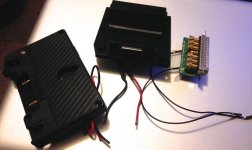
Sony has already made all the parts, just need a thin plate to hold the Dual HDSDI out ports with a couple of holes drilled in it. I give up audio this way, but film cameras don't normally have audio and the 7q can input if necessary. It's kind of stupid to do all this work just to loose a few inches, but I think the IF box is the most ridiculous looking part of the F35, it doesn't conform to the shape of the F35 main body.
7Q + F65 ? maybe one day, I know this depends on Sony more than CD. Dropping the hunk of recorder off the F65 is the answer to a lot more interest in the F65 as a useful camera.
Does anyone have the ability to change the title of this thread?
I reworked the IF box and it's under an inch now and basically part of the recorder. Much more streamlined.
From all the reasons the Sony F65 is not more widely used in the industry I think the size of the SR-R4 is at the very bottom of the list, if at all. It is not really larger than the old Alexa-Codex set up and that configuration got a lot of use before ARRIRAW could be recorded internally.
I never understood the preoccupation with size and weight in cameras like the F35, F65 or Alexa. It's akin to buying a muscle car and being worried about fuel consumption. If one can't afford the fuel he shouldn't buy a Hemi V8. I think the size and weight are there for a reason in such cameras.
The unpopularity of the F65 in the industry has more to do with the Alexa. If there was no Alexa everybody would be raving about the F65, which is a better camera in every single technical way.
From all the reasons the Sony F65 is not more widely used in the industry I think the size of the SR-R4 is at the very bottom of the list, if at all. It is not really larger than the old Alexa-Codex set up and that configuration got a lot of use before ARRIRAW could be recorded internally.
I never understood the preoccupation with size and weight in cameras like the F35, F65 or Alexa. It's akin to buying a muscle car and being worried about fuel consumption. If one can't afford the fuel he shouldn't buy a Hemi V8. I think the size and weight are there for a reason in such cameras.
The unpopularity of the F65 in the industry has more to do with the Alexa. If there was no Alexa everybody would be raving about the F65, which is a better camera in every single technical way.
kassimnorris
Active member
Hey thanks Mitch!!! Definitely made my day...About to download the latest firmware right now...Cant wait to test 
Mitch Gross
Veteran
The code has to be written in for each mode separately and then tested within each mode separately. We go with the most requested first because this coding & testing process is insanely tedious and takes way more time than you can imagine. So we pushed to get this one done first but the others are still in progress. Eventually we will have it working on all modes.According to the release notes the remote trigger is only enabled for pro res hd recording, why that?

macgregor
Veteran
According to the release notes the remote trigger is only enabled for pro res hd recording, why that?
What release notes? what has been implemented for the F35 exactly? I cannot seem to find the right info about this.
Mitch Gross
Veteran
Release Notes, as published on our website and in the latest edition of the manual.
NEW FEATURES (ODYSSEY7Q+)
HDMI 4K/UHD -> 2K/HD Supersample
4096x2160 to 2048x1080 23.98
3840x2160 to 1920x1080 23.98
High quality supersampling of 4K/UHD video signal over HDMI yields 2K/HD video superior to that available directly from some small cameras
NEW FEATURES (ODYSSEY7Q & ODYSSEY7Q+)
Apple ProRes 422 & Apple ProRes 422 (LT) Support
4K/UHD/2K/1080/720 resolutions all supported
4K/UHD up to 30p; 2K/1080/720 up to 60p
Sony F35 12-bit/10-bit RGB 4:4:4 Support
12-bit or 10-bit RGB 4:4:4 recording in uncompressed DPX stacks
Dual-link capture, 23.98, 25, 29.97
Sony FS7/FS700 Record Option Adds Apple ProRes 422 & Apple ProRes 422 (LT)
(FS7/FS700 Record Option Required.)
Option of Apple ProRes 422 or Apple ProRes 422 (LT) for
4K RAW -> 4K Apple ProRes 23.98
4K RAW -> UHD Apple ProRes 23.98
4K RAW -> 2K Apple ProRes 23.98, 25, 29.97, 50, 59.94
4K RAW -> HD Apple ProRes 23.98, 25, 29.97, 50, 59.94
Sony FS700 Record Option Adds High Speed Burst in 2K/HD Apple ProRes
(FS7/FS700 Record Option Required. Feature only available for FS700.)
Option of Apple ProRes 422 (HQ), Apple 422 or Apple 422 (LT) for
4K RAW Burst -> 2K Apple ProRes 100p, 120p
4K RAW Burst -> HD Apple ProRes 100p, 120p
Canon C500 Record Option Adds Apple ProRes 422 & Apple ProRes 422 (LT)
(Canon RAW Record Option Required.)
Option of Apple ProRes 422 or Apple ProRes 422 (LT) for
4K RAW -> 4K Apple ProRes 23.98, 24, 25, 29.97, 30
QHD RAW -> UHD Apple ProRes 23.98, 24, 25, 29.97, 30
NEW FEATURES (All Odysseys)
Apple ProRes 422 & Apple ProRes 422 (LT) Support
1080p, 1080i & 720p supported
Odyssey Remote Trigger Supported
New Odyssey Remote Trigger (cable remote with record indicator)
HD Apple ProRes recording only
FIXES & IMPROVEMENTS
FIXED HDMI video Legalizing issue on some cameras
FIXED FS7 RAW DNG magenta cast
FIXED FS7 RAW DNG compatibility with Adobe, FCPX & Scratch Lab
FIXED C300 1080p30 playback
FIXED FS7 RAW to Apple ProRes S-Log2
FIXED C100 & FS100 1080p24 support
IMPROVED Playback performance
IMPROVED Safe Eject errors
IMPROVED FS700 LUTs
THIRD PARTY DEVELOPMENTS
Sony PXW-FS7 and Odyssey7Q Workflow Guide
Nick Shaw of Antler Post worked with Convergent Design to develop Resolve Workflow for FS7/FS700 .DNG files. Also created corrective LUTs for FS7 DNG files created in firmware builds prior to this release (versions 2.1.100 – 4.1.100)
View Online: Sony PXW-FS7 and Odyssey7Q Workflow Guide
Picture Rescue 2 - Prosoft Engineering
Prosoft Engineering has updated Picture Rescue 2 to recover ALL file types from Convergent Design SSDs. Even if a Safe Eject was not performed, this inexpensive utility can rescue the files.
KNOWN ISSUES
4K/UHD HDMI input recording 4K/UHD Apple ProRes, HDMI monitoring output shows lines in display. SDI output, OLED image and recording are unaffected.
4K/UHD HDMI input recording to supersampled 2K/HD Apple ProRes, OLED image may show lines in display. HDMI & SDI outputs and recording are unaffected.
During SSD Safe Eject, OLED will flash after each clip completed. Operation unaffected.
720p50/60 over HDMI not functioning on Odyssey7Q+ (working on Odyssey7 and Odyssey7Q).
Timecode triggering over HDMI not correctly functioning on FS7 & GH4. Use camera trigger.
SDI output embedded audio occasionally has ticking noise.
FS7 4K RAW->2K/HD Apple ProRes, S-Log3 to Rec709 LUT not working.
FS700 4K RAW to 2K/HD Apple ProRes S-Log2 to Rec709 LUT not working.
FS700 4K RAW Burst up to 10 additional frames (450 instead of 440) recorded. Additional frames are “bad” and should be deleted.
FS700 4K RAW Burst -> 2K/HD Apple ProRes clip length may be off by 1% (437 frames instead of 440).
KNOWN ISSUES (FROM PREVIOUS RELEASE: 4.1.100)
Audio
SDI/HDMI outputs occasionally will not carry audio. Cycle Odyssey power to restore.
SDI/HDMI audio occasionally will have a static pop when powering up.
Audio will occasionally swap tracks when recording in DPX.
Using Analog Audio and HDMI video, occasionally SDI, HDMI and headphone outputs do not carry audio.
Audio output (headphones) occasionally flips channels.
Monitor
Focus Assist in Edge Enhanced mode and recording Apple ProRes 422(HQ) shows edges as white instead of selected color.
PIXEL ZOOM in RAW or DPX occasionally causes stretching of image. Recording is unaffected.
Switching between ARRIRAW 1.5G DL and 3G DL occasionally can make the image incorrect on the OLED screen. Disconnect & reconnect one of the SDI inputs to correct. Recording is unaffected.
SDI/HDMI outputs have a pink line in image on Canon C500 2K 12-bit/10-bit video. Recording is unaffected.
IO Industries RAW files do not send color balance metadata to the Odyssey7Q so images appear incorrect. Recorded metadata color balance is set to 5600K but is not baked in.
Play
Very fast scrubbing can show bad colors. The image corrects after scrubbing completed.
PLAY mode audio occasionally out of sync.
Playlist occasionally reports timecode as “00:00:00;00”. Eject and re-insert the SSD to correct.
PIXEL ZOOM in PLAY mode, 1080i60 not supported & will blank image. Recording is unaffected.
Scrubbing RAW or DPX files occasionally causes the image to pixelate. The image corrects after scrubbing completed.
FS700 2K RAW files occasionally show improper colors on initial selection of a clip. De-select and then re-select the clip to correct.
FS700 RAW files occasionally show vertical line on right edge of frame. Recording is unaffected.
F700 4K RAW 50p files occasionally do not play back audio. Recording is unaffected.
FS700 RAW 30p and 60p files occasionally play with jitter. De-select and
re-select to correct. Recording is unaffected.
Multiple clip playback not supported in RAW formats.
Canon UHD RAW occasionally plays back black image. De-select and re-select to correct. Recording is unaffected.
Record
Audio at the last few frames of an Apple ProRes 422(HQ) file occasionally records static. Add two seconds of pre- and post-roll to shots to avoid.
ARRIRAW 4:3 mode is currently unsupported.
Post
FS RAW files appear green when imported directly into SpeedGrade.
Pending Adobe update, import via dynamic link from Premier.
Canon Cinema 4K half RAW 100/120 does not work in Adobe or Resolve - Working with Adobe and BMD to resolve.
In Resolve 11 Lite, FS700 RAW (CinemaDNG) files that are underexposed may appear green when using “Auto-Color” setting. - Working with Blackmagic Design to resolve.
NEW FEATURES (ODYSSEY7Q+)
HDMI 4K/UHD -> 2K/HD Supersample
4096x2160 to 2048x1080 23.98
3840x2160 to 1920x1080 23.98
High quality supersampling of 4K/UHD video signal over HDMI yields 2K/HD video superior to that available directly from some small cameras
NEW FEATURES (ODYSSEY7Q & ODYSSEY7Q+)
Apple ProRes 422 & Apple ProRes 422 (LT) Support
4K/UHD/2K/1080/720 resolutions all supported
4K/UHD up to 30p; 2K/1080/720 up to 60p
Sony F35 12-bit/10-bit RGB 4:4:4 Support
12-bit or 10-bit RGB 4:4:4 recording in uncompressed DPX stacks
Dual-link capture, 23.98, 25, 29.97
Sony FS7/FS700 Record Option Adds Apple ProRes 422 & Apple ProRes 422 (LT)
(FS7/FS700 Record Option Required.)
Option of Apple ProRes 422 or Apple ProRes 422 (LT) for
4K RAW -> 4K Apple ProRes 23.98
4K RAW -> UHD Apple ProRes 23.98
4K RAW -> 2K Apple ProRes 23.98, 25, 29.97, 50, 59.94
4K RAW -> HD Apple ProRes 23.98, 25, 29.97, 50, 59.94
Sony FS700 Record Option Adds High Speed Burst in 2K/HD Apple ProRes
(FS7/FS700 Record Option Required. Feature only available for FS700.)
Option of Apple ProRes 422 (HQ), Apple 422 or Apple 422 (LT) for
4K RAW Burst -> 2K Apple ProRes 100p, 120p
4K RAW Burst -> HD Apple ProRes 100p, 120p
Canon C500 Record Option Adds Apple ProRes 422 & Apple ProRes 422 (LT)
(Canon RAW Record Option Required.)
Option of Apple ProRes 422 or Apple ProRes 422 (LT) for
4K RAW -> 4K Apple ProRes 23.98, 24, 25, 29.97, 30
QHD RAW -> UHD Apple ProRes 23.98, 24, 25, 29.97, 30
NEW FEATURES (All Odysseys)
Apple ProRes 422 & Apple ProRes 422 (LT) Support
1080p, 1080i & 720p supported
Odyssey Remote Trigger Supported
New Odyssey Remote Trigger (cable remote with record indicator)
HD Apple ProRes recording only
FIXES & IMPROVEMENTS
FIXED HDMI video Legalizing issue on some cameras
FIXED FS7 RAW DNG magenta cast
FIXED FS7 RAW DNG compatibility with Adobe, FCPX & Scratch Lab
FIXED C300 1080p30 playback
FIXED FS7 RAW to Apple ProRes S-Log2
FIXED C100 & FS100 1080p24 support
IMPROVED Playback performance
IMPROVED Safe Eject errors
IMPROVED FS700 LUTs
THIRD PARTY DEVELOPMENTS
Sony PXW-FS7 and Odyssey7Q Workflow Guide
Nick Shaw of Antler Post worked with Convergent Design to develop Resolve Workflow for FS7/FS700 .DNG files. Also created corrective LUTs for FS7 DNG files created in firmware builds prior to this release (versions 2.1.100 – 4.1.100)
View Online: Sony PXW-FS7 and Odyssey7Q Workflow Guide
Picture Rescue 2 - Prosoft Engineering
Prosoft Engineering has updated Picture Rescue 2 to recover ALL file types from Convergent Design SSDs. Even if a Safe Eject was not performed, this inexpensive utility can rescue the files.
KNOWN ISSUES
4K/UHD HDMI input recording 4K/UHD Apple ProRes, HDMI monitoring output shows lines in display. SDI output, OLED image and recording are unaffected.
4K/UHD HDMI input recording to supersampled 2K/HD Apple ProRes, OLED image may show lines in display. HDMI & SDI outputs and recording are unaffected.
During SSD Safe Eject, OLED will flash after each clip completed. Operation unaffected.
720p50/60 over HDMI not functioning on Odyssey7Q+ (working on Odyssey7 and Odyssey7Q).
Timecode triggering over HDMI not correctly functioning on FS7 & GH4. Use camera trigger.
SDI output embedded audio occasionally has ticking noise.
FS7 4K RAW->2K/HD Apple ProRes, S-Log3 to Rec709 LUT not working.
FS700 4K RAW to 2K/HD Apple ProRes S-Log2 to Rec709 LUT not working.
FS700 4K RAW Burst up to 10 additional frames (450 instead of 440) recorded. Additional frames are “bad” and should be deleted.
FS700 4K RAW Burst -> 2K/HD Apple ProRes clip length may be off by 1% (437 frames instead of 440).
KNOWN ISSUES (FROM PREVIOUS RELEASE: 4.1.100)
Audio
SDI/HDMI outputs occasionally will not carry audio. Cycle Odyssey power to restore.
SDI/HDMI audio occasionally will have a static pop when powering up.
Audio will occasionally swap tracks when recording in DPX.
Using Analog Audio and HDMI video, occasionally SDI, HDMI and headphone outputs do not carry audio.
Audio output (headphones) occasionally flips channels.
Monitor
Focus Assist in Edge Enhanced mode and recording Apple ProRes 422(HQ) shows edges as white instead of selected color.
PIXEL ZOOM in RAW or DPX occasionally causes stretching of image. Recording is unaffected.
Switching between ARRIRAW 1.5G DL and 3G DL occasionally can make the image incorrect on the OLED screen. Disconnect & reconnect one of the SDI inputs to correct. Recording is unaffected.
SDI/HDMI outputs have a pink line in image on Canon C500 2K 12-bit/10-bit video. Recording is unaffected.
IO Industries RAW files do not send color balance metadata to the Odyssey7Q so images appear incorrect. Recorded metadata color balance is set to 5600K but is not baked in.
Play
Very fast scrubbing can show bad colors. The image corrects after scrubbing completed.
PLAY mode audio occasionally out of sync.
Playlist occasionally reports timecode as “00:00:00;00”. Eject and re-insert the SSD to correct.
PIXEL ZOOM in PLAY mode, 1080i60 not supported & will blank image. Recording is unaffected.
Scrubbing RAW or DPX files occasionally causes the image to pixelate. The image corrects after scrubbing completed.
FS700 2K RAW files occasionally show improper colors on initial selection of a clip. De-select and then re-select the clip to correct.
FS700 RAW files occasionally show vertical line on right edge of frame. Recording is unaffected.
F700 4K RAW 50p files occasionally do not play back audio. Recording is unaffected.
FS700 RAW 30p and 60p files occasionally play with jitter. De-select and
re-select to correct. Recording is unaffected.
Multiple clip playback not supported in RAW formats.
Canon UHD RAW occasionally plays back black image. De-select and re-select to correct. Recording is unaffected.
Record
Audio at the last few frames of an Apple ProRes 422(HQ) file occasionally records static. Add two seconds of pre- and post-roll to shots to avoid.
ARRIRAW 4:3 mode is currently unsupported.
Post
FS RAW files appear green when imported directly into SpeedGrade.
Pending Adobe update, import via dynamic link from Premier.
Canon Cinema 4K half RAW 100/120 does not work in Adobe or Resolve - Working with Adobe and BMD to resolve.
In Resolve 11 Lite, FS700 RAW (CinemaDNG) files that are underexposed may appear green when using “Auto-Color” setting. - Working with Blackmagic Design to resolve.
kassimnorris
Active member
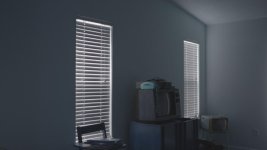
Hey Mitch I could use your help...so I ran a couple test shots yesterday just to test out the new functions of 12bit 444 DPX from the 7q+ and the F35...when playing the footage back in the 7q+ everything looks good..Once I bring the 12bit 444 dpx files into Resolve this is what the footage looks like below...I have no idea whats going on..Also keep in mind that Im only getting this image (weird blue hue in the Mids) from 12bit 444 ..Help Mitch or suggestions anybody? Btw that blue phone on top of the tv is supposed to yellow.
Last edited:
Hi kassimnorris,
It looks like your red and blue color channels are swapped. For some unexplainable reason this happens to my 12-bit Codex DPX footage when I bring it in Nuke. In Nuke I simply add a shuffle node and swap the two color channels and this corrects the image. I'm not sure how you can do that in Resolve, but I'm sure there is a way. Someone else here might be able to help you with that.
Cheers,
Igor
It looks like your red and blue color channels are swapped. For some unexplainable reason this happens to my 12-bit Codex DPX footage when I bring it in Nuke. In Nuke I simply add a shuffle node and swap the two color channels and this corrects the image. I'm not sure how you can do that in Resolve, but I'm sure there is a way. Someone else here might be able to help you with that.
Cheers,
Igor
kassimnorris
Active member
Hi kassimnorris,
It looks like your red and blue color channels are swapped. For some unexplainable reason this happens to my 12-bit Codex DPX footage when I bring it in Nuke. In Nuke I simply add a shuffle node and swap the two color channels and this corrects the image. I'm not sure how you can do that in Resolve, but I'm sure there is a way. Someone else here might be able to help you with that.
Cheers,
Igor
Hey thanks a lot Igor! I think I've figured out a way to swap the red and blue channels in Resolve in the RGB Mixer...Theres an option to swap the channels there. Looks like its working but Im not sure if Im loosing any information by doing this. Again thanks a lot