F35: Will the Odyssey 7Q+ record 12bit 4:4:4 out of F35?

Hey thanks a lot Igor! I think I've figured out a way to swap the red and blue channels in Resolve in the RGB Mixer...Theres an option to swap the channels there. Looks like its working but Im not sure if Im loosing any information by doing this. Again thanks a lot

My pleasure kassimnorris. Regarding losing information, I can tell you that, at least in Nuke, that is not an issue whatsoever. There is an incredible amount of information in the image. So much so that I am experimenting with ACES to try to convert all that information and bring it into a sRGB colorspace without losing any of the color and detail information that are in the highlights. Soon I will post some example images I've been working on in another topic.

Cheers,
Igor
 
When shooting in DPX on the Odyssey7Q, please remember that the files must be "unpacked" by running through the free App that can be downloaded off the Convergent Design website. The first time many people use DPX they don't know about this step and get some unpleasant results. The App is easy to use and runs ridiculously fast.
 
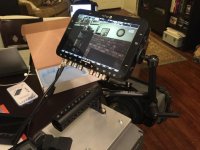
I know it has been said before by other F35 users, and I was a big believer that the 7" LCD might be too big, the 7Q and F35 are a match made in heaven. I have been playing with my F35 and 7Q for 1/2 a day and it is wonderful to have a monitor that accurately shows the F35 image in it's wonderful detail. The SmallHD DP4 and 5" IPS monitor I was using beforehand do not compare to the 7Q image.

Everyone else has made these points but once I felt it and saw it for myself, I have been quickly converted to the F35 7Q is the path to making these beautiful cameras modern. Perfect light weight, size isn't as overwhelming at all, and the image, I can't get over seeing my F35 live, I am so used to looking at crap colors, the 7Q really captures the tiny nuances of the F35 image. FOCUS is a breeze!

I know there have been a lot of arguments about the 7Q vs older recorder backs made for the camera and I feel it really depends on your use. If you want to use the F35 with the big sticks, and the 19mm rods and all the cinema parts that were made for film rigs, then the Codex or SR-R1 are great options. If you have just an F35 body, want to make it lightweight like a FS700 or C300 - the cameras that cost about the same as F35 now...Then the 7Q is without question the game changer for the F35, it enables the dream of just taking the F35 CCD head, and replacing it with a small lightweight all in one recording solution.
When you approach the Codex vs 7Q on paper, the codex has a slight edge because of ability to talk to the camera, and the ability to speed ramp, which is cool, but we still have 50P which can be ramped in post. For anyone who has gone down the Codex path, it is very time consuming to track down the countless parts that are no longer made or sold, and it will involve some large number haggling, everyone wants 5k for the 15k system still. The Codex is an awesome system, and I am very impressed with the dvx users who have gone down that path.

From an operating standpoint however, hands down the 7Q is what makes the F35 a new machine.

Thanks Mitch and CD for supporting the F35, I admit, I bought mine used from someone who wanted to upgrade to 7Q+, but I have ordered drives and accessories and I can't see the 7Q becoming separated from my F35 package at any point in the future.

There is a SLOG LUT built into the 7Q I have noticed. Has anyone else used this? Seems very handy for shooting with the dual SDI when you can't use the in camera MLUT. I don't have a way to photograph it well, but either using the Sony MLUT out the monitor out port, or the 7Q SLOG MLUT renders similar results to the eye.

I unfortunately broke my IF box it appears. I do not know if it ever worked because I always used the monitor out port. I am really worried the back dock is what is not working because it shows blank when I go to the docked devices menu. Power will travel through the IF box fine but the SDI signal doesn't. I very well could of broken it taking it apart. I ordered one of the strange F35/23 IF boxes off eBay only because the flat back to it looked nicer for mounting a battery plate, I would still like a real IF box at some point if anyone has an extra.IMG_1139.jpg
 
If you have just an F35 body, want to make it lightweight like a FS700 or C300 -

Agree with most of your post and does sound great partnership....but it's never gonna be light like an FS700! The F35 must be something like 3x the weight of the FS700, then you need a heavy battery (in fact 4-6 to run a full day!)

Steve
 
hahaha yes a bit of an exaggeration. Most people do add a lot of junk to their FS700's to make them useable.
 
Make sure your IF Box is seated properly. Just today setting up for NAB I found the IF Box passing power but no signal. Reseating the box fixed the issue.

Anyone attending NAB and wishing to see the F35 with the Odyssey, along with a lot of other nice kit, come visit us at the Convergent Design booth, Central Hall booth C8012.
 
Mitch and team, respect for the move of opening up the recorder for a 3rd party ssd manufacturer.


[TD="class: td1"]"Convergent Design today announces that Odyssey monitor/recorders will support the use of two models of Samsung SSDs. The Samsung 850 EVO 500GB and Samsung 850 EVO 1000GB SSDs will be allowed for use in the Odyssey7, Odyssey7Q, and Odyssey7Q+."


[/TD]
 
SIIICK!!!

are they going to sell the little finger grips separately so the drives don't get permanently stuck? :)
 
I shoot so many interviews and they grab plenty of B-roll, but I can't control what they use or not. I've definitely shown it but don't know what's out there.
 
the grandpa F35 wants to get back on TV! He hasn't been seen in a BTS in years! I love how this year at NAB you guys are showing this old beast - to show how new technology can make old technology amazing and usable and the f35 the more I mess with it - it's a $10k version of the alexa, but with nicer colors - I've just used it now on 3 jobs back to back - 2 of which would have been Red Dragon jobs but I showed them what I was getting with tests.
 
Is it possible to use the Odyssey 7Q similar to the Aja lut box to convert the 24 psf to true 24p
 
Last edited:
There is an issue with the F35 24psf if you are using older software like Final Cut 7, Final Cut views it fine, but if you export straight from the timeline to a quicktime format, the grain increases because it misreads the 24psf. There is a thread on this issue, I couldn't find it quick. Basically the solution was to go through compression and do the reverse telecine to true 23.98p.

I know most programs such as Resolve and Premiere handle the 24psf conversion just fine but it is just another variable to worry about. About 50% of the footage I shoot with my F35 I hand off to other people to use for their own project. In the case where clients are converting the F35 footage for the web, or using in a project with footage shot on multiple cameras, it is nicer to have true 23.98P footage and not the PSF footage the F35 delivers. I know 24psf holds just as much detail as Progressive footage, and it will be fine in 99% of situation. I just worry once the footage is out of my hands that it could be handled incorrectly and interlacing introduced. However if the 10-bit mode 4:2:2 is able to convert and record true 24P, this is all I need because I would be shooting 10-bit Prores to hand off footage to someone else.

I have 12-bit working finally, very exciting. I don't own a display capable of showing the difference, it's still nice to know it's possible to harness the full quality of the camera. SLOG Mlut is very helpful.
 
Back
Top