C100: Will C100 Record Two Hours with One Clip?

nedcam

Well-known member
I just received a request to film a speech of two hours and the NEXT DAY they want to stream it themselves on their corporate website. So I don't have the time to import it, add titles or fades, etc. then export it, then FTP it. The client wants the media at the end of the shoot.

He has VLC to open and play it and QuickTime will do it too, I just sent him a one minute test. My question to all the geeks here is:

IF I RECORD WITHOUT STOPPING FOR TWO HOURS WILL IT BE JUST ONE CLIP?

That's very important. My Plan B would be to hire a DP I know who does webcast and I can go straight into his system and it immediately encodes it into a MP4. Thoughts?

Thanks,

Ned
 
If the main AVCHD file is opened with quicktime... it will.
edit -> Meaning you'll have one seamless file in quicktime that will run for two hours.

If you drill down the the .MTS files, there will be several 2gig size files that will play individually, and as far as I know, you can't play them seamlessly that way.


So... I suppose technically no its not one file -> The C100 will break them into 2gig files....
But if you open the main AVCHD file, quicktime will know which MTS files are meant to be 'included together' in the same recording, and play it back that way.
 
Example (not 2 hours... but same idea)
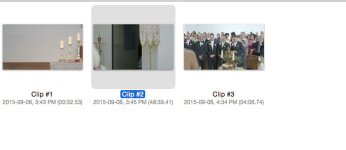
sample1.jpg
Opening the AVCHD File gives me the three clips that were recorded in the quicktime 'preview'.... (I hit record 3 times on this card)
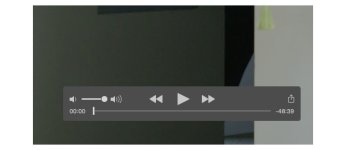
I choose clip two which is 48 mins... it opens in quicktime and plays (this is the play bar in quicktime)

sample2.jpg

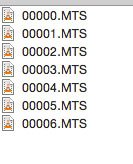
However if I "right click -> show package contents" twice, get to the STREAM folder... here are the files I have
sample3.jpg
 
So I gather the client doesn't plan to use an editor that would enable them to merge clips easily themself, then export the file to upload it, and instead want to simply upload the file directly?

I can't think of a way to do that with the internal recording. I'm not sure if the external recorders split files like a cheap Ninja which could be rented cheaply, but I'd guess they don't split them. The C300 Mark II's files record for a long time without breaking, so I suspect they don't break at all. The longest clip I have thus far is a 47 minute clip which didn't break at all. That'd be more expensive to rent than a recorder, though.
 
If you want to merge all of the 2GB MTS files into a single file, import with Canon's Data Import Utility, which is included with the C100.
 
I did a test for 1:30 minutes and it is one clip. But I recall in past shoots it broke them up, or maybe I'm confusing that with "spanned clips" in P2? Oh well, I'll let the client decide based on the test I sent him. If they can afford it I think using webcasting equipment is the way to of. Very smile file.

Thanks!
 
I did a test for 1:30 minutes and it is one clip.
Are you saying you recorded for a minute and a half, or for 90 minutes?

And by "it is one clip", are you saying that the playback menu shows just one clip, or did you put it into the computer and examine the files and that there's only one .MTS file there? Because if you recorded 90 minutes, I think it's unquestionable that there will be multiple .MTS files in the directories. It may look to the camera like there's one clip, but on the memory card there will be multiple pieces that go into creating that one clip.

But I recall in past shoots it broke them up, or maybe I'm confusing that with "spanned clips" in P2?
AVCHD breaks long files up into pieces, exactly the same as P2 did, so, in effect, you could call AVCHD's clips "spanned clips".

If you're using the 24mbps profile, you'll get around 20 minutes or so before it is forced to span to another clip. That is unavoidable. It is the nature of AVCHD -- files will be split after a certain amount of data has been recorded. If you wanted to record for two continuous hours, in one file, you'd have to lower the bitrate to about 4 megabits per second, and the C100 doesn't have that option. Plus, it'd look not great -- probably look better than you'd expect at such a low bitrate, but it wouldn't be great. The C100 looks like it goes down to about 7mbps at its lowest, so you'd get a maximum of about 70 minutes of recording time in one file before it had to span.
 
I'm not sure if the external recorders split files like a cheap Ninja which could be rented cheaply, but I'd guess they don't split them.
Yes this will work with a Ninja, the last shoot I did I recorded a single file 1hr 13m, 98 gigabytes @ ProRes 422 HQ with no problems.
It should only be limited by your storage capacity, and you can record at ProRes LT to reduce file size.
I find this is one huge benefit over internal, including intelligently naming your clips, even if you don't want the better quality.
 
To recap what others have said. When recording a long clip, AVCHD will record to any length by clip spanning. So once each .MTS file gets to about 4 GB, it makes a new .MTS file. But with the full AVCHD folder structure intact, editing applications/ Quicktime/ etc. view it as a single clip. So if you hand off the AVCHD footage to the client, and they don't work in video production, they might not know what to do with it.

Easy solution:

Record in-camera, in AVCHD format, like normal. Bring your laptop (Mac), and buy ClipWrap (http://www.divergentmedia.com/clipwrap). ClipWrap rewraps your footage into an .mov package. It's not transcoding, so it doesn't take a long time, like if you were converting to ProRes. It just repackages it. I just did a test on 50 minutes of AVCHD footage that is split into three .MTS files. It took 2.5 minutes to rewrap it on a 2013 iMac with a 3.5 GHz i7. So even on an older laptop, it shouldn't take very long to do it. It came out as a single .mov file with an h.264 codec. So that's something that any client who is savvy enough to upload a video file would be able to work just fine with.

I used ClipWrap for the first time recently because I had about 10 hours of GH4 footage that I needed to sync timecode with another cam on. Premiere seems to not work with timecode on the GH4. I used ClipWrap on the GH4 footage, and the timecode on the new .mov files worked perfectly (and was correct). People used to use the program a lot when the edit systems didn't play well with AVCHD, but I can see some good uses for it now, too. I may start using it on freelance jobs when I need to upload the footage.

One significant thing to consider-- the file should be roughly 16 GB. Any single file larger than 4 GB cannot go onto a drive that is formatted as FAT32, which is what most drives come formatted as when bought. If you aren't pretty familiar with hard disk formats, and what plays with what operating systems, you need to read up. NTFS, HFS (the Mac format), and exFAT WILL let you put a file larger than 4 GB on them. Without special software, Windows cannot read or write HFS and Mac OS cannot write to NTFS. Both operating systems can read and write to exFAT, but there's some issues with it.

So if you're on Mac, and your client works on Windows, you need to know in advance how you're going to handle that, if you go with the plan that I have suggested. And if they're providing the disk and you need to format it, you should make sure that they bring one without anything on it that they need.

Feel free to PM me if you have any questions.
 
Last edited:
Thank you everyone! My test was for 1 hour 53 minutes and it appears in the camera and on my laptop desktop as ONE FILE, but I don't trust it. This shoot will be a CEO speech of a company announcement that it is going public the next day, so there is a lot riding on it and the client is from the IT department. I do not believe he has the ability to edit. He mentioned he has VLC.

So in sum, I will suggest my Plan B of me as cameraman and my buddy running his webcast system. This also provides me with someone to ride audio. Thanks for all your suggestions.

Ned
 
Back
Top