
Joshua Provost
Veteran
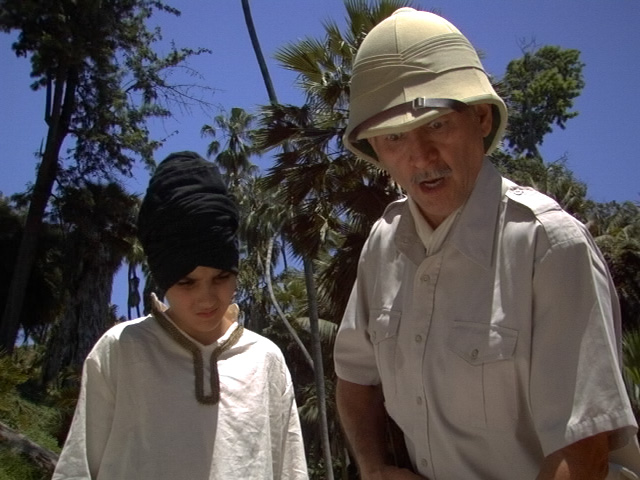
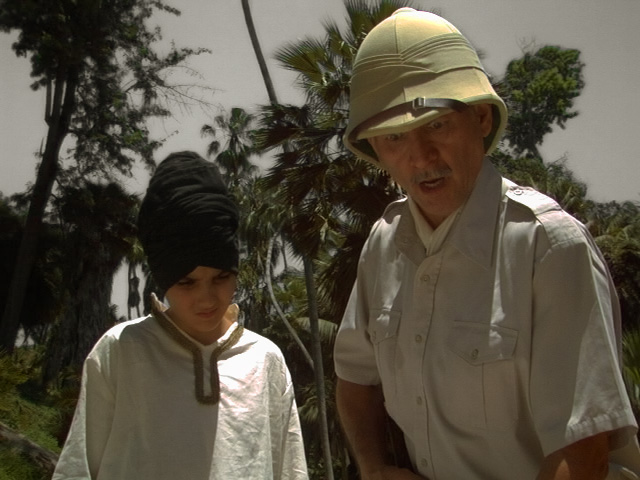
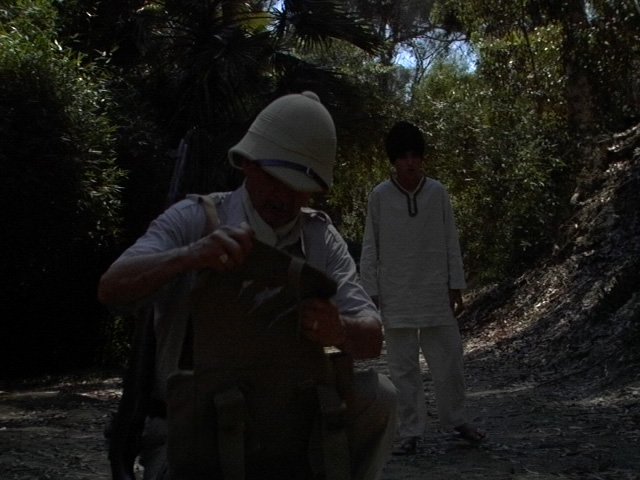
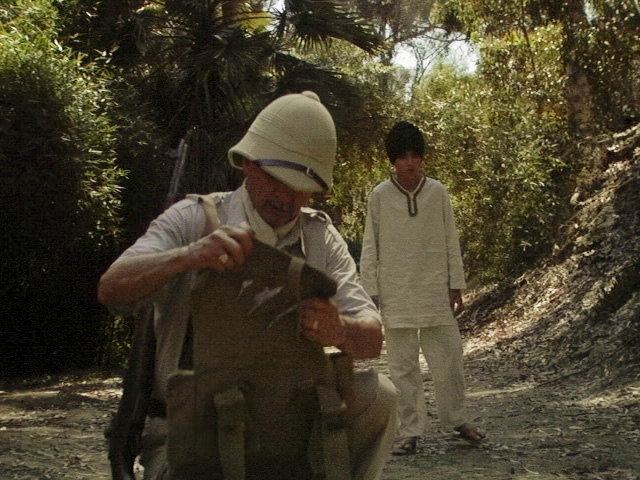
Hey, these shots are from a short film I DP'd and edited, called Wildlifeless. It was shot on the DVX in 4:3 mode. Overall, I am very pleased, but there are a couple shots that were terribly underexposed. I think I accidentally engaged the ND, thus underexposing them by 3 full stops. Yikes! I wanted to post some stills and see if anyone had any better ideas for grading these shots to match. I have included two shots that cut with each other, one exposed properly, one underexposed, along with my cracks at color correction. There are links to the PSD's below, so you don't have to work with JPEG's.
My basic process for these shots is:
1. Rebel Deartifacting (Median Radius = 3, Color Blending)
2. Levels to set Black Level, if necessary
3. Curves to adjust gray, using the hunters shirt as a reference (the shirt is gray, but slightly blue-gray, so using that as a gray reference I end up with a slightly warm image, and I go further to take all the blue out of the shadows, which is important because of the next step...)
4. Hue/Saturation - Blue/Cyan -50 Saturation and +100 Lightness, to create oppressive skies. Also, a +10 Sat bump for Yellow and +20 Sat bumb for Green
5. MB Look Suite to mess with Gamma/Contrast, add a touch of Black Diffusion, add a little warmth, and a little saturation
Of course, my corrections had to be very extreme on the underexposed shots.
Anyone have any suggestions on the underexposed shots, they just look terrible to me.
Before
After
Before
After
http://www.727records.com/blog/wildlifeless01-before.psd
http://www.727records.com/blog/wildlifeless01-after.psd
http://www.727records.com/blog/wildlifeless02-before.psd
http://www.727records.com/blog/wildlifeless02-after.psd
My basic process for these shots is:
1. Rebel Deartifacting (Median Radius = 3, Color Blending)
2. Levels to set Black Level, if necessary
3. Curves to adjust gray, using the hunters shirt as a reference (the shirt is gray, but slightly blue-gray, so using that as a gray reference I end up with a slightly warm image, and I go further to take all the blue out of the shadows, which is important because of the next step...)
4. Hue/Saturation - Blue/Cyan -50 Saturation and +100 Lightness, to create oppressive skies. Also, a +10 Sat bump for Yellow and +20 Sat bumb for Green
5. MB Look Suite to mess with Gamma/Contrast, add a touch of Black Diffusion, add a little warmth, and a little saturation
Of course, my corrections had to be very extreme on the underexposed shots.
Anyone have any suggestions on the underexposed shots, they just look terrible to me.
Before
After
Before
After
http://www.727records.com/blog/wildlifeless01-before.psd
http://www.727records.com/blog/wildlifeless01-after.psd
http://www.727records.com/blog/wildlifeless02-before.psd
http://www.727records.com/blog/wildlifeless02-after.psd
