F3: Why I Bought an F3

On the external mon?

sorry I only used the display functions on the LCD, but pretty sure you can toggle enable/disable to an external monitor if you are using HDMI or SDI. Try the display button on the side near the monitor volume buttons.

EDIT: under VIDEO SET -> SDI/HDMI Out Display toggle On/Off. This should do the trick.
 
Last edited:
This works on the onboard display only like the histo? Im across those tools but ideally don't want to turn to see the onboard monitor when operating on the shoulder.

Also is there a menu item that will show the area (a box) that the spot meter is reading?

You see a LUT that moves 68 in log to 100 in lut and activates a zebra is something you might consider on the F5, at least with the F3 it is simple to see what is going where.. spot meter during the setup phase!

S

Just sell the Hyperdeck and get a Samurai Blade.
The monitor functions perfectly, is crisp has all the same functionality of peaking, zebras etc and mostly importantly has 3 different ways you can see the waveform.
Frankly, wisest move I have made yet.
By the way, the owner of Atomos told me that they will be producing an loupe viewfinder hood for the Blade, which is why they kept it at 5".
 
Yes turn on spot meter and make sure in the display menu "marker" or something to that effect is turned on. What it does is give you a nice little box in the center of the LCD or VF which will give you a full scale IRE reading of whatever that box is on top of.

Sony failed big time with their miniature and unlabelled waveform monitor on the F5/F55 absolutely useless for nailing slog2 exposure. I would have taken the spot meter and box function from the F3 over that miserable attempt.

Useful tip Dennis thanks.

There is always a bit of white poly board or something white on or near set that can be used to expose white at the correct IRE for Slog. Finding a suitable grey can be difficult.

Surinder.
 
sorry I only used the display functions on the LCD, but pretty sure you can toggle enable/disable to an external monitor if you are using HDMI or SDI. Try the display button on the side near the monitor volume buttons.

EDIT: under VIDEO SET -> SDI/HDMI Out Display toggle On/Off. This should do the trick.

Afaik you can get all sorts of gunk on the external montitor (and switch it off using 'display', just not exposure tools), when the FS100 was 'clean' it showed TC on the Ext monitor, when the F3 ext mon is clean (hdmi) you get nothing to now you are rolling.

S
 
Same here looking forward to the 7Q for the exposure tools and the ability to do 1080p 60fps.

User created LUTs are also going to be available some time down the firmware road map.


Surinder.
 
Very interesting thread.

I've had my F3 for several months now and love the picture quality recorded to the BM shuttle. As I am mainly shooting in controlled lighting situations I've stuck to using gamma's 1 and 4.

I've not shot much Slog as I'm pretty much having the same issues that Sam has highlighted, increased noise and not yet having the confidence to expose Slog correctly. I don't have the paid Slog upgrade so I'm using Slog as a gamma curve within a PP. The unpaid version does not have a monitor LUT option, So I've not had the confidence to use it on an actual shoot.

I may try switching between 2 PP's as suggested in this post between an Slog PP and a standard rec709 based one.

Would it be totally disastrous to set/light up with a rec709 PP and then roll on a Slog PP?

Will be following this thread with interest and hope to learn a lot more about how to get the best out of Slog.

Sam if your ever in Birmingham please pop in to see us. I noticed that your only a stones throw away up in Bristol :)


Surinder Singh.

This thread and the "F3 noise" thread are getting very similar, so I suggest you also check that out.

It would not be disastrous to switch from a pp profile before shooting slog, but I would highly recommend creating a custom profile where you can be 100% certain that when you switch from the slog picture profile to the new one that your middle grey is in fact going from 38% to 50%. Before using this in the field you can tweak your custom picture profile at home using a grey card and the built in spot meter on the F3.
 
This thread and the "F3 noise" thread are getting very similar, so I suggest you also check that out.

It would not be disastrous to switch from a pp profile before shooting slog, but I would highly recommend creating a custom profile where you can be 100% certain that when you switch from the slog picture profile to the new one that your middle grey is in fact going from 38% to 50%. Before using this in the field you can tweak your custom picture profile at home using a grey card and the built in spot meter on the F3.

I've also been following that thread Dennis.

This along with your previous advice since getting my F3 has been very very valuable. I've also been following your blogs and will be doing a serious round of internal test before using Slog on productions.


Thanks,

Surinder.
 
Sam I am at home viewing on an old iPad. I'm back in the office tomorrow when I will put your blog pics on a decent monitor to evaluate better.

My client base like to have skin as bright as possible. I'm ok with that as long as the highlights don't start getting ugly.
I've stuck to cine gamma's 1 and 4 thus far. I'm still sitting on the fence in regards to using slog in controlled lighting situations. If skin tones are rendered better in slog with acceptable amounts of shadow noise I'd be happy to use it. I usually end up crushing the blacks quite a bit anyway during the grade. I don't use Resolve so I do all my CC in either Premier or After Effects.

I'm hoping to do some of my own tests at my studio too. On that point anyone know where I could pic up a test card with 18% grey here in the UK?


Surinder.
 
anyone know where I could pic up a test card with 18% grey here in the UK?

http://dsa.ebay.co.uk/sch/i.html?_t....Xgrey+card&_nkw=grey+card&_sacat=0&_from=R40


I also recommend a monitor color calibration system which will make sure your monitor is calibrated accurately for both external lighting conditions, and also that your color renditions are as accurate as possible. It does this by profiling your monitor and measuring individual R, G, B output strengths and then creating a monitor profile that eliminates any biases towards specific color channels.

I know it sounds like hocus pocus but especially in terms of highlight rendition I saw a huge difference on some stills I shot on DSLR when toggling between the new and old monitor profile. Not so much in just color alone but in brightness which if wrong can throw off your entire grading and color correction process.

The one I'm using is Datacolor Spyder 4 and if you buy the pro version it has an unlimited number of monitors or devices you can calibrated. It does ipads too yes.
 
http://dsa.ebay.co.uk/sch/i.html?_t....Xgrey+card&_nkw=grey+card&_sacat=0&_from=R40


I also recommend a monitor color calibration system which will make sure your monitor is calibrated accurately for both external lighting conditions, and also that your color renditions are as accurate as possible. It does this by profiling your monitor and measuring individual R, G, B output strengths and then creating a monitor profile that eliminates any biases towards specific color channels.

I know it sounds like hocus pocus but especially in terms of highlight rendition I saw a huge difference on some stills I shot on DSLR when toggling between the new and old monitor profile. Not so much in just color alone but in brightness which if wrong can throw off your entire grading and color correction process.

The one I'm using is Datacolor Spyder 4 and if you buy the pro version it has an unlimited number of monitors or devices you can calibrated. It does ipads too yes.

Thanks Dennis,

Just clicked the buy button ;)

Was also reading an older thread of yours earlier on TLCS on another forum, more useful stuff to look into:)

Surinder.
 
Nerd alert. OK so I feel a bit lost in where I am trying to go with an Slog file. It occured to me that the Nikon D3/CaptureOne has a look/gamma that I am happy with.

Took a test shot with the D3 and then replicated with the F3, I can now fiddle with the F3 to try and make it replicate the D3

Here is a shot, top is D3, bottom is F3, Slog exposed to hit my SmallHD zebras at the hottest point (no point getting a look if you dont know what exposure you need to get it in the field)

Interesting to see the F3 looks a bit flimsy, Im guessing a lower exposure may have a little more 'meat'

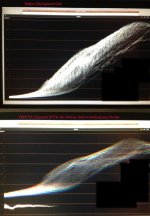
Using this 'target' it is fairly simple to create a node using lift,gamma,gain, that matches the D3, very simple in fact!

Scope1_small.jpg
 
I just hit the danger button, - uncompressed 10bit 10gb per minute.

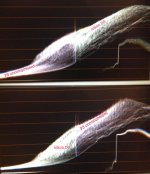
2 mins in the scopes and twinkle with resolve reveals easy matching to the Nikon d3. Damn.

Scopes2_small.jpg

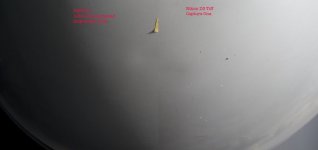
match_850.jpg
 
Last edited:
In my experience shooting with the F3 for a year is that once in s-log there are only two things to pay attention to.

1: Select either 3200k or 5600k white balance
2: Adjust exposure to either 68% white and 38% middle gray or, as I've learned, observe the histogram to end up with about the same exposure as the first method.

There's no room for error if you want the maximum image quality out of the F3 but even if you get things wrong it can be saved to good looking footage. I actually stopped my camera tweaking thanks to the simplicity of the F3 in s-log. A thing I'm reminded of when looking at how to set my FS100 up.
 
I'd add, that if you add a 10-bit external recorder with false colour metering, your life will become so much easier - just get your highlights on caucasian skin to turn pink and you're set. That's quite literally all you have to do.
 
I'd add, that if you add a 10-bit external recorder with false colour metering, your life will become so much easier - just get your highlights on caucasian skin to turn pink and you're set. That's quite literally all you have to do.

yep
 
Back
Top