Those programs exist already all over the internet, search for "transport stream demux". And ffmpeg can be used to transfer the AVC elementary stream from the AVCHD streams into a different container.The first one who can make a program that rips out the H.264 from the AVCHD container without transcoding will make lots of money.

Navigation
Install the app
How to install the app on iOS
Follow along with the video below to see how to install our site as a web app on your home screen.
Note: This feature may not be available in some browsers.
More options
You are using an out of date browser. It may not display this or other websites correctly.
You should upgrade or use an alternative browser.
Why does my footage suck?
- Thread starter Andor
- Start date

ajamils
Well-known member

PerroneFord
Deals in Lead
Just to get this right. AVCHD is much more than a codec.
Yes, you are right of course. But I didn't want to get into the minutiae at that point. But your point is well taken.
PerroneFord
Deals in Lead
VirtualDub seems enticing, but I'm a little confused about the GUI. When you select "reduce frame rate" with the IVTC filter, it reduces down to 19.2 by itself, with my 1920x1080/24P footage, and the resulting render looks it. I'm toying with it somewhat, and will continue to do so.
It could be that I was mistaken about the "reduce frame rate" option. The version of VirtualDub that I use did not have this option. Perhaps it is simply not necessary. I'll try the new version of virtualdub today with some footage I have and see if that fixes it.
Mr. Ford, I could send you a DVD, or upload to an ftp site, or send you via email a very small clip. Anything you suggest. Thank you once again.
I could set you up with an account on my FTP server tonight. Or perhaps you could send me a small clip with USendIt or something like that.
PerroneFord
Deals in Lead
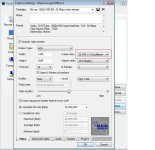
Yesterday I discovered something. In Vegas Pro 9, when I do File > Render As..... under video frame rate drop down I get an option for 23.976 + 2-3 pull down (see picture). So am I correct in assuming that VP9 does pulldown correction ?
No, it can ADD pulldown, but not remove it. This option is used so that if you are working in 24p, you can add pulldown so that your video can be broadcast in a 60i stream. Like for DVD purposes. This option is doing the exact same thing your GH1 is doing. You need the reverse of this process.
ajamils
Well-known member
No, it can ADD pulldown, but not remove it. This option is used so that if you are working in 24p, you can add pulldown so that your video can be broadcast in a 60i stream. Like for DVD purposes. This option is doing the exact same thing your GH1 is doing. You need the reverse of this process.
oh ok.....sorry :embarasse
PerroneFord
Deals in Lead
Once I know your address for "UsendIt", I will send you a short clip, Mr. Ford.
Thank you once again.
I don't have an address. I've only gotten some stuff from there.
ajamils
Well-known member
Are you guys really seeing that MUCH difference from 60i vs 24p? I'm probably not removing pulldown correctly. Can someone here post some footage one with pulldown removed and one without pulldown?
same here. I don't see any difference between the two. I would also like to see a sample.
Mr. Ford...thanks for the PM...I think, however, this link will do the trick:
http://www.4shared.com/dir/19706662/5df380a0/sharing.html
You have to wait about 35 seconds before the download starts, but it should work. It's about 45 seconds of footage, 1920x1080/24P...hand held...not great, but something to work with. I can't thank you enough for your time and trouble.
MTS file will not work since it's not 24p native. It needs to be pulldown removed to get 24p so your footage needs to be after rendering. And probably need to post two version of the same footage, one without pulldown removed and one with. I must say that most of us here are going thru all this trouble in getting 24p and not have experience enough with what the hell 24p is and if it even look significantly better than 60i. Average Joe probably can't tell a 60hz tv from 120hz tv. this is probably similar comparison. I'll just shoot in 720p and call it a day.
PerroneFord
Deals in Lead
Average Joe probably can't tell a 60hz tv from 120hz tv. this is probably similar comparison. I'll just shoot in 720p and call it a day.
LOL, so much truth in this! But at some point, you make a decision. Either you are going to improve your video and techniques, or you aren't. The point at which you aren't is as far as you're willing to go.
Some of us are interested in making home movies. Some of us want to have footage on National Geographic and we want to create the best TV video we can. At another level, some folks want to submit movies to screening and potentially have a movie purchased for distribution. This means that only the very best video will do, and it BETTER be movie like because the people making the decisions surely WILL be able to tell.
My workflow when I know I am only going to the web is vastly different from my workflow when I am going to be delivering for broadcast and the web. The tolerances are tighter for PBS than nearly anyone else. And they really do scrutinize the footage.
PerroneFord
Deals in Lead
Mr. Ford...thanks for the PM...I think, however, this link will do the trick:
http://www.4shared.com/dir/19706662/5df380a0/sharing.html
You have to wait about 35 seconds before the download starts, but it should work. It's about 45 seconds of footage, 1920x1080/24P...hand held...not great, but something to work with. I can't thank you enough for your time and trouble.
Ok, the wheels fell off the wagon somewhere. The standard workflow that I used created a beautiful 24p file.
Loaded mts file into vegas. Set up project as a 1080i upper field first file. Rendered to Lagarith 1080i upper field first .avi file. Into Virtualdub. Added IVTC filter with adaptive, and change frame rate. Created a lovely lagarith 24p file. Brought that into Vegas and just created a mp4 file to play.
Has lovely color, typical 24p motion judder, compression artifacts that I would expect. Looks exactly like I would think it would look. The GOOD news is that I found a nice means of checking things. When you are in virtualdub, and you've entered your settings for IVTC, and clicked ok, you get a screen that shows what filters have been applied. At the bottom is a checkbox that says: "Show Frame Rates". If you click that on, then on the filter status it will show you under the output column, what frame rate the output file is going to be. It should say 24 fps). If it doesn't, then you've either messed up with the video coming out of vegas, or somewhere else upstream. If you do NOT click "Change Frame Rate" in the IVTC filter, it will leave the frame rate alone. And at this status check screen it SHOULD say 30fps. If it does not, then you can tell what frame rate you encoded to out of Vegas.
I suspect that you encoded to 24p out of Vegas, then selected reduce frame rate in Virtualdub, leaving you with a 19 fps file. In fact, when I load up a 24fps video file into VirtualDub and do the same things in IVTC, that is EXACTLY what it does. It gives me a 19.2 fps file. So I think you encoded wrong out of Vegas.
PerroneFord
Deals in Lead
would it be possible for you to upload before and after files so that we (newbies) can see what difference does the 24p makes.
Yes, but I'd need a place to do it. I can only put one file at a time on Vimeo and Youtube won't let you download the source files. Yousendit is designed to send things to someone, not have a group of people go and download it.
The file I processed can be seen on Vimeo here: http://www.vimeo.com/6403333 (the source file can be downloaded for a week) I took some liberties that the owner of the footage will see immediately.
Last edited:
PerroneFord
Deals in Lead
how about putting it on megashare or something like it ?
The 24p verison can be seen on Vimeo.
The 60i version is here:
http://d01.megashares.com/dl/7fc09e3/testvideo_60i.mp4
PerroneFord
Deals in Lead
PerroneFord,
Thanks for all the work.
I still do not see any difference between the two.
Somehow, I suspected you wouldn't.
 No problem. Just keep doing what works for you. If at some point, you need to make a change, then you'll know where to start.