Why does my footage suck?

Andor

Active member
Ok, I'm sorry that I didn't use a tripod, but here's some sample footage I took with my GH1 right out of the box.

http://www.youtube.com/watch?v=R0x9lCzaL68&feature=player_embedded

I used the Panasonic PL filter you can buy on their website. I edited with Vegas Movie Studio Platinum 9.0, and the only effect I added was Studio RGB to Computer RGB.

When I have the footage in Vegas Studio it reads it as 1920x1080x12 at 29.970 fps interlaced.

So I guess, I have a lot of questions. Because I am a total noob. How do I get my camera to shoot at the 24fps? I would actually rather prefer to film in 720 60p (I believe I read that is an option for the camera), so uh... as sad as this sounds, where is that setting? Also, which is the best mode to always render my videos in? When I render them as 1080 they get massive file sizes (25gig to 40gig), and the video and sound skips and lags, what am I doing wrong?

Pretty much anything you guys can tell me will help, honestly. I have read through the manual a lot, but from what I have seen it doesn't provide answers for those questions. I will film some more today using a tripod and upload it to vimeo and YouTube both.

Other thoughts:
I am using a class 4 Sandisk 8gig memory card.
The regular video on my PC also has the mud and shitty quality that the YouTube version does, so it's not just YouTube.
 
You need to remove the pulldown for 1920x1080 footage to work properly. There are other trehads on this.

I don't know much about post workflow for PCs or else I'd be more helpful.
 
Please

Please

Can someone explain how to remove "pulldown" from 24p footage shot with the GH1 in Vegas Pro 8.1?

Some of the footage I've seen looks so very film like, but whatever I shoot and render, whether it's 1080/24p or 720/60i, and no matter what timeline I drop it in, it looks extremely jittery.

If I render 720/60i footage in a 59.970 timeline @59.970, it looks like videotape, or live video that one would see on broadcast TV.

That's great, but I would love to know the secret of the smooth film look. I know you have to minimize the panning and zooming, but I believe there's a secret that should be shared to get film like smoothness, if it is known.

Am I limited by Vegas? Is removing "pulldown" mandatory? Do I need an Apple workstation with FCP?

Or, is what I'm seeing that's rendered for Vimeo just more film like for their posting protocol?

I would just love a film like production using Vegas 8.1 pro 64bit..something that looks similar to the Zacuto promos for their DSLR Gorilla Kit on Vimeo.

So film like, even though it was shot I believe with the Panasonic HVX150? and the Canon 5D Mark II.

Please, those of you in the know....give up those post production Vegas tips and secrets....

Thanks for any and all replies.
 
Can someone explain how to remove "pulldown" from 24p footage shot with the GH1 in Vegas Pro 8.1?

Can't be done with that. Neoscene or VoltaicHD will do the trick. The problem is that a lot of people think that this cameras have a "film magic" button that will make motion pictures just happen. After 35 years in the imaging business I know for sure that it takes a lot of equipment knowledge, post production skills and especially talent to make something out of this cameras look like "film". It takes a lot of studying and practice to get it right.
 
Last edited:
Can someone explain how to remove "pulldown" from 24p footage shot with the GH1 in Vegas Pro 8.1?

Some of the footage I've seen looks so very film like, but whatever I shoot and render, whether it's 1080/24p or 720/60i, and no matter what timeline I drop it in, it looks extremely jittery.

If I render 720/60i footage in a 59.970 timeline @59.970, it looks like videotape, or live video that one would see on broadcast TV.

That's great, but I would love to know the secret of the smooth film look. I know you have to minimize the panning and zooming, but I believe there's a secret that should be shared to get film like smoothness, if it is known.

Am I limited by Vegas? Is removing "pulldown" mandatory? Do I need an Apple workstation with FCP?

Or, is what I'm seeing that's rendered for Vimeo just more film like for their posting protocol?

I would just love a film like production using Vegas 8.1 pro 64bit..something that looks similar to the Zacuto promos for their DSLR Gorilla Kit on Vimeo.

So film like, even though it was shot I believe with the Panasonic HVX150? and the Canon 5D Mark II.

Please, those of you in the know....give up those post production Vegas tips and secrets....

Thanks for any and all replies.
Seems like we're in the same boat. I'm trying to figure out how to get this footage to look good, but so far when I render to 24 fps anything it lags.

Also, thanks for the replies Ben. I haven't been messing around with my camera too much for fear of screwing something up.

Does anyone even truly recommend Sony Vegas? Does it need to be used in conjunction with some other program? I have a Mac, so should I just forget Vegas and invest in FCP?

I mean, I have read a lot back and forth, and I know FCP is better, but if there's a way to get the same 24p look on a PC, that'd be great.
 
Again you can use Neoscene or VoltaicHD to remove pull-down but like John says, it isn't only about the magic 24p....wait is that Martti and his killer clown I hear approaching to plug TOAST :)
 
Can someone explain how to remove "pulldown" from 24p footage shot with the GH1 in Vegas Pro 8.1?

Take some time, an go educate yourself on what "pulldown" means and why it is used. When you understand what it is, and why it's used, you will have a better understanding of how to work with the footage from your GH-1.

Some of the footage I've seen looks so very film like, but whatever I shoot and render, whether it's 1080/24p or 720/60i, and no matter what timeline I drop it in, it looks extremely jittery.

There is a reason for that. Probably several reasons. It's going to take some time, education, and practice for you to learn to make more film-like images with your camera.

If I render 720/60i footage in a 59.970 timeline @59.970, it looks like videotape, or live video that one would see on broadcast TV.

And it should. That is exactly what that mode is for.


That's great, but I would love to know the secret of the smooth film look. I know you have to minimize the panning and zooming, but I believe there's a secret that should be shared to get film like smoothness, if it is known.

There is no secret. I'm sorry you think there is. The secret of creating film-like footage, is to shoot like you are shooting film. This requires study and practice. All the information on how to do this is freely available. Or you can attend film school and learn like many of the people who's work you seem to admire. That's probably the fastest way to learn, though not the cheapest.

Am I limited by Vegas? Is removing "pulldown" mandatory? Do I need an Apple workstation with FCP?

No you are not limited by Vegas. You are limited by your own knowledge, or lack thereof at this point. Removal of pulldown is only mandatory if you want to have 24p material that is shot by your GH-1. No, you do not need an Apple with FCP.

Or, is what I'm seeing that's rendered for Vimeo just more film like for their posting protocol?

No. What you are seeing is well shot footage. That is the culmination of years of study and practice by professional filmmakers in many instances.

I would just love a film like production using Vegas 8.1 pro 64bit..something that looks similar to the Zacuto promos for their DSLR Gorilla Kit on Vimeo.

Then you are going to have to learn to make film like the guys at Zacuto. Years of experience shooting and learning camera systems, editing, lighting, etc. No one said this was going to be easy.

So film like, even though it was shot I believe with the Panasonic HVX150? and the Canon 5D Mark II.

Yes. two cameras that have capabilities your camera does not. But it's about more than the camera. It's about time-tested ways of positioning and moving the camera. About lighting like film. About good sound. About skill in post production. There is a lot going on there.

Please, those of you in the know....give up those post production Vegas tips and secrets....

Volumes have been written on post workflow. But I suspect your problems are starting in pre-pro, with a lot more while rolling camera. You need to fix those issues befor worrying about vegas.
 
Virtualdub will do it for free.
Awesome, I will give it a try today. Right now my main concern is trying to figure out what the best way to render the footage is after I have edited it in Vegas Movie Studio.

Here's a quick clip I shot last night:
http://www.youtube.com/watch?v=svspp1sMHlI

I used the "YouTube Higher Quality 25p" option under MPEG-4. It rendered without the video lagging, but terrible quality considering it came from a GH1.
 
Hang on a sec. You need to understand a basic workflow before you go running off trying to implement what we are talking about here.

Something basic might be:

1. Shoot "60i/24p" inside GH1.
2. Render 60i/24p to lossless .avi file
3. Use Virtualdub to remove pulldown and get a real 24p .avi file.
4. Open 24p .avi file in Vegas and proceed with edit.

You need to understand the limitations of your software, and understand what you are starting with and what you want to finish with, then figure out how to get there.
 
Hang on a sec. You need to understand a basic workflow before you go running off trying to implement what we are talking about here.

Something basic might be:

1. Shoot "60i/24p" inside GH1.
2. Render 60i/24p to lossless .avi file
3. Use Virtualdub to remove pulldown and get a real 24p .avi file.
4. Open 24p .avi file in Vegas and proceed with edit.

You need to understand the limitations of your software, and understand what you are starting with and what you want to finish with, then figure out how to get there.

Wait a minute, why do I need to render it to lossless .avi ? If I'm using Vegas Pro 9, can I remove the pulldown in VP 9 ? Or does it not support it ?
 
Wait a minute, why do I need to render it to lossless .avi ? If I'm using Vegas Pro 9, can I remove the pulldown in VP 9 ? Or does it not support it ?

Doesn't support it. It expects you to feed it real 24p. As do FCP, and other editors.
 
Last edited:
Excuse my ignorance but doesn't Vegas Pro 9 and FCP support direct editing of AVCHD files ? If so, then why do we have to go through the whole exercise of converting it ?

Is there a quality difference between the raw file from GH1 (recorded at 1080/24p in 60i wrapper) via the REAL 24p (converted file) ???
 
Excuse my ignorance but doesn't Vegas Pro 9 and FCP support direct editing of AVCHD files ? If so, then why do we have to go through the whole exercise of converting it ?

AVCHD is a codec. And you can encode all kinds of video with it. You can encode 60i, 24p, 25p, 60p, and all other manner of files. So you need to separate the idea of the codec (AVCHD in this case) from what is contained inside of it.

So to answer your question directly, yes, Vegas supports editing AVCHD directly. I am not sure if FCP does as it wants to covert EVERYTHING to a Quicktime codec, preferably ProRes. And you do not need to go through the process of converting it if you don't want to. Totally up to you.

BUT if you want to deliver a product that moves like film, then you really need to have 24p video. And to get there from the GH1, you're going to need to remove pulldown. And since neither Vegas nor FCP can do that, you need to get that video into an application that can. Neoscene and Voltaic are two options. VirtualDub is another. And since VirtualDub can only understand .avi files, if you use that application, you'll need to convert.

Of course, all these gyrations could have been avoided by using a camera that actually shoots native 24p. But since your camera doesn't, well, there you are.


Is there a quality difference between the raw file from GH1 (recorded at 1080/24p in 60i wrapper) via the REAL 24p (converted file) ???

Quality difference? No. Is there a difference in being able to work with that file in certain ways? You bet. Because until you remove that pulldown, your editing application is not going to see a 24p file. It's going to see a 60i file. And those two things are not the same. Even the timecode won't match up correctly.
 
PerroneFord,

Thank you for your detailed reply. It did clear some confusion but (isn't there always a but :) ) I have some more questions (sorry for hijacking your thread OP.)

1) If VirtualDub can do the the pull down for FREE, is there any advantage of paying for Neoscene and Voltaic (except for that they can remove pulldown from AVCHD directly ?)

2) Is it better to remove the pulldown and then edit the file in VP9 or after editing ?

3) Most important question, how do I remove pull down in VirtualDub ? I downloaded it last night but couldn't figure it out.
 
1) If VirtualDub can do the the pull down for FREE, is there any advantage of paying for Neoscene and Voltaic (except for that they can remove pulldown from AVCHD directly ?)

No idea, I've never used them. Well Neoscene has some other huge advantages like converting the footage to cineform codec which Vegas loves. :)

2) Is it better to remove the pulldown and then edit the file in VP9 or after editing ?

I prefer to edit in 24p.

3) Most important question, how do I remove pull down in VirtualDub ? I downloaded it last night but couldn't figure it out.

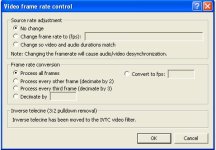
Video > Frame Rate > inverse Telecine > Adaptive
 
Ok,

Video > Filters > Add >IVTC

Choose: Reduce Frame Rate (change 29.97 to 23.976), Autodetect, Adaptive

Note this ONLY works for video that is encoded with 3:2 pulldown. This is the most common kind. There are some more sophisticated pulldown methods such as the "advanced" pulldown in the DVX/HVX cameras that use 2:3:3:2 pulldown and that cannot be removed with Virtual Dub.

I do not know what the GH1 uses for pulldown, but I'd be shocked if it was anything other than 3:2 pulldown.
 
Ok,

Video > Filters > Add >IVTC

Choose: Reduce Frame Rate (change 29.97 to 23.976), Autodetect, Adaptive

Note this ONLY works for video that is encoded with 3:2 pulldown. This is the most common kind. There are some more sophisticated pulldown methods such as the "advanced" pulldown in the DVX/HVX cameras that use 2:3:3:2 pulldown and that cannot be removed with Virtual Dub.

I do not know what the GH1 uses for pulldown, but I'd be shocked if it was anything other than 3:2 pulldown.

Where do I put 23.976 ? In video frame rate control (Video > Frame Rate) or under Filters > IVTC (offset of first combed frame)
 

Attachments

  • VDub2.JPG
    VDub2.JPG
    37.4 KB · Views: 0
  • VDub3.JPG
    VDub3.JPG
    33.1 KB · Views: 0
Back
Top