AC90: Why does my AC90 look so muddy compared to GH3?

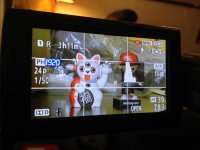
Compared to my GH3/GH2 everything that comes out of my AC90 seems pretty ugly and blurry. I'm just using the standard profile with chroma adjusted to match the GH. Anyone have ideas how I can make it sharper or with more detail and less zombie like skin tones? These were both shot at about F2.8. Same room, the girl zoomed in pretty far with the ac90 and the guy at about 50mm with the GH3 12-35.


AC90.jpgGH3.jpg
 
Have you shot the exact same thing with both? The AC90 is a substantially higher resolution camera than the GH cams. As long as it is focused properly, you don't have a lot of gain applied, and you don't have coding turned up high or detail turned down low...
 
I'm wondering if the strong backlight from that window is causing something bad to happen with auto settings, or dynamic range or something? What was the gain and aperture on that shot? Was anything on auto?

It does seem to be exposed for the background and not the subject.
 
I would also guess that all the AG series camcorders have OLPF that makes them way softer in appearance than any of the GH series cameras. I got so much detail out of the GH3 that my AF100 look really bad in comparison.
 
The AC90 is a full-raster, three-chip system that does a 4K sample and downconverts to 1080p. It is as sharp as anything you're going to find, and much sharper and more detailed than a GH-anything. Used properly it will easily outperform any DSLR-type camcorder.
 
Here's another example. Both cameras were custom wb on a white card.

AC90 Settings:
AVCHD 24p 1/50
Open +10db
Scene 1 with Cine-like D, Detail Corning-3, Chroma Level -2, Chroma Phase -2
Zoomed in Z83

GH3 Settings:
AVCHD 24p 1/50
F2.8 iso 400
Scene Standard with -3 sharpness, -2 saturation, -3 noise reduction
Zoomed in 100 on the 35-100x lens

Which do you think looks better?
Could there be something wrong with my scene file?

AC90-1.jpgGH3-1.jpgIMG_1184.jpgIMG_1183.jpg

Here's links to the full size frame grab:
GH3
AC90
 
Last edited:
Yes, there's certainly things wrong with your scene file! Just for laughs, put it on HD NORM gamma, chroma level +2, detail coring -7, and chroma phase +3 and shoot the exact same setup, and see if you notice a substantial difference. Plus the AC90 shot is significantly underexposed. The AC90 is only 40 ISO, you'd have to go to 21dB of gain to match the exposure on a GH3 at 400 ISO.
 
And it would be much higher quality if it was exposed properly in the first place, and didn't have a lot of gain in the image. Bring up the light to where the AC90 can expose properly without needing gain, and it will look much better.
 
Thanks everyone for the suggestions. Barry, here's the same screen with the settings you recommended. It certainly helped. The first is with the same +10db and the second was set to Auto Iris which bumped it up to +16. Comparing to the GH3 the red on the cat is looking a little more pink/magenta on the AC90. If anyone else has more settings or ideas I'll post the results.

AC90-3.jpgAC90-4 Autoiris.jpg
 
That is one thing about the AC90. When exposed properly (no gain added) it is crazy sharp. I think that a lot of people get a false sense of security with the gain system since noise is so low but there is always a compromise in some way.
 
Experiment with different chroma phase settings to get the colors the way you like. It's looking pretty good at the moment though.
 
That is one thing about the AC90. When exposed properly (no gain added) it is crazy sharp. I think that a lot of people get a false sense of security with the gain system since noise is so low but there is always a compromise in some way.

So, with low light, ac90 loose sharpness?
 
With high gain the AC90 can lose sharpness. Pouring a lot of gain on to overcome the low light, will result in a softening of the image.

As said before, a video camera feeds on light. Give it enough light and it will reward you with great images. Starve it of light and it will not be able to perform its best.
 
And it would be much higher quality if it was exposed properly in the first place, and didn't have a lot of gain in the image. Bring up the light to where the AC90 can expose properly without needing gain, and it will look much better.

This makes total sense Barry. But I have to say that I've been hard pressed to get the exposure to 0 dB in ANY indoor setup. That includes a studio setup that has plenty of high powered Frezzies as it's disposal as well as other high output lights.

Last week I shot a corporate piece and had an 800w redhead with a softbox attachment as my key, only had the the single diffuser on the softbox and the light was at full up but I still wasn't able to get 70IRE on the face without using 6db of gain..that being said the shot looked excellent, super sharp and certainly had no sign of grain or smearing from the detail coring (which I have started reducing more and more)

I know this camera has alot going for it but it seems hard pressed to provide an indoor image without some gain. Unless I'm missing something?

For the record I was using the HD Norm gamma setting and was on 24P and 1/50.
 
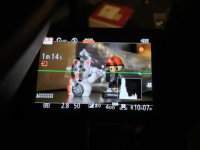
While the exposure may look fine on the LCD, it is obvious from looking at the histogram that the image was actually underexposed.

It really pays to trust your histogram readout.
Exactly -- and why you should never, ever just look at the LCD to judge exposure! A little on-camera LCD is never going to be a truly accurate representation of exposure. But the histogram is a mathematical, objective representation. And in that histogram you can see that it's grossly underexposed.
 
From my experience, high gamma yields much more satisfying results indoors. Almost all of my indoors stuff, even under good lighting looks under exposed using the HD standard gamma. I honestly think the stock settings are somehow incorrect.
 
Back
Top