Why does a single clip in camera appear as multiple clips on import

I haven't found a solution to this problem yet, so I'll pose it here.

On several occasions I've found a discrepancy between the clips in my camera viewfinder and those in the Final Cut 6.2 Log & Transfer Window.

I'm shooting at 720/24PN on a pair of 64 gig cards, documenting live performance. I'll often shoot a 75 - 90 minute act continuous, so it appears as one clip in the viewfinder menu.

Yet when I call it up in Log & Transfer, it will appear as 7 or 8 separate 12-min clips, which I have to import individually.

Can anyone explain why this happens, and what I can do to prevent it from happening or fix it when it does occur?

Right now my only solution has been to drop all clips into a timeline, then export as a Q-Time movie, and re-import that to the browser in order to have a full-length clip.

Thanks for any suggestions
 
P2 cards are FAT32 based so that they can work on both Windows and Macs. FAT32 has a maximum file limit of I believe 4gb. What the cards are doing is internally spanning the clips (like they would if you where recording and one p2 card filled up and went to the next p2 card) What you are seeing is 4gb segments of the same clip.

FCP should during log and transfer realize that these are the same spanned clip and automatically stitch it back together. What version of FCP are you using?
 
Yes, I understand the principal of the spanned clips, and as I read my initial post I realize I left a couple things unclear.

First, I am working in Final Cut 6.0.6 (not 6.2).

Second, Final Cut normally recognizes continuous clips and I can import them whole.

This problem is an occasional one, but it just happened again this weekend twice in a row, with two different cameras and two different P2 cards. Interestingly, the next piece I shot on 64 gig card showed up in Log&Transfer window as a continuous clip (115min).

I have had it occur previously under circumstances which I blamed on myself. On one occasion I shut off the camera without hitting Pause first and on another occasion (obviously not thinking clearly) I popped out the battery to swap for a fresh one without shutting down. Since then I've been meticulous about not making either mistake.
 
I'm shooting at 720/24PN on a pair of 64 gig cards, documenting live performance. I'll often shoot a 75 - 90 minute act continuous, so it appears as one clip in the viewfinder menu.

Yet when I call it up in Log & Transfer, it will appear as 7 or 8 separate 12-min clips, which I have to import individually.

Before you select "Add custom Path" in the "gear wheel" in the upper right hand corner of the L&T bin, select "Preferences" first. When the window drops down make sure the "remove Advanced Pulldown and Duplicate Frames" is NOT CHECKED.

Hope that helps.
 
Thanks RicFic,

Interestingly I've never used the "gear wheel" when importing. I simply make sure my System Settings are directing to the right folder before opening Log&Transfer. Then I label my clips, highlight them and drag them to the queue window.

I did try your suggestion just now to select Preferences and uncheck "Remove Advanced Pulldown,etc), but it made no difference.

My clips remained the same in the L&T window. I also tried shutting off the camera, setting the L&T preferences as suggested, then turning on the camera and going to MCR, then PC mode. Clips did not unite.

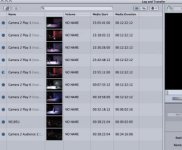
I'll attach a screenshot below.

You'll notice I've already renamed the clips to ensure I'll have them show up in proper order in my Final Cut browser. This is camera 2 with the play broken into the 8 clips. There is also a clip (34 minutes, very interestingly) of audience in post-show discussion, plus a 2 second clip when I first turned that camera around, and I've left that clip unidentified as I would skip it on the import.

I can't attach a screenshot of the viewfinder camera menu, but it shows only 3 clips: the play, the 2-sec aborted clip, and the audience clip.


(One thing I forgot to mention is that I import straight from the camera via the 1394 cable (firewire 400).
 

Attachments

  • Log & Transfer screen shot.jpg
    Log & Transfer screen shot.jpg
    16 KB · Views: 0
You need to reimport them with "Remove Advanced: unchecked. They wont merge just by unchecking that box. Eject the clips (top 2nd from left) and reimport from your MXF files. You shot 720p24pn (24 frames). With that box checked it imports as 30fps
 
Yea I seen the same thing. Sometimes I get a long single clip thats over an hour and sometimes I get alot pieces instead. Cant se the logic?
 
Sorry RicFic, but now I'm confused.

I hit the eject button as you recommend, but all that does is remove the relationship between my computer and my camera, just like unplugging the firewire or turning off the camera. With no communication between my camera and computer, I can't reimport the clips.

The only way I can re-establish the connection (apparently) is to unplug the firewire, then plug it back in, at which point my clips show up again in 8 pieces.

I now have "Remove Advanced" unchecked, and it comes up that way in a new project as well, which I tried, just in case there's a problem with this specific project file.

And here's where I confess my rookie status (even though I've been working in Final Cut for the past three years, it's still a bottomless well of learning for me). I'm not clear on what you mean by the MXF files. I see no reference to them in the camera menu, so I presume it's a technical term for how data is organized on the P2 card.
 
I'm not clear on what you mean by the MXF files. I see no reference to them in the camera menu, so I presume it's a technical term for how data is organized on the P2 card.

Sounds like you're trying to log and transfer right from the card into FCP. Are you offloading your P2 Footage (Contents folder) and last.txt to a external hard drive first? If not, you have to download the card first. Do this:

http://www.dvxuser.com/V6/showthread.php?t=118672

Then Log and transfer your footage into FCP from the hard drive (SELECT THE CONTENTS FOLDER, don't open it and select individual folders) . Make sure your FCP project is set for 720p24pn and the "Remove Advanced" is unchecked.
 
I tried downloading the card last night ... took 3 hours to download two hours of footage. Didn't have a chance to look at it today, but opened Log & Transfer this evening and selected the contents folder, got the same series of 8 clips for the single one in the camera.

Then I came here, read your note, followed your link to Barry Green's thread with the strict warning not to drag&drop, which is what I had done. Followed his link to Panasonic, downloaded the P2 Contents Management Software and installed successfully, apparently, but cannot locate the installed item to activate. Have sent Panasonic a note and will wait to hear from them tomorrow.

Am on the latest version of Snow Leopard (10.6.4), but a slightly older version of Final Cut (6.0.6)
 
Back
Top