Why do we decrease saturation in our DSLR settings?

HansSteinert

Well-known member
I understand why we shoot with minimal contrast and with Technicolor. It expands the dynamic range, and it's easy to add contrast in post. But why do we decrease saturation? I understand many do this, but it's never made sense to me. Wouldn't it be easier to decrease saturation in post rather than adding it? Plus, because digital noise is added over whatever you're recording, having higher saturated content underneath it and decreasing saturation in post would ultimately lead to less saturated noise, which would appear more filmic and less digital. If we shoot with low saturation and add saturation in post, we are now adding saturation to that digital noise which makes it look really fugly.

It seems to me that keeping saturation at "normal" in your profile settings would be have more benefits, would it not?
 
depending on you post software adding contrast may also add saturation

I know video people have different names (chroma and luma?)

So it makes sense to dial both down?


Im much more experienced at post on stills but in post when I ramp up contrast I nearly always have to desaturate hand in hand with that move

S
 
Contrast does add to saturation... but wouldn't decreasing saturation in post be better than having to increase it in post?
 
I think it would indeed - you might need to do both .. actually I dot think I have sat down on my cam (5d) but regularly decrease in post

im not a fan of too flat in camera anyway

S
 
instead of pondering, why don't you try it and find out? It would only take about five minutes to answer you own question.

I don't think coming to a DSLR forum and asking for input about a hot DSLR topic is a bad thing. And shooting quality, scientific tests that would truly answer his question would take more than 5 minutes.


Hans, I think most of these third party picture styles decrease the saturation to try to give you more room in post for coloring your footage. If you shoot an image at normal saturation (either Standard or Normal picture styles, let's say), with the H.264 encoding and 4:2:0 subsampling, you are, in a sense, locked in to the colors of your image. If you shoot, however, with a less saturated image, you can remap colors in the color suite of your choice with more freedom.

I'm just theorizing here, but let's say you shoot a normally saturated image with a higher dynamic range picture style, like Technicolor Cinestyle. There are a fair amount of warm tones in the shot, but you want the image to be very blue and contrasty, so you begin to grade that image heavily to give you a specific look. You will likely have a hard time imbuing the cooler colors over the warm and still maintaining skin tones. If you shoot less saturated, however, the theory is that you can manipulate colors more because they are not locked in to such a high contrast, so the grading process is more forgiving, especially if you use secondaries and a range of applications/effects.

Will the latter be a less noisy image? I'm honestly not sure. I'm used to my footage from the 7D having a certain amount of noise; I think a level of soft digital noise in that image is acceptable, but when it breaks up into red and green blocks of noise, then I have a problem. This is usually caused by a bad exposure, however, not from shooting desaturated/flat or from boosting the colors in post.

Don't get me wrong, I'm not trying to make an argument for what setting you should be shooting with. (In all honesty, I gave up on using third party picture styles like Cinestyle and have switched back to Neutral because I was struggling to light properly for it, and Neutral still gives me enough room to tweak colors in post. I'm more a fan of getting the look in-camera, however.) I was just positing a reason behind dialing the saturation down in your camera. Some quality time testing usually provides the best answers, but hopefully others can shed some light, as I know a lot of DSLR users employ a range of third party picture styles.
 
"It expands the dynamic range"
Nope, there is no way to increase dynamic range, the bottom and the top of the range cannot be modified.
What you can do is a better use of that range, knowing where you need more and can give up a bit elsewhere.
Technicolor is using a s-range, that means they took a bit of definition in the middle and used it in the extreme of the range.
The result looks like a more linear range (dark is brighter, middle looks dull, and you get more details also in bright).
Obviously, at looking LCD, this is a bad image, so you need to redeploy the s-curve.
Depending the equipement you get, there is 2 ways to do it.
1) you cannot increase the range because you already use all of it (for example from lowest to biggest value in a 8 bit codec).
So you will need to choose what you want to keep and what you want to throw away, expecting you shot the right way.
basically with an 8 bit codec, you got 256 levels, but not necessarily disposed at regular interval. that what the s-curve does.
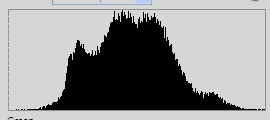
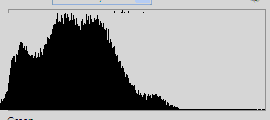
That is also why you need to work with histogram when shooting, to make sure you use all the values available.
This will allow to start with the best contrast (distinct values) to allow corrections later.
The target being to use all the width of the histogram, with no flat end at left or right of it)

histo1.gif
histo2.gif
There would be no point to use Technicolor to get better black if you are looking for a very contrasy and dark picture.
That is why the Technicolor profile is not good if main of your values are in the middle of the range, since this part has been compressed).
The main problem you encounter with stretching and compressing part of the range is the banding, where there is not enough values to define levels.

2) you can increase the range because you codec allows for it (for example going from a 8 bit codec to an 10 bit codec).
Here you will get more values available , so if you correct the video, you can create intermediate value without giving up elsewhere.
Cineform codec for example allows to convert a 4:2:0 mpeg4 to an 4:2:2 or even 4:4:4 10 bit video.

Noise is another issue that has nothing to do with range, but more with the way the sensor is pushed (ISO) to get the signal.

you can have the same histogram busy from dark to bright (so correctly exposed it shows you used all of the witdh of it) but not enough light (the histogram is not high enough) , so you get noise
fortunately noise can be easily suppressed but it give a plastic look to the picture (film look include Grain, that is sometime assimilated to noise, while it
is a bit different behaviour).

http://www.scribd.com/doc/55184632/4-Histograms
 
Last edited:
instead of pondering, why don't you try it and find out? It would only take about five minutes to answer you own question.

I have been, and what's been happening is that after I add some contrast, there's too much saturation. Then all I do is decrease it in post and the footage looks fine, and the digital noise looks less colorful. I just didn't know if my reasoning was true or not. Perhaps there is a legitimate reason why saturation should be reduced while recording.

I don't think coming to a DSLR forum and asking for input about a hot DSLR topic is a bad thing. And shooting quality, scientific tests that would truly answer his question would take more than 5 minutes.


Hans, I think most of these third party picture styles decrease the saturation to try to give you more room in post for coloring your footage. If you shoot an image at normal saturation (either Standard or Normal picture styles, let's say), with the H.264 encoding and 4:2:0 subsampling, you are, in a sense, locked in to the colors of your image. If you shoot, however, with a less saturated image, you can remap colors in the color suite of your choice with more freedom.

I'm just theorizing here, but let's say you shoot a normally saturated image with a higher dynamic range picture style, like Technicolor Cinestyle. There are a fair amount of warm tones in the shot, but you want the image to be very blue and contrasty, so you begin to grade that image heavily to give you a specific look. You will likely have a hard time imbuing the cooler colors over the warm and still maintaining skin tones. If you shoot less saturated, however, the theory is that you can manipulate colors more because they are not locked in to such a high contrast, so the grading process is more forgiving, especially if you use secondaries and a range of applications/effects.

Will the latter be a less noisy image? I'm honestly not sure. I'm used to my footage from the 7D having a certain amount of noise; I think a level of soft digital noise in that image is acceptable, but when it breaks up into red and green blocks of noise, then I have a problem. This is usually caused by a bad exposure, however, not from shooting desaturated/flat or from boosting the colors in post.

Don't get me wrong, I'm not trying to make an argument for what setting you should be shooting with. (In all honesty, I gave up on using third party picture styles like Cinestyle and have switched back to Neutral because I was struggling to light properly for it, and Neutral still gives me enough room to tweak colors in post. I'm more a fan of getting the look in-camera, however.) I was just positing a reason behind dialing the saturation down in your camera. Some quality time testing usually provides the best answers, but hopefully others can shed some light, as I know a lot of DSLR users employ a range of third party picture styles.

Ah, ok. It's easier to change coloring if there's the original footage isn't very saturated. Got it.

"It expands the dynamic range"
Nope, there is no way to increase dynamic range, the bottom and the top of the range cannot be modified.
What you can do is a better use of that range, knowing where you need more and can give up a bit elsewhere.
Technicolor is using a s-range, that means they took a bit of definition in the middle and used it in the extreme of the range.
The result looks like a more linear range (dark is brighter, middle looks dull, and you get more details also in bright).
Obviously, at looking LCD, this is a bad image, so you need to redeploy the s-curve.
Depending the equipement you get, there is 2 ways to do it.
1) you cannot increase the range because you already use all of it (for example from lowest to biggest value in a 8 bit codec).
So you will need to choose what you want to keep and what you want to throw away, expecting you shot the right way.
basically with an 8 bit codec, you got 256 levels, but not necessarily disposed at regular interval. that what the s-curve does.
That is also why you need to work with histogram when shooting, to make sure you use all the values available.
The target being to use all the width of the histogram, with no flat end at left or right of it)

View attachment 37953
View attachment 37954
There would be no point to use Technicolor to get better black if you are looking for a very contrasy and dark picture.
That is why the Technicolor profile is not good if main of your values are in the middle of the range, since this part has been compressed).
The main problem you encounter with stretching and compressing part of the range is the banding, where there is not enough values to define levels.

2) you can increase the range because you codec allows for it (for example going from a 8 bit codec to an 10 bit codec).
Here you will get more values available , so if you correct the video, you can create intermediate value without giving up elsewhere.
Cineform codec for example allows to convert a 4:2:0 mpeg4 to an 4:2:2 or even 4:4:4 10 bit video.

Noise is another issue that has nothing to do with range, but more with the way the sensor is pushed (ISO) to get the signal.

you can have the same histogram busy from dark to bright (so correctly exposed it shows you used all of the witdh of it) but not enough light (the histogram is not high enough) , so you get noise
fortunately noise can be easily suppressed but it give a plastic look to the picture (film look include Grain, that is sometime assimilated to noise, while it
is a bit different behaviour).

Thanks for the detailed write up. Learned a lot.
 
Last edited:
Back
Top