FS7: Which software do you use for conversion ?

What is your configuration for editing on Mac?

I edit with Premiere and grade with DaVinci Resolve (mostly S-LOG 4K XAVC-I or Sony 4K RAW) using the following configuration:

15" MacBook Pro (mid 2014 model)
16GB RAM / 2.7 GHz processor

24" Apple Cinema Display
17" Sony OLED broadcast monitor via HDSDI
40" Sony Bravia monitor via HDMI
Leader LV-5330 Waveform monitor / vectorscope via HDSDI
Blackmagic Design UltraStudio 4K Thunderbolt 2 (or a UltraStudio Mini if I am traveling)
4TB OWC Thunderbolt SSD (or smaller SSD if I am traveling)
 
I edit with Premiere and grade with DaVinci Resolve (mostly S-LOG 4K XAVC-I or Sony 4K RAW) using the following configuration:

15" MacBook Pro (mid 2014 model)
16GB RAM / 2.7 GHz processor

24" Apple Cinema Display
17" Sony OLED broadcast monitor via HDSDI
40" Sony Bravia monitor via HDMI
Leader LV-5330 Waveform monitor / vectorscope via HDSDI
Blackmagic Design UltraStudio 4K Thunderbolt 2 (or a UltraStudio Mini if I am traveling)
4TB OWC Thunderbolt SSD (or smaller SSD if I am traveling)
So do you think the upcoming iMac Pro will fit the editing process at base configuration of 4.999$?
 
I don't know anything at all about the new iMac Pro and I won't be buying one, no matter what it offers, because I prefer the portability of my two identical MacBook Pros. But as an Apple stock holder, I hope they sell a million of them! :-)
 
You can edit with just 16GB of memory? Damn, on my machine (running window7) I need
at least 64G or the PC (with adobe Premiere) just hang whenever I edit 4K XAVC-I
 
So do you think the upcoming iMac Pro will fit the editing process at base configuration of 4.999$?

As I learnt in another thread from Joema the iMac Pro may NOT be the best choice for editing XAVC. The reason is that Intel I7s have QuickSync which accelerates H264 editing but the 8 core+ Xeons do no so you may find the normal fully loaded iMac better than the iMac Pro.

So if you edit a lot of h264 and future h265 you may want to check out the iMac Pro performance with these media types before spending a wedge.
 
You can edit with just 16GB of memory? Damn, on my machine (running window7) I need
at least 64G or the PC (with adobe Premiere) just hang whenever I edit 4K XAVC-I

I've cut 20 minute 4k pieces on my MBP with 16GB in various hotel rooms with no effort at all.
 
I've cut 20 minute 4k pieces on my MBP with 16GB in various hotel rooms with no effort at all.

Likewise, 4K editing is definitely possible on my MBP system with 'only' 16GB of RAM. I can think of three reasons off the top of my head that might be limiting your experience, @jpham:

- Not taking advantage of a 'low' res viewer system, such as the 1/2, 1/4, or even 1/8 mode in the Program window in Premiere Pro.
- Not having a graphics card in your Windows7 system. This is much more important than either CPU speed or RAM capacity.
- Not having a fast, dedicated media drive. Ideally SSD, but 7200 rotational drives in RAID could work. Ideally thunderbolt, but USB3 will also work.

What system are you running on exactly @jpham?

jason
 
Likewise, 4K editing is definitely possible on my MBP system with 'only' 16GB of RAM. I can think of three reasons off the top of my head that might be limiting your experience, @jpham:

- Not taking advantage of a 'low' res viewer system, such as the 1/2, 1/4, or even 1/8 mode in the Program window in Premiere Pro.
- Not having a graphics card in your Windows7 system. This is much more important than either CPU speed or RAM capacity.
- Not having a fast, dedicated media drive. Ideally SSD, but 7200 rotational drives in RAID could work. Ideally thunderbolt, but USB3 will also work.

jason

+1 On these. SSD media drives make a huge difference.
And also make sure you have updated drivers for your video card ! (And make sure your NLE is properly configured to use your CUDA card for hardware acceleration...)
 
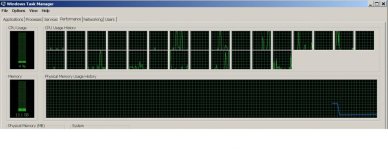
I have a super fast machine. It's a custom build Xeon with 28 cores, GPUs
The editing is fast - it starts to run really slow when I turn on sharpening/unsharp mask, or initial opening a slog project, or load a LUT into lumetri color correction
or when I put tittle across 15+ clips - then the machine crawl to halt (pop up system manager) and
I see Adobe is sucking all the memories.
In case you wonder what's the rendering time - a 20Min 4K SLOG3 renders in about 2hrs to H264
1080p we achieve 1hr = 1hr rendering time.

system.jpg
 
Last edited:
The big question - what is your 4K delivery time? what's everyone standard H264 video bitrate for 24fps and 30fps ?
 
I have a super fast machine. It's a custom build Xeon with 28 cores, GPUs
The editing is fast - it starts to run really slow when I turn on sharpening/unsharp mask, or initial opening a slog project, or load a LUT into lumetri color correction
or when I put tittle across 15+ clips - then the machine crawl to halt (pop up system manager) and
I see Adobe is sucking all the memories.
In case you wonder what's the rendering time - a 20Min 4K SLOG3 renders in about 2hrs to H264
1080p we achieve 1hr = 1hr rendering time.

And a little MacBook Pro beats the pants off that machine. I've never been happier to be a Mac owner. Even when I upgrade to a newer, faster machine every few years my old Macs just keep chugging along in one way or another working as good as the day they were new. I even have a 2006 17" MacBook Pro that I put out to pasture a few years ago that still earns its keep as a prompter computer.
 
What's your rendering time on that little Macbook pro? (20 mins 4K SLOG3/30fps to H264 30fps/180-300mbps)
some number would be nice :-)
 
What's your rendering time on that little Macbook pro? (20 mins 4K SLOG3/30fps to H264 30fps/180-300mbps)
some number would be nice :-)

I would never go from 4K S-LOG3 to H264. I always grade S-LOG in Resolve . . . export as ProResHQ . . . import and edit in Premiere . . . then export the finished edit to whatever deliverable(s) are required. Sometimes H.264 but more often some flavor of ProRes. So going straight from S-LOG3 to H264 is never going to happen in my workflow. But I'd be happy to provide you with a number, how about 20 minutes of 4K S-LOG3 with a 3D LUT and a light secondary grade then exported to ProResHQ? Would you like that number?
 
Okay, so I just setup a test project in Resolve and it says it will take 1:13:00 to export 21 minutes of footage to ProRes 3840x2160 29.97. Resolve is pretty accurate with it's estimates but I can do the actual render tomorrow if you really need an exact number. Does 1:13:00 sound good or bad to you?

XAVC-I
A mix of 3840x2160 and 4096x2160 clips on a single timeline
29.97 fps
21 minutes of footage
 
I have to laugh at trying to quote numbers unless really comparing the same files, settings, etc....
I sometimes create plate shots where I need to replace or mask parts of an cityscape (such as Times Square in NYC) by replacing numerous billboards, looping elements, blurring sections and limiting or replacing colors on other parts. I'm always amazed how long some of the renders end up - though I'm used to it by now. Adding slight blurs and color correction in Premiere to my 3-d rotated add-in elements to make them look like they belong may expand a basic 3 hour render to 15 or 20 hours (for a 1 hour finished output). But those are just numbers, and basically meaningless since each time I create a set of plates it has different requirements needs to take as long as it takes.
In my case I've found my PC (Alienware) happens to run the same render about twice as fast as my macbook pro... Which is probably a good thing since I use the Mac for transfers on location and I'm happy it's not tied up with the long renders. But the numbers are going to be different for every person you ask...
 
Doug, are you grading in Resolve before editing? Is the Pro Res output that you use for editing then in 709 with the grade baked in or do you keep it as Log?
If its 709 then you would be limiting your grading options during the cut right? Do you go back to the Log later for final grading?

I'm not being judgmental, just curious what people's workflow is as I don't generally edit 4K or Log and I need to up my game eventually with limited power on my machine.

Also what graphics card do you have on your Macbook Pro?

Lenny
 
export to 4096x2160 ProRES HQ, then compress down to H264. How would end user play PRORES - the file is HUGE
what's the time then ? also if you run Mac OS - you have advantage over Windows. Apple never make PRORES codec multithread or support multicore cpu on Windows

Also what the is video bitrate? if you export highly compress - say 30Mbits it sure compress nice and fast
Compress in the 200Mbits VBR and let see how good your machine and codec

Since we're looking for performance number - let make it standard test setup
software - Adobe Premiere
video - XAVC-I - 29.97fps (find a video that has a lot of moving background - ocean waves)
compress to 4096x2160 H264 1-pass VBR to 180Mbps, I-frame every 14 frames
 
Last edited:
I have a super fast machine. It's a custom build Xeon with 28 cores, GPUs
The editing is fast - it starts to run really slow when I turn on sharpening/unsharp mask, or initial opening a slog project, or load a LUT into lumetri color correction
or when I put tittle across 15+ clips - then the machine crawl to halt (pop up system manager) and
I see Adobe is sucking all the memories.
In case you wonder what's the rendering time - a 20Min 4K SLOG3 renders in about 2hrs to H264
1080p we achieve 1hr = 1hr rendering time.

View attachment 125012

Those Xeons don't have Intel's QuickSync core on them which is one of the reasons for the slow export. By comparison a lowly MBP or iMac exporting from FCPX will do a 20 min 4k h264 multiples export in about 15 mins and that's a full render with titles, grades and filters.

Dare I say you may have better luck with a PC with 4 core i7s that have QuickSync but that also depends on how well Adobe supports it.

Basspig built himself an almighty system and had similar performance issues that you're experiencing, he eventually solved some of his problems so you could try messaging him for his fix.
 
Last edited:
I have to laugh at trying to quote numbers unless really comparing the same files, settings, etc....

Laugh all you want but I was just trying to give someone a ballpark number on a light grade with a LUT and minor changes. Only a fool would think the numbers would be universal in all conditions, but it is a simple test that would be easy for anyone to setup to get a rough idea of how their render times compare. If you'd like to do a more complex test with a dozen nodes, blurs, noise reduction, and mask tracking, be my guest but I don't think anyone is going to be able to repeat it. Then we could all have a good laugh.
 
Last edited:
Back
Top