
AndreeOnline
Veteran
You're welcome to tell us what you think about the image I posted. Where do you find the differences in the image (100% crop) between ProRes and AVCHD. And how do you think they hold up with the mid tones lifted?

Follow along with the video below to see how to install our site as a web app on your home screen.
Note: This feature may not be available in some browsers.
It's obvious the AVCHD suffers from a little color noise but once darkened in post a lot of it becomes "hidden" and once played back as video these artifacts would become even less apparent.
If this was shot in C-LOG I think the image was over-exposed between 1 to 2 stops. I threw the frame in FC just to have a look at a WM and see what kind of levels were there before any grading. Have a look and see what you guys think:

According to Canon's white paper on C-LOG (see the table below I put together based on the white paper) middle grey should read around 32.8%. Blacks should reach down in the 12% ~ range, and nothing brighter than "white" should exceed 62.7%. Looking at the image we can see that the back of her neck is almost 26% higher than what "white" itself should read on a scope and the shadow side of her face is sitting around where middle grey should land ~ approx 32.8%
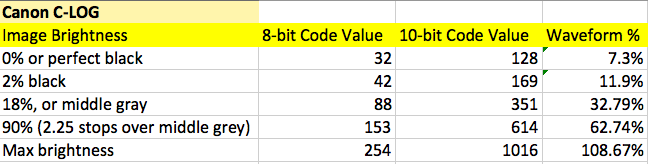
The debacle however is that if you over-exposed and need to darken your image in post you actually end up "eliminating" some noise, where-as if you under-exposed and need to boost exposure in post you will amplify any noise or codec artifacts.

You're welcome to tell us what you think about the image I posted. Where do you find the differences in the image (100% crop) between ProRes and AVCHD. And how do you think they hold up with the mid tones lifted?
Your references are for 320 iso not 850, I shot at 850, Clipping is much higher on the ire scale for 850. It is overexposed by 1-1.5 stops. I set middle grey to 45 IRE instead of 32 because there was a lot of fuss about underexposed this and that