C100: When you don't need an external recorder and when you do

I found some interesting results while testing.

This was a great post with lots of stuff to take away. Nice.

The extra detail/sharpness and the increased noise in external recording goes hand in hand. The lower bitrate of AVCHD doesn't have enough resolving power to bring out every last bit of detail, it would seem. Kind of expected, but still good info and goes along what others have said in previous tests.

I would be very surprised if you could get a more robust image out of the C300 compared to external recording of a C100. This is a very interesting subject that I would like you or anyone else with an opportunity to check. If the C300 requires no denoising I would say that it's the same scenario where the internal codec hides the noise, but I don't know for sure as I haven't tested it.

Only 3.5 stops of highlight protection seems a bit low, even if you overexpose with one stop. Officially the C100 gives you 5.3 stops at all ISOs above ISO850. So that should mean 4.3 stops. But then again, 45% is slightly more than one stop over, so an estimated 3.5 stops might be within margin.

I'd still say though, that we are better off exposing a little bit over with Canon Log to make sure people look good, and just accept some clipping if it comes to that. There is a pretty sound rolloff in the Log gamma anyway, so it should be a smooth transition in most cases.

Regarding comparing the C100 to other camers: it is still much cheaper than many alternatives with similar image charachteristics. It is also targeted at 'one man band' operations. Ultimatly, I think its real strenght is the compromise between portability, usability and IQ. All things considered it hits the mark pretty well.

I realize you didn't conduct these test of my behalf, but I'm glad you decided to take the time and post them. I would still like to see a full res .png where there is macro blocking, though. It would be good to know where it shows up.
 
It's also 3 times the price! Looks like you have done some thorough testing RZE, I hope you'll stick around and contribute more to the forums.
Personally I've found the workflow of the Ninja recorder to be worth far more than just the image quality. It's almost always attached to my C100 now.

Rightfully so it should be better, but I've seen some mention that c100 looks like downsampled RED, thats not really right.

I definitely am with you on the atomos front, yesterday they added RED file name support in firmware for the samurai, my hyperdeck is up for sale and my samurai ships tomorrow. There aren't many downsides to the c100 for recording externally other than cost.

Workflow is the way to go, one thing I've been coming to realize is that working the way you like to work is more important then what your working on.

Thanks for some support.
 
It's also 3 times the price! Looks like you have done some thorough testing RZE, I hope you'll stick around and contribute more to the forums.
Personally I've found the workflow of the Ninja recorder to be worth far more than just the image quality. It's almost always attached to my C100 now.

I also tested some c100 against RED, and sorry to say it, but RED really murders c100. Its not the same.

I've also seen footage from Alexa and it murders RED too. Am I going to get Alexa? Of course no, the $ difference is too great. The same goes to RED vs C100. Maybe FS100 is a better comparison to C100.

Matt, I'm using PP CS6 on windows platform. Does using ninja going to have a far better workflow than the native avchd codec?
 
This was a great post with lots of stuff to take away. Nice.

The extra detail/sharpness and the increased noise in external recording goes hand in hand. The lower bitrate of AVCHD doesn't have enough resolving power to bring out every last bit of detail, it would seem. Kind of expected, but still good info and goes along what others have said in previous tests.

I would be very surprised if you could get a more robust image out of the C300 compared to external recording of a C100. This is a very interesting subject that I would like you or anyone else with an opportunity to check. If the C300 requires no denoising I would say that it's the same scenario where the internal codec hides the noise, but I don't know for sure as I haven't tested it.

Only 3.5 stops of highlight protection seems a bit low, even if you overexpose with one stop. Officially the C100 gives you 5.3 stops at all ISOs above ISO850. So that should mean 4.3 stops. But then again, 45% is slightly more than one stop over, so an estimated 3.5 stops might be within margin.

.


If you count data up to 109% IRE then probably, but for an 8 bit camera I don't exceed 100% IRE. I've calibrate my meter to 32% IRE and made 1 stop adjustment to readings. I got 45% but the test was done a little whimsically so I'm sure there was a margin for error. I was going to do a studio test until I saw comments from maarek.
 
I'm using PP CS6 on windows platform. Does using ninja going to have a far better workflow than the native avchd codec?

What do you mean by workflow in this case? Timeline performance? Or file handling issues surrounding import and data management?
 
OK! Yes, Canon's documentation counts up to 109%, so that would be the difference.

I'm going to look at the file you provided, thanks.
 
Prores hq copy of the initial testing.

RZE, this is what we're talking about. This is brilliant.

I will take it into FCPX and look at it, but it kind of brings everything back around full circle: I don't see that massive macro blocking you're talking about and looking at this I still feel VERY confident recommending people to shoot internal AVCHD and be happy about it.

It is one thing for us to be anal about pixel level quality, but if you are shooting commercial stuff chances are MANY clients wouldn't find a difference here if their lives depended on it (apart from more obvious noise in ProRes for reasons we've already stated).
 
RZE, this is what we're talking about. This is brilliant.

I will take it into FCPX and look at it, but it kind of brings everything back around full circle: I don't see that massive macro blocking you're talking about and looking at this I still feel VERY confident recommending people to shoot internal AVCHD and be happy about it.

It is one thing for us to be anal about pixel level quality, but if you are shooting commercial stuff chances are MANY clients wouldn't find a difference here if their lives depended on it (apart from more obvious noise in ProRes for reasons we've already stated).

Like I mentioned before in optimal setting the difference is not large. the exposure range in the shots is within 3 stops both ways and the gamma adjustment to restore middle grey is almost nothing. When scenes forces underexposure then that is when the macro blocking shows its face. Theres also the issue that pulling a key is difficult with avchd, for any colorist its a pain. I would not shoot any commercial stuff avchd though. Most rental houses at least that I have talked to have no intention of renting c100s, so I would think it would be risky to pitch 24 mbps as ok to a producer. Plus for commercials you want as much exposure latitude (understood in this fashion http://www.thefilmbakery.com/blog/sony-f5-f55-test-footage) and safety room as possible, not to mention plasticyness will impact cinematic feel. What I am going to test next is exposure latitude. How much can you underexpose the image without degradation after normalization.

Nonetheless its pretty difficult to argue against a external recorder, they cost $325 and give you a hdsdi out, plus its no more heavy with a recorder than a c300.
 
There is only one. Hyperdeck Shuttle 2.

WHich external are you referring to for $325?

RZE,

I read all four pages and it wasn't clear to me, was middle grey exposed at 32 or 45? What tool was used to measure the IRE?

That frame looks blocky in the dark areas but also judging from the file size it's equivalent to a 30/100 jpeg quality setting. We really should be looking images not as compressed. I've had pretty good luck with photobucket and flickr.

Is it possible to post a link to a frame from the original un-graded LOG footage?
 
Here's a 100% crop of a part of the frame in non destructive png format. You will have to right click and download the image to see it at full size I guess.

One pushed grade with major gamma shift and one standard primary color correction.

avchd_vs_prores.png
 
Good example Andree. These are 8-bit correct?

One thing to really note about working with LOG images is generally because they are serious hyper gamma curves generally in post to de-log you are PULLING the image (decreasing exposure) resulting in an increase to the signal to noise ratio as opposed to PUSHING the image (increasing exposure) generally resulting in an increase of noise, hence decreasing the signal-to-noise ratio.

For those reasons there is something far too fishy with the original image posted in this thread. More tests are needed and details to the exact exposure method used.
 
I'm assuming that you mean the first test, It was set to 32% IRE, the shot was a pre-production still for this scene.

https://vimeo.com/56264185 (No noise reduction all recorded prores ((download the H264 it looks way better)))

I don't have the original still anymore from the OP. I'll be doing another lut test at 32% IRE. Apologies, I barely ever deal with photos so I don't know flickr and embedding stills stuff. I'll have a video sample soon.

I think the thread had too much emphasis on the still and not the question at hand, when to use a recorder? Chroma Key is obvious, I wanted to get into what exposure conditions warrant external recording.
 
Yeah flickr is pretty good at retaining quality since its meant more for the photo peoples :cool:

I more or less entered the same debate (or lets call it evaluation or assesment) of 8-bit vs 10-bit for both non-LOG and S-LOG (Sony's log naming convention) and just like you I was more interested in knowing the exact set of circumstances that would actually warrant the use of 10-bit. Frankly I could not really accept a generic opinion that 10-bit was waaaaaaaaaaaay better than 8-bit. In certain cases YES it is, but not all.

10-bit really is only 4 times the amount of information over 8-bit and with non-LOG (standard or cine gammas) the "extra" data is not evenly distributed across the entire dynamic range of the sensor anyway. It means you end up with exponentially more information in the bright tones and only a few more bits in the dark tones where you actually might want them.... so what big deal is that?

This is where use of LOG curves becomes powerful however because it allows more of the data bits to be used and distributed evenly across the entire range of the sensor. For 8-bit it means from around 256 levels available (256 for arguments sake) 95 are allocated for the dark tones up to middle grey, 60 are allocated to bright tones 90% IRE from middle grey, and the rest (appox 90) are used for super whites, or highlights. In the case of 10-bit just multiply these levels by 4.

The only catch with LOG is that images need their gamma adjusted before you can even start "grading" so with 8-bit you could really be pushing your "luck" if you have to do anything excessive. I have a few projects shot entirely in LOG 8-bit that were de-logged with a subtle grad in post and the images held up quite well:

Sony F3 8-bit 420 LOG:


I also have some projects shot straight to internal cards using the XDcam EX format which is 8-bit 4:2:0 (35mbps) and through good exposure and use of cine gammas I was able to pull these out of them after grading:

Sony F3 8-bit 420 cine gamma 4 (non LOG):


Last edited:
These are 8-bit correct?

Yes. These are from the clip that RZE posted and shows ProRes and AVCHD side by side. And it's a crop out of the full frame, so you are looking at 100% real pixels.

There is no way to get anything else than 8 bit for the time being.

If you can expose your scene without clipping critical highlights in a way that allows you to pull back exposure in post, like you're saying, then you are home free. But if you let the C100 do an "auto expose" while in Canon Log you are going to end up with pretty dark images. These will need to be pushed, and that can get you into trouble. That is the reason I showed that example.
 
It's obvious the AVCHD suffers from a little color noise but once darkened in post a lot of it becomes "hidden" and once played back as video these artifacts would become even less apparent.

If this was shot in C-LOG I think the image was over-exposed between 1 to 2 stops. I threw the frame in FC just to have a look at a WM and see what kind of levels were there before any grading. Have a look and see what you guys think:

rze01.png


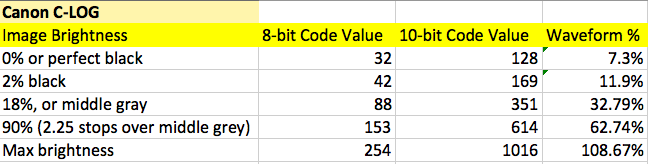
According to Canon's white paper on C-LOG (see the table below I put together based on the white paper) middle grey should read around 32.8%. Blacks should reach down in the 12% ~ range, and nothing brighter than "white" should exceed 62.7%. Looking at the image we can see that the back of her neck is almost 26% higher than what "white" itself should read on a scope and the shadow side of her face is sitting around where middle grey should land ~ approx 32.8%

canon_c-log.png


The debacle however is that if you over-exposed and need to darken your image in post you actually end up "eliminating" some noise, where-as if you under-exposed and need to boost exposure in post you will amplify any noise or codec artifacts.
 
If this was shot in C-LOG I think the image was over-exposed between 1 to 2 stops.

There were no ungraded images in my post. If you re-read it you can see that I say that there is one pushed grade with a major gamma shift (the ones you checked), and one standard primary correction where the black levels have been reset to an arbitrary value that looked good (subject to opinion). The dark images are the "normal" ones with the black level reset.

Your post is a nice effort, but you are entering the discussion kind of sideways.

The footage is available for download and has a gray card that has been cropped away in my images to save space. RZE exposed for IRE 45 on purpose in these images, after another discussion about the effects of putting 18% gray at 32 IRE.
 
Sorry I asked for a frame from original un-graded LOG footage, you had posted right after that so I thought you answered my post and posted a LOG frame.

My points about proper exposure for LOG are still valid however as I'm sure many people are curious and interested in how to expose LOG.

As I understand it the thread is about whether or not and when might you need an external recorder with the C100. In agreement with the poster, there is a lot of confusion on what difference it actually does make or people think it makes. Most of the time I'd say the codec is the limitation not the bit-depth but often when you use an external deck you are not using the same codec as was in the camera originally - so its hard to know the true difference.

I have clients who occasionally ask me about working on a Canon platform, so I am genuinely curious to see more images from it along with ungraded untouched LOG ones. That is how I veered on this thread.
 
Back
Top