What the %#*@! is with the BNC connectors?

nedcam

Well-known member
Does anyone have a solution to this problem or is it just me and my fat bricklayer's fingers? I am having a very hard time getting my cables on/off the SDI and Video Out ports. The camera's connectors are very recessed and my first solution was to put right angle adapters on them but then the video flickers on and off.

Are there any connectors where the barrel part is longer and you can grab and twist? If so I would have all my BNC cables retrofitted with them. I am concerned that the camera's connectors are flimsily (price point!) connected to a circuit board and my constant wiggling and jamming is asking for expensive repair problems.

So, is anyone else and their crew having this problem?

Thanks
 
Hi Jockomo,

Not sure what this tool does. I have to connect and disconnect BNC cables many times throughout the day on the 300 as we change set ups and we have a very hard time getting them on and off. Are you saying this tools helps grab and twist?

Thanks
 
Last edited:
That tool is for when you can't reach a bnc with your fingers because of the rack, it will not help him in his situation.

the problem seems to be that the bnc connections don;t stick ot enogh to get a handle on.
 
"the problem seems to be that the bnc connections don;t stick ot enogh to get a handle on"

Exactly! So how could they design it like that? Is anyone else having this issue? At this rate I don't think the connectors will last...
 
How about trying putting short BNC patch cables to the camera connections that come out to another BNC connector, to which you would hook your cables from SDI and Video out devices to. Instead of disconnecting from the camera each time you do a new set up, you would disconnect from the short cable connectors. With them off of the camera body, you should be able to grasp them with no trouble. I would suggest patch cables of about a foot or so, give or take.
 
Yes I was thinking of that, it would work through the day but...when I put the camera in and out of it's case it will add torque and could damage the connection the connector has to the circuit board.

Thanks
 
Hi Ned:

That tool that Jockomo referenced WOULD help you in your situation, I have used them on patch bays, decks and cameras. Certain devices just have the BNC connection recessed a little too tightly and this tool allows you to get a good grip on the connector and twist it without destroying it.

Dan
 
Yes I was thinking of that, it would work through the day but...when I put the camera in and out of it's case it will add torque and could damage the connection the connector has to the circuit board.

Thanks

Yeah, I wouldn't store the camera with the patch cables attached. But cutting down on the need to pull the cables from the camera connectors all day long would be a good thing. Maybe get the above tool to take the connectors off at the end of the day and use the patch cables during the day. Good luck.
 
Yeah, I wouldn't store the camera with the patch cables attached. But cutting down on the need to pull the cables from the camera connectors all day long would be a good thing. Maybe get the above tool to take the connectors off at the end of the day and use the patch cables during the day. Good luck.

Or as I do have a BNC to phono adaptor on the camera and then it is easy to hook up a video assist on the composite using low cost phono cables, OK its not perfect but in a recent drama shoot I did it worked really well as it was a quick hook up and release between scenes, we had a 14" and a 7" SD monitor just for framing. The 14" was a 4x3 but set up for 16x9 with black bars so the boom op could see the top of frame very acuratley.
 
Or as I do have a BNC to phono adaptor on the camera and then it is easy to hook up a video assist on the composite using low cost phono cables, OK its not perfect but in a recent drama shoot I did it worked really well as it was a quick hook up and release between scenes, we had a 14" and a 7" SD monitor just for framing. The 14" was a 4x3 but set up for 16x9 with black bars so the boom op could see the top of frame very acuratley.

I like that actually. I had a director kick out the S-Video socket on a camera I was shooting with a few years back and since then I have set up my video out with patch cables, tied to the camera handle, or tripod, with the longer cable, going to the monitor, attached to that. I figure that if I run into another kick out situation again, the cable will separate at the cable connections and not at the camera.

The above scenario, locking BNC connectors to locking BNC connectors would still be dangerous, to the camera, if kicked out. Connecting the BNC patch cables, tied to the camera handle or tripod, with a phono adaptor connector attached would be safer, that's for sure.
 
The breakaway via rca connector sounds like a good plan.

The tool has a tapered inside. You slide the cable and bnc connector through the tip and the tapered inside grabs hold of the part of the bnc and grips it like you are pinching it (you hold the pressure by pulling the cable back toward the handle).

If you spend much time with BNC connectors it's on of those tools you'll wonder how you lived without.
 
Those "BNC Drivers" are awesome. They normally also work with F connectors (the standard threaded connector used on antenna & cable-TV cables).
I got mine from the local The Home Depot, they had in in with the rest of their data & coax cabling tools & supplies.

Note that those tools aren't compatible with all BNC connectors, some have a large strain relief on the back that prevents the tool from working. But, speaking of strain reliefs...

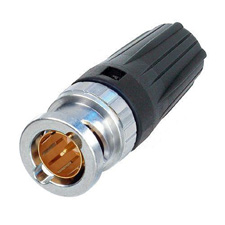
Another option, if you want to go tool-less is to retrofit your cables (or get new ones) with Neutrik "Rear Twist" BNC connectors: http://www.markertek.com/Cables-Con...C-Connectors/Neutrik-USA-Inc/NBNC75BLP9.xhtml
NBNC75BLP9.JPG
The strain relief is attached to the twist nut, not to the (fixed) core of the connector, so you can twist from the rear of the connector.

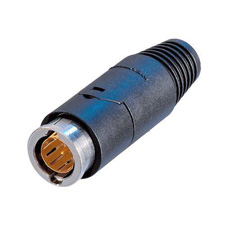
Or, if you want to go all out, there's always Neutrik's push-pull connector, that works just like an air hose, just pull back on the connector and it releases (but it's still locking, so pulling on the cable won't disconnect it): http://www.markertek.com/Cables-Con...C-Connectors/Neutrik-USA-Inc/NBNC75PLS9.xhtml
NBNC75PLS9.JPG


I've never used the push-pull connectors beyond a quick test at a trade show (and they seem to work pretty well, but they are quite big). I love the rear-twist ones.

- Mikko
 
Thanks Mikkowilson!!! The Rear Twist is just what I need. I don't want to carry another tool around, the right angle adapters made the video flicker, so I'll buy the rear twist and have my repair guy retrofit all my cables. This forum is very useful. Thanks again!
 
Ned, be sure to make sure you get the right connectors for the cable you have. The links I posted where for Belden 1505A or equivalent (the most common type) cable. If you are retrofitting cables, they should have the brand & type number printed somewhere along them (normally every foot or two). If you are buying new, then just get yourself some 1505A to go with an you are set. :)

- Mikko
 
Ned, be sure to make sure you get the right connectors for the cable you have. The links I posted where for Belden 1505A or equivalent (the most common type) cable. If you are retrofitting cables, they should have the brand & type number printed somewhere along them (normally every foot or two). If you are buying new, then just get yourself some 1505A to go with an you are set. :)

- Mikko

...and also make sure your repair guy does also have the corresponding crimp tool and die for the connectors you'll buy!

my 2¢

H
 
I will look into having Markertek make the cables custom, they've done that before. Probably end up the same price and less headaches. Thanks guys!
 
I looked for pre-made with the twisties on their site but didn't see any. Let us all know what they say / part numbers / cost etc. I need a few of these myself.
 
I'm coming to this thread kind of late, but there's a solution no one has mentioned, and that is to NOT use old BNC cables that were designed for composite video... Buy Canare (or equivalent) SDI cables that have a much longer base to grab onto. This is the style I use:
canareBCP-C_rev5.JPG


No problems any more getting BNCs on or off!
 
Back
Top