
Before I describe anything, I want to sincerely apologize if this is not the most appropriate area to post such a question in. I recorded a live event recently and set up the camera as best I thought but after watching them on my PC, they just don't look that great. I figured that the GH camera thread might be most appropriate since that's what I used (that's the issue in a nutshell, more details below). So please go easy on me if you feel like this is not the most appropriate area to ask this in.
I went to record my sisters dance recital and I was all excited. This was the first time I would get to really use my GH3 for video. I had played around with it before and familiarized myself with it's interface and settings (and what they meant) during the past year and I was ready to put that all to use.
During the rehearsal dances, I was playing with all the settings manually so that it would be ready when the recital actually started. I set the aperture as high as I could without it being too dark so that I would have a deeper area of focus. I set the shutter speed to match the frame rate I was recording because I didn't want too much motion blur (1/60), and I had to set the ISO to 2000 because of the aperture and shutter settings (and maybe that was my problem?) but even though 2k ISO is pretty noisy on a GH3, I figured it would be fine for 1080p video. I knew I'd be able to see the difference, but I figured the parents and kids wouldn't, so I wasn't too worried about that. I set the focus manually using the focus assistance at 10x (it looked nice and clearly focused) and I set the white balance manually to 5k which seemed to look good.
I did some recording tests, watched the display as it recorded, and everything looked good. The background was a little dark, but I couldn't make it any brighter without over exposing the dancers as far as I knew. I played back the test recordings and things were good as far as I could tell as well. But when I got back home and played them, they looked like this:
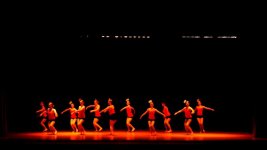
To me, it looks...off. I'm not even sure how to describe it. Too warm, out of focus? Just off. What could I have done to get better results? I was worried about opening the aperture up all the way and having faces out of focus, and I was always also trying to make sure nothing was overexposed...and, it's a lot to try and balance. I know the tiny low resolution built in display doesn't help. Maybe that's really my only problem? If I had an external display to monitor settings and changes and what not, would that have made this a none issue? I wish so badly I could do it again to try different settings, but there isn't another one for a little bit, so I'm hoping I can get some expert feedback on this and hopefully be better prepared next time.
Thank you very much for your time!
EDIT:
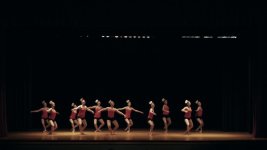
I took some of the advice and put it to use and I was surprised at how much better I was able to make this look! I'm sure it could be better, but I have even less experience with color correction and levels. Here's what I've got now after all the help, and I welcome any feedback from this as well.
I went to record my sisters dance recital and I was all excited. This was the first time I would get to really use my GH3 for video. I had played around with it before and familiarized myself with it's interface and settings (and what they meant) during the past year and I was ready to put that all to use.
During the rehearsal dances, I was playing with all the settings manually so that it would be ready when the recital actually started. I set the aperture as high as I could without it being too dark so that I would have a deeper area of focus. I set the shutter speed to match the frame rate I was recording because I didn't want too much motion blur (1/60), and I had to set the ISO to 2000 because of the aperture and shutter settings (and maybe that was my problem?) but even though 2k ISO is pretty noisy on a GH3, I figured it would be fine for 1080p video. I knew I'd be able to see the difference, but I figured the parents and kids wouldn't, so I wasn't too worried about that. I set the focus manually using the focus assistance at 10x (it looked nice and clearly focused) and I set the white balance manually to 5k which seemed to look good.
I did some recording tests, watched the display as it recorded, and everything looked good. The background was a little dark, but I couldn't make it any brighter without over exposing the dancers as far as I knew. I played back the test recordings and things were good as far as I could tell as well. But when I got back home and played them, they looked like this:
To me, it looks...off. I'm not even sure how to describe it. Too warm, out of focus? Just off. What could I have done to get better results? I was worried about opening the aperture up all the way and having faces out of focus, and I was always also trying to make sure nothing was overexposed...and, it's a lot to try and balance. I know the tiny low resolution built in display doesn't help. Maybe that's really my only problem? If I had an external display to monitor settings and changes and what not, would that have made this a none issue? I wish so badly I could do it again to try different settings, but there isn't another one for a little bit, so I'm hoping I can get some expert feedback on this and hopefully be better prepared next time.
Thank you very much for your time!
EDIT:
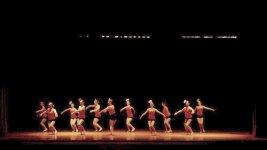
I took some of the advice and put it to use and I was surprised at how much better I was able to make this look! I'm sure it could be better, but I have even less experience with color correction and levels. Here's what I've got now after all the help, and I welcome any feedback from this as well.
Last edited:



 but I'm not even sure if that holds any significance haha. I think the light bulb is 2700k for some reason (maybe my camera says that somewhere).
