GH3 What did I do wrong? GH3 Live Event recording doesn't look so good

Soundfx4

Active member
Before I describe anything, I want to sincerely apologize if this is not the most appropriate area to post such a question in. I recorded a live event recently and set up the camera as best I thought but after watching them on my PC, they just don't look that great. I figured that the GH camera thread might be most appropriate since that's what I used (that's the issue in a nutshell, more details below). So please go easy on me if you feel like this is not the most appropriate area to ask this in.


I went to record my sisters dance recital and I was all excited. This was the first time I would get to really use my GH3 for video. I had played around with it before and familiarized myself with it's interface and settings (and what they meant) during the past year and I was ready to put that all to use.

During the rehearsal dances, I was playing with all the settings manually so that it would be ready when the recital actually started. I set the aperture as high as I could without it being too dark so that I would have a deeper area of focus. I set the shutter speed to match the frame rate I was recording because I didn't want too much motion blur (1/60), and I had to set the ISO to 2000 because of the aperture and shutter settings (and maybe that was my problem?) but even though 2k ISO is pretty noisy on a GH3, I figured it would be fine for 1080p video. I knew I'd be able to see the difference, but I figured the parents and kids wouldn't, so I wasn't too worried about that. I set the focus manually using the focus assistance at 10x (it looked nice and clearly focused) and I set the white balance manually to 5k which seemed to look good.

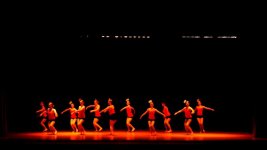
I did some recording tests, watched the display as it recorded, and everything looked good. The background was a little dark, but I couldn't make it any brighter without over exposing the dancers as far as I knew. I played back the test recordings and things were good as far as I could tell as well. But when I got back home and played them, they looked like this:
danceimg.jpg

To me, it looks...off. I'm not even sure how to describe it. Too warm, out of focus? Just off. What could I have done to get better results? I was worried about opening the aperture up all the way and having faces out of focus, and I was always also trying to make sure nothing was overexposed...and, it's a lot to try and balance. I know the tiny low resolution built in display doesn't help. Maybe that's really my only problem? If I had an external display to monitor settings and changes and what not, would that have made this a none issue? I wish so badly I could do it again to try different settings, but there isn't another one for a little bit, so I'm hoping I can get some expert feedback on this and hopefully be better prepared next time.

Thank you very much for your time!

EDIT:

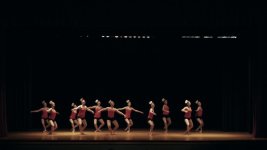
I took some of the advice and put it to use and I was surprised at how much better I was able to make this look! I'm sure it could be better, but I have even less experience with color correction and levels. Here's what I've got now after all the help, and I welcome any feedback from this as well.
Poker Face.jpg
 
Last edited:
What did the stage look like in real life? Was it washed with that much red light? Red is never very friendly to video for complicated reasons. It also looks like it's out of focus. If you wanted a more natural look, i.e. not red, I would have set my white balance somewhere around 3200 K.
 
I agree that the biggest problem looks like the white balance settings.

A shutter of 1/60, were you recording 30p, then, with 180° shutter?

Also, for the record, 2K is pretty similar to 1080p in image size, 2048 pixels wide vs 1920.
 
Keep in mind you have to white balance whenever the environment changes. Are you sure you didn't white balance when a different set of lights were on like the house lights? The house lights could be a different color temperature than some of the stage lights used. In this environment you would either have to ask the lighting guy to turn on the production lights so you could white balance before the event starts or quickly try to white balance once the event starts. You should always check with the lighting guy/girl to make sure they will not throw you a curve ball. Of course for a family even this isn't always an option so you have to be quick to adapt to the lighting changes. Years ago we used to shoot with cameras that only had a black and white view finder. Today we are pretty lucky to have fairly accurate color LCD displays on our cameras that usually do a pretty good job at showing us if the color is off. It will take some time of course but you will have to get used to trusting what you see on the display and if something looks off then chances are it is off.
 
all the feedback above is right-on. but i'll add that DSLRs (of any price) arent really the best choice for events like this. especially just ONE. the lack of servo zooms make moving in and out clunky. not to mention iffy onboard mics and lack of quality audio monitoring / input options... not to say some arent better than others or that they cant be set up to do a decent or even good job. just wouldnt be my first choice for a solo setup.

if i were shooting an event with a DSLR, i'd use three of them. a medium and semi-closeup left and right and a wide at the back of the room.

another question is your lens. do i assume you're using one of the kit lenses that live around 4.x? WAYYYYYY too slow for events like this.

i do events like this from time to time and thats why i'll give up my hpx170 when they pry it from my cold, dead hands.
 
Last edited:
What did the stage look like in real life? Was it washed with that much red light? Red is never very friendly to video for complicated reasons. It also looks like it's out of focus. If you wanted a more natural look, i.e. not red, I would have set my white balance somewhere around 3200 K.

It didn't look quite that red, but the stage lighting was consistent (the different dances didn't have different light set ups). I think it looks out of focus too, but I just don't understand how. The GH3 doesn't have focus peaking, but it does have assist, which "digitally" zooms in (which is fine since it's a 16mp sensor) so that you can see if you're in focus or not. And I have no way of digitally zooming in while recording without pressing a button or turning the focus ring, both which would shake the camera...I'm wishing I had just done it though now. :\

I was bringing the white balance downwards but I decided to stop about about 5000k instead of going farther down. The reason is quite simply that I don't fully understand this and it really threw me off. Im used to light temperatures being warmer and more red looking at around 2500k ish and cooler at around 5000k ish, so it made me tilt my head when the image started to look cooler when I dropped the color temp.

I agree that the biggest problem looks like the white balance settings.

A shutter of 1/60, were you recording 30p, then, with 180° shutter?

Also, for the record, 2K is pretty similar to 1080p in image size, 2048 pixels wide vs 1920.

I'm unfamiliar with film shutter systems and how they work...for that matter, I don't really have a solid grasp on how my mirrorless camera's shutter works when recording video that well...I need to do some reading up on that. But according to my camera's settings, the shutter was 1/60 and the frame rate was 60p.

Keep in mind you have to white balance whenever the environment changes. Are you sure you didn't white balance when a different set of lights were on like the house lights? The house lights could be a different color temperature than some of the stage lights used. In this environment you would either have to ask the lighting guy to turn on the production lights so you could white balance before the event starts or quickly try to white balance once the event starts. You should always check with the lighting guy/girl to make sure they will not throw you a curve ball. Of course for a family even this isn't always an option so you have to be quick to adapt to the lighting changes. Years ago we used to shoot with cameras that only had a black and white view finder. Today we are pretty lucky to have fairly accurate color LCD displays on our cameras that usually do a pretty good job at showing us if the color is off. It will take some time of course but you will have to get used to trusting what you see on the display and if something looks off then chances are it is off.

When they were doing rehearsal, only the stage lights were on, not the house lights, so it was the correct lighting to the best of my knowledge. What I saw on my display did look slightly red, but for some reason, it looked acceptable, but while on my computer, it just looks terrible :\

all the feedback above is right-on. but i'll add that DSLRs (of any price) arent really the best choice for events like this. especially just ONE. the lack of servo zooms make moving in and out clunky. not to mention iffy onboard mics and lack of quality audio monitoring / input options... not to say some aren't better than others or that they cant be set up to do a decent or even good job. just wouldnt be my first choice for a solo setup.

if i were shooting an event with a DSLR, i'd use three of them. a medium and semi-closeup left and right and a wide at the back of the room.

another question is your lens. do i assume you're using one of the kit lenses that live around 4.x? WAYYYYYY too slow for events like this.

i do events like this from time to time and thats why i'll give up my hpx170 when they pry it from my cold, dead hands.

It is the kit lens. It's 3.5-5.6 at min and max zoom respectively. I don't understand what you mean by slow though (I don't have a grasp on the fast/slow terminology yet. Fast is larger, slow is smaller, I think?)...the only thing I know for sure is that the lower the aperture number(f-stop), the larger the aperture is, which does two things. Let's more light in and decreases the depth of the focus area (which when you have a really large aperture can take those nifty shallow depth of field shots). I understand that much at least, but that's why I was trying to bump the f-stop up for a deeper area of focus...or that was my thought process based on what I think I know anyway. I may have been off in my thinking. :\


The feedback I'm getting is great, and I really appreciate it :)
 
A lot of time GH cameras read warm. I like the custom K setting to 2700 a lot of the time when shooting events / weddings

That color temp thing really throws me off. A light bulb at 2700k would be very warm looking, and a light bulb at 5000k would be cool and nice looking. So I was and still am confused about those color temp settings haha. I'll remember a lower setting next time though around 2700k and see how that turns out!

Needs color correction. For starters, try setting gamma to 2.0 and saturation to 50%.

glad to see I might be able to make it look a bit better at least! Thanks for the starting point there!
 
Last edited:
or that was my thought process based on what I think I know anyway. I may have been off in my thinking. :\

you're right for the most part. but sensor size comes into play as well. f2.8 on a full frame will have a shallower focus than f2.8 on a m4/3 camera like the gh. thats one of the complaints you'll hear when folks talk about full frame vs the various crop sensors. and everyone has their own preferences as well as perception. there are tons of articles out there on sensor size vs focal performance.

in your case, i would have left the lens all the way open. focused on the primary point of action and called any focus issues (which wouldnt have been drastic) "style". dialed back the saturation and cranked the ISO even a bit higher. it becomes an issue of whats worse? grain or irreparably crushed blacks?
 
I use "video cameras" and not DSLRs, but for stage events like dance recitals and plays, I have always locked white balance to the "Incandescent" preset. I don't know what temperature that translates to, but I figure that the light will be changing a lot during the show, and since all the stage lighting has been incandescent (versus flourescent or sunlight), the "light bulb" setting will be a good starting point and I can always do some post color correction as needed for light changes.

I had one dance studio that used the all-red "Martian Landscape" theme on many of their dance numbers and they all came out looking like your sample no matter what I did with camera settings, OR post-production (too far gone, as another poster mentioned). I dropped that studio.
 
you're right for the most part. but sensor size comes into play as well. f2.8 on a full frame will have a shallower focus than f2.8 on a m4/3 camera like the gh. thats one of the complaints you'll hear when folks talk about full frame vs the various crop sensors. and everyone has their own preferences as well as perception. there are tons of articles out there on sensor size vs focal performance.

in your case, i would have left the lens all the way open. focused on the primary point of action and called any focus issues (which wouldnt have been drastic) "style". dialed back the saturation and cranked the ISO even a bit higher. it becomes an issue of whats worse? grain or irreparably crushed blacks?

I would be afraid of the dancers being overexposed though if I open the lens up all the way and bump the iso up even higher. Or at least parts of their bodies, especially shoulders and the lighter hair dancers. In the picture, some of their shoulders look like they're not far away from being overexposed as it is. It's a pretty drastic contrast between the back curtain and the actual dancers :\ I don't suppose there's any way I can get both to show up perfectly with this camera? Or is that even something I should be worried about?

I use "video cameras" and not DSLRs, but for stage events like dance recitals and plays, I have always locked white balance to the "Incandescent" preset. I don't know what temperature that translates to, but I figure that the light will be changing a lot during the show, and since all the stage lighting has been incandescent (versus flourescent or sunlight), the "light bulb" setting will be a good starting point and I can always do some post color correction as needed for light changes.

I had one dance studio that used the all-red "Martian Landscape" theme on many of their dance numbers and they all came out looking like your sample no matter what I did with camera settings, OR post-production (too far gone, as another poster mentioned). I dropped that studio.

This is technically a mirrorless so it's not an SLR ;) but I'm not even sure if that holds any significance haha. I think the light bulb is 2700k for some reason (maybe my camera says that somewhere).

I'm glad it's not that bad at least! I'm thankful it's salvageable! And hopefully from all the feedback, I'll do much better next time :)
 
That color temp thing really throws me off. A light bulb at 2700k would be very warm looking, and a light bulb at 5000k would be cool and nice looking. So I was and still am confused about those color temp settings haha. I'll remember a lower setting next time though around 2700k and see how that turns out!

The issue is that the camera control is called "White Balance" as in compensation. When you set the camera to 2700 it will make a 2700K light look white, not warm. When you set the camera to a cooler setting it makes the image more warm because you're balancing out the higher color temp.

Fran
 
Wow, you have a lot to learn. Judging from your forum name video isn't usually your thing, is it? How come you were thrown off into the deep end just like that?

WB temps are for you to MATCH to the current temperature. You set a warm setting to match the setting's warm lights so they'll render white.

Apertures are a fraction, they're like f/2.8, etc. Since 1/2 is bigger than 1/4, therefore an aperture f/2 is bigger than f/4. We call them fast lenses because they light in more light so you can use faster shutter speeds.

If you're having focus issues pre-focus before recording, then switch the camera to MF so it doesn't muck up during recording. Make sure the camera doesn't go to sleep in the process from pre-focusing to actual recording, because mirrorless cameras have a tendency to reset the damn lens after waking up.
 
Alright, you messed it up pretty badly. People here who say the GH3 isn't up for the task have no idea what they are talking about. We use the GH3's to shoot cinematic wedding films and under all circumstances we get great results. You have to know what you are doing and use good lenses.

You closed the aperture a few stops to 'not have the dancers out of focus'. Even at f1.4 you wouldn't have the dancers out of focus, because of the distance between the camera and dancers. For more about this, I suggest you read about how Depth of Field (DOF) works.

If you would have used a large aperture, you could have lowered the ISO and still have a good, or even better exposure. It all looks very soft because of the fact that it's underexposed and because of the ISO 2000. Next time, use a f1.8 aperture, ISO 640 and it would look a million times sharper. Also, as mentioned before, the white balance is set wrong and therefore the colors are bad. Slight corrections are possible, but you can't really do much with it because it will introduce more noise and artifacts. Next time, if you are not really willing to put much time in learning about this, use the 'Auto' setting. Mind you, I don't advice to use 'auto' but it's a measure that works when you have no idea or no time.

Alright, those are the faults you made. Now what can be done about it?

You could try:
- Reduce saturation
- Use the 3-way color corrector to decrease the reds and move the mids towards the opposite direction. So that would be blue-ish. Look carefully on a big monitor to see where the point is that it starts to get more noisy or strange color shifts start to happen
- Increase the exposure of the mids slighty
- Add an 'Unsharp Mask' or something like 'Sharpen' to make it appear to be sharper

If this doesn't give the desired results, and it probably won't, then show them your footage on the smallest screen you can find. An Ipad or 13 inch laptop makes everything look amazing :D

Good luck! Don't pity yourself. Use the free information here to improve yourself for the next time! :)
 
I record theatrical events with two GH3s - my settings are:
1) always set white balance to 3200K - been setting it at this in multiple venues for years.
2) never go over 640iso
3) dial saturation down to -1.
4) use Natural profile
5) use two cameras minimum - one wide, one following action if you're a one-man-band.

A good post from RedUser.net on White Balance for theater:

Cail Young
04-08-2009, 02:01 AM
99% of theatrical lamps will be normal tungsten bubbles - 3200K or thereabouts. The big-boy followspots will be nearer to 10000K as they are arclamps or similar high-temperature units.

For best results, shoot 3200K balanced as this is the temperature of the bulbs and any gelling the lighting designer has used will be preserved in the recording.

EDIT Of course, often theatrical lamps are dimmed, which drops the colour temperature, so your mileage may vary...
 
The issue is that the camera control is called "White Balance" as in compensation. When you set the camera to 2700 it will make a 2700K light look white, not warm. When you set the camera to a cooler setting it makes the image more warm because you're balancing out the higher color temp.

Fran

ahhhh, so you're aiming to set it for the color temp that the actually lighting is and it balances it according to that. I get it :) thank you!
 
Wow, you have a lot to learn. Judging from your forum name video isn't usually your thing, is it? How come you were thrown off into the deep end just like that?

WB temps are for you to MATCH to the current temperature. You set a warm setting to match the setting's warm lights so they'll render white.

Apertures are a fraction, they're like f/2.8, etc. Since 1/2 is bigger than 1/4, therefore an aperture f/2 is bigger than f/4. We call them fast lenses because they light in more light so you can use faster shutter speeds.

If you're having focus issues pre-focus before recording, then switch the camera to MF so it doesn't muck up during recording. Make sure the camera doesn't go to sleep in the process from pre-focusing to actual recording, because mirrorless cameras have a tendency to reset the damn lens after waking up.


You really could have done without that entire first line. It was rude, condescending, and insulting. I do have a lot to learn, but I don't need you to tell me that, I'm fully aware of that myself. But you might even be surprised by just how knowledgeable I am even considering what you seem to think. Regardless, if this is the type of help you are offering me (throwing insults and cheap shots into your advice), then I'll pass. There are plenty of other members here that are managing to be helpful and friendly at the same time.

Oh, and my name actually holds no relevance. It's just a name I've been using for years and have stuck to it. I've only recently started to use different names online. I know very little about sound.
 
People here who say the GH3 isn't up for the task have no idea what they are talking about.
my issue with a GHx (or any video slr) in this case is due more to the lack of servo zoom in a 1-man-band, event situation than to the camera itself.
the camera body isnt the primary offender. i think the weakest link in this chain may be the kit lens that was probably living at about f4+. you simply werent getting enough light to the sensor to tell the story.

i had GH2s when they first came out and the native lenses were the disappointing component in the equation. i hated just about everything that came through them. EVERYTHING looked better with my adapted, OLD, manual, fast nikkors

 
Last edited:
Alright, you messed it up pretty badly. People here who say the GH3 isn't up for the task have no idea what they are talking about. We use the GH3's to shoot cinematic wedding films and under all circumstances we get great results. You have to know what you are doing and use good lenses.

You closed the aperture a few stops to 'not have the dancers out of focus'. Even at f1.4 you wouldn't have the dancers out of focus, because of the distance between the camera and dancers. For more about this, I suggest you read about how Depth of Field (DOF) works.

If you would have used a large aperture, you could have lowered the ISO and still have a good, or even better exposure. It all looks very soft because of the fact that it's underexposed and because of the ISO 2000. Next time, use a f1.8 aperture, ISO 640 and it would look a million times sharper. Also, as mentioned before, the white balance is set wrong and therefore the colors are bad. Slight corrections are possible, but you can't really do much with it because it will introduce more noise and artifacts. Next time, if you are not really willing to put much time in learning about this, use the 'Auto' setting. Mind you, I don't advice to use 'auto' but it's a measure that works when you have no idea or no time.

Alright, those are the faults you made. Now what can be done about it?

You could try:
- Reduce saturation
- Use the 3-way color corrector to decrease the reds and move the mids towards the opposite direction. So that would be blue-ish. Look carefully on a big monitor to see where the point is that it starts to get more noisy or strange color shifts start to happen
- Increase the exposure of the mids slighty
- Add an 'Unsharp Mask' or something like 'Sharpen' to make it appear to be sharper

If this doesn't give the desired results, and it probably won't, then show them your footage on the smallest screen you can find. An Ipad or 13 inch laptop makes everything look amazing :D

Good luck! Don't pity yourself. Use the free information here to improve yourself for the next time! :)


Next time, if you are not really willing to put much time in learning about this, use the 'Auto' setting. Mind you, I don't advice to use 'auto' but it's a measure that works when you have no idea or no time.

I'm really sorry, but I am actually quite insulted by what you said here. I don't know how else to take that other than you pretty much telling me I had no idea what I was doing, and that couldn't be farther from the truth. I know what aperture does, what the numbers mean (to some extent, smaller numbers mean larger means more light, means less focus depth), and I understand Depth of Field to a good extent (although I wasn't sure about the distance affecting it, but I had a hunch about it and you better believe I'm going to read up on DOF to get an even better grasp on it), I understand the relation to ISO and light sensitivity and noise, and even the ISO limits on the GH3 before it just...looks like a mess. I know the limits of my lens (and I also know that in this situation I could not of had a faster lens to use), and I'm familiar with the shutter speed and what it does (although admittedly, I don't quite understand how it works in motion picture mode, I do know how it works for pictures though). I even understood white balance played a key role and I KNEW I had to set it manually. I was not as prepared as I should have been, but I also had no way of knowing that. I've been reading about this stuff for ever it seems and the GH3 is the first camera I've been able to get my hands on that could actually be considered a real video camera. Hell, before I even choose the GH3, I spent over a month learning about camera mechanics (and that was in addition to what I already knew). And everything that you guys are telling me is not a foreign language to me, not by a stretch which in and of itself should mean something. I'm not trying to be rude, and I know you are only trying to be helpful (and you ARE! and I do appreciate it very much), but it's just...I'm seriously passionate about this and want to eventually be able to do this full time, and seeing someone suggest the possibility that I'm not willing to put time into learning this trade is very upsetting.

That all being said PLEASE dont' think I'm unappreciative. I am, I REALLY am. I love the tips and you've given me a great deal of information too. I just wanted you to know how I feel about this and know that I really do have a love for this stuff!
 
Back
Top