GH2 What causes this color banding in the sky?

This issue is stoping me to buy the GH2, one time you see that banding you see everywhere!
This is not a issue relative to the encoder, is in the sensor mode itself. I do test with my HV20 and i cant get this type of banding!, this is because the sensor captures the image in 8+ bits rounded down to a 8bits, so bandend is reduced and "promediate". But in the Gh2 this does seem that, and i have the suspicious that the sensor is capturing directly in 8bits maybe to reduce processing power of the dsp/cpu, so the banding is extreme. Im testing various plugins in After Effects working in 16bits workspace but i cant rid off, is annoying! Not suitable for professional work or proyection (that banding scaled 10x!!!) Even it the HDMI clips in ProRes posted in the HDMI capture thread.

If someone download that clips in the last post recorded via Atomos Ninja, nd via some Avisynth magic can get off...


sorry for my bad english, im from Argentina
 
Panasonic Japan has confirmed to me that they are aware of the colorbanding problem, but can not say if or when it will be addressed by means of a firmware update.

But as far as i know these people -> if they can't solve it, they wouldn't have answered my mail in the first place, so having good hopes for a resolve.

I see that the banding is also outputted through the HDMI output, so that renders the camera useless for any kind of broadcast whatsoever at the moment, and confirms that it has nothing to do with the AVCHD codec or compression.

Can i assume that the AF-101 does not exhibit this problem?!

Such a shame of such a beautiful camera with such a gorgeous picture...
I think we have to be patient...


Martin Beek.

The camera is superior in SO many ways to the other offerings out there, having to add some noise to dither solid blue sky shots is worth it.

We and many others are using it for some broadcast now, on the DL just like with the 5d, but it's getting into spots and into hours.
 
The camera is superior in SO many ways to the other offerings out there, having to add some noise to dither solid blue sky shots is worth it.

We and many others are using it for some broadcast now, on the DL just like with the 5d, but it's getting into spots and into hours.

I think that superior statement in image quality only refers to resolution/moire free, color, noise, dynamic range>gradation in colors not is the winner... ergonomically yes asap, but im concerning the final image to the screen.
 
This is posterization:


AE in 16bpc, deartifacted, denoised slighty and curves effect to down the gamma, untouched black nd white points


gh2_hdmi_banded.png


I have some success with GenArts Saphire S_DeBand
 
one time you see that banding you see everywhere!

damn you're right... :(
this is plain ugly and low budget, i get it on lots of shot throughout my shooting.
when i'll get the final sequence to online post, i'll appreciate a thorough AE tutorial on how to minimize this, thanks.

improser is right- i will eventually screen these shots on 10X bigger theater screen. i must find a way to handle it.
 
My GH2, definitely does it, I did a Time Lapse of the sky and it showed in the blue spot's on the screen, I sincerely hope Panasonic find a Firmware update that will fix this, finger's crossed!
 
Last edited:
My GH2, definitely does it, I did a Time Lapse of the sky and it showed in the blue spot's on the screen, I sincerely hope Panasonic find a Firmware update that will fix this, finger's crossed!

Panasonic will sell the firmware update in form of a GH3. If a firmware update will open the door for a hack, you best belive
 
My GH2, definitely does it, I did a Time Lapse of the sky and it showed in the blue spot's on the screen, I sincerely hope Panasonic find a Firmware update that will fix this, finger's crossed!

Panasonic will sell the firmware update in form of a GH3. If a firmware update will open the door for a hack, Pana will not do it.
 
Panasonic will sell the firmware update in form of a GH3. If a firmware update will open the door for a hack, Pana will not do it.

This is what I was thinking. Incremental baby steps. But if enough people either request for a fix or vote with their dollars, just maybe... Looking forward to Canon's next offerings.
 
Watched this video here :

http://www.vimeo.com/21771310

Like you see, the filmer has really big banding and probably codec/color demolitions in form of pixel squadres. I was testing with grad filters and video a bit in the last days for landscape and noticed that if you underexpose too much at sunset, I get such bandings/color demolitions aswell in certain areas of the screen, not just in the sky but also on water surfaces.
Iam totally new to video, but maybe some more exprienced videographer have a clue here. I have the feeling that probably the cause is from too much underexposure/missing light in certain situations. At 1:25 suddenly the banding is gone and the picture has more light.
 
That's awful. I mean, beautiful shots, but if I got home seeing that on the computer............... trynotthrowingthecameraforthesakeofthewall

This needs serious research. Problem is confirmed by Panasonic, now we just have to pin down the available workarounds. Use of filters, 10bit difference, etcetera.
 

http://www.vimeo.com/22225257

No doubt, the GH2 has a pretty heavy sky-banding problem as you can see in these shots here:

1. normal-exposure
2. under-exposure
3. normal-exposure + grading
4. under-exposure + grading

The colors do not blend smoothly and gradually from one color to the next. On top of it: the codec breaks into green + violet stripes the more you under-expose. With under-exposure + grading you get a complete mess of artifacts. I have read that Panasonic is aware of that problem. So hopefully we´ll get an update to fix that problem. Any workaround is welcome... :-)

Kit Lens 14-140
1080p24 scaled down to 720p24 for Vimeo
 
Watched this video here :

http://www.vimeo.com/21771310

Like you see, the filmer has really big banding and probably codec/color demolitions in form of pixel squadres. I was testing with grad filters and video a bit in the last days for landscape and noticed that if you underexpose too much at sunset, I get such bandings/color demolitions aswell in certain areas of the screen, not just in the sky but also on water surfaces.
Iam totally new to video, but maybe some more exprienced videographer have a clue here. I have the feeling that probably the cause is from too much underexposure/missing light in certain situations. At 1:25 suddenly the banding is gone and the picture has more light.

(1) Carefull when watching converted vimeo vids - they are usually heavily compressed
(2) the filmer did not use correct settings in his editing system - you can see double contours which hint that he used 1080p24 instead of 1080p23.98 settings

Hence, to me it's not appropriate to use this as an example for banding.

I just posted this http://www.vimeo.com/22157896 and I don't see heavy banding (maybe if you search hard, please download the source file) despite shallow DOF (thanks to Martin Oller for pointing this out).

best regards, Gunther
 
(1) Carefull when watching converted vimeo vids - they are usually heavily compressed
(2) the filmer did not use correct settings in his editing system - you can see double contours which hint that he used 1080p24 instead of 1080p23.98 settings

Hence, to me it's not appropriate to use this as an example for banding.

I just posted this http://www.vimeo.com/22157896 and I don't see heavy banding (maybe if you search hard, please download the source file) despite shallow DOF (thanks to Martin Oller for pointing this out).

best regards, Gunther

Hello Gunther,

you have to test this with a flat sky without clouds i.e. especially sunset or sunrise when you are going to underexpose for more rich colors or using a polfilter or nd filter at daylight , you probably wont see any 8bit posterization/banding with your kind of shooting since the issue happens mostly with a clear sky.
 
Last edited:
Hello Gunther,

you have to test this with a flat sky without clouds i.e. especially sunset or sunrise when you are going to underexpose for more rich colors or using a polfilter or nd filter at daylight , you probably wont see any 8bit posterization/banding with your kind of shooting since the issue happens mostly with a clear sky.

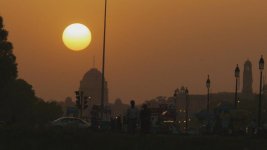
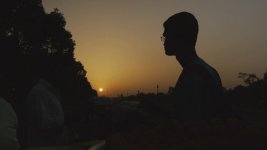
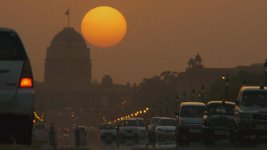
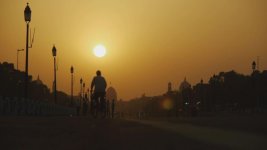
Hmm, I don't see it (maybe it's just me). Find some screegrabs from my shoot in India from last week (will post in about a month when shooting is completed), used a Fader ND and a Hoya ND8 filter:
 

Attachments

  • Sunset2.jpg
    Sunset2.jpg
    28.9 KB · Views: 0
  • Sunset3.jpg
    Sunset3.jpg
    21.3 KB · Views: 0
  • Sunset4.jpg
    Sunset4.jpg
    28.7 KB · Views: 0
  • Sunset1.jpg
    Sunset1.jpg
    24.8 KB · Views: 0
Hmm, I don't see it (maybe it's just me). Find some screegrabs from my shoot in India from last week (will post in about a month when shooting is completed), used a Fader ND and a Hoya ND8 filter:

In those samples I've seen, it seems to be more noticeable in 'blue/darkblue' sky, rather than in your cast redish/yellow. Could be related to the lower sample rate on blue, as well as blue being more compressed, as 'natural' terrestrial
scenes don't have a lot of blue in them... sky, who take shots of just sky... anyway...
 
Back
Top