Weird Audio Sound with Adobe Audition

Joshua Milligan

Well-known member
Hey guys. New to the forum here. I am working on a video for a company that I shot last week and am trying to clean up the audio using Audition. With some of my clips, I am getting a weird, almost futuristic electronic sound that can be heard in playback. I am using dynamic link with Adobe Premiere Pro CC and am using Audition CC for the audio. Any idea on what it might be and how I can fix it? By the way, to give a little more insight with this clip, I will tell you what all I have done: This is audio captured off of a Rode VideoMic Pro with a Sony a99 DSLR. In Audition, I first applied a parametric equalizer of "Loudness Maximizer", then I normalized to 95.8, followed by using a custom dynamics processor I made via a link I watched on YouTube and lastly I normalized again to 95.8 to keep from clipping. After I did those steps, I did a "Capture Noise Print" of a hissing background noise and then applied it to the whole clip using "Noise Reduction (process)". I have used this same exact method with other clips and achieved great results, but with this clip and a few others, I am getting this weird sound.

I am new to Audition as I mainly did all of my audio in Premiere Pro in the past, so any help would be greatly appreciated. Thanks!

Here is the custom dynamics processor I use:
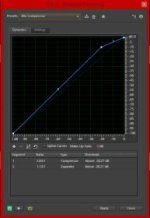
Capture.jpg

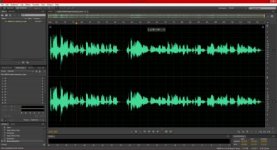
Here is a shot of the audio clip:

Capture1.jpg

Here is a link to the file I have edited in Audition that has the weird sound:

https://www.dropbox.com/s/kb8r7s1nx7gq55w/00064 Audio Extracted_2.wav

Here is a link to the original sound file:

https://www.dropbox.com/s/ise9uv7mfczikxo/Original Clip.wav
 
What you are hearing are artifacts from all that processing you've done to the audio, specifically noise reduction. You put too much noise reduction on a file and that's what you get.

That being said, the problem started by not properly recording the audio in the first place. The level in the original audio file is way too low. I never rely on a "videomic" or any such variant as my main audio. If I use one plugged right into a camera it is purely for a scratch track. There lots of options out there for recording dual system. On the cheaper end of the spectrum sometimes I'll use a Tascam DR-60D as my audio recorder with a different mic plugged into that and a videomic plugged into the camera as reference. This way I can actually monitor the audio I am recording and I know the audio will sound good on it. Audio recorded on a camera never really sounds good, no matter what anyone says. Cameras are there to capture picture, not sound, even though they have audio inputs on them. The audio part of cameras is always an after thought.

When I can, I'll use my Sound Devices 744t as my main audio recorder with a scratch track on the camera. I also always make sure to do proper mic placement.

As far as fixing your immediate problem, you are going to need better plug-ins and possibly another DAW to get this cleaned up. I've had some stuff cleaned up using CEDAR, which is amazing, but expensive. You might know someone that has access to it. It can be a life saver.
 
What you are hearing are artifacts from all that processing you've done to the audio, specifically noise reduction. You put too much noise reduction on a file and that's what you get.

That being said, the problem started by not properly recording the audio in the first place.

+1

The other thing about noise reduction is that it should not be applied heavily in a single pass to remove all the noise. It should be applied very gently over several passes.
 
What you are hearing are artifacts from all that processing you've done to the audio, specifically noise reduction. You put too much noise reduction on a file and that's what you get.

That being said, the problem started by not properly recording the audio in the first place. The level in the original audio file is way too low.

Yes, what Dave said. I've heard that exact same artifact from Audition and it's always come from too heavy a hand on the noise reduction when I get it. The problem is that the background hiss is spread across the voice frequencies. When you try to eliminate the hiss with the noise filter, you're also eliminating some of the content of the voice. It sounds strange because you've removed parts of the guy's voice; you're hearing what's left. The solution (for me anyway) was to back off. Live with a little noise. Use it as a learning experience about the importance of getting your levels set correctly while recording, and proper gain staging.

What you want, is to lightly polish audio. Not reshape it, not repair it, not really change it. Just lightly polish. Think fine grit sandpaper, not a grinding wheel.
 
Great stuff guys. I appreciate the help. I actually recorded all of the audio with a BeachTek audio adapter and a Sennheiser wireless mic, but it turns out the BeachTek had a malfunction and messed up ALL of the audio clips. I happened to have a VideoMic Pro running on my a99 as a backup, but couldn't monitor both it and the BeachTek at the same time, and since the BeachTek was my main source for audio recording, my attention went to it. After I got over the heartbreaking find of discovering that my audio was ruined with my BeachTek adapter, I remembered that I had recorded audio as well on my a99 with the VideoMic Pro and am doing whatever I can now to save it. I would love to just go re-record it now that BeachTek has helped me fix the audio problem in the recorder, but I cannot, so I have to live with doing whatever I can to make this audio work. I have never had this much trouble with audio in my life! It's hard when you have to be a one-man band sometimes, especially when you wind up having issues with your equipment that you've never had before.

I am just doing everything I can to salvage what I have, so I will take a look at CEDAR and see what it's all about. Davefisk, what did you mean by DAW? And Alex H., how do you apply it gently in several passes? Again, I am new with Audition as I have never had to work with audio this much before. It usually records well to begin with!
 

Digital Audio Workstation. ProTools, Nuendo, Cubase, etc., are DAWs. A DAW is a software-based system for recording, editing, and mixing audio. Think of ProTools being to sound what AVID and Premiere Pro are to video. In professional production, once the video has been edited the sound will be exported in a format that maintains all the individual clips and then sent to a sound editor, who will do all the sweetening and mixing (and, if necessary, repair work).

And Alex H., how do you apply it gently in several passes? Again, I am new with Audition as I have never had to work with audio this much before. It usually records well to begin with!

I'm not well-versed in Audition so I cannot tell you exactly where to find this feature, but most NR plug-ins have a threshold adjustment, which determines exactly where the NR filter begins removing noise. Set it just at/under the top of the noise floor and it will do only light reduction/removal. Drop the threshold way down and it will do some pretty heavy processing.

As Bruce mentioned, the noise you have exists in the same space as the human voice, so removing frequencies contained in the noise also removes them from the voice. So, by making a light pass of NR, and then going back and doing that again, and possibly a third time, we can use Bruce's analogy of fine-grit sandpaper to say that it is taking off only tiny layers of the noise. You can always remove more, but you can't ever add something back in. This process may not remove the noise entirely, but it will minimize it as best as possible.
 
Cedar starts at around $5,000, so you may want to look at something like RX by iZotope first.

The "noise" you are hearing is the artifacting of the noise reduction as others have said but you are also doing way too much destructive processing. IF you have to normalize do it once and do it first. With all this stuff you are doing to the sound it's amazing your not having more problems.
BTW you can't use normalizing to keep something from clipping. All it will do is lower the peaks of your clipped file.

The first thing you are going to want to do is convert all those files that are probably MP3's to 48K 24 bit WAV files. You absolutely do not want to be doing any processing on MP3's. Converting will not boost your quality but it will keep your generation loss down as you process the clips.

As a general rule you want to do any destructive gain first. Then noise reduction. After that you can do the shaping kinds of things like EQ and dynamics.

Everything is subtractive and any gain you do after other things is going to bring up the problems with what you want. So gain first. Noise reduction wants the least altered noise to take a sample of so you want that before you much around with the file.
Multiple gentle passes means you take a noise sample for a clip audition the clip with the noise reduction on and slowly add or subtract the amount of noise reduction till you are hearing no artifacts. Maybe even a little less than that. You will still hear some noise. Process the clip and take a new noise print and repeat. Two passes like this will sound better and have fewer artifacts than one pass that gets a similar level of noise reduction.
 
Thanks for the help guys! Noiz2, I appreciate the advice. Fortunately I was using WAV files, so at least I was doing that right. Just to clarify, you are saying to work in a specific order which goes like this: gain, noise reduction, EQ and dynamics? And what exactly do you mean by destructive gain? Are you talking about gain in general?
 
"And what exactly do you mean by destructive gain?"
I would assume Scott means rendering or saving the file?
Personally, I put NR prior to normalizing/volume adj... which I normally adjust in the comp/limit, a second time if needed, after the EQ stage.. with an updated noise print in the process chainer.
 
It sounded to me like he was doing each step destructively, I don't think there is a non destructive "normalizing" plugin.

If your gain is not destructive then there is no need to do NR after the gain.

I personally almost always (as in 99.9%) use NR destructively. Some folks use it as a track plugin. If your doing that the work flow would probably be different, I don't so?

My logic on the order is if I'm gaining everything destructively then the noise print will catch more of the low noise that I just boosted. I can see the argument that if you do the opposite the noise won't be there to boost so YMMV.

The reason I'm doing NR before everything else is that I'm worried that the other things can "smear" the noise and make it less defined and that makes it harder to remove. Again YMMV.

There is a fair amount of "art" in cleaning up dialog so anyones "do this list" is not going to work for everyone.

Destructive is anything you do that permanently alters the file. If you use the plugin and it goes away it was destructive, if you have to leave the plugin active in the session it's nondestructive.

I have found that the nature of noise changes so much that I have never been able to get decent results having it on a track. So I go clip by clip and process destructively.
 
Back
Top